
Best Mechanical Keyboards for Beginners: A No-Nonsense Guide
New to mechanical keyboards? We break down switches, sizes, and the best beginner-friendly options without the enthusiast jargon.
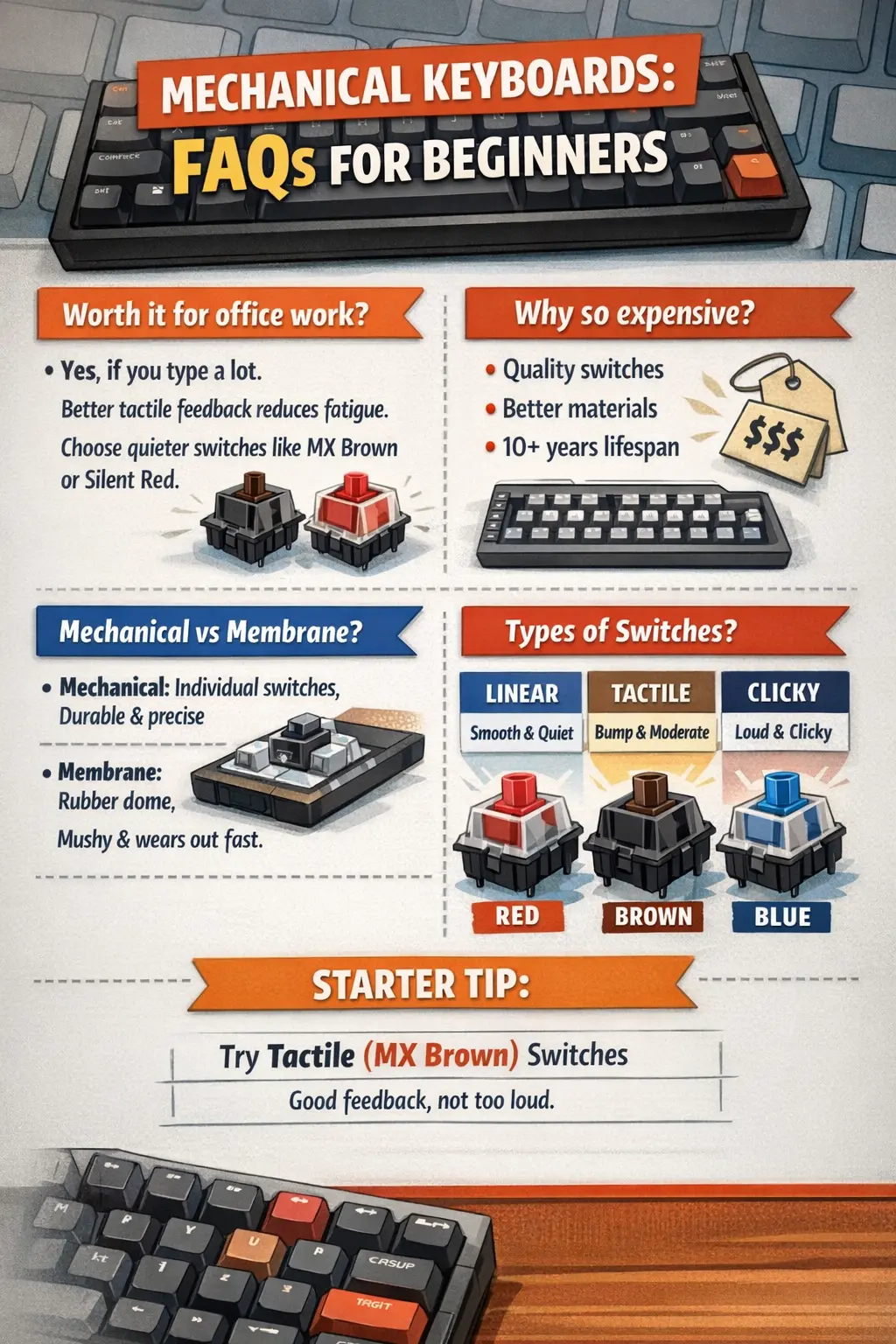
You’ve heard people rave about mechanical keyboards. The satisfying click-clack. The premium typing feel. The rabbit hole of switches, keycaps, and custom builds.
But you just want a good keyboard that feels nice to type on. Without spending $300 or learning a new vocabulary.
This guide is for you.
What Makes Mechanical Keyboards Different?
Regular keyboards (membrane keyboards) use a rubber dome under each key. Press down, rubber squishes, key registers. It works, but the feel is mushy and imprecise.
Mechanical keyboards have individual mechanical switches under each key. Each switch is a tiny precision mechanism with a spring, stem, and housing. The result: consistent feel, tactile feedback, and durability measured in decades.
The benefits:
- Better typing feel and feedback
- More accurate key presses
- Last 5-10x longer than membrane keyboards
- Satisfying sound (if you want it)
- Customizable (switches, keycaps, everything)
The trade-offs:
- More expensive
- Louder (usually)
- Heavier
- Can become an expensive hobby
Understanding Switches (The Simple Version)
Switches determine how your keyboard feels and sounds. There are three main types:
Linear Switches (Smooth)
- Feel: Smooth press from top to bottom
- Sound: Quiet to moderate
- Best for: Gaming, fast typing, quiet offices
- Popular option: Cherry MX Red, Gateron Red
Tactile Switches (Bump)
- Feel: Small bump halfway through the press
- Sound: Moderate
- Best for: Typing, programming, general use
- Popular option: Cherry MX Brown, Gateron Brown
Clicky Switches (Click + Bump)
- Feel: Bump with an audible click
- Sound: LOUD
- Best for: People who live alone or have understanding coworkers
- Popular option: Cherry MX Blue, Kailh Box White
For beginners: Start with tactile (Brown switches). They’re versatile, not too loud, and give satisfying feedback without being obnoxious.
Keyboard Sizes Explained
Mechanical keyboards come in different sizes. Smaller isn’t always better — pick based on what keys you actually use.
Full Size (100%)
- All keys: number pad, function row, navigation cluster
- Best for: Data entry, spreadsheets, people who use the numpad
- Width: ~17-18 inches
Tenkeyless / TKL (80%)
- Removes the number pad
- Keeps function row and navigation keys
- Best for: Most people, more desk space, still has all essential keys
- Width: ~14-15 inches
75%
- Compact function row and navigation
- Keys are closer together
- Best for: Those who want compact but still need function keys
- Width: ~12-13 inches
65%
- No function row
- Small navigation cluster
- Best for: Minimalists who can use Fn key combinations
- Width: ~12 inches
60%
- No function row, no navigation keys, no arrow keys
- Everything through Fn key combinations
- Best for: Enthusiasts, extreme minimalists, people who’ve memorized shortcuts
- Width: ~11 inches
For beginners: Start with TKL (80%) or 75%. You get more desk space without losing functionality. Planning a full desk upgrade? A keyboard is one of the best starting points.
Best Mechanical Keyboards for Beginners (2026)
Best Overall: Keychron K8 Pro
Price: $100-120
The Keychron K8 Pro does everything well. TKL layout, hot-swappable switches (swap without soldering), wireless and wired modes, Mac and Windows compatible.
- Hot-swappable (try different switches later)
- Bluetooth + USB-C
- Works with Mac and Windows
- Quality PBT keycaps
- Reasonable price
Best for: Anyone who wants a great keyboard without overthinking it.
Best Budget: Royal Kludge RK87
Price: $45-55
Shocking value for the price. Hot-swappable, wireless, RGB lighting, decent build quality.
- Hot-swappable switches
- Bluetooth + 2.4GHz + Wired
- RGB backlighting
- Surprisingly good stock switches
Best for: Testing if you like mechanical keyboards without major investment.
Best for Gaming: SteelSeries Apex Pro TKL
Price: $150-180
Adjustable actuation point means you can customize how sensitive each key is. Fast linear switches for gaming.
- OmniPoint adjustable switches
- Magnetic switches, very fast
- OLED display
- Premium build quality
Best for: Gamers who want every possible advantage.
Best for Typing/Office: Leopold FC750R
Price: $100-130
No RGB, no wireless, no frills. Just exceptional build quality and the best stock typing experience.
- Cherry MX switches
- PBT keycaps
- Sound-dampening material inside
- Built like a tank
Best for: Writers, programmers, and anyone who wants pure typing quality.
Best Compact: Keychron Q1
Price: $150-170
75% layout with premium aluminum case. Heavy, solid, sounds great.
- Full aluminum CNC case
- Hot-swappable
- QMK/VIA programmable
- Excellent acoustics
Best for: People who want a premium compact keyboard.
Best Quiet: Logitech G515 Rockspeed TKL
Price: $130-150
Low-profile mechanical switches — shorter travel, quieter operation, more laptop-like feel.
- Low-profile switches
- Very quiet
- Wireless with great battery life
- Slim design
Best for: Office use where noise is a concern.
Quick Recommendation Matrix
| Need | Recommendation | Price |
|---|---|---|
| Best overall | Keychron K8 Pro | $100-120 |
| Best budget | Royal Kludge RK87 | $45-55 |
| Best for typing | Leopold FC750R | $100-130 |
| Best for gaming | SteelSeries Apex Pro TKL | $150-180 |
| Quietest option | Logitech G515 | $130-150 |
| Premium compact | Keychron Q1 | $150-170 |
What About Cherry MX vs Others?
Cherry MX is the original mechanical switch brand. They’re good. But they’re no longer the only option.
Other excellent switch brands:
- Gateron: Smoother than Cherry, often cheaper
- Kailh: Great variety, good value
- Akko: Budget-friendly, surprisingly good
- Durock/JWK: Enthusiast-grade smoothness
For beginners, don’t stress about switch brands. Cherry MX Brown, Gateron Brown, or any “Brown equivalent” will serve you well.
If your keyboard is hot-swappable, you can try different switches later without buying a new board.
Things Beginners Should Ignore (For Now)
The mechanical keyboard community loves going deep. But as a beginner, don’t worry about:
- Lubing switches (makes them smoother)
- Stabilizer mods (reduces rattle on big keys)
- Custom keycap sets (expensive rabbit hole)
- Building a keyboard from scratch
- Sound profiles and foam mods
- Artisan keycaps ($50+ for a single key)
Get a solid keyboard, use it for 6 months, then decide if you want to go deeper.
What to Look For
When shopping, prioritize:
- Hot-swappable switches — Try different switches without soldering
- USB-C connection — Modern standard, cables are everywhere
- PBT keycaps — More durable than ABS, won’t get shiny
- Good reviews for build quality — Avoid flex and rattle
- Mac/Windows compatibility — If you use both
Tips for Your First Mechanical Keyboard
- Try before you buy — Visit a store or buy a switch tester ($10-15)
- Start with Brown switches — Good middle ground
- Get TKL size — Best balance of size and functionality
- Budget $50-120 — Sweet spot for quality/value
- Don’t cheap out too much — Sub-$40 boards often have issues
Office Reality Check: Will My Coworkers Hate Me?
Let’s be real — you’re probably using this keyboard at work. Pair it with a good ergonomic office chair and you’ve got a solid setup. Here’s what matters in an office:
The Noise Question
Your open-plan neighbors will absolutely notice a clicky keyboard. Blues and greens are out. Even Browns can be too loud in quiet offices.
Stealth recommendations:
- Silent Reds — Almost silent, very smooth
- Logitech G515 — Low-profile, barely audible
- Any board with O-rings — Dampen the bottom-out sound
Will IT Care?
Most companies don’t police keyboards. But if you’re worried:
- Stick to wired or bring your own USB receiver
- Avoid RGB disco mode during meetings
- Keep the box — you might need to swap back for video calls
The “Is That a Gaming Keyboard?” Conversation
Yes, you’ll get comments. Options:
- Lean into it: “It’s ergonomic, actually”
- Go stealth: Leopold and HHKB look professional (HHKB is a premium Japanese brand with Topre switches — importing from Japan can save you 20-30%)
- Ignore: Good keyboards speak for themselves
Pro tip: A mechanical keyboard actually looks more professional than the crusty Dell keyboard IT gave you in 2019.
The Bottom Line
A good mechanical keyboard makes typing more enjoyable. You’ll feel the difference immediately.
For most beginners: Keychron K8 Pro with Brown switches. It’s versatile, well-built, and hot-swappable so you can experiment later.
On a budget? Royal Kludge RK87. Remarkable value, and good enough to know if you want to invest more later.
Welcome to the hobby. Your fingers will thank you.
Related Guides
- Best Tech Gifts Under $50 — Mice, desk lamps, and office essentials
- Desk Upgrade Guide — Standing desks, chairs, and monitor arms
- Best Office Chairs — Complete your ergonomic setup
Related Articles
7 Best Webcams for Working From Home (I Tested Them)
The best webcams for working from home compared. From 4K options to budget picks under $70, I tested 7 webcams so you don't look terrible on your next call.
![7 Best Monitors for Working From Home in 2026 [Tested]](/images/best-monitors-working-from-home.webp)
7 Best Monitors for Working From Home in 2026 [Tested]
I compared 27-inch 4K and ultrawide monitors for WFH setups. Here are the 7 best picks for every budget, from $240 to $1,020, with USB-C and hub options.

8 Best Free Investing Courses (2026) — Learn at Work
These 8 free investing courses fit your work schedule. Yale, Khan Academy, and Morningstar — ranked by quality, no credit card needed to start learning.