
Best AI Note-Taking Apps 2026 (Organize Your Brain)
The best AI note-taking apps in 2026: tools that capture, organize, and resurface your notes with AI, from Notion to Obsidian, plus how to pick the right one.

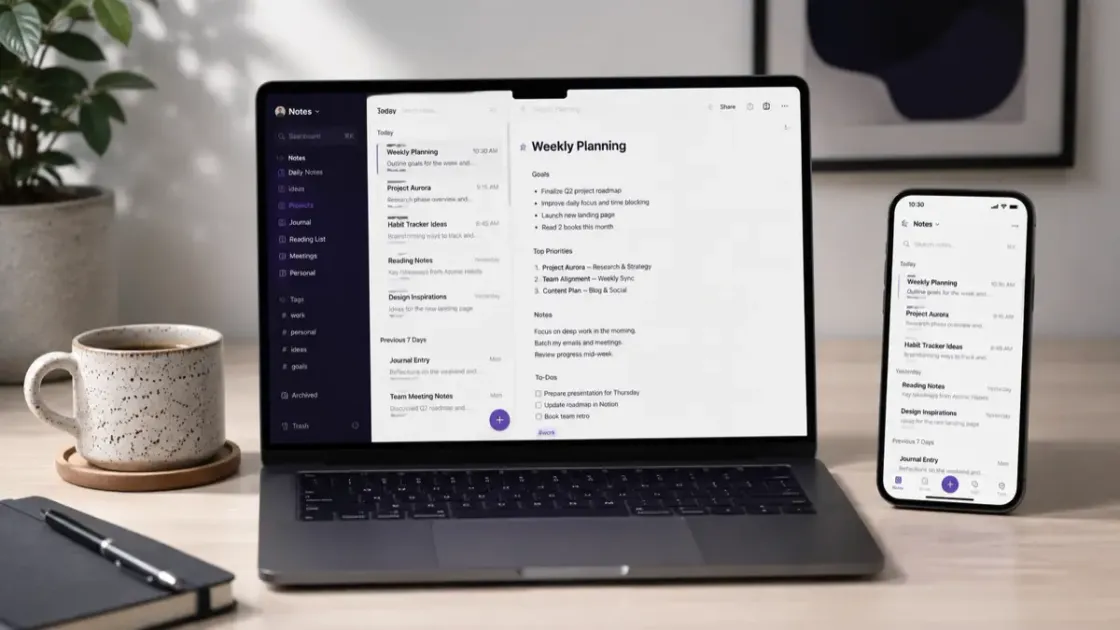
Taking notes is easy. Finding the right note three weeks later is the hard part. That is where AI note-taking apps earn their keep: they do not just store your thoughts, they summarize, organize, and resurface them. Here are the best AI note-taking apps in 2026, what each one actually charges for the AI, and how to choose. Prices were read on each vendor’s pricing page on October 9, 2026.
One quick distinction first: this guide is about apps for your own notes and ideas. If your main goal is automatically transcribing meetings, you want a dedicated tool, see our best AI meeting assistants roundup for that.
Quick Comparison
| App | Where notes live | AI included? | Price (checked Oct 9, 2026) |
|---|---|---|---|
| Notion | Notion cloud | Trial on Free and Plus, full Notion Agent on Business | Free; Plus €9.50 per member/month (Notion shows local currency, yearly saves up to 20%); Business €19.50 |
| Obsidian | Local plain-text files | Via community plugins, your own API key | Free for personal use; Sync $4/month billed yearly |
| Apple Notes | iCloud | Apple Intelligence writing tools on supported devices | Free |
| Google Keep | Google account | Light AI touches | Free |
| OneNote | OneDrive | Copilot with a Microsoft 365 subscription | Microsoft 365 Personal $9.99/month or $99.99/year |
| Mem | Mem cloud | Built in, the whole product | Free (25 notes/month); Plus $9/month; Pro $29/month |
| Reflect | Reflect cloud | Optional, your own API key | Mac app free; iPhone and iPad paid via the App Store |
1. Notion, Best All-in-One (If You Pay for the AI)
Notion is the closest thing to a do-everything workspace. Notes, docs, databases, and project boards all live together, and the Notion Agent can summarize long pages, rewrite text, extract action items, and answer questions across your workspace.
The catch is in the pricing. On the Free and Plus plans you get a trial of Notion AI, enough to see what it does, not enough to rely on. The full agent, automatic meeting notes, and enterprise search are Business-plan features. Custom agents are metered on top, free to try and then $10 per 1,000 monthly Notion credits. If you want Notion mainly for the AI, budget for Business or accept the trial limits.
Best for: people who want notes plus databases and light project management in one place, and teams already on a paid plan.
2. Obsidian, Best for Control and Ownership
Obsidian stores your notes as plain-text Markdown files on your own device. That means privacy, longevity, and no lock-in: the notes are readable with any editor in twenty years. Personal use is free without limits and needs no sign-up; a commercial license is $50 per user per year, and Obsidian says you are not required to buy it.
AI arrives through community plugins. You bring your own API key from the model provider, which keeps your notes out of any vendor’s training data and means you pay the provider directly for what you use. Syncing between devices is an optional add-on at $4 per month billed yearly ($5 monthly).
Best for: power users, writers, and anyone who wants local files and a customizable, linked “second brain.”
3. Apple Notes and Google Keep, Best for Quick Capture
Sometimes you just need to jot something fast. Apple Notes and Google Keep are free, instant, and already on your devices. Apple Notes gets Apple Intelligence writing tools (summaries, rewrites, proofreading) on supported devices; Keep has lighter AI touches for cleaning up lists. Neither is a power tool, but for capturing a thought before it disappears, both are hard to beat.
Best for: fast, simple capture across your phone and computer, at no cost.
4. Microsoft OneNote With Copilot
If your world runs on Microsoft 365, OneNote with Copilot keeps notes right alongside Word, Excel, and Outlook, with AI summaries and drafting built in. The app itself is free; Copilot comes with a Microsoft 365 Personal subscription at $9.99 a month or $99.99 a year (Family is $12.99 a month or $129.99 a year), which Microsoft lists as including advanced Copilot chat with higher usage than the free tier.
Best for: Microsoft 365 subscribers who want notes in the same place as everything else, with no extra AI bill.
5. Mem, Best for Resurfacing Old Notes
Mem is built around one idea: you write, and the AI connects and resurfaces. There are no folders to maintain; you ask Mem what you know about a topic and it pulls the relevant notes together. The free tier allows 25 notes a month and 25 AI messages, which is enough to test the idea. Mem Plus is $9 a month and Mem Pro is $29 a month with higher limits and voice mode hours.
Best for: heavy note-takers whose main pain is “I know I wrote this down somewhere.”
6. Reflect, A Simpler Second Brain
Reflect is a clean, fast networked-notes app for Mac, iPhone, and iPad. The Mac app is free with no subscription; the iPhone and iPad apps are a paid subscription through the App Store. AI is optional and, like Obsidian, uses your own API key, so the provider bills you separately.
Best for: Apple users who want backlinks and daily notes without Notion’s complexity.
How to Choose
| You want… | Pick |
|---|---|
| One flexible workspace for everything, and you will pay for Business | Notion |
| Local files and full control, AI on your own terms | Obsidian |
| Fast, free, simple capture | Apple Notes or Google Keep |
| Notes inside Microsoft 365 with Copilot included | OneNote |
| AI to auto-connect and resurface your notes | Mem |
| Simple networked notes on Apple devices | Reflect |
What “AI Note-Taking” Actually Buys You
Three things, in order of how much they matter:
- Finding, not writing. Asking a question across your whole library beats hunting through folders. This is the feature worth paying for.
- Summaries on long notes, so future-you can skim a meeting or a research dump in ten seconds.
- Cleanup. Turning a voice memo or a messy brain dump into structure. Useful, but any free assistant can do it if you paste the text.
If your notes are short and few, the free capture apps plus a general assistant cover you. If you have years of notes, the retrieval features in Notion Business, Mem, or an Obsidian plugin earn their price.
Getting the Most From AI Notes
- Capture messy, organize later. Do not fight the app while an idea is fresh; let AI structure it afterward.
- One home, not three. The retrieval only works if the notes are all in one place.
- Own your export. Before committing to a cloud app, check that you can export everything as Markdown or plain text. Obsidian is the only one here where that question does not arise.
- Watch the AI bill. With Obsidian and Reflect the model provider charges per use; with Notion the serious AI is a plan upgrade. Know which model you are on before the invoice arrives.
The Bottom Line
For most people, Notion is the best AI note-taking app if you are willing to pay for the Business tier where the real AI lives. Choose Obsidian if you value local files and control, Apple Notes or Google Keep for free quick capture, OneNote if you already pay for Microsoft 365, and Mem if resurfacing old notes is the whole point. And if you actually need meetings transcribed, reach for a dedicated meeting assistant instead.
Want to build a wider AI toolkit? Our best AI tools for office work and AI tools guide cover the rest, and how to use AI at work safely covers what not to paste into any of them.
Cost-Effective AI Models for Workflows & Automation
Empirical rankings sourced from Artificial Analysis, Arena.ai, LLM Stats & BenchLM.
Related Articles

Best AI PDF Summarizers (2026): Chat With Your Documents
The best AI tools for summarizing PDFs and long documents. Upload a 100-page report, get key insights in seconds. Free and paid options compared.
9 Best AI Chrome Extensions for Productivity (2026)
The only AI Chrome extensions worth installing: summarize any page, write emails faster, and research smarter, without leaving your browser.
Grammarly vs Jasper vs Claude: Best AI Writing Tools (2026)
Grammarly vs Jasper vs Claude vs Copy.ai, tested on real writing tasks. See which AI writing tool wins on quality, speed, and value for office work.