
RapidRAW: The Open-Source Lightroom Alternative
Tired of slow RAW editors? Discover RapidRAW, the open-source powerhouse built with Rust and GPU acceleration for lightning-fast photo editing.
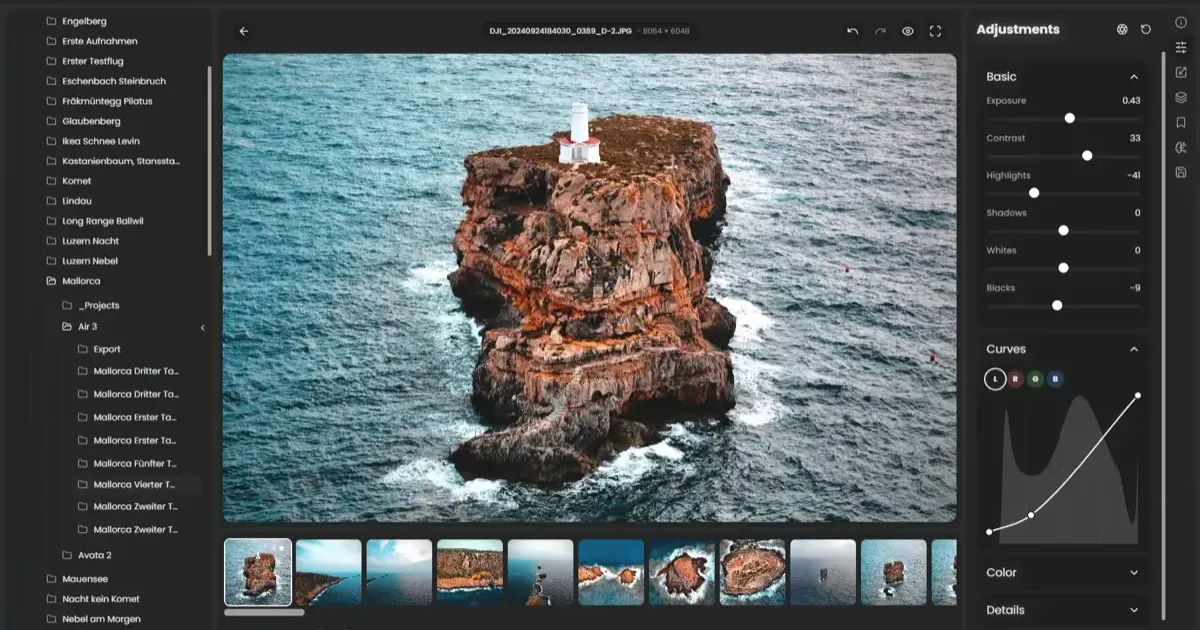
For years, the world of RAW photo editing has been dominated by a few heavy hitters. Adobe Lightroom is the industry standard, but it comes with a recurring subscription. Open-source alternatives like Darktable and RawTherapee are powerful but often criticized for their steep learning curves and sometimes sluggish performance.
Enter RapidRAW—a fresh, ambitious project that aims to bridge the gap between professional power and open-source accessibility. Visit the official RapidRAW website to download it for your platform. If you’re just getting into photography, check out our best cameras for beginners guide first.
System Requirements
RapidRAW is lightweight compared to Lightroom, but its GPU-accelerated pipeline does require a decent graphics card. Here’s what you need:
| Component | Minimum | Recommended |
|---|---|---|
| OS | Windows 10 / macOS 12 / Linux | Latest version |
| GPU | Any Vulkan-compatible card | Dedicated GPU (NVIDIA GTX 1060+ / AMD RX 580+) |
| RAM | 8 GB | 16 GB |
| Storage | 500 MB for app | SSD recommended for RAW library |
| Display | 1080p | Calibrated 1440p+ for color-critical work |
Integrated Intel/AMD graphics will work for basic edits, but you’ll see the real speed advantage with a dedicated GPU. The WGSL shaders really shine when processing 40-50 megapixel RAW files from modern cameras.
How to Install RapidRAW
Getting started takes under five minutes:
- Download the latest release from getrapidraw.com for your platform
- macOS users: Right-click the app and select “Open” to bypass Gatekeeper on first launch (see our macOS tips for more on this)
- Import your photos: Point RapidRAW to your RAW folder — it supports CR3, NEF, ARW, RAF, ORF, DNG, and most major RAW formats
- Start editing: Adjustments are instant thanks to GPU acceleration
No account creation. No subscription activation. Just open and edit.
Built for Speed: Rust and GPU Power
The most impressive thing about RapidRAW isn’t just its feature set—it’s how it’s built. Developed by Timon Käch, the application utilizes a modern tech stack designed for the 2020s:
- Rust Backend: Using Rust ensures the application is memory-safe and incredibly fast at the system level.
- GPU Acceleration: Unlike many editors that rely heavily on your CPU, RapidRAW moves the heavy lifting to your graphics card. Its image processing pipeline uses custom WGSL shaders, making adjustments to exposure, contrast, and color feel instantaneous even on high-resolution RAW files.
- Tauri + React: The user interface is built with web technologies but wrapped in Tauri, resulting in a lightweight desktop app that doesn’t hog resources like traditional Electron apps.
Non-Destructive, Pro-Grade Editing
At its core, RapidRAW follows the non-destructive workflow every photographer needs. Your original RAW files are never touched; instead, all your edits are stored as instructions, allowing you to go back and tweak any setting at any time.
Key Features You’ll Love:
- AI-Powered Masking: RapidRAW includes local AI models for subject and sky detection. You can combine these with linear, radial, and brush masks for ultimate control over your lighting and color.
- Deep Tonal Control: Beyond basic exposure, you get dedicated sliders for highlights, shadows, whites, and blacks, along with a powerful tone curve.
- Color Grading: A full HSL mixer and vibrance/saturation controls give you total command over your palette.
- Effects and Detail: Sharpening, noise reduction, film grain, and even a dehaze tool are built-in and hardware-accelerated.
For color-critical editing work, pair RapidRAW with a color-accurate monitor and proper desk lighting to ensure what you see on screen matches the final output.
Local AI Integration
In a unique move, RapidRAW also allows for integration with a local ComfyUI server. This means you can use your own Stable Diffusion models for generative edits or advanced image manipulation, all while keeping your data local and private.
RapidRAW vs. Other Free Editors
How does RapidRAW stack up against other free options?
| Feature | RapidRAW | Darktable | RawTherapee | Lightroom |
|---|---|---|---|---|
| Price | Free (AGPL-3.0) | Free (GPL) | Free (GPL) | ~$10/mo |
| GPU Acceleration | Full pipeline | Partial (OpenCL) | None | Yes |
| AI Masking | Local AI | No | No | Cloud AI |
| Non-Destructive | Yes | Yes | Yes | Yes |
| Learning Curve | Low | High | Very High | Low |
| RAW Format Support | Good (growing) | Excellent | Excellent | Excellent |
| LUT Support | Yes | Yes | Yes | Limited |
| Preset Ecosystem | Growing | Large | Large | Massive |
Key takeaway: Darktable and RawTherapee have more mature RAW format support and larger preset libraries. But RapidRAW’s speed advantage is immediately noticeable — culling through 200 photos from a shoot feels effortless compared to the lag you get in Darktable.
Why Switch?
RapidRAW is still in early development, but it’s already showing massive potential. It’s perfect for:
- Hobbyist Photographers: Who want a modern, fast interface without the Adobe tax.
- Open-Source Enthusiasts: Who value privacy and community-driven software.
- Speed Demons: Who are tired of wait times when scrolling through a large library of RAW files.
Current Limitations
RapidRAW is still early in development, so it’s worth knowing what’s missing:
- No catalog management — it’s a pure editor, not a photo organizer like Lightroom. You’ll need a separate tool (or just your file system) to manage your library.
- Plugin ecosystem doesn’t exist yet — no third-party extensions or marketplace
- RAW format support is growing but may not cover every obscure camera model. Check the compatibility list before committing.
- No mobile version — desktop only for now
These are expected for a young project, and the active development pace means gaps are closing fast.
Final Thoughts: A New Era for Open-Source Photography
RapidRAW isn’t just another fork of an old tool. It’s a ground-up reimagining of what a photo editor should be in the age of GPUs and AI. While it may not yet have every single feature of Lightroom, its performance and modern architecture make it one of the most exciting projects in the photography space today.
For more photography tips and gear recommendations, see our photography guide and camera vs smartphone comparison.
Related Articles
RFID Record Player: Play Spotify with Physical Vinyl
Build an RFID Record Player that plays Spotify with physical vinyl cards. A complete DIY guide using Raspberry Pi, NFC tags, and 3D printing.
Cheap Manual Lenses for Beginners: 7Artisans & TTArtisan
Discover why affordable manual lenses from brands like 7Artisans and TTArtisan are the best secret weapon for beginner photographers to learn the craft quickly.
Sesame Robot: The Most Adorable DIY Quadruped You Can 3D Print
Build the Sesame Robot — an open-source 3D-printed quadruped with personality, OLED eyes, and WiFi control. Full BOM, print settings, and build guide inside.