
How to Use AI for Job Interview Prep: Full Guide
Use ChatGPT or Claude to research companies, craft STAR answers, run mock interviews, and write follow-up emails. Copy-paste prompt templates included.

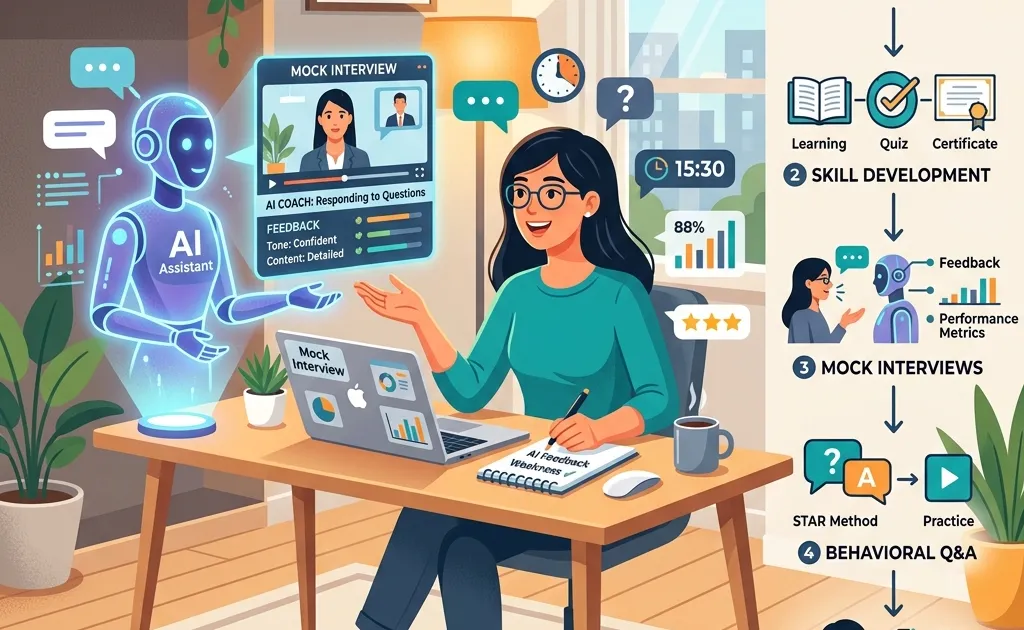
A friend of mine had a senior PM interview at a fintech company. She called me the night before, completely unprepared. We sat down with ChatGPT for about two hours, researched the company, built STAR answers for her top experiences, ran three mock interview rounds, and drafted questions to ask the panel.
She got the offer.
Want a structured roadmap? Check out our comprehensive Guide to Learning AI in 2026 with step-by-step milestones, free courses, and career advice.
I’m not saying AI did the work for her. She had the experience, the skills, and the personality. But AI compressed what would normally be a week of scattered preparation into one focused evening. And the structure it gave her answers made a noticeable difference.
Here’s the exact workflow we used, broken into four phases. Total time: about 2 hours and 15 minutes. Every prompt is copy-paste ready.
Phase 1: Research the Company (30 Minutes)
Most candidates skim the “About Us” page and call it research. That’s not enough. You need to understand what the company is actually dealing with right now, recent product launches, leadership changes, market challenges, competitor moves.
This is where AI saves you hours of tab-hopping.
Start With the Company Brief
Open ChatGPT (free tier works fine for this) or Claude and paste this prompt:
I’m interviewing for the role of [JOB TITLE] at [COMPANY NAME] on [DATE]. Give me a briefing document that covers: (1) What the company does in plain language, (2) Their main products or services, (3) Recent news from the last 6 months, product launches, funding rounds, leadership changes, layoffs, partnerships, (4) Their biggest competitors and how they differentiate, (5) Any public challenges or controversies. Keep it factual and cite specific events where possible.
This gives you a solid foundation in about 60 seconds. But here’s the critical part: verify the key facts. AI models can hallucinate details, especially about recent events. Cross-check any specific numbers, names, or dates against the company’s actual press page, LinkedIn company profile, or reliable news sources. Sites like Glassdoor are also useful for checking interview question patterns and company culture details.
Decode the Job Description
Next, feed it the full job description:
Here’s the job description for the [JOB TITLE] role at [COMPANY NAME]. Analyze it and tell me: (1) The top 5 skills they’re actually looking for (read between the lines, not just what’s listed), (2) What problems this person will probably need to solve in their first 90 days, (3) Red flags or challenges I should be aware of, (4) Keywords and phrases I should naturally work into my answers. [PASTE FULL JOB DESCRIPTION]
This is gold. The “first 90 days” section alone gives you material for one of the most common interview questions: “What would you do in your first three months?”
Map Your Experience to Their Needs
Now connect the dots:
Here’s my resume/background: [PASTE RESUME OR KEY BULLET POINTS]. Based on the job description analysis above, identify: (1) My strongest overlaps with what they need, (2) Gaps where I’m weak, and how I could address each gap in an interview, (3) Experiences I should definitely bring up, even if they don’t seem obviously relevant.
By the end of Phase 1, you’ll know more about this company and role than 90% of candidates walking into that interview. And it took you 30 minutes, not an entire weekend.
Phase 2: Prepare Your Answers (1 Hour)
This is the most important phase. Raw knowledge means nothing if you can’t deliver it in a structured, compelling way under pressure.
Build Your STAR Story Bank
The STAR method (Situation, Task, Action, Result) isn’t new. But most people butcher it. They spend too long on Situation, rush through Action, and forget to quantify Results.
AI fixes this by forcing structure:
I need to prepare STAR-format answers for a [JOB TITLE] interview. Here are 5 experiences from my career that I want to turn into stories. For each one, help me structure it into a tight STAR format. Keep each answer under 2 minutes when spoken aloud (roughly 250-300 words). Make the Action section the longest part. Quantify results wherever possible.
Experience 1: [Describe what happened in 2-3 sentences] Experience 2: [Describe what happened in 2-3 sentences] Experience 3: [Describe what happened in 2-3 sentences] Experience 4: [Describe what happened in 2-3 sentences] Experience 5: [Describe what happened in 2-3 sentences]
The key here: give AI the raw material, then reshape its output in your own voice. If the AI version sounds too polished or uses words you’d never say, rewrite those parts. Interviewers can smell rehearsed, corporate-speak answers from across the table.
Tackle the Hard Questions
Every interview has a few questions designed to trip you up. Let’s prepare for those specifically:
Generate the 10 hardest interview questions for a [JOB TITLE] role at [COMPANY NAME], based on the job description. Include: (1) 3 behavioral questions, (2) 2 situational/hypothetical questions, (3) 2 questions about weaknesses or failures, (4) 2 role-specific technical questions, (5) 1 curveball question they might ask based on recent company news. For each question, give me a brief strategy note (2-3 sentences) on what the interviewer is actually trying to learn.
That last part, understanding what the interviewer is really asking, is what separates prepared candidates from everyone else. “Tell me about a time you failed” isn’t about the failure. It’s about self-awareness and growth. Knowing the subtext changes how you frame your answer.
Prepare for the “Why This Company” Question
This one trips up more people than it should:
Based on everything we’ve discussed about [COMPANY NAME], help me draft a genuine, specific answer to “Why do you want to work here?” that: (1) References something specific about their product, mission, or recent news, (2) Connects to my actual career goals and experience, (3) Doesn’t sound like I’m reading their About page back to them, (4) Is under 60 seconds when spoken aloud. My actual reasons for being interested: [LIST YOUR REAL REASONS, EVEN IF THEY’RE PARTLY ABOUT MONEY OR LOCATION]
Be honest with the AI about your real motivations. It can help you frame “I need a higher salary” as “I’m looking for a role where the scope of impact matches my experience level” without being dishonest.
Address Your Resume Gaps
If you have employment gaps, short stints, or a career pivot, don’t wait for the interviewer to bring it up. Prepare a tight explanation:
I have the following potential red flags on my resume: [DESCRIBE, gap, short tenure, career change, etc.]. For each one, help me craft a 30-second explanation that: (1) Acknowledges it directly without being defensive, (2) Frames what I learned or gained during that period, (3) Pivots back to why I’m a strong fit for this role.
Phase 3: Run a Mock Interview (30 Minutes)
Reading your answers silently is not preparation. You need to say them out loud, in real time, under mild pressure. This is where AI genuinely surprised me.
Set Up the Mock Interview
You are now the interviewer for the [JOB TITLE] position at [COMPANY NAME]. Conduct a realistic 20-minute interview with me. Rules: (1) Ask one question at a time and wait for my response, (2) Ask follow-up questions based on my answers, don’t just move to the next topic, (3) Start friendly, then gradually increase difficulty, (4) If my answer is vague, push me for specifics, (5) After the interview, give me brutally honest feedback on: answer quality, structure, specificity, and areas where I was unconvincing.
Now here’s the important part: actually speak your answers out loud and then type a summary of what you said. Don’t type out a perfect written response, that defeats the purpose. The goal is to practice verbal delivery, catch yourself rambling, and notice which stories feel natural versus forced.
If you’re using ChatGPT Plus ($20/month), you can use Advanced Voice Mode for this. Talk directly to it. It’ll respond conversationally, ask follow-ups, and the experience is surprisingly close to a real phone screen.
Get Feedback That Actually Helps
After the mock interview, ask for targeted feedback:
Based on our mock interview, give me: (1) A letter grade (A through F) for each answer I gave, with one sentence explaining why, (2) The single biggest improvement I could make overall, (3) Any answers where I rambled or lost focus, (4) Phrases or filler words I should eliminate, (5) Which of my stories was the strongest and why.
This is where Claude really shines, by the way. Claude tends to give more detailed, nuanced feedback on communication patterns. If you have access to both tools, consider doing the mock interview in ChatGPT (especially with voice mode) and then pasting your answers into Claude for a second opinion on quality.
For more on getting better outputs from AI tools, check out our guide on prompt engineering techniques, the same principles that make AI write better emails also make it a better interview coach.
Phase 4: Prepare Your Follow-Up (15 Minutes)
Most advice says “send a thank you email.” That’s table stakes. You want a follow-up that actually reinforces why you’re the right pick.
Draft Smart Questions to Ask the Interviewer
Prepare these before the interview, not during:
Based on the [COMPANY NAME] research and the [JOB TITLE] job description, generate 8 thoughtful questions I could ask the interviewer. Requirements: (1) Nothing that’s easily answered by their website, (2) Questions that show I’ve done deep research, (3) At least 2 questions about team dynamics or culture, (4) At least 1 question about challenges or what keeps them up at night, (5) Avoid anything about salary, PTO, or perks, those come later. For each question, note who it’s best suited for (hiring manager, peer interviewer, or executive).
Pick your top 4-5 and memorize them. Having strong questions ready is one of the easiest ways to stand out, and most candidates completely waste this opportunity.
Pre-Write Your Thank You Email Template
Don’t wait until after the interview when you’re tired and second-guessing everything:
Write a thank you email template I can customize after my [JOB TITLE] interview at [COMPANY NAME]. Structure: (1) Thank them for their time and reference something specific from our conversation (leave a blank for me to fill in), (2) Briefly reinforce one key qualification that maps to their biggest need, (3) Address any concern that came up during the interview (leave a blank), (4) Express genuine enthusiasm without being over-the-top, (5) Keep it under 150 words total. Tone: professional but warm, not stiff.
Having this template ready means you can send your follow-up within 2 hours of the interview, which signals real interest and organization. Just fill in the specific details from the actual conversation.
Bonus: The Company Research Cheat Sheet
Before your interview, compile a one-page cheat sheet you can review in the parking lot or waiting room:
Based on everything we’ve discussed, create a one-page cheat sheet I can review 10 minutes before my interview. Include: (1) Company’s core business in one sentence, (2) 3 recent news items to potentially reference, (3) The interviewer’s likely top 3 priorities for this role, (4) My 3 strongest STAR stories and which question each answers, (5) My top 3 questions to ask, (6) One sentence on why I want this job specifically.
Print this out. Fold it up. Read it one last time before you walk in.
What AI Cannot Do for You
After walking through this whole system, I want to be clear about its limits. AI is a preparation tool, not a personality replacement.
AI can’t fake authenticity. Interviewers who’ve done thousands of interviews can tell when someone is reciting memorized answers versus speaking from real experience. Use AI to structure and sharpen your stories, but the core content has to come from your actual career.
AI can’t read the room. Body language, eye contact, the energy you bring into the room, knowing when to let a pause sit versus when to fill it, these are human skills that no amount of prompt engineering will give you.
AI can’t generate genuine enthusiasm. If you don’t actually want the job, a perfectly crafted “Why this company?” answer won’t save you. The best interview prep in the world can’t compensate for a fundamental mismatch.
AI can’t replace domain expertise. For technical interviews, AI can help you organize your knowledge and practice articulation. But if you don’t actually understand the technical concepts, it’ll show the moment someone asks a follow-up question.
What AI can do is eliminate the excuse of being unprepared. Two hours with the workflow above, and you’ll walk into that room knowing the company, having practiced your stories out loud, and carrying a cheat sheet that would make your career counselor proud.
The interview is still yours to win. AI just makes sure you show up ready.
Quick Reference: All Prompts in One Place
If you want the most streamlined experience, here’s the order to run these prompts. You can do it all in a single ChatGPT or Claude conversation to maintain context:
- Company briefing prompt (5 min)
- Job description analysis (5 min)
- Experience-to-role mapping (5 min)
- STAR story bank (20 min)
- Hard questions + strategy notes (10 min)
- “Why this company?” answer (5 min)
- Resume gap explanations, if needed (5 min)
- Mock interview with feedback (30 min)
- Questions to ask the interviewer (5 min)
- Thank you email template (5 min)
- One-page cheat sheet (5 min)
Total: roughly 2 hours and 15 minutes. That’s it. One evening, and you’re more prepared than you’ve ever been for an interview.
For more ways to use AI tools at work beyond interview prep, check out our roundup of the best AI tools for office work, several of the tools there will also help with resume writing, cover letters, and career planning.
Cost-Effective AI Models for Workflows & Automation
Empirical rankings sourced from Artificial Analysis, Arena.ai, LLM Stats & BenchLM.
Related Articles

12 Best Custom GPTs for Productivity at Work (2026)
I browsed and tested 50+ custom GPTs from the ChatGPT GPT Store so you don't have to. Here are the 12 that actually save time for writing and research.

7 Repetitive Office Tasks You Can Automate With AI Right Now
Stop doing repetitive work manually. These 7 office tasks can be automated with AI tools like ChatGPT, Zapier, and Make.com, most in under 30 minutes.

Best AI Tools for Job Seekers 2026 (Resume to Offer)
The best AI tools for job seekers in 2026: resume and cover letter help, LinkedIn tips, ATS matching, and interview prep to land more offers, used honestly.