
Best Kindle Accessories Worth Buying in 2026
The best Kindle accessories from cases to stands and screen protectors. Only the ones actually worth your money.
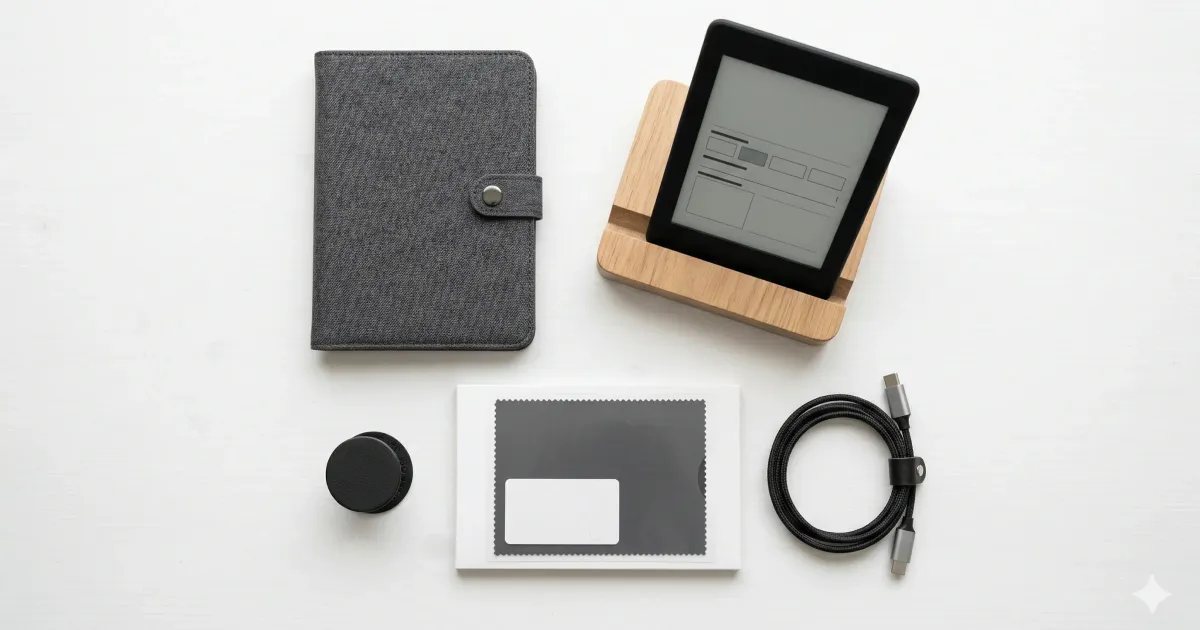
You got a Kindle. Great choice. (Not sure which one? Check our Kindle vs Kobo comparison or our guide on whether a Kindle is worth it.)
Now here’s the thing — the Kindle itself is almost perfect out of the box. You don’t need accessories. But a few well-chosen ones can make your reading experience significantly better.
Here are the accessories I actually recommend after years of Kindle ownership.
The Quick Overview
| Accessory | Best For | Price Range |
|---|---|---|
| Slim fabric case | Everyday protection | ~$15–40 |
| Book-style leather cover | Premium feel | ~$30–60 |
| Matte screen protector | Beach/pool readers | ~$8–12 |
| Adjustable stand | Desk/nightstand reading | ~$10–20 |
| PopSocket/finger grip | One-handed reading | ~$8–15 |
| Waterproof pouch | Pool/bath reading (non-waterproof models) | ~$8–12 |
| USB-C cable (extra) | Charging at multiple spots | ~$8–12 |
| Clip-on light | Older Kindles without frontlight | ~$10–15 |
| Kindle sleeve | Minimal bag protection | ~$10–20 |
| Wireless charger | Paperwhite Signature Edition | ~$15–25 |
1. A Slim Case or Cover (~$15–40)
This is the one accessory almost everyone should get. Your Kindle’s screen is tough, but it’s not invincible — keys, coins, or a water bottle in your bag can scratch it over time.
Amazon’s official fabric cover ($40) is solid but overpriced. The MoKo slim case ($15) and Fintie slimshell (~$15) do the exact same job — auto sleep/wake, magnetic closure, minimal bulk — at a fraction of the price.
Go for something slim and lightweight. The whole point of a Kindle is that it’s light enough to hold for hours. Don’t ruin that with a bulky case.
2. Book-Style Leather Cover (~$30–60)
If you want your Kindle to feel like a book, a book-style cover with a foldable front flap is the way to go. CoBak makes a particularly nice faux-leather version (~$15–20) that looks premium without the premium price.
Amazon’s official leather cover (~$60) is beautiful but honestly hard to justify unless aesthetics are a priority. The third-party options are nearly identical in function.
3. Matte Screen Protector (~$8–12)
Two reasons to get one:
- Anti-glare — reduces reflections if you read outdoors or under bright lights
- Paper-like texture — gives the screen a slightly rough feel that mimics actual paper
This is particularly nice if your Kindle feels too “slippery” or glass-like. A 2-pack from brands like Supershieldz or MoKo runs about $8–10 and lasts months.
Skip the tempered glass protectors — they add unnecessary weight and the Kindle screen isn’t like a phone screen that needs impact protection.
4. Adjustable Stand (~$10–20)
If you read at your desk, on a nightstand, or while eating (no judgment), a small stand is a game-changer. It frees up both hands and keeps the Kindle at a comfortable angle.
The MoKo adjustable tablet stand (~$12) works perfectly. Any phone/tablet stand in the 6–7 inch range will do. Some people even use a cheap cookbook stand — whatever works.
5. PopSocket or Finger Grip (~$8–15)
The Kindle Paperwhite weighs about 205g, which is light — but after an hour of one-handed reading, your pinky starts to ache. A PopSocket or stick-on finger grip on the back solves this completely.
Alternatively, a hand strap case (like the ones from Fintie) has a built-in elastic strap on the back. Great for reading in bed or on the couch.
6. Waterproof Pouch (~$8–12)
If you have a Kindle Paperwhite or newer, it’s already IPX8 waterproof. Skip this.
But if you have a basic Kindle or an older model, a universal waterproof pouch lets you read in the bath or by the pool without anxiety. The touchscreen works fine through the plastic. Just make sure it’s rated for 6-inch devices.
7. Extra USB-C Cable (~$8–12)
Kindles have incredible battery life — weeks on a single charge. But when they do die, it’s always at the worst time, and the cable is in the other room.
Keep a short USB-C cable at your nightstand and one in your bag. Nothing fancy needed — any USB-C cable works. Anker makes reliable short cables (~$8 for a 2-pack).
8. Clip-On Book Light (~$10–15)
Only relevant if you have an older basic Kindle without a built-in frontlight. The Mighty Bright clip-on light is the classic choice — warm LED, flexible neck, runs on batteries.
If your Kindle has a frontlight (Paperwhite, Oasis, or the 2022+ Basic), skip this entirely. The built-in light is better than any clip-on.
9. Kindle Sleeve (~$10–20)
If a full case feels like too much, a simple neoprene or felt sleeve protects the Kindle in your bag without adding bulk during reading. You slide it out, read, slide it back.
Fintie and MoKo both make good ones. Or if you want something nicer, felt sleeves on Etsy run about $15–20.
10. Wireless Charger (~$15–25)
Only works with the Kindle Paperwhite Signature Edition, which has Qi wireless charging built in. If you have one, a simple charging pad on your nightstand means you never have to think about cables.
Any Qi charger works — the Anker 313 (~$16) is a safe bet. Drop the Kindle on it before bed, wake up fully charged.
What You Actually Need
Minimalist setup (under $25):
- Slim case (~$15)
- That’s it. Seriously.
Comfortable setup (under $50):
- Slim case (~$15)
- Matte screen protector (~$10)
- PopSocket or finger grip (~$10)
- Extra USB-C cable (~$8)
Full setup (under $80):
- Book-style cover (~$20)
- Matte screen protector (~$10)
- Adjustable stand (~$12)
- Hand strap or PopSocket (~$10)
- Extra USB-C cable (~$8)
- Waterproof pouch if needed (~$10)
The Kindle is designed to be simple. Don’t overcomplicate it with accessories you don’t need. Start with a case, and add from there only when you feel a genuine need.
Want to get more out of your Kindle software-side? Check out our Kindle modding guide for tips on custom fonts, KOReader, and more.
Related Articles
Is a Kindle Worth It in 2026? (Honest Answer After 3 Years)
After 3 years with a Kindle, here's my honest take. Pros, cons, and exactly who should (and shouldn't) buy one in 2026.
Unlock Your E-Reader: The Ultimate Kindle Modding Guide (2026)
Ready to take your Kindle to the next level? From jailbreaking to installing KOReader, here is everything you need to know about Kindle modding.
Kindle vs Kobo (2026): I Own Both — Here's Which to Buy
After using both Kindle and Kobo daily, here's the honest truth. Features, prices, and ecosystem compared — with a clear winner.