
Kindle Modding Guide: Jailbreak, Mods & KOReader (2026)
The complete Kindle modding wiki: jailbreak, KOReader, custom fonts, screensavers, and EPUB sideloading. Works on Paperwhite, basic Kindle, and Scribe.

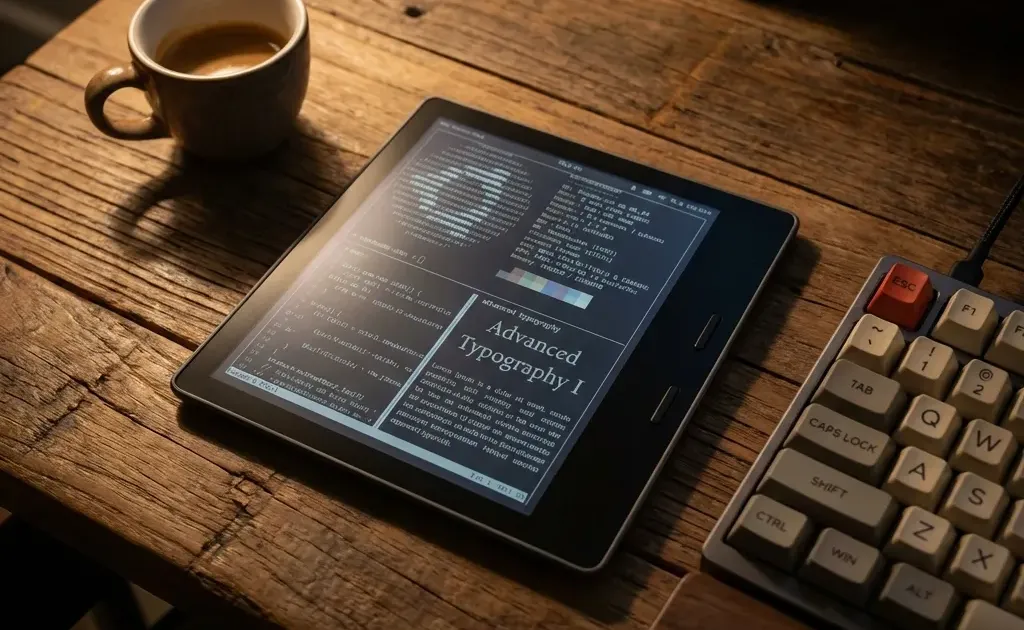
Amazon builds reliable, battery-efficient E Ink hardware, but the stock operating system is deliberately designed as a walled garden. Between locked-down formatting, lack of native EPUB support, and persistent lockscreen advertisements, stock Kindles restrict you to Amazon’s proprietary ecosystem.
Kindle modding unlocks the full potential of your device. Whether your goal is reading academic PDFs with margin cropping, organizing a private Calibre library without DRM restrictions, or running an open-source reader like KOReader, this guide outlines the modern 2026 modding landscape.
Considering an e-reader purchase? Compare hardware philosophies in our Kindle vs Kobo breakdown or evaluate long-term value in Is a Kindle Worth It?.
Quick Picks: Best Kindle Jailbreak & Mod Options by Firmware (2026)
Before connecting your Kindle to a computer or toggling Wi-Fi, check your firmware version under Settings -> Device Options -> Device Info. Match your firmware against the verified methods below:
| Firmware Range | Supported Kindle Models | Exploit / Method | Difficulty | Unlocked Capabilities |
|---|---|---|---|---|
| FW 5.16.4 to 5.18.6 | Paperwhite 5 (11th Gen), Basic 11, Oasis 3 | Nosebleed / AdBreak | Medium (15 min) | Full root access, KUAL launcher, KOReader, custom sleep screens |
| FW up to 5.18.0 | Older models (2013 to 2021: PW2-PW4, Voyage) | WinterBreak | Easy (10 min) | Full root, KUAL, on-device package manager, native EPUB support |
| FW 5.14.3 to 5.16.2 | Legacy Paperwhite & original Kindle Scribe | LanguageBreak | Medium (20 min) | Full root, SSH/Telnet terminal access, custom reader engines |
| FW 5.18.1.1.1+ / 5.19.x | Kindle Colorsoft & updated 2026 firmware | Soft Mods Only | None (Zero risk) | Drag-and-drop OTF/TTF fonts and USB Calibre book management |
| Any Firmware (No Root) | All Kindle models without exception | USB Sideloading | Beginner (5 min) | Custom font families, high-res book covers, and clean metadata |
The 4-Step Kindle Modding Pipeline
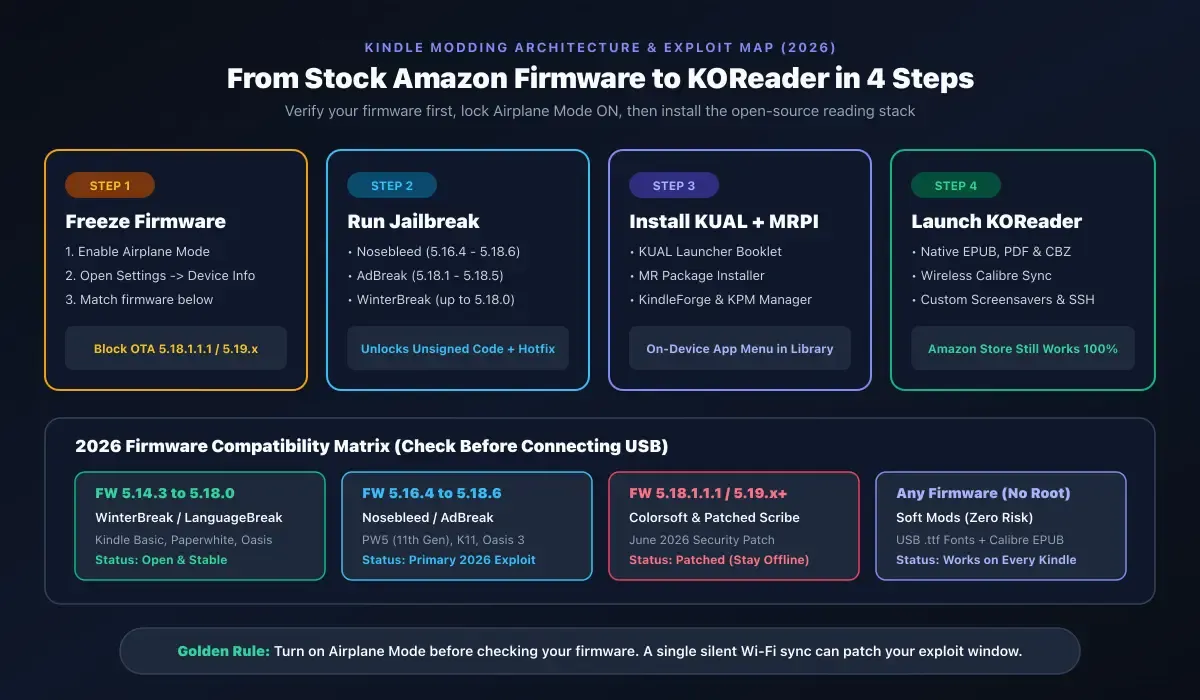
Modding a Kindle requires a systematic sequence to avoid automatic over-the-air (OTA) updates from patching your firmware.
1. What Exactly Is Kindle Modding?
When readers talk about modding a Kindle, the modifications fall into two distinct categories:
Level 1: Soft Mods (No Jailbreak Required)
These enhancements operate within Amazon’s official operating system boundaries. By plugging your Kindle into a computer via USB, you can install custom typography (.ttf and .otf fonts), organize collections via Calibre, and sideload DRM-free books without modifying system files. This carries zero risk of bricking and works on every firmware version.
Level 2: The Root Jailbreak
Jailbreaking executes an exploit that grants root access to the underlying Linux operating system. This allows the Kindle to execute unsigned code, unlocking:
- KOReader: A full-featured alternative reading interface with native EPUB and PDF reflow.
- KUAL (Kindle Unified Application Launcher): An on-device app drawer to launch homebrew tools.
- Custom Lockscreen Screensavers: Display the currently reading book cover or custom artwork on ad-supported units without paying Amazon’s removal fee.
- Wireless Library Sync: Transfer books directly from your computer or NAS over your local Wi-Fi network.
2. Stock Kindle vs. Modded Kindle: Feature Comparison
| Capability | Stock Kindle OS | Modded Kindle (KOReader + KUAL) |
|---|---|---|
| EPUB Document Support | Requires Send-to-Kindle cloud conversion | Native rendering with zero conversion artifacts |
| PDF Handling | Static zoom, slow panning, poor contrast | Margin auto-cropping, text reflow, contrast boost |
| Typography Options | 10 built-in Amazon fonts, limited sizing | Unlimited custom fonts, granular line height, kerning |
| Lockscreen Artwork | Amazon ads or basic book covers | Any custom wallpaper, comic panel, or weather dashboard |
| System Terminal | Completely locked down | SSH, Telnet, and Bash command-line access |
| Homebrew Apps | None | Calculators, chess, Sudoku, RSS news readers |
| Cloud Dependency | Tied to Amazon Whispernet servers | Completely autonomous local and offline operation |
3. Firmware Prerequisites: Can Your Device Be Jailbroken?
The most critical step in Kindle modding is determining whether your device’s current software build is vulnerable to an exploit.
CRITICAL GOLDEN RULE: Turn on Airplane Mode immediately. If your Kindle connects to Wi-Fi while idling on a charger, Amazon will silently download and install the latest OTA firmware update, permanently closing your jailbreak window.
Step 1: Check Your Exact Firmware
- Open your Kindle home screen and tap the Menu icon (three vertical dots).
- Tap Settings, then tap the menu icon again and select Device Info.
- Locate the Firmware Version string.
Step 2: Match Your Exploit
- Nosebleed (Firmware 5.16.4 to 5.18.6): The primary modern jailbreak. Targets 11th Generation devices including the Kindle Paperwhite 5 and the basic Kindle 11.
- WinterBreak (Firmware up to 5.18.0): Highly stable web-based exploit tailored for older devices released between 2013 and 2021.
- AdBreak (Firmware 5.18.1 to 5.18.5.0.1): Leverages the lockscreen ad subsystem on ad-supported devices to trigger arbitrary code execution.
- Firmware 5.18.1.1.1 and 5.19.x (Patched): Devices on these newer updates cannot currently be rooted. If your Kindle is on this software, stick to Level 1 Soft Mods and keep Airplane Mode active while the community develops fresh exploits.
4. The Cornerstone App: Installing KOReader
If you only install a single application after jailbreaking your Kindle, it should be KOReader.
KOReader is an open-source document viewing platform maintained specifically for low-power E Ink hardware. It resolves the most frustrating shortcomings of Amazon’s default reader:
- Intelligent PDF Reflow: Academic papers and technical manuals formatted in two-column A4 layouts are nearly unreadable on a standard 6-inch or 6.8-inch Kindle screen. KOReader can automatically detect margins, crop white borders, and reflow text into a single scrollable column.
- True Format Independence: KOReader opens
.epub,.mobi,.cbz,.cbr,.fb2, and.djvufiles directly from internal storage without requiring cloud conversion. - E Ink Optimization: You can adjust the exact refresh interval (e.g., full screen refresh every 5 page turns) to eliminate ghosting while preserving battery life.
- Detailed Reading Statistics: Live metrics track pages per hour, estimated chapter finish times, and reading heatmaps stored locally rather than sent to corporate telemetry servers.
Installation files and platform updates are maintained on the community-run KindleModding wiki and MobileRead forums.
5. The Modern Tooling Stack: KUAL, MRPI, and KindleForge
Manual file transfers over USB have been largely superseded by an integrated package management stack:
KUAL (Kindle Unified Application Launcher)
KUAL functions as your on-device application launcher. Once installed, it appears in your book library as an interactive booklet. Opening KUAL presents a clean menu where you can launch KOReader, toggle custom screensavers, restart the Kindle framework, or run diagnostic scripts.
MRPI (MobileRead Package Installer)
MRPI is the background installation daemon. Instead of modifying core system files manually, you place .bin modification packages into the mrpackages directory on your Kindle and trigger MRPI through KUAL. MRPI safely verifies checksums and installs packages without corrupting root partitions.
KindleForge & KPM (Package Manager)
KindleForge serves as an informal homebrew directory. Paired with KPM (Kindle Package Manager), you can update installed utilities directly over Wi-Fi without repeatedly tethering the device to a PC.
6. High-Impact Soft Mods (No Jailbreak Required)
If your device is running a patched firmware version or you prefer not to root your primary reader, you can significantly enhance your experience using built-in capabilities:
Add Custom Typography via USB
Since firmware 5.9.6, Amazon has natively supported user-installed fonts:
- Connect your Kindle to a computer using a USB cable.
- Open the Kindle drive and locate the
fontsfolder in the root directory. - Copy your preferred
.otfor.ttffont files into this folder. For optimal rendering, copy all four variants: Regular, Bold, Italic, and Bold Italic. - Eject the Kindle, open any book, tap the Aa display menu, and select your installed font under the Font Family list.
Top typography recommendations for E Ink: Literata (Google’s custom e-book face with high legibility at small sizes), Bitter (a slab-serif designed for screens), and Atkinson Hyperlegible (optimized for high reader contrast).
Manage Your Library with Calibre
Calibre is an essential desktop utility for every e-reader owner. Beyond organizing metadata and tags, Calibre can automatically fetch high-resolution cover art, format author sorting names properly, and send DRM-free books directly over USB using the optimal AZW3 format.
7. Operational Safety & Risk Mitigation Checklist
While modern jailbreak exploits like Nosebleed and WinterBreak are thoroughly tested by the MobileRead community, modifying embedded system firmware always carries inherent risks.
Follow these rules to protect your hardware:
- Charge to 100% Before Starting: Never execute a firmware hotfix or jailbreak package on a low battery. A sudden shutdown during flash writes can leave the bootloader unrecoverable.
- Keep Airplane Mode Active: Ensure Wi-Fi remains disabled throughout the installation process until the hotfix package is fully verified in KUAL.
- Double-Check Serial Number Characters: When identifying your hardware revision on the MobileRead Kindle Serial Numbers wiki, verify the first four to six characters against your specific box or settings menu.
- Use Factory Recovery Wisely: A standard factory reset restores default user settings, but it does not downgrade firmware. Never assume a factory reset will re-open an exploit window if the firmware was already updated to a patched version.
Next Steps for Tinkerers
Modding transforms a closed commercial appliance into a versatile, private digital reading workstation. If you are ready to explore further, start by reading the dedicated Kindle Developer’s Corner on the MobileRead Forums, verify your firmware version, and begin with custom fonts and Calibre library curation before applying root packages.
Related Articles
Kindle Black Friday Deals 2026: What to Expect & Buy
Kindle Black Friday 2026: which models to watch, the discounts to expect based on past years, current prices as a baseline, and how to avoid overpaying.

Best Kindle for Kids 2026: Safe, Simple & Affordable
The best Kindle for kids in 2026: which Kids edition to buy, what's included, and how it compares to a tablet, with a clear pick for every age and budget.
Kindle Scribe vs reMarkable 2026: Which Should You Buy?
Kindle Scribe vs reMarkable in 2026: price, note-taking, reading, and ecosystem compared, with a clear pick for writers, readers, and everyone in between.