
iPad vs. Android Tablet: Which Should You Buy in 2026?
A comprehensive 2026 comparison between iPads and Android tablets to help you decide which platform best suits your creative and professional needs.

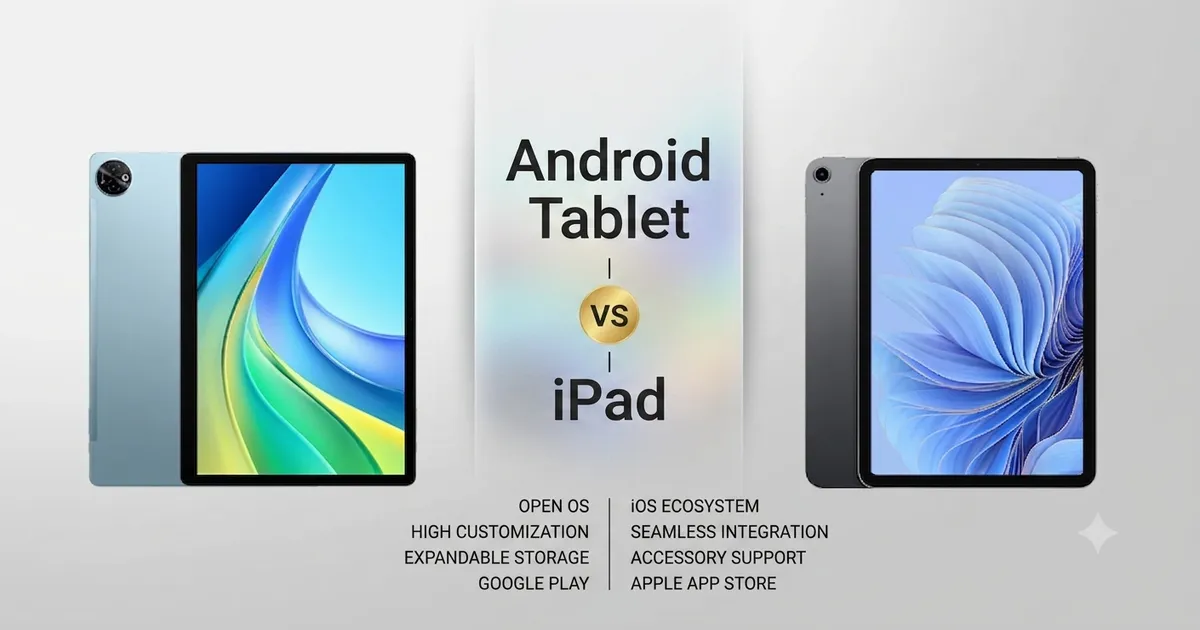
The tablet market in 2026 has reached a point of maturity where the question is no longer “is a tablet useful?” but rather “which tablet fits my life best?” The rivalry between Apple’s iPad and the diverse world of Android tablets has never been more intense, yet they have evolved to serve distinct, albeit overlapping, needs.
If you are trying to decide which path to take, this guide will break down the essential differences in software, hardware, ecosystem, and intended use cases to help you make an informed decision for 2026. You can also explore the software fueling many of these Android tablets in our Android 17 Guide, or check out Apple’s iPad lineup.
The Philosophical Divide
At the core of the iPad versus Android debate is a difference in philosophy.
Apple’s iPad is built on the premise of “curated excellence.” Apple controls both the hardware and the software, resulting in a cohesive, highly polished, and reliable experience. Apps are generally optimized specifically for the tablet form factor, and the integration with other Apple devices is legendary. It is a “walled garden,” but one that is incredibly well-maintained.
Android Tablets are built on the premise of “choice and flexibility.” Various manufacturers, most notably Samsung, create hardware that spans from affordable budget devices to premium, professional-grade tablets. The operating system allows for deep customization, complex multitasking, and a more open file system, mirroring the flexibility of a traditional computer.
App Ecosystem and Optimization
This is often the deciding factor for most users.
The iPad Advantage
The iPad’s biggest strength remains the quality and optimization of its applications. Because Apple’s tablet lineup is relatively narrow, developers can create apps specifically designed to take advantage of the iPad’s display, processing power, and touch interface. Creative apps, like Procreate, LumaFusion, and Adobe’s suite, are often more polished, more stable, and more feature-rich on iPadOS than their counterparts on Android.
The Android Flexibility
Android tablets have made massive strides in app optimization, thanks to better tablet-specific Android updates. While you might still encounter some apps that are just phone apps “stretched out,” the major productivity and media apps run beautifully. Furthermore, Android allows for sideloading and using apps that might not be available on the tightly controlled App Store, giving power users more control.
Multitasking and Productivity
How do you plan to use your tablet?
Android: The Multitasking Powerhouse
If you need a tablet that behaves like a computer, Android is typically the winner. Features like “Samsung DeX” on Galaxy Tab devices effectively turn your tablet interface into a desktop-like experience with windows, a taskbar, and support for mouse and keyboard that feels far more natural than the iPad’s split-view system. If you spend your time managing multiple windows, files, and browsers simultaneously, Android’s file management and windowing are superior.
iPad: The Focused Creative Tool
The iPad is designed for focus. Its multitasking (Stage Manager and Split View) is efficient but arguably more rigid. It excels when you want to dive deep into a single task, like painting in Procreate or editing a video in Final Cut Pro, without distraction. It is the ultimate tool for a creative person who wants their hardware to get out of the way.
Ecosystem Integration
The Apple Continuity
If you own an iPhone, a Mac, or an Apple Watch, buying an iPad is an easy choice. Apple’s “Continuity” feature allows you to copy text on your phone and paste it on your iPad, use your iPad as a secondary display for your Mac (Sidecar), and sync your iMessages and files instantly via iCloud. It is an unparalleled, frictionless experience.
The Android Openness
Android tablets integrate brilliantly with Google services, Drive, Gmail, Photos, and Chrome, across any platform. You can access your files on a Windows PC, an Android phone, or a Linux machine with equal ease. Android isn’t trying to lock you into a single hardware brand; it is built to be the hub that connects all your different devices, regardless of manufacturer.
Hardware Variety and Price
Android’s Broad Spectrum
Android is a playground of hardware. You can find a budget-friendly tablet for a child’s entertainment, a mid-range tablet for students, or a flagship device with a massive OLED screen that rivals a laptop. This variety ensures that no matter your budget or your specific hardware requirement (like specialized stylus pressure sensitivity or expandable storage), there is an Android tablet for you.
Apple’s Premium Focus
Apple does not make “budget” tablets in the same way Android manufacturers do. Every iPad is a premium product with top-tier silicon (the M-series chips), excellent display technology, and industry-leading build quality. You pay for this, and while it guarantees a high-performance experience, it also limits entry for those with smaller budgets.
The Stylus Experience: Apple Pencil vs. Android Alternatives
For digital artists and note-takers, the stylus is the extension of the hand.
The Apple Pencil is widely considered the benchmark. Its latency is virtually non-existent, and its integration with iPadOS apps is seamless.
Android tablets, particularly the Samsung Galaxy Tab S series, have largely closed the gap. The S Pen often comes included in the box (a massive value add), and it offers a more “pen-on-paper” friction and feel that many artists prefer. The choice here comes down to personal preference for the app environment (Procreate on iPad is a major draw for many) versus the hardware feel of the pen itself.
Summary Comparison Table
| Feature | iPad | Android Tablet |
|---|---|---|
| Best For | Creativity, Long-term use, Ecosystem users | Multitasking, Flexibility, Media, Value |
| App Quality | Exceptional, highly optimized | Very good, improving steadily |
| Multitasking | Focused, rigid but efficient | Flexible, desktop-like |
| Ecosystem | Tight, seamless (Apple-only) | Open, flexible (Cross-platform) |
| Price Range | Premium | Broad (Budget to Premium) |
| Hardware | High-end only | Massive variety |
Conclusion: Which Tablet is for You?
The “iPad vs. Android” debate in 2026 is no longer about which is inherently better, but about what you value more in your workflow.
Choose an iPad if:
- You are already deeply embedded in the Apple ecosystem.
- You need the absolute best creative and professional apps available (like Procreate or Final Cut Pro).
- You value a premium, polished, and consistent user experience above all else.
- You want a device that will likely hold its resale value for years.
Choose an Android Tablet if:
- You prefer a device that offers true desktop-level multitasking and file management.
- You want a wide range of hardware choices, particularly if you prefer OLED displays or expandable storage.
- You do not want to be locked into a single hardware ecosystem and prefer cross-platform flexibility.
- You want the best value for media consumption and web browsing without paying a premium.
In 2026, both platforms are capable of replacing a laptop for many users. The best choice is the one that aligns with your existing technology, your budget, and how you prefer to get your work done.
Related Articles
Apple HomeView: Specs, Siri AI, Pricing & Release Date
Apple has announced HomeView, a $299 smart display powered by Siri AI and A18 silicon. Discover the 7-inch screen, multi-user privacy, audio, and specs.
Rumored iPhone Fold: Specs, Release Date & Price
Everything about Apple's rumored iPhone Fold: supply chain leaks, crease-free display patents, expected launch windows, pricing, and custom iOS features.

Android 17 Features & Release Guide (2026)
Explore Android 17's revolutionary AI integration, enhanced privacy features, and everything you need to know about Google's latest mobile OS release.