
Android 17 Features & Release Guide (2026)
Explore Android 17's revolutionary AI integration, enhanced privacy features, and everything you need to know about Google's latest mobile OS release.

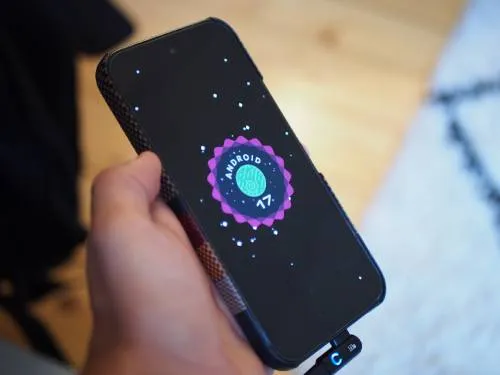
The mobile landscape in 2026 is no longer about raw specs or megapixels; it is about intelligence. With the official release of Android 17 on June 16, 2026, it has become clear that the “smartphone” has undergone its most radical transformation since the introduction of the touchscreen. Android 17 is not just an incremental update with prettier icons and smoother animations, it is a fundamental reimagining of what an operating system should be in the age of generative artificial intelligence.
For years, we have interacted with our phones through a grid of apps. Android 17 begins the process of dissolving those boundaries, creating a more fluid, proactive, and “invisible” interface. If Android 15 was about refinement and Android 16 was about performance, Android 17 is undeniably about intelligence. In this comprehensive guide, we will explore every corner of the new OS, from the technical underpinnings to the user-facing features that are changing how you use your phone every day. You can also explore how it compares by reading our iPad vs Android Tablet Guide. Or check out the official Android 17 announcement.
Want a structured roadmap? Check out our comprehensive Guide to Learning AI in 2026 with step-by-step milestones, free courses, and career advice.
The Core Philosophy: From Reactive to Proactive
To understand Android 17, one must understand the shift in Google’s philosophy. Traditionally, operating systems have been reactive. You want to send a text? You open an app and type. You want to check the weather? You tap a widget.
Android 17 introduces the concept of Proactive Computing. By leveraging a second-generation on-device Large Language Model (LLM), Gemini Nano 2, the OS is now capable of understanding context in a way that was previously impossible. It doesn’t just wait for your input; it anticipates your needs. This philosophy touches everything from how notifications are grouped to how the battery is managed during your morning commute.
Deep Dive: The AI-First OS
The headline feature of Android 17 is the deep, system-wide integration of Gemini. This isn’t just a chatbot living in an app; it is the fabric of the operating system itself.
Gemini Nano 2: The On-Device Powerhouse
Privacy has always been the primary concern with AI. Sending every tap and text to a cloud server is a security nightmare. Android 17 solves this by bringing more processing power to the device. Gemini Nano 2 is optimized for the latest NPU (Neural Processing Unit) hardware found in 2026 flagships.
This allows for:
- Real-time Voice Translation: Imagine having a phone call with someone speaking a different language and hearing a high-quality, synthesized version of their voice in your language, all happening locally on your device with zero lag.
- Contextual Search: You can ask your phone, “When did my sister say she was arriving?” and the OS will scan your messages, emails, and calendar to give you the answer, without that data ever leaving your hardware.
- Smart Summaries: Every notification stack can now be summarized into a single, coherent sentence. Instead of seeing ten separate Discord messages, you see: “Your friends are discussing dinner plans for 7 PM at the Italian place.”
Proactive App Actions
Android 17 introduces “App Intents 2.0.” Developers can now expose deep functionality of their apps to the system’s AI. If you are looking at a restaurant on a website, the OS might suggest: “Book a table for two at 8 PM?” because it knows you have a gap in your calendar and that you typically eat dinner around that time.
User Interface: Material You 3.0
The visual language of Android has evolved again. Material You 3.0 builds upon the dynamic color system introduced years ago but adds a layer of “Living UI.”
Dynamic Motion and Haptics
Animations in Android 17 are no longer just visual; they are tied to a sophisticated haptic engine. When you pull down the notification shade, the “weight” of the shade is felt through the vibration motor. As you scroll through a list, the haptics provide a subtle “click” that matches the speed and friction of the content.
The Predictive Back Gesture: Finally Finished
Google has been teasing the predictive back gesture for years. In Android 17, it is finally the default and mandatory behavior. As you swipe back, the current screen shrinks to reveal a preview of the screen you are going back to. This eliminates the “accidental exit” problem that has plagued gesture navigation since its inception.
Modular Lock Screen
The lock screen has become a dashboard. Users can now add “Live Activities” (similar to iOS but more interactive) that show real-time data like sports scores, Uber arrivals, or 3D printing progress from your local network. These modules are interactive, allowing you to pause a print or tip a driver without even unlocking the device.
Connectivity: The Satellite Revolution
One of the most exciting hardware-software synergies in Android 17 is the expansion of satellite connectivity. What was once a “break glass in case of emergency” feature is now becoming a standard communication tool.
Satellite Messaging for All
Android 17 introduces a native API for non-emergency satellite messaging. In partnership with major carriers and satellite providers, users can now send basic text messages even when they are completely out of range of a cell tower. This is integrated directly into the Google Messages app. While it is slower than 5G, it ensures that “dead zones” are a thing of the past for hikers, travelers, and rural residents.
Ultra-Wideband (UWB) Expansion
Android 17 doubles down on UWB. Your phone can now act as a high-precision key for your home, car, and office with better reliability. The “Find My Device” network has also been upgraded, allowing you to find lost items with centimeter-level accuracy, even if the device is powered off, by leveraging a low-power reserve in modern chips.
Privacy and Security: The Privacy Sandbox
Google is walking a tightrope between AI capability and user privacy. Android 17 introduces the most robust privacy controls ever seen in a mobile OS.
AI Data Isolation
When an app requests “AI Access,” it no longer gets access to your raw data. Instead, it interacts with a “Privacy Sandbox” where the system’s AI processes the request and returns only the necessary result to the app. For example, if a travel app wants to know your flight details, the OS finds the info and gives the app the flight number and time, but doesn’t let the app read your entire email inbox.
Permission Auto-Reset 2.0
We all have apps we use once and forget. Android 17 will now proactively suggest revoking permissions for apps you haven’t opened in 30 days. It also introduces “One-Time AI Permissions,” where an app can use a specific AI feature (like photo editing) just once before the access is automatically wiped.
Identity Protection
A new “Private Space” feature (which debuted in earlier versions but is significantly enhanced here) allows you to create a completely hidden, biometric-locked area for sensitive apps like banking or health trackers. In Android 17, these apps don’t even appear in the system’s “Recent Apps” or battery usage stats unless the space is unlocked.
Performance: Under the Hood
While the features are flashy, the “boring” parts of Android 17 are equally impressive.
ART 15 (Android Runtime)
The Android Runtime has been heavily optimized. Google claims that app startup times are 15% faster across the board, and memory usage has been reduced by 10%. This is particularly important for mid-range devices that don’t have the 16GB of RAM found in flagships.
Advanced Thermal Management
Android 17 uses AI to predict when a device is about to overheat. Instead of waiting for the phone to get hot and then throttling the CPU (which causes lag), the OS subtly adjusts background tasks and refresh rates ahead of time to maintain a consistent temperature during long gaming sessions or 4K video recording.
Battery Intelligence
The “Adaptive Battery” feature has been rewritten. It now learns your weekly patterns. If it knows you usually go for a long hike on Saturdays, it will be more aggressive with background power saving on Friday night to ensure you start the day with a maximum reserve. It also supports the new “Qi 2.2” standard for more efficient wireless charging with less heat loss.
Compatibility: Will Your Phone Get It?
As with every Android release, the question of “when” depends on your hardware.
The Pixel Priority
Google’s own devices were the first to receive the update on June 16.
- Pixel 10 Series: Ships with Android 17.
- Pixel 9, 8, and 7 Series: Stable update available now.
- Pixel 6 Series: This is the final major OS update for the Pixel 6, 6 Pro, and 6a.
The Samsung Galaxy Ecosystem
Samsung has become the king of Android updates, with a rollout expected shortly.
- Galaxy S26 Series: Will ship with One UI 8 (based on Android 17).
- Galaxy S25, S24, and S23 Series: Beta programs are ending; stable release expected by October 2026.
- Z Fold and Z Flip Series (5 and 6): High priority for the upcoming update.
Other Manufacturers
- OnePlus: The OnePlus 14 and 13 will likely see the update in late 2026.
- Xiaomi: The Xiaomi 16 series will be the flagship carrier for Android 17 in international markets.
- Nothing: Nothing OS 4.0 is expected to bring a very clean, minimalist version of Android 17 to Phone (2) and Phone (3).
The Release Timeline: From Beta to Stable
The journey to Android 17 was one of the most stable in Google’s history. Here is how we got to the June 16 release:
- Developer Previews (Feb - April 2026): Focused on foundation and NPU integration.
- Beta Phase (May - June 2026): Revealed at Google I/O, these versions focused on polishing the Gemini Nano 2 integration.
- Platform Stability (Early June 2026): The APIs were finalized, allowing developers to push their Android 17-ready apps.
- Official Launch (June 16, 2026): Google surprised the industry with an early summer release, making the stable OTA (Over the Air) update available for Pixel users.
Developer Focus: Building for Android 17
For the developers among us, Android 17 offers a wealth of new tools. The “Gemini SDK” is now part of the standard Android development kit, making it trivial for any developer to add high-quality generative features to their apps.
There is also a new emphasis on “Large Screen Continuity.” With the rise of foldables and tablets (like the Pixel Fold 3 and Galaxy Tab S11), Android 17 forces apps to be more responsive. Apple is expected to enter this form factor as well, and we collected what is known so far in rumored iPhone Fold: specs, release date and price. If an app doesn’t have a tablet-optimized layout, the system now uses AI to “remix” the layout into something that looks native, ensuring a premium experience regardless of the device.
Summary Table: Android 17 at a Glance
| Feature | Description | Impact |
|---|---|---|
| Core AI | Gemini Nano 2 (On-device) | Faster, private, proactive intelligence |
| User Interface | Material You 3.0 & Predictive Back | Smoother, more intuitive navigation |
| Messaging | Native Satellite Texting | Communication anywhere on Earth |
| Privacy | AI Privacy Sandbox | Your data stays on your device |
| Performance | ART 15 & AI Thermal Management | Longer battery life and faster apps |
| Release Date | June 16, 2026 | Now available for Pixels |
Is Android 17 the Biggest Update Ever?
It is easy to get caught up in the “new year, new version” cycle, but Android 17 feels different. For the first time, the OS isn’t just a container for your apps; it is a collaborator.
The move toward on-device AI is a massive win for privacy, and the integration of satellite connectivity is a major step forward for safety and reliability. Now that it is officially out, the polish and ambition shown by Google suggest that Android 17 will be remembered as the point where smartphones truly became “smart.”
If you have a compatible device, the update is a must-download. For everyone else, the wait until your manufacturer pushes the update will be well worth it. Android 17 is more than just a software update; it is a glimpse into the future of how we will interact with technology for the next decade.
Conclusion
Android 17 is the culmination of years of work in machine learning, hardware optimization, and user-centric design. By focusing on “Proactive Computing,” Google has finally solved the problem of information overload. Instead of you managing your phone, your phone is finally starting to manage the digital noise for you.
Whether it’s the peace of mind offered by satellite messaging, the sheer convenience of AI-summarized notifications, or the sleek new animations of Material You 3.0, there is something in this update for every type of user. Now that the final release is here, the excitement is well-justified. Android 17 isn’t just an evolution; it’s a revolution.
Stay tuned to Boredom at Work for more in-depth guides following the release of Android 17. We will be doing deep dives into specific features like the Gemini SDK and Satellite Connectivity in the coming weeks.
Related Articles

Offline Travel Tech: Essential Apps & Devices for No-Data Regions
Prepare your smartphone, Kindle, and gear for zero-connectivity travel. Discover offline maps, offline translation packs, travel guides, and power tips.

SEO in 2026: How to Rank in the Age of AI Search
Traditional keyword SEO is dead. Learn how to rank in 2026 with generative engine optimization: search intent, semantic content, and answers AI will cite.

How the AI Boom Is Driving Up Hardware Prices (2026)
Explore how the explosive demand for artificial intelligence is monopolizing silicon fabrication and driving up the cost of consumer hardware across the board.