
VS Code vs. Antigravity: The Agentic Workspace in 2026
VS Code vs Google's Antigravity in 2026: which agentic workspace wins? We compare performance, security, and the new 'vibe coding' workflow.

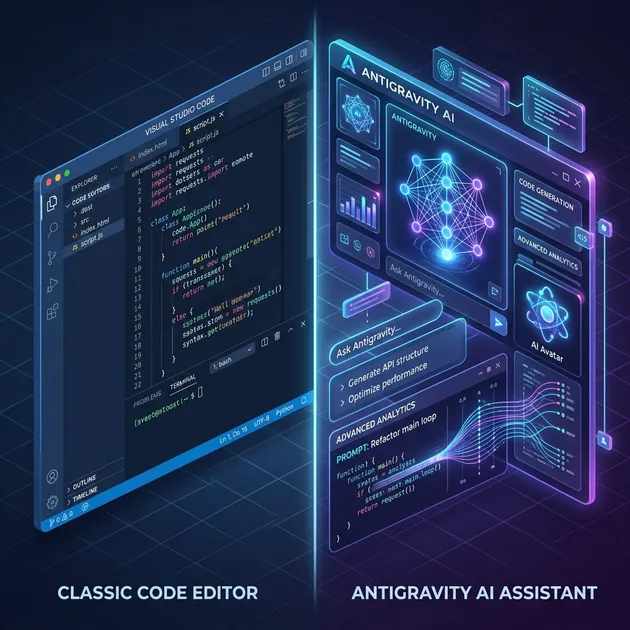
The software development world of April 2026 looks nothing like the world of 2024. The era of “writing” code is rapidly being replaced by the era of “orchestrating” intent. As we cross the threshold of the second quarter of 2026, the industry is locked in a titanic struggle between two philosophies: the evolved legacy of Visual Studio Code (VS Code) and the radical, agent-first approach of Antigravity.
If 2024 was the year of the “Copilot,” 2026 is the year of the “Agent.” In this 1,600-word deep dive, we’ll analyze why the choice of your workspace has become the most critical decision in a developer’s career.
1. The Landscape: From Autocomplete to Autonomy
In the early 20s, we were impressed when an AI could finish a function. Today, that’s table stakes. The current gold standard is agentic autonomy,the ability for an AI to take a prompt like “Add a stripe subscription flow with tiered pricing and a trial period,” and then go off to create the database schemas, implement the API endpoints, build the frontend components, and verify the integration with real-world test tokens.
The Contenders
- VS Code (Version 1.110+): The veteran. Microsoft has spent the last 18 months refactoring the VS Code core. It is no longer just a text editor; it is a host for specialized AI agents that have direct “hooks” into the terminal, the integrated browser, and the OS.
- Antigravity: The challenger. Developed by Google Deepmind’s Advanced Agentic Coding team, Antigravity was built from the ground up for a world where AI does 90% of the typing. It doesn’t treat AI as a plugin; it treats the user as the plugin.
2. Architecture: Deep Integration vs. Agentic Core
VS Code’s Evolution: The Agentic Core Update
Microsoft’s strategy has been “evolutionary.” In early 2026, they released the “Agentic Core” update. This moved Copilot from a side-car chat window into the very fabric of the editor.
- Integrated Browser Tools: VS Code now includes a headless browser that agents can use to validate UI changes without the user ever leaving the IDE.
- Shell Hooks: Agents can now register “hooks” to automatically run
npm installordocker-compose upwhen they detect a change in requirements. - The Agent Debug Panel: A major 2026 addition that allows developers to “step through” an AI’s reasoning process, seeing exactly which tools it called and why it made specific architectural choices.
Antigravity’s Revolution: The Multi-Agent Swarm
Antigravity doesn’t just use one AI. It uses a swarm orchestration model. When you give Antigravity a task, it spins up three specialized sub-agents:
- The Planner: Researches the codebase and creates a step-by-step execution roadmap.
- The Coder: Executes the plan, writing the code and running the terminal commands.
- The Auditor: Acts as a hostile reviewer, looking for security vulnerabilities and edge cases before the code is ever presented to the human.
This “separation of concerns” within the AI itself significantly reduces the “hallucination rate” compared to VS Code’s more singular model.
3. The “Vibe Coding” Reality: Human as Orchestrator
The term “vibe coding” became a professional reality in 2025. It describes a workflow where the developer spends more time talking about the “vibe” and architecture of the application than the syntax of a for loop.
How it works in Antigravity
In Antigravity, the UI is designed around Intent Blocks. You don’t just type in a chat; you define an “Intent.” The editor then transforms into a dashboard showing the agent’s progress across multiple files. You can see the agent “thinking” in the sidebar, and you can intervene at any moment to steer it.
“The shift in Antigravity is that I’m no longer a writer; I’m an editor-in-chief,” says Sarah Chen, Lead Engineer at Fintech-26. “I set the direction, and Antigravity handles the prose.”
How it works in VS Code
VS Code still feels like an editor. You have your files open, and you use / commands to invoke agents. While powerful, it still requires more manual “tab-switching” than Antigravity. However, for developers who still want to “feel the code,” VS Code’s balance of manual control and agentic help is often preferred.
4. Context Management: The Battle of Memory
The biggest technical challenge of 2026 is Context Drift. As codebases grow to millions of lines, how does the AI remember the custom utility function you wrote six months ago?
Context Compaction in VS Code
VS Code 1.110 introduced Context Compaction. It automatically summarizes long conversation histories and “hibernate” irrelevant file contexts to stay within the LLM’s optimal performance window. It’s efficient, but it can sometimes “forget” niche architectural decisions made early in a project.
Global Project Awareness in Antigravity
Antigravity uses a proprietary vector-graph memory system. It doesn’t just read your files; it builds a semantic graph of your entire organization’s codebase (if permitted). If you’re writing a new service in Project A, Antigravity might suggest, “Hey, we solved this exact problem in Project B using this specific middleware. Should I port it over?”
5. Performance Metrics: “Time to First Commit”
In 2026, we don’t measure “Lines of Code per Hour.” We measure Time to First Commit (TTFC).
| Task | VS Code (+ Copilot Agents) | Antigravity |
|---|---|---|
| New Feature Setup | 12 minutes | 4 minutes |
| Legacy Bug Fix | 18 minutes | 14 minutes |
| Refactor (Sass to Tailwind) | 45 minutes | 12 minutes |
| Security Audit | 20 minutes | 5 minutes (Native) |
Antigravity wins on speed, particularly in large-scale refactoring. Because it can operate on 50 files simultaneously with its “Auditor” agent checking for regressions in real-time, it effectively parallelizes the development process in a way that VS Code’s single-user-focused interface struggle to match.
6. Security: The Corporate Immune System
A major concern in 2026 is Prompt Injection and Supply Chain Poisoning via AI. If an agent autonomously installs a library, how do you know it hasn’t been tricked into installing a malicious package?
Antigravity’s “Sandbox First” Approach
Antigravity runs all autonomous executions in a “Disposable Shadow Environment.” The agent can run npm install all it wants, but it happens in a containerized sandbox. Only after the “Auditor” agent and a human have reviewed the changes does the code merge back into the main branch.
VS Code’s “Enterprise Shield”
Microsoft relies on GitHub Enterprise Shield. It uses static analysis and real-time scanning of all AI-generated PRs. It’s highly effective for teams already deep in the Azure/GitHub ecosystem, but it can feel reactive rather than proactive.
7. The Cost of Intelligence: Pricing in 2026
The “Free” era of AI coding is largely over for professionals. In 2026, intelligence is a utility bill.
- VS Code: Remains free to use, but the “Agentic Core” requires a Copilot Pro subscription ($30/month) or a GitHub Enterprise plan.
- Antigravity: Operates on a “Compute-as-a-Service” model. You pay for the “Agent-Hours” you use. For a solo developer, this typically averages $45/month, but for heavy enterprise use, it can scale significantly higher.
Is it worth it? When you consider that Antigravity can replace the output of two junior developers for the price of a fancy lunch, the ROI is undeniable for most tech leads.
8. The Verdict: Choosing Your Future
You should stick with VS Code if:
- You are a “Craftsman”: You love the tactile feel of writing code and only want AI to help when you’re stuck.
- You rely on niche plugins: You have 50 extensions for obscure languages or hardware integrations that the agentic world hasn’t mapped yet.
- You are in a tightly controlled Microsoft ecosystem: The integration with Azure DevOps and GitHub remains second-to-none.
You should migrate to Antigravity if:
- You are an “Architect”: You care about results and system design more than the syntax of an individual file.
- You manage large, complex codebases: You need a tool that can “see” the whole project and refactor it across 100 files without breaking a sweat.
- You want to move at the speed of thought: You are tired of the “write-test-fail-fix” loop and want an agent that can handle the “fail-fix” part for you.
Conclusion
The battle between VS Code and Antigravity isn’t just about software; it’s about the identity of the developer. Are we writers, or are we directors?
As we move further into 2026, the gap between “standard” coding and “agentic” coding will only widen. Those who master the art of directing agents, whether through the evolved VS Code or the revolutionary Antigravity, will be the ones building the world of 2027.
The choice is yours. Will you pick up the pen, or will you take the baton?
Related Articles
Top AI Models for Coding & Developer Agents
Empirical rankings sourced from Artificial Analysis, Arena.ai, LLM Stats & BenchLM.
Related Articles

OpenCode vs Cursor vs Codex vs Antigravity: AI Coding Tools
Compare OpenCode, Cursor, Codex, and Antigravity. Discover features, workflow fits, agentic capabilities, and pricing to pick the best AI coding tool.

Antigravity CLI Guide: Ultimate AI Agent for Terminal
Google's Gemini CLI has been deprecated and replaced by Antigravity CLI. Here is everything you need to know about setting up and mastering the new terminal AI.
Gemini CLI Guide: How to Use Google's AI in Your Terminal
How to install and use Gemini CLI for AI-powered coding, task automation, and project analysis. A complete guide to Google's terminal AI agent.