
Anycubic S1 Max vs Snapmaker U1: Multi-Color Showdown
Compare the Anycubic Kobra S1 Max vs Snapmaker U1. Detailed breakdown of multi-color printing speed, hardware specs, slicer integration, and 2026 value.

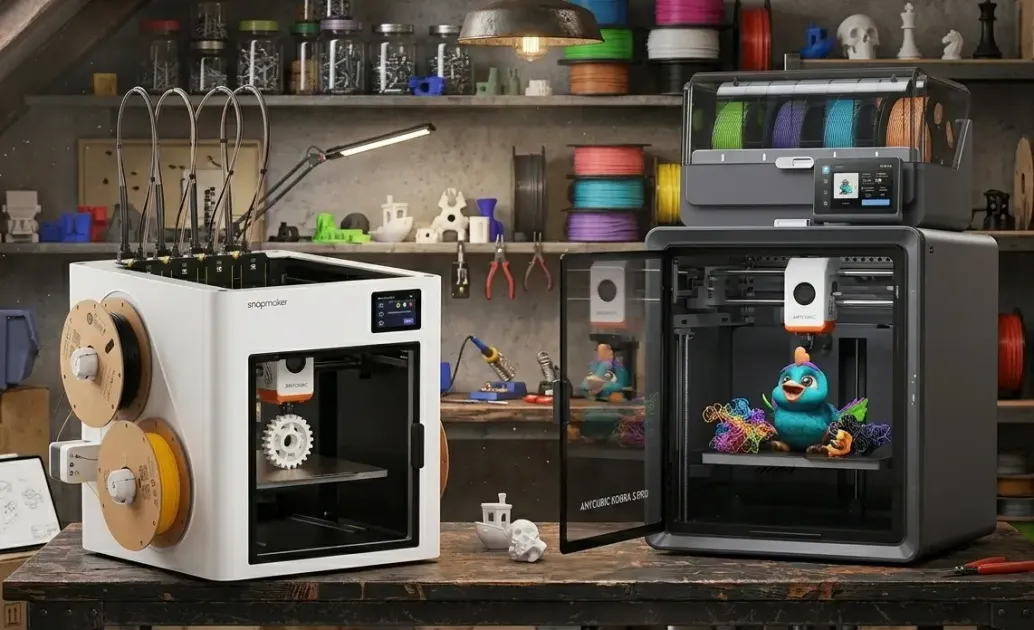
2026 has brought us a clash of the titans in the desktop 3D printing space. While we’ve seen budget multi-color machines like the Kobra X thrive, the high-end enthusiasts are looking at two clear frontrunners: the Snapmaker U1 and the Anycubic Kobra S1 Max.
Both machines are priced around the $850 mark, but they take fundamentally different approaches to the multi-color problem. This guide dives deep into the technology, software, and real-world reliability of these two flagship machines.
Master 3D printing from start to finish: Dive into our complete 3D Printing Guide for Beginners covering printers, troubleshooting, and project ideas.
1. Technical Specifications: At a Glance
| Feature | Snapmaker U1 | Anycubic Kobra S1 Max |
|---|---|---|
| Price (Combo) | $849 | $850 |
| Technology | CoreXY + SnapSwap (4 Toolheads) | CoreXY + ACE 2 Pro (16 Colors) |
| Build Volume | 270 x 270 x 270 mm | 350 x 350 x 350 mm |
| Max Hotend Temp | 300°C | 350°C |
| Max Bed Temp | 100°C | 120°C |
| Chamber Heating | Passive (Enclosure Optional) | Actively Heated (65°C) |
| AI Monitoring | Anomaly & Obstruction Detection | Spaghetti & First Layer Detection |
| Software | Snapmaker Orca (Beta) | Anycubic Cloud / Slicer Next |
2. Multi-Color Philosophy: Precision vs. Scale
Snapmaker U1: The Zero-Waste “SnapSwap”
The Snapmaker U1 isn’t just a 3D printer; it’s a modular platform. Its SnapSwap system uses four independent toolheads.
How it works: Instead of one nozzle trying to manage four colors (and wasting filament on purge towers), the U1 physically swaps the entire toolhead in under 5 seconds. Each color has its own nozzle, meaning:
- Zero Cross-Contamination: You can print white next to black without any gray bleeding.
- Multi-Material Flexibility: Unlike single-nozzle systems, the U1 can print diverse materials (like TPU and PLA) in the same model without risk of clogging.
- Speed: Because there’s no “purge” phase, multi-color prints are up to 5x faster than traditional AMS-style systems.
Anycubic Kobra S1 Max: The ACE 2 Pro Powerhouse
Anycubic takes the traditional filament-changing approach but perfects it with the ACE 2 Pro. This unit uses a single nozzle but handles the filament gymnastics behind the scenes.
How it works: The ACE 2 Pro feeds up to 16 colors (via daisy-chaining) into a single high-flow hotend.
- Scale: The S1 Max’s 350mm³ build volume is its greatest weapon. Printing a multi-color wearable helmet or large-scale architectural model is only possible on the Anycubic.
- Integrated Drying: The ACE 2 Pro actively dries filament at 65°C while you print. For hygroscopic materials like PETG or Nylon, this is a massive advantage over the Snapmaker’s open reels.
3. The Software Ecosystem: Orca vs. Cloud
Snapmaker Orca (The Pro Slicer)
Snapmaker has moved away from its old Luban software to Snapmaker Orca, a custom-tuned version of the open-source OrcaSlicer.
- Pros: Highly optimized for IDEX and tool-swapping. Advanced calibration tools (Flow rate, pressure advance) are built-in.
- Cons: Still in beta as of March 2026. The UI can be overwhelming for beginners.
Anycubic Cloud & Slicer Next (The Connected Experience)
Anycubic’s software is built for the “smart home” era.
- Pros: Excellent mobile app for remote monitoring. “One-click” printing handles settings automatically. Native 720p stream integration for the S1 Max’s chamber camera.
- Cons: More “locked-in” to the Anycubic ecosystem. Advanced users may find the slicing settings less granular than Orca.
4. AI & Reliability: The 2026 Standard
Both machines use AI cameras to monitor prints, but their focus differs:
- Snapmaker U1 AI: Focuses on hardware safety. It detects build plate obstructions (like a forgotten tool) and toolhead swap errors. It’s designed to protect the expensive toolheads.
- Anycubic S1 Max AI: Focuses on model failure. Its “Spaghetti Detection” and “First Layer Inspection” are best-in-class for stopping a failed print before it wastes an entire spool of filament.
Note: In early 2026 testing, Snapmaker’s obstruction detection proved more reliable, while Anycubic’s spaghetti detection occasionally gave false positives in low-light conditions.
5. Maintenance: Toolheads vs. Hotends
A often-overlooked factor is how easy it is to fix the machine when things go wrong.
- Snapmaker U1: If a nozzle clogs, you swap the entire toolhead. It’s modular and takes seconds. However, buying spare toolheads is more expensive than buying nozzles.
- Anycubic S1 Max: Uses a “Quick-Release” hotend system. You don’t need tools to swap the nozzle, but you are still dealing with a complex internal filament path in the ACE 2 Pro unit that requires occasional cleaning.
6. The Verdict: Which Flagship is Yours?
The Snapmaker U1 is for:
- Professional Prototype Shops: If you need to print soluble supports (PVA) or multi-material mechanical parts (TPU + PC) daily.
- Efficiency Nerds: If you hate seeing wasted filament “poop” and want the fastest possible multi-color turnarounds.
- Desktop Users: Its 270mm footprint fits easily on a standard work-from-home desk.
The Anycubic Kobra S1 Max is for:
- Large-Scale Creators: Cosplayers, architects, and prop makers who need that massive 350mm³ volume.
- Engineering Users: Those printing Warp-prone materials (ABS/ASA/Nylon) who need that 65°C actively heated chamber.
- Color Enthusiasts: If 4 colors are just the starting point and you want to push for 8 or 16-color masterpieces.
Summary Table: Head-to-Head
| Category | Winner | Rationale |
|---|---|---|
| Multi-Color Speed | Snapmaker U1 | 5-second tool swaps beat filament purging every time. |
| Material Range | Anycubic S1 Max | 350°C hotend + 65°C heated chamber handles anything. |
| User Experience | Anycubic S1 Max | The Cloud ecosystem and 720p monitoring are more polished. |
| Waste / Eco | Snapmaker U1 | Virtually zero waste compared to traditional purge towers. |
| Value (Price/Size) | Anycubic S1 Max | Massive volume for the same price as the smaller U1. |
Ready to start your 3D printing journey? Check out our 3D Printing Beginners Guide or browse the Best 3D Printers Under $300 if these flagships are a bit too much for your first machine.
Related Articles
The Golden Age of $500 3D Printers: Turn-key vs. DIY
Is $500 the sweet spot for 3D printing? We compare modern plug-and-play machines against legendary DIY kits, featuring the Bambu Lab P2S and Creality K2.
Bambu Lab A2L: Specs, Price & Who It's For (2026)
Bambu Lab's A2L brings a 330mm large-format build to the A-series for $469. Here's what the specs actually mean and who this budget big-bed printer is for.
Justway Review 2026: Pricing, Quality & Lead Times
Wondering if Justway is legit? Read our honest 2026 review covering on-demand 3D printing, CNC machining, turnaround speeds, and comparisons with JLCPCB.