
Bambu Lab X2D Review: $649 Dual-Nozzle Heated Chamber
Bambu Lab X2D review: $649 base / $899 AMS Combo. Dual-nozzle mechanical switching, 65°C heated chamber, 256mm build, and 31 sensors. Is it worth it?

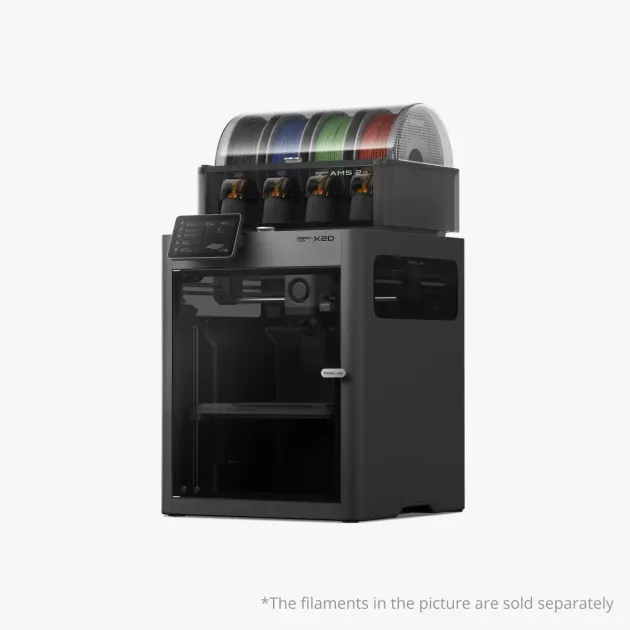
Bambu Lab just announced the X2D, the company’s first compact 3D printer with true dual extrusion and an actively heated chamber.
The X2D launched on April 14, 2026 with the tagline “Xcellence made simple.” Here’s everything you need to know.
Master 3D printing from start to finish: Dive into our complete 3D Printing Guide for Beginners covering printers, troubleshooting, and project ideas.
What Is the Bambu Lab X2D?
The X2D is Bambu Lab’s new flagship desktop 3D printer. The “D” stands for dual, two nozzles with mechanical switching that can print with two different materials in a single job.
This isn’t just a multi-color trick like the AMS. Dual-nozzle printing means you can print a model in one material (like PETG or nylon) while using a completely different material (like PVA or HIPS) for dissolvable supports. That’s a game-changer for complex geometries and engineering prints.
| Spec | Bambu Lab X2D |
|---|---|
| Build Volume (single nozzle) | 256 × 256 × 260 mm |
| Build Volume (dual nozzle) | 235.5 × 256 × 256 mm |
| Extrusion | Dual-nozzle with mechanical switching (PMSM servo motor) |
| Nozzle Temp | Up to 300°C |
| Bed Temp | Up to 120°C |
| Chamber | Cool Mode (ambient air) / Heat Mode (up to 65°C) |
| Print Speed | Up to 1000 mm/s |
| Sensors | 31 sensors monitoring filament path, thermal, and safety |
| AI Detection | Full filament path AI detection |
| Air Filtration | 3-stage: G3 pre-filter + H12 HEPA + activated carbon |
| Noise | Below 50 dB |
| AMS Compatible | Yes (AMS 2 Pro, AMS HT supported) |
| Optional | Vision Encoder (50-micron accuracy) |
| Price | From $649 (base) / $899 (AMS Combo) |
Why Dual Extrusion Matters
If you’ve been printing with a single-nozzle machine, you know the pain of complex support removal. Breakaway supports damage surfaces. Manual removal takes forever. And some geometries are simply impossible to print without internal supports you can’t reach.
Dual extrusion solves this with dissolvable supports. Print your model in PLA or PETG on one nozzle, and print water-soluble PVA supports on the other. Drop the finished print in water, wait a few hours, and you have a perfect part with zero support marks.
Other dual extrusion use cases:
- Multi-material functional prints: Rigid body + flexible grips in a single print
- Color separation without purge waste: Two colors, two nozzles, no filament wasted between swaps
- Engineering prototypes: Combine materials with different thermal, chemical, or mechanical properties
- Dedicated TPU printing: The X2D’s specialized TPU feeder addresses the jamming problems that plague standard extruders with flexible filaments
X2D vs. P2S vs. H2D: Which Should You Pick?
| Feature | P2S | X2D | H2D |
|---|---|---|---|
| Price (base / combo) | $549 / $799 | $649 / $899 | ~$1,749+ |
| Build Volume | 256 × 256 × 256 mm | 256 × 256 × 260 mm | 350 × 320 × 325 mm |
| Extrusion | Single | Dual (mechanical switching) | Dual |
| Chamber | Enclosed (Passive) | Up to 65°C (Cool/Heat Mode) | 65°C heated |
| AI Detection | No | Yes (31 sensors) | Yes |
| TPU System | No | Yes | Yes |
| AMS | Optional | Optional | Optional |
| Best For | Tight budgets, everyday printing | Best value for serious makers | Large-format production |
Choose the X2D if you want the best all-round Bambu Lab printer. For just $100 more than the P2S, you get dual nozzles, an actively heated chamber up to 65°C, dedicated TPU support, 31 sensors, advanced three-stage air filtration, and Cool/Heat Mode switching. That’s a massive feature jump for a small price difference, it’s hard to justify the P2S when the X2D exists at $649.
Choose the P2S only if you’re on a strict budget and don’t need active chamber heating. You’ll still be able to print high-temperature materials like ABS and ASA thanks to the passive enclosure and activated carbon filtration, but you’ll miss the actively heated chamber, dual nozzles, and dedicated TPU support. See our best 3D printers under $300 guide if you need something even more affordable.
Choose the H2D if you need a larger build volume for production work. The H2D’s 350 × 320 × 325 mm build area is significantly bigger, but at $1,749+ it’s nearly 3x the X2D’s base price.
Key Features Breakdown
Dual-Nozzle Switching System
The X2D uses a mechanical nozzle-switching system, no extra motor on the toolhead, just gears and triggers. The left nozzle runs a direct-drive extruder (better for flexible filaments), while the right nozzle uses a Bowden setup with a rear-mounted motor (lighter, faster movements). Bambu Lab tested the switching mechanism for over one million cycles without degradation.
Both nozzles reach 300°C with a 120°C heated bed, powered by a proprietary PMSM servo motor that samples torque and position 20,000 times per second. This enables printing with engineering materials like nylon, ABS, ASA, PC, and carbon-fiber composites at speeds up to 1000 mm/s.
31 Sensors and Dynamic Flow Calibration
The X2D packs 31 sensors monitoring the feeding path, thermal environment, and safety in real time. The Dynamic Flow Calibration system watches the extrusion motor, hotend, nozzles, and filament simultaneously. An optional Vision Encoder upgrade brings motion accuracy to the 50-micron class, serious precision for dual-nozzle alignment where even 0.1mm misalignment ruins a print.
Cool Mode / Heat Mode Chamber
The X2D’s chamber operates in two modes: Cool Mode draws in ambient air for clean overhangs in PLA, while Heat Mode actively heats the chamber up to 65°C for ABS, ASA, nylon, and PC. The three-stage air filtration (G3 pre-filter, H12 HEPA, and coconut shell activated carbon) handles VOC emissions, and the whole system runs below 50 dB.
Dedicated TPU Feeding System
Anyone who’s tried to print TPU on a Bowden system knows the frustration: the soft filament compresses and jams in the tube. The X2D includes a purpose-built TPU feeding path that eliminates this problem. If you print phone cases, flexible hinges, or vibration dampeners, this feature alone might justify the upgrade.
Who Should Buy the X2D?
Yes, if you:
- Want the absolute best value in Bambu Lab’s lineup. The extra $100 over the P2S is incredibly easy to justify, it’s arguably the most cost-effective upgrade in 3D printing history, giving you an actively heated chamber and true dual extrusion.
- Print anything beyond basic PLA, the active heated chamber and dual nozzles make flawless ABS, ASA, nylon, PC, and TPU prints effortless compared to the P2S’s passive enclosure.
- Are tired of fighting with support removal (dissolvable supports change everything)
- Want multi-material or multi-color capability without H2D money
- Are upgrading from an X1 Carbon, Ender 3, or any single-nozzle printer
Consider the H2D instead, if you:
- Need a build volume larger than 256mm for large-format or production prints
- Want optional laser engraving and cutting capability
Consider the A1 Mini instead, if you:
- Are on a strict budget under $300 and only need basic PLA printing
- Want the smallest possible footprint for a desk setup
Pricing and Availability
The X2D is available in two configurations:
- X2D Base: $649, the printer with dual-nozzle extrusion, heated chamber, 31 sensors, and three-stage filtration
- X2D AMS Combo: $899, adds the AMS 2 multi-material system for expanded color and material options
The X2D is available now through the Bambu Lab store and retailers like Best Buy.
The Bottom Line
At $649, the X2D makes the P2S incredibly hard to recommend for all but the tightest budgets. The value proposition is staggering: for an extra $100 over the P2S, you are upgrading from a standard single-nozzle machine to a true professional dual-extrusion system with an actively heated chamber, 31 smart sensors, dedicated TPU support, and Cool/Heat Mode switching. It is a complete no-brainer, skipping that $100 upgrade means leaving a massive leap in reliability and capability on the table.
The $899 AMS Combo adds multi-color and expanded material management, making it a complete production-ready setup for under $900.
If you’ve ever abandoned a print because the supports were impossible to remove, spent hours sanding support marks, or wished you could combine rigid and flexible materials in one job, the X2D solves all of that. For most people buying a 3D printer in 2026, this is the one to get.
New to 3D printing? Start with our 3D Printing Beginner Guide for the full overview. Already printing and want to level up your designs? Check out our CAD software comparison or learn to code your own models with OpenSCAD. Having trouble with prints sticking? See our 3D print adhesion troubleshooting guide. Want multi-color prints without buying an AMS? Try our Bambu Studio filament mixing guide. And if you need a part printed but don’t want to own a printer, our JUSTWAY on-demand review breaks down the service.
Related Articles
Bambu Lab A2L: Specs, Price & Who It's For (2026)
Bambu Lab's A2L brings a 330mm large-format build to the A-series for $469. Here's what the specs actually mean and who this budget big-bed printer is for.
The Golden Age of $500 3D Printers: Turn-key vs. DIY
Is $500 the sweet spot for 3D printing? We compare modern plug-and-play machines against legendary DIY kits, featuring the Bambu Lab P2S and Creality K2.
Bambu Lab H2 Series in 2026: Does It Still Matter?
Is the Bambu Lab H2 series still relevant after the X2D launch? We revisit the H2S, H2D, and H2C to see how they hold up in the 2026 3D printing landscape.