
Bambu Lab H2 Series in 2026: Does It Still Matter?
Is the Bambu Lab H2 series still relevant after the X2D launch? We revisit the H2S, H2D, and H2C to see how they hold up in the 2026 3D printing landscape.

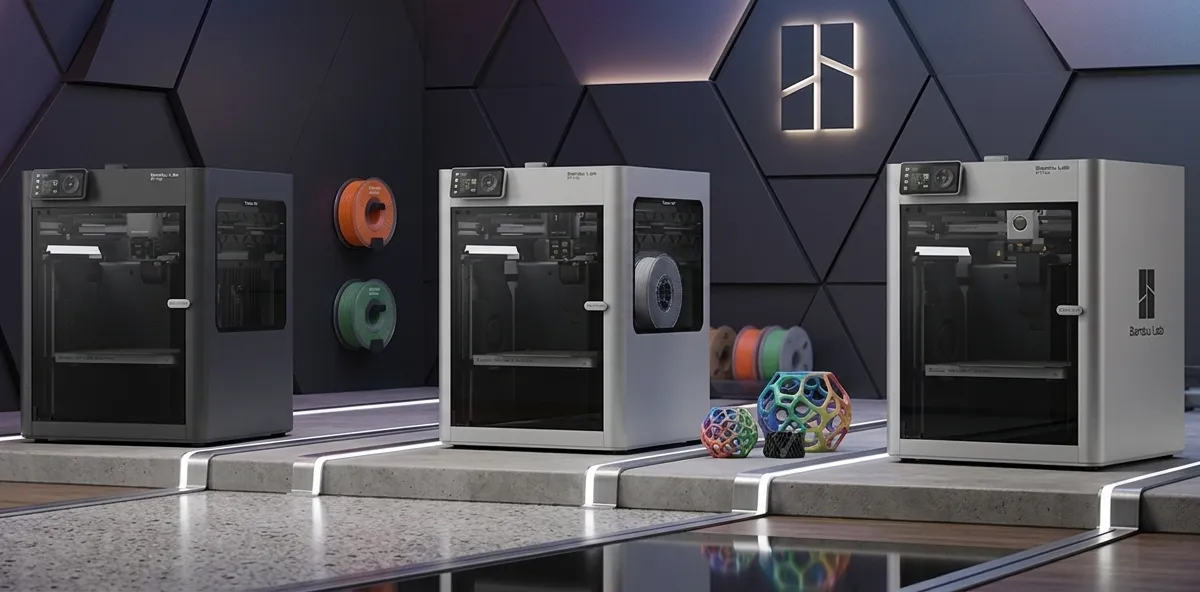
Six months after launch, the H2 series is still the biggest build volume Bambu Lab sells: 340 × 320 × 340 mm against 256 mm cubes on the X2D and P1S. If size is your constraint, the H2 remains the answer; if you want the newest features in a smaller box, the X2D took over that role in 2026. This guide sorts the H2 variants by what each one is actually for.
In the fast-moving world of 2026, a printer that is six months old can feel like ancient history. When Bambu Lab dropped the H2 series in late 2025, they effectively killed the legacy P1 and X1 lines. But now, with the X2D flagship dominating the conversation, it’s time to ask: is the H2 series still the “Goldilocks” choice for the productive procrastinator?
Six months after launch, the H2 series has aged gracefully across owner reports and review communities. These machines aren’t the “new toys” anymore, but they have become something better: proven reliable tools.
Master 3D printing from start to finish: Dive into our complete 3D Printing Guide for Beginners covering printers, troubleshooting, and project ideas.
1. The H2C (Complex/Color): The Vortek Revolution
The H2C remains the most interesting printer in the lineup, thanks entirely to the Vortek system.
Unlike the old AMS units that had to retract and purge filament for every color change, the Vortek head on the H2C has a secondary slot that can swap the entire hot end assembly in seconds. By keeping six different hot ends ready to go, the H2C can print with up to seven materials (one in the fixed nozzle, six in the swap slots) with significantly less purge waste than we ever thought possible.
For complex, multi-functional 3D printed projects, the ability to print rigid PLA structural parts alongside TPU gaskets and PVA supports in a single, seamless job is still a revelation. (For a primer on which materials work where, see our PLA vs PETG vs ABS guide.)
The Vortek System Explained
The standard AMS (Automatic Material System) feeds different filaments into a single nozzle and purges the old material every time it changes color. That works, but you can lose 30 to 50 grams of filament to purge waste on a complex multi-color print, sometimes more than the actual model uses.
Vortek takes a different approach. Instead of routing filament through one nozzle, it physically swaps the hotend itself. One hotend “lifts” out of the way while another rotates into position. Because each material has its own dedicated hotend, there is no purge required when switching colors or materials.
The trade-off is the cap on simultaneous materials: Vortek is limited to seven (one fixed lifting hotend plus six tool-changing inductive hotends), while AMS can chain up to 16 colors across multiple AMS units. For most users this is fine: very few prints actually need more than seven materials. And the filament savings on a heavy multi-color print can pay back the price difference quickly.
2. The H2D (Dual): The Efficiency Expert
While the H2C is about complexity, the H2D is about efficiency. Its dual-nozzle system is designed for high-speed multi-material printing without the mechanical overhead of the Vortek system.
It’s positioned as the go-to for “practical” prints, things like desk organizers or tool holders where you need a secondary material for support or labels but don’t need the full seven-color palette. The dual-nozzle setup eliminates the need for prime towers in many cases, saving both time and filament.
With the launch of the X2D earlier this year, the H2D has seen a significant price drop, making it the most affordable entry point into professional-grade dual extrusion.
3. The H2S (Single): The Large-Format Workhorse
Sometimes, you just need a big bucket. The H2S is the simplest machine in the lineup, featuring a single-nozzle system and a massive 340 x 320 x 340 mm build volume.
In a world obsessed with multi-color figurines, the H2S is for the person building actual stuff. Owners have used it for entire drone frames, modular storage bins, and custom keyboard cases. It is the spiritual successor to the X1-Carbon but with significantly more breathing room.
It doesn’t have the swappable nozzles of the H2C or the dual-heads of the H2D, but its simplicity is its strength. It just works, every time, at speeds that still make 2024 printers look like they’re standing still.
The Vortek Upgrade Kit: Should You Convert Your H2D or H2S?
If you already own an H2D or H2S, you don’t have to buy a new H2C to get the Vortek experience. Bambu Lab released the Vortek Upgrade Kit in January 2026, which retrofits the 6-hotend tool-changing system onto existing H2 series machines.
US pricing runs roughly $599 to $799 depending on which compatibility pack you need (H2D vs H2S). For comparison, the H2C runs significantly higher at retail, so the upgrade path is the cheaper route to multi-material capability if you already have a base machine.
The H2D upgrade is also notably simple: no firmware reset, no major mechanical rework. The kit installs onto the existing toolhead mount and the machine auto-detects the new hardware after Bambu Studio updates.
Who should upgrade?
- H2D owners who do enough multi-material work to feel the AMS purge waste piling up. If you regularly print color-heavy models or PLA-plus-PVA support combos, the upgrade pays for itself in saved filament inside a few months.
- H2S owners who want to add multi-material capability without giving up the larger 340 mm build volume. (Yes, the Vortek upgrade preserves the H2S’s larger frame, you don’t lose build volume to install it.)
Who should skip?
- H2D owners who only print single-material functional parts. You’re not benefiting from Vortek if you never use it. Save the $600.
- H2S owners who already love the simplicity. Adding tool-changing complexity to a machine you bought for reliability is a debatable trade.
H2 Series vs X2D: Which Should You Buy in 2026?
The X2D launched in April 2026 at $649 base / $899 AMS Combo, and it has reshaped the value question for the H2 lineup.
| Use Case | Best Pick | Why |
|---|---|---|
| Multi-material, 7+ colors per print | H2C (or H2D + Vortek upgrade) | Only the Vortek system truly does zero-purge multi-material |
| Multi-material, 2 to 4 colors | X2D or H2D | Both work well; X2D adds heated chamber for engineering materials |
| Large-format functional parts | H2S | Biggest build volume in the lineup at 340x320x340 mm |
| Engineering materials (ABS, ASA, PC) | X2D | Active chamber heat to 65°C makes high-temp materials reliable |
| Best value entry point | H2D | Post-X2D price drop makes it the cheapest dual-nozzle option |
| Production reliability | H2D or X2D | Both have the most maturity from a service/support perspective |
The H2 series isn’t obsolete by any stretch. It’s just no longer the obvious answer for every use case. The X2D fills the “small-but-pro” slot that the H2D used to occupy, while the H2C and H2S retain niches the X2D doesn’t directly address. (For the full X2D breakdown, see our Bambu Lab X2D first look.)
The 2026 Bambu Lab Ecosystem
| Feature | H2S | H2D | H2C | X2D (New!) |
|---|---|---|---|---|
| Nozzles | 1 (Fixed) | 2 (Fixed) | 1 Fixed + 6 Swappable | 2 (Advanced Dual) |
| Max Colors | 1 (or 4 w/ AMS) | 2 (or 8 w/ AMS) | 7 (Native) | 2 (or 16 w/ AMS 2) |
| Build Volume | 340 x 320 x 340 | 256 x 256 x 256 | 256 x 256 x 256 | 256 x 256 x 260 |
| Primary Use | Large Scale / Simple | Multi-Material / Fast | Complex / Color | Pro / Industrial |
The Verdict: Don’t Chase the Hype
The X2D is an incredible machine, but for the average enthusiast, it’s overkill. The H2 series represents the peak of the 2025 technology wave, and in mid-2026, these machines are more stable and better-supported than ever.
- Choose the H2C if you want to push the boundaries of what a desktop printer can do with multiple materials.
- Choose the H2D if you want the best balance of speed and multi-material capability for a workshop.
- Choose the H2S if you just need a large, reliable volume for single-material functional prints.
Bambu Lab changed the game in 2022, but they perfected it in late 2025 with the H2. The X2D might be the future, but the H2 is the present.
Related Articles
- Bambu Lab X2D First Look: The $649 Dual-Extrusion Game Changer
- PLA vs PETG vs ABS: Which Filament Should You Use?
- 3D Printing Beginners Guide
- Best 3D Printers Under $300
- 10 Practical Desk Upgrades You Can 3D Print
- 3D Printing for Coffee Nerds: Building the Perfect Setup
- Bambu Studio Filament Mixing Guide
Related Articles
Bambu Lab A2L: Specs, Price & Who It's For (2026)
Bambu Lab's A2L brings a 330mm large-format build to the A-series for $469. Here's what the specs actually mean and who this budget big-bed printer is for.
Bambu Lab X2D Review: $649 Dual-Nozzle Heated Chamber
Bambu Lab X2D review: $649 base / $899 AMS Combo. Dual-nozzle mechanical switching, 65°C heated chamber, 256mm build, and 31 sensors. Is it worth it?
The Golden Age of $500 3D Printers: Turn-key vs. DIY
Is $500 the sweet spot for 3D printing? We compare modern plug-and-play machines against legendary DIY kits, featuring the Bambu Lab P2S and Creality K2.