
7 Best Laptop Stands for Home Office (2026) [Tested]
I compared 7 popular laptop stands from ~$15 to ~$90, Rain Design, Roost, Nulaxy, and more. Here's which ones actually fix your posture at work.
 Mehdi
Mehdi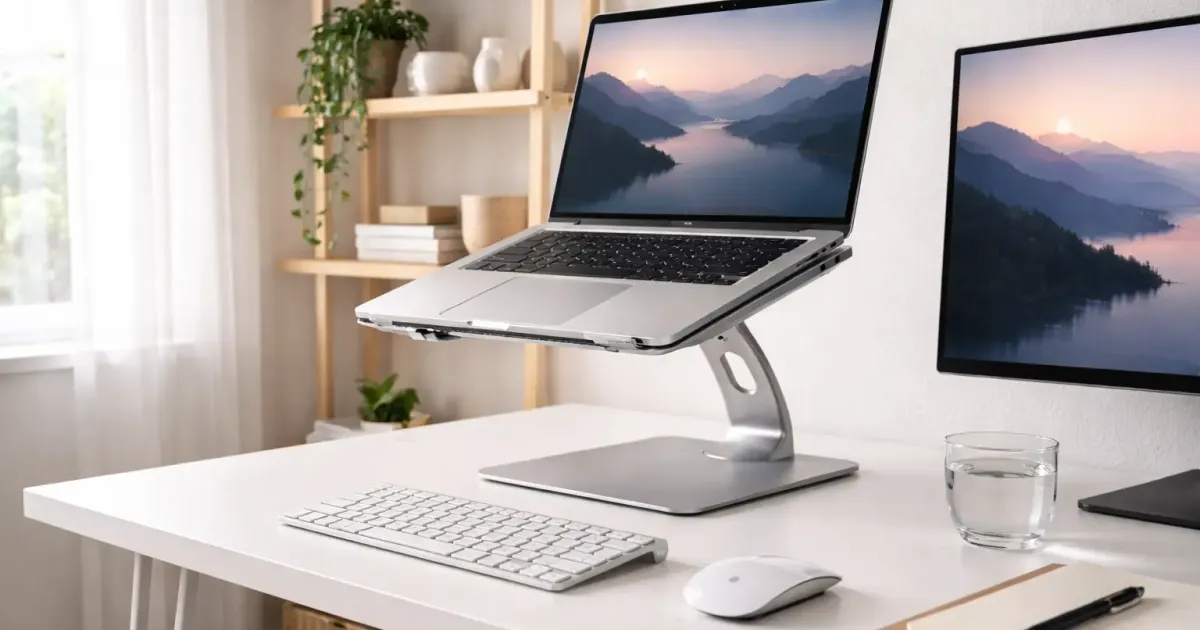
If you spend 8+ hours a day staring at a laptop screen, your neck already knows what I’m about to say: the screen is too low. (Still choosing the machine that goes on the stand? See best sub-$1000 laptops for every workflow.)
Laptop screens sit 4-6 inches below eye level, which means you’re spending your entire workday looking down. That’s how you end up with neck pain, shoulder tension, and the kind of posture that makes your chiropractor’s eyes light up with dollar signs.
A laptop stand fixes this for ~$15-90. It’s one of the cheapest upgrades in the complete desk upgrade guide, and probably the one that’ll make the biggest immediate difference to how you feel at the end of the day.
I compared 7 of the most popular laptop stands across different budgets and use cases. Here’s what’s actually worth buying.
Quick Comparison: Best Laptop Stands 2026
| Stand | Price | Best For | Material | Height | Laptops |
|---|---|---|---|---|---|
| Rain Design mStand | ~$50 | Classic design | Aluminum | 6” fixed | Up to 15” |
| Twelve South Curve SE | ~$40 | MacBook aesthetic | Aluminum | 6.5” fixed | 11-17” |
| Nulaxy C1 | ~$37 | Adjustable height | Aluminum | 3.15-10.6” | 10-17” |
| UGREEN Foldable Stand | ~$26 | Best value | Aluminum | 2 angles | Up to 17.3” |
| Roost V3 | ~$90 | Travel/portability | Glass-filled nylon | 6.5-12.5” | 12-18” |
| Boyata Adjustable | ~$30 | Budget adjustable | Aluminum | Multi-angle | Up to 17” |
| Amazon Basics Ventilated | ~$15 | Ultra-budget | Metal mesh | 8 positions | Up to 15” |
Prices fluctuate, check current prices before buying.
The 7 Best Laptop Stands (Detailed Reviews)
1. Rain Design mStand, Best Classic Design
Price: ~$50 | Material: Solid aluminum | Height: 6 inches (fixed) | Laptop size: Up to 15” (10.4” max depth) | Stand weight: 2.89 lbs | Colors: Silver, Space Gray, Gold, Black
The Rain Design mStand has been around for over a decade, and there’s a reason it keeps selling. It’s carved from a single piece of aluminum, not assembled from parts, which gives it a clean, unibody look and serious stability.
What makes it special:
- The aluminum body doubles as a passive heat sink, pulling heat away from your laptop
- Built-in cable management hole (2” diameter) in the back keeps your charging cable tidy
- The base is 7.5” x 10”, so it doesn’t wobble even when you’re typing aggressively during a Slack argument
- Rubber pads on top prevent your laptop from touching the aluminum directly
Who it’s for: Anyone who wants a permanent, elegant stand for their desk. The mStand lives on your desk and stays there, it’s not something you fold up and carry around.
The catch: No height adjustment. It raises your screen exactly 6 inches, which works well for most people at a standard desk height. But if you’re particularly tall or short, you can’t tweak it.
2. Twelve South Curve SE, Best for MacBook Users
Price: ~$40 | Material: Aluminum | Height: 6.5 inches (fixed) | Laptop size: 11-17” (min 10.2” wide) | Weight capacity: 7 lbs | Stand weight: 2.5 lbs
Twelve South makes accessories specifically designed to complement Apple products, and the Curve SE is their most affordable laptop stand. It’s a three-piece modular design that looks like it was made in the same factory as the MacBook itself.
What makes it special:
- The matte aluminum finish matches MacBook aesthetics perfectly
- Open design underneath allows maximum airflow for cooling
- At 6.5 inches, it raises the screen slightly higher than the mStand
- Modular three-piece construction means you could theoretically disassemble it for travel (though it’s not really meant for that)
Who it’s for: MacBook owners who care about aesthetics. If your desk setup looks like an Apple Store display, the Curve SE fits right in. It also works with any laptop 11-17 inches, so Windows users aren’t excluded.
The catch: The 7 lb weight limit means this isn’t ideal for heavy gaming laptops. And like the mStand, there’s no height adjustment, what you see is what you get.
3. Nulaxy C1, Best Adjustable Stand
Price: ~$37 | Material: Aluminum alloy | Height: 3.15-10.6 inches (adjustable) | Laptop size: 10-17” | Weight capacity: 44 lbs | Colors: Silver, Gray, Black
If you want actual height flexibility without spending $90 on a Roost, the Nulaxy C1 is the sweet spot. It has dual adjustable shafts that let you dial in exactly the right screen height and viewing angle.
What makes it special:
- Height adjusts from 3.15” to 10.6”, enough range for sitting or standing desk use
- 44 lb weight capacity is absurdly strong for a ~$37 stand
- Aluminum ventilation plate helps with heat dissipation
- Silicone pads protect your laptop from scratches
- Foldable design for storage when not in use
Who it’s for: Anyone who wants adjustability without paying a premium. Great if you switch between sitting and standing, or if you share a desk with someone of a different height. Also good for people with multiple devices, the 10-17” range covers almost everything.
The catch: The dual-shaft design is sturdy but not as elegant as the single-piece mStand or Curve SE. It looks more “functional” than “minimal.”
4. UGREEN Foldable Laptop Stand, Best Value
Price: ~$26 | Material: 3.5mm aluminum alloy | Height: 2 adjustable angles | Laptop size: Up to 17.3” | Weight capacity: ~11 lbs (5 kg) | Stand weight: 0.52 lbs
UGREEN has quietly become one of the best value brands in tech accessories, and their foldable laptop stand is a perfect example. It’s aluminum, it’s adjustable, and it costs less than lunch for two.
What makes it special:
- Open-grid ventilation design maximizes airflow underneath your laptop
- Folds flat for storage or travel, compact enough for a backpack
- Non-slip silicone pads on top and bottom
- Triangle construction provides solid stability despite the lightweight build
- Compatible with laptops and tablets from 8” to 17.3”
Who it’s for: Anyone who wants a solid aluminum stand without spending $50+. It’s also a great travel companion since it folds to about 5.9” x 3.2” x 2”, much cheaper than the Roost if you don’t need extreme portability.
The catch: Only two angle settings, not infinite adjustment like the Nulaxy C1. And the 11 lb weight capacity means some of the beefier 17” gaming laptops might be too heavy.
5. Roost V3, Best Portable Stand
Price: ~$90 | Material: Glass-filled nylon | Height: 6.5-12.5 inches (adjustable) | Laptop size: 12-18” | Weight capacity: 22 lbs | Stand weight: 6 oz (170g)
The Roost V3 is the stand that digital nomads swear by. At 6 ounces, it weighs less than a smartphone, folds down to roughly smartphone size, and somehow still holds up to 22 lbs without wobbling.
What makes it special:
- 6 oz total weight, lighter than two bananas
- Patented folding mechanism locks firmly into place with zero wobble
- Self-adjusting grips automatically adapt to any laptop thickness (12-18”)
- Height adjustable from 6.5” to 12.5”, the tallest range on this list
- Folds to roughly the size of a thick smartphone
Who it’s for: Frequent travelers, coworking space regulars, and anyone who doesn’t have a permanent desk. If you work from coffee shops, airports, or hotel rooms, the Roost is worth every penny. It’s also the only stand on this list that fits in a jacket pocket.
The catch: ~$90 is steep for a laptop stand. It’s also not aluminum, so it doesn’t act as a heat sink like the metal stands do. And the minimalist design means no cable management features.
6. Boyata Adjustable Stand, Best Budget Adjustable
Price: ~$30 | Material: Aluminum alloy | Height: Multi-angle adjustable (3.9-7.4”) | Laptop size: Up to 17” | Weight capacity: ~20 kg (44 lbs) | Colors: Silver, Space Gray, Black
The Boyata is one of the best-selling laptop stands on Amazon, and for good reason. It’s an aluminum Z-style stand with multi-angle adjustment that costs about the same as a decent lunch.
What makes it special:
- Adjustable height from 3.9” to 7.4” with smooth Z-style hinge mechanism
- Heat-vent cutouts across the platform improve airflow
- Large platform (11.7” x 10”) accommodates laptops up to 17”
- 4 slide-proof silicone pads plus protective hooks keep your laptop locked in place
- Sturdy 1.8cm aluminum parallel bars resist wobbling during typing
Who it’s for: Anyone who wants adjustability on a budget. The Boyata hits a great middle ground, it’s cheaper than the Nulaxy C1 but still offers meaningful height and angle adjustment. The Z-style design also looks decent on a desk.
The catch: The height range (3.9-7.4”) is more limited than the Nulaxy C1 (3.15-10.6”), so it’s better for sitting desks than sit-to-stand setups. The adjustment mechanism can also be stiff at first, it loosens up after a few days of use.
7. Amazon Basics Ventilated Stand, Best Ultra-Budget
Price: ~$15 | Material: Metal mesh | Height: 8 adjustable positions (12-35 degree tilt) | Laptop size: Up to 15” | Dimensions: 13” x 11” | Features: 6-slot cord organizer
If you just need something better than stacking books under your laptop, the Amazon Basics Ventilated Stand gets the job done for the price of a movie ticket.
What makes it special:
- Metal mesh platform absorbs and distributes heat, simple but effective cooling
- 8 adjustable tilt positions from 12 to 35 degrees
- 6 cord management slots on the back keep cables organized
- The tilted position improves airflow around and under the laptop
- Weighs almost nothing and sets up in seconds
Who it’s for: Anyone on a tight budget who wants basic ergonomic improvement. It’s also great as a second stand, keep one at the office and one at home. At ~$15, buying two still costs less than most single stands on this list.
The catch: It’s a mesh platform, not solid aluminum, so it feels less premium. The tilt adjustment doesn’t raise the screen as high as a dedicated elevated stand, it angles it more than lifts it. And the 15” laptop size limit excludes larger machines.
Why Use a Laptop Stand?
If you’re on the fence, here’s what a laptop stand actually does for you:
1. Fixes Your Posture (and Neck Pain)
When your laptop sits flat on a desk, the screen is 4-6 inches below eye level. Your head tilts forward, your shoulders round, and your neck muscles work overtime to hold that position for 8 hours. A stand raises the screen to eye level, which keeps your spine neutral and your neck relaxed.
2. Brings the Screen to Eye Level
The top of your screen should be roughly at or slightly below your eye line. Most laptop stands raise the screen 5-7 inches, which puts a 13-15” laptop at the right height for most people. Taller users may want adjustable stands that go higher (like the Roost V3 at up to 12.5”).
3. Improves Airflow and Cooling
Laptops generate heat. When they sit flat on a desk, the bottom vents get partially blocked. A stand lifts the laptop off the surface, allowing air to circulate underneath. Metal stands (especially aluminum) also act as passive heat sinks. Cooler laptops mean better performance and longer component life.
4. Frees Up Desk Space
A laptop on a stand takes up vertical space instead of just horizontal space. This opens up room underneath for an external keyboard, notepads, or just breathing room on your desk.
How to Choose the Right Laptop Stand
Fixed vs. Adjustable
| Type | Pros | Cons | Best For |
|---|---|---|---|
| Fixed height | Cleaner design, more stable, usually cheaper | Can’t customize height | Permanent desk setups, one user |
| Adjustable | Dial in perfect height, works for multiple users | More moving parts, can wobble | Shared desks, sit-to-stand setups |
Rule of thumb: If you have a dedicated desk and know your ideal screen height, go fixed. If you share a workspace, switch between sitting and standing, or aren’t sure what height you need, go adjustable.
Material Matters
| Material | Cooling | Durability | Weight | Price |
|---|---|---|---|---|
| Aluminum | Excellent (heat sink) | High | Medium | $$-$$$ |
| Metal mesh | Good (airflow) | Medium | Light | $ |
| Glass-filled nylon | None | High | Very light | $$$ |
| Plastic | Poor (insulates heat) | Low-Medium | Light | $ |
Aluminum is the sweet spot for most desk stands. For travel, glass-filled nylon (like the Roost V3) wins on weight.
Portability
If you travel or switch workspaces, weight and folded size matter:
| Stand | Folded? | Weight | Portability Rating |
|---|---|---|---|
| Roost V3 | Yes, smartphone-sized | 6 oz | Excellent |
| UGREEN Foldable | Yes, compact | 0.52 lbs | Very good |
| Nulaxy C1 | Yes | ~1.5 lbs | Good |
| Rain Design mStand | No | 2.89 lbs | Poor |
Don’t Forget the Keyboard
Here’s the thing everyone forgets: a laptop stand raises your screen and your keyboard. Once the screen is at eye level, the built-in keyboard is at an awkward angle. You need an external keyboard and mouse to actually get the ergonomic benefit.
Budget an extra ~$30-80 for a decent external keyboard if you don’t already have one. A good ergonomic mouse helps too.
My Recommendation by Use Case
| Use Case | Best Pick | Price | Why |
|---|---|---|---|
| Permanent desk setup | Rain Design mStand | ~$50 | Elegant, stable, built to last years |
| MacBook aesthetic | Twelve South Curve SE | ~$40 | Matches Apple design language perfectly |
| Adjustable on a budget | Nulaxy C1 | ~$37 | Best height range for the price |
| Best overall value | UGREEN Foldable | ~$26 | Aluminum quality, foldable, great price |
| Travel & remote work | Roost V3 | ~$90 | 6 oz, fits in a pocket, unbeatable portability |
| Budget adjustable | Boyata Adjustable | ~$30 | Amazon bestseller for a reason |
| Absolute cheapest | Amazon Basics Ventilated | ~$15 | Gets the job done, no frills |
The Bottom Line
If you’re working from a laptop for more than a few hours a day, a stand is a no-brainer upgrade. Even the cheapest option on this list (~$15) is better than hunching over a flat laptop.
For most people, I’d recommend the Nulaxy C1 (~$37) as the best all-around pick. You get aluminum build quality, real height adjustment, and a 44 lb weight capacity, all for less than $40. It’s not the prettiest stand, but it’s the most versatile.
If aesthetics matter and you have a MacBook, the Twelve South Curve SE (~$40) looks stunning. If you travel frequently, the Roost V3 (~$90) pays for itself in saved neck pain.
And if you’re building out a complete home office, pair your laptop stand with a standing desk, a good office chair, and proper cable management. Check out the desk upgrade guide for the full picture.
Your neck will thank you.
Related Articles

Best Desk Shelves and Organizers for Clean Home Offices
The best desk shelves, monitor risers, and organizers compared. From premium Grovemade to budget alternatives, keep your workspace clean and organized.
7 Best Under-Desk Footrests for Posture & Ergonomics
Struggling with leg fatigue or posture? We tested 7 top under-desk footrests from $18 to $143. Find the best rocking, tilting, and memory foam picks for 2026.

7 Best Desk Mats for Home Office (I Tested Them All)
The best desk mats and pads for your home office in 2026. From premium wool felt to budget PU leather, I break down which desk mat is actually worth buying.