
Best Sub-$1000 Laptops for Every Workflow (2026 Guide)
Discover the best laptops under $1000 in 2026. From the MacBook Neo to the HP OmniBook, find the perfect budget machine for students, creators, and coders.

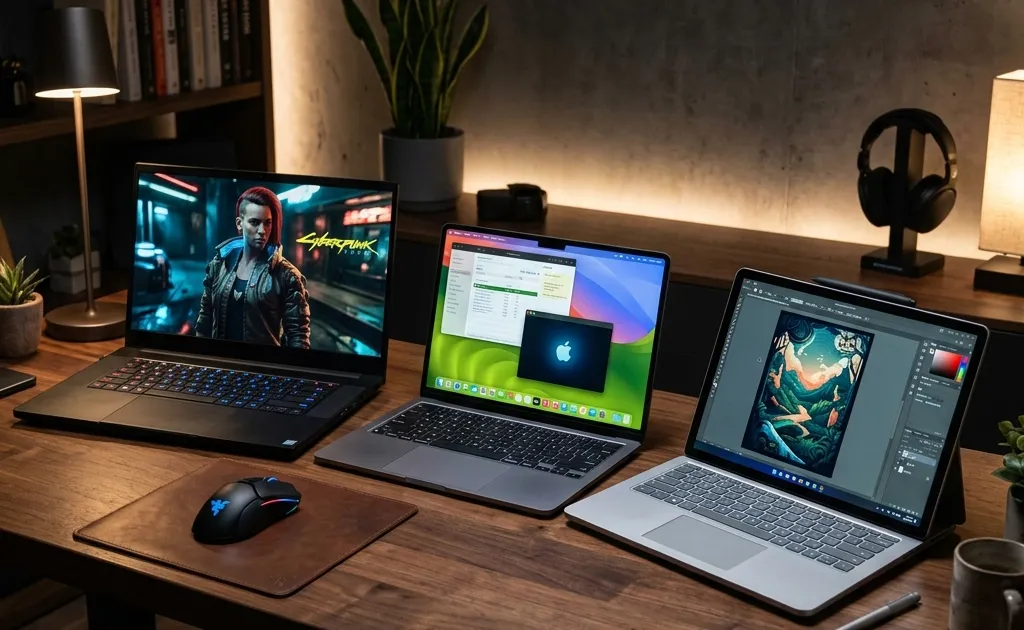
Buying a laptop on a budget used to mean accepting severe compromises: terrible screens, flimsy plastic chassis, and battery life that barely lasted a morning meeting. In 2026, the landscape of the sub-$1000 laptop market has completely transformed. Thanks to massive leaps in processor efficiency and intense competition, you no longer have to settle.
However, the definition of a “good” laptop is entirely dependent on your workflow. A machine that is perfect for a computer science student compiling code might be entirely wrong for a digital artist who needs a color-accurate touchscreen. Furthermore, the 2026 market introduces new challenges, including fluctuating component costs and the absolute necessity of having enough memory to run native AI applications.
Looking for the bigger picture? Check out our complete Photography Guide for Beginners for gear recommendations, camera fundamentals, and editing workflows.
In this comprehensive guide, we are ignoring the marketing noise and categorizing the best laptops under $1,000 strictly by workflow. Whether you are a student, a creative professional, a developer, or someone who just wants a reliable machine that won’t die on a cross-country flight, here is exactly what you should buy this year.
1. The Everyday Professional & Student: HP OmniBook 5 14
If you just need a laptop that does everything well without breaking a sweat, the HP OmniBook 5 14 is the current undisputed champion of the $800 price bracket.
Battery Life That Defies Logic
The most impressive feature of the OmniBook 5 is its endurance. Thanks to its hyper-efficient ARM-based architecture, this laptop routinely pushes past 30 hours of battery life in real-world productivity tests. For students who spend all day on campus or professionals jumping between conference rooms, the ability to leave the charger at home is a massive quality-of-life upgrade.
A Screen Worth Looking At
Historically, budget laptops featured washed-out LCD panels. The OmniBook 5 shatters this trend by including a vibrant OLED display as standard. Whether you are building complex spreadsheets, reading dense PDFs, or just unwinding with Netflix in your dorm room, the perfect blacks and infinite contrast of the OLED panel make a noticeable difference in eye strain and overall enjoyment.
The Catch
Because it uses an ARM-based processor, some incredibly niche, legacy Windows applications might run through an emulator (slightly reducing performance) or not run at all. However, for 99% of users relying on web browsers, Microsoft Office, Spotify, and standard productivity tools, the performance is flawless.
Who should buy it: College students, writers, project managers, and anyone who values battery life and screen quality above raw computing horsepower.
2. The Budget Creative: Apple MacBook Neo
For years, creative professionals on a budget were forced to hunt for refurbished older MacBooks. In 2026, Apple finally addressed this gap with the MacBook Neo, an entry-level laptop designed to capture the sub-$750 market without compromising on Apple’s core build quality.
Premium Feel, Budget Price
The MacBook Neo retains the iconic all-aluminum chassis, the industry-leading trackpad, and a high-quality Liquid Retina display. It feels exactly like a premium Apple product, not a budget knockoff. The speakers are excellent, the microphone array is clear for Zoom calls, and it seamlessly integrates into the broader Apple ecosystem (iPhone, iPad, AirPods).
Capable Creative Performance
Powered by a binned version of Apple’s M-series silicon, the Neo is shockingly capable. If your workflow involves editing RAW photos in Lightroom, designing vector graphics in Illustrator, or even cutting 4K video for YouTube in Final Cut Pro, the Neo handles it with ease. The unified memory architecture means that even the base models perform significantly better in creative tasks than Windows counterparts with equivalent specs on paper.
The Catch
Apple’s pricing ladder is notorious. While the base model starts around $699, upgrading the RAM or storage directly through Apple quickly pushes the price near the $1,000 limit. You have to be disciplined and buy exactly what you need, relying on external SSDs for bulk storage to keep the price down.
Who should buy it: Photographers, graphic designers, social media managers, and anyone already invested in the Apple ecosystem who needs creative capabilities on a strict budget.
3. The Developer & Power User: Lenovo IdeaPad Pro 5 Gen 11
Coders, data analysts, and engineering students have different needs. They require exceptional keyboards, strong multi-core processing power for compiling code or running local databases, and a wide array of ports. For this workflow, the Lenovo IdeaPad Pro 5 Gen 11 is the standout choice.
Built for Typing
Lenovo is famous for its keyboards, and the IdeaPad Pro inherits much of the DNA from the legendary ThinkPad lineup. The keys have excellent travel, a distinct tactile bump, and are comfortably spaced. If your workflow involves typing thousands of lines of code or data entry every day, this keyboard will save your wrists and your sanity.
Raw Computing Power
Unlike the ultra-efficient ARM laptops, the IdeaPad Pro usually ships with high-wattage AMD or Intel x86 processors. This means it has the brute-force multi-core performance required to run virtual machines, handle massive datasets in Python, or compile large software projects quickly. It also offers excellent out-of-the-box compatibility with various Linux distributions, a crucial factor for many developers.
The Catch
The tradeoff for all this power is portability and endurance. The IdeaPad Pro is slightly heavier than the OmniBook or MacBook Neo, and its battery life, while respectable, won’t survive a full 12-hour day away from a wall outlet if you are running heavy compilations.
Who should buy it: Software developers, computer science students, data analysts, and anyone who needs raw CPU power and a top-tier typing experience.
4. The Presenter & Flexible Worker: Lenovo IdeaPad 5i 2-in-1 16
Sometimes, a traditional clamshell laptop just gets in the way. If your workflow involves reviewing documents with clients, giving presentations, sketching diagrams, or reading long-form content in portrait mode, you need a convertible. The Lenovo IdeaPad 5i 2-in-1 is currently the best sub-$1000 option that doesn’t compromise on performance to achieve its flexibility.
The Power of Versatility
The 360-degree hinge allows you to use the device in “Tent Mode” (perfect for watching videos or giving a presentation across a table) or fold it entirely flat into a heavy tablet. When paired with a stylus, it becomes an excellent digital whiteboard for brainstorming sessions or taking handwritten notes during lectures.
A Generous Canvas
The 16-inch model, despite its size, remains relatively lightweight. That extra screen real estate is a massive productivity booster. It allows you to comfortably snap two full-sized windows side-by-side, a spreadsheet on the left, a research document on the right, without feeling cramped.
The Catch
Convertibles always have a slight durability concern regarding the hinge over long-term use. Furthermore, as a tablet, a 16-inch device is heavy. You won’t be holding this in one hand to read a book on the couch; it is meant to be used on a desk or rested on your lap.
Who should buy it: Sales professionals, teachers, managers who frequently present, and anyone who prefers digital note-taking with a stylus over typing.
5. The Occasional Gamer / 3D Modeler: Acer Swift Go 14 AI
Finding a laptop under $1,000 that can handle 3D modeling or modern gaming without looking like a glowing spaceship is difficult. The Acer Swift Go 14 AI bridges this gap beautifully, offering respectable graphical horsepower in a sleek, professional chassis.
Balanced Performance
While it doesn’t feature a massive dedicated GPU that would drain the battery in an hour, it utilizes the latest integrated graphics architectures (often AMD’s high-end Radeon graphics or Intel’s Arc). This is more than enough to run software like Blender or AutoCAD smoothly, and it can comfortably play modern competitive games (like Valorant or Apex Legends) at high framerates after hours.
AI-Ready Hardware
As the name suggests, the Swift Go is built with a dedicated Neural Processing Unit (NPU) to handle local AI tasks. This means features like background blurring on video calls, local text generation, and AI-assisted rendering operate efficiently without bogging down the main CPU or draining the battery.
The Catch
The build quality, while decent, feels slightly more plastic and less rigid than the aluminum chassis of the MacBook Neo or the premium feel of the HP OmniBook. The trackpad is also distinctly average.
Who should buy it: Architecture students, casual gamers, 3D hobbyists, and anyone who needs graphical flexibility without buying a bulky, battery-draining “gaming” laptop.
Buying Advice for 2026: How Not to Get Scammed
The sub-$1000 market is filled with traps. Retailers frequently try to offload older, slower stock by disguising it as a “doorbuster deal.” To ensure your laptop lasts until 2030, adhere to these strict rules:
1. The 16GB Minimum Rule
Do not buy a laptop with 8GB of RAM in 2026. Period. Between modern operating systems, memory-hungry browsers, and local AI tools, 8GB is no longer sufficient. A laptop with 8GB of RAM will begin to stutter and slow down significantly within a year of purchase. 16GB is the absolute baseline; 32GB is ideal if you can find a good deal.
2. Beware of “Storage Traps”
Many budget laptops hit their low price point by including a pathetic 256GB SSD. After Windows and a few core applications are installed, you will have almost no room left. Look for a minimum of 512GB of storage. If a deal is too good to pass up on a 256GB model, check beforehand if the SSD is user-upgradeable.
3. Track the Pricing Cycles
Laptop prices are incredibly volatile. A machine that costs $1,100 on a Tuesday might be on sale for $850 by Friday. Do not buy at MSRP. Use deal tracking websites and browser extensions to monitor price history. The best times to buy remain the “Back to School” windows (late July through August) and the holiday season.
4. Leverage Student and Member Discounts
If you are a student, always check the manufacturer’s dedicated education store (Apple, Lenovo, and HP all have excellent education pricing). If you are not a student, check warehouse clubs like Costco or Sam’s Club. They often sell exclusive bundles that include an extra year of warranty or double the RAM for the same price as the base model at Best Buy.
Conclusion
The days of suffering through terrible performance just to stay under a $1,000 budget are over.
If you prioritize battery life and an incredible screen above all else, buy the HP OmniBook 5. If you are a creative on a budget, the MacBook Neo offers unmatched value. For the hardcore coders, the Lenovo IdeaPad Pro 5 provides the best typing and processing experience. And if you need maximum versatility, the Lenovo IdeaPad 5i 2-in-1 is the undisputed king of budget convertibles.
Identify your primary workflow, refuse to compromise on the 16GB RAM minimum, and you will secure a machine that powers your productivity for years to come.
For broader mobility trends, read our comprehensive overview of the state of electric vehicles in 2026.
Related Articles
iPad Air 11 M4 Review: iPadOS 27 Powerhouse in 2026
Apple iPad Air 11-inch M4 review with iPadOS 27: benchmark performance, Apple Intelligence, Stage Manager 3.0, Apple Pencil Pro, and real battery life.
macOS 27 and iOS 27 Review: Everything New in 2026
Apple releases macOS 27 Golden Gate and iOS 27 on Sept 14, 2026. Discover Siri AI, Liquid Glass, Visual Intelligence, and next-gen Apple Intelligence features.

OM SYSTEM PEN First Look: Retro Charm Meets Modern Power
First look at the OM SYSTEM PEN, announced September 2026: 20.4MP sensor, built-in OLED EVF, IPX1 weather sealing, creative dial, $999, ships October.