
Fitbit Air vs. WHOOP: Screenless Tracking Compared 2026
Fitbit Air vs WHOOP compared: which screenless wearable wins on recovery, strain, and health data? Full breakdown for athletes and health enthusiasts in 2026.

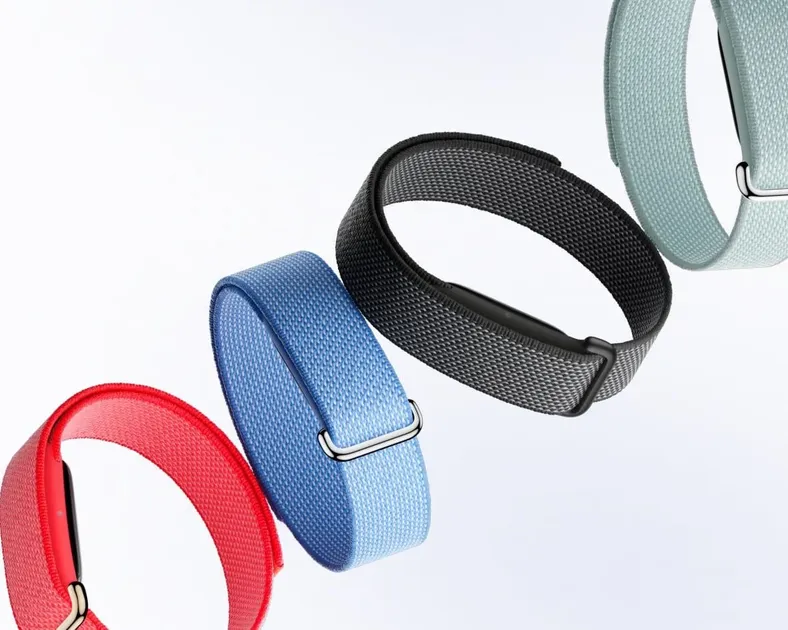
For the last decade, the wearable market has been obsessed with putting a smartphone on your wrist. We got notifications, apps, and even phone calls, but we also got more distractions and another screen to charge every night.
In 2026, the pendulum has officially swung back. The fastest-growing segment of the wearable market is screenless performance trackers. These devices don’t vibrate when you get an email; they don’t tell you the time; they just sit silently on your body, collecting data that helps you live better, sleep longer, and train harder. If you want health tracking without a screen but with a real watch face, the hybrid route is covered in my Withings smartwatch guide.
Upgrading your workstation? See our all-in-one Desk Upgrade & Home Office Guide to build a comfortable, productive workspace.
The heavyweight champion of this space has long been WHOOP. But with the release of the Fitbit Air, Google (who now fully manages Fitbit) is making a direct play for the biohacking and athletic crowd.
This is an exhaustive, 1,600-word comparison of the two most advanced screenless wearables on the market today.
Part 1: Design Philosophy - The Invisible Tracker
The biggest difference between these two devices is how they feel on your body.
Fitbit Air: Jewelry-Grade Health
The Fitbit Air is, quite frankly, beautiful. It looks less like a piece of tech and more like a slim, brushed-titanium bracelet. It’s significantly thinner than the Fitbit Luxe or the Charge series, utilizing a flexible PCB that wraps around the wrist.
- Form Factor: Ultra-slim, rounded edges.
- Material: Aerospace-grade titanium or recycled aluminum.
- Versatility: Can be worn as a bracelet, a necklace pendant, or even a clip-on for your waistband.
WHOOP: The Athletic Identity
WHOOP hasn’t changed its core design language in years, and for good reason. It’s an “apparel” company as much as a tech company. The WHOOP 4.0 (and the rumored 5.0) focuses on the “Any-Wear” ecosystem.
- Form Factor: A slightly bulky sensor pod held by a high-tension knit strap (SuperKnit).
- Placement: Wrist, bicep, or inside WHOOP Body clothing (underwear, sports bras).
- Vibe: “I am an athlete.” Wearing a WHOOP is a social signal in the fitness community.
The Verdict on Design: If you want a tracker that disappears under a dress shirt or looks like a piece of high-end jewelry, the Fitbit Air wins. If you want a device that can be moved to your bicep to free up your wrists for lifting or boxing, WHOOP is superior.
Part 2: Sensor Technology and Accuracy
Both devices are packed with sensors, but they prioritize data differently.
| Sensor | Fitbit Air | WHOOP |
|---|---|---|
| Optical Heart Rate | Multi-path Green/Yellow LED | 5-LED (Green/Red/IR) |
| Blood Oxygen (SpO2) | Yes | Yes |
| Skin Temperature | Continuous (High Precision) | Continuous |
| EDA (Stress) | cEDA (Continuous) | Via HRV/Skin Temp |
| GPS | No (Uses Phone) | No |
The Heart Rate Battle
Fitbit Air uses the same sensor tech found in the Pixel Watch 3, which is highly optimized for resting heart rate and daily activity. However, green-light sensors still struggle with “noise” during high-intensity interval training (HIIT).
WHOOP uses a more complex 5-LED array. By including Red and Infrared lights (similar to a pulse oximeter), WHOOP can get deeper into the tissue, resulting in slightly more accurate readings during heavy sweat and vigorous movement.
Stress Tracking (EDA)
This is where Fitbit Air pulls ahead. It features a cEDA (continuous Electrodermal Activity) sensor. It measures microscopic changes in sweat levels on your skin to detect stress in real-time. The Fitbit app will actually ping your phone to ask, “How are you feeling?” when it detects a stress spike.
WHOOP tracks stress purely through Heart Rate Variability (HRV) and movement. While effective, it’s a lagging indicator compared to Fitbit’s direct skin measurement.
Part 3: Data, Analytics, and “The Score”
Data without context is just noise. Both companies have created proprietary “scores” to tell you if you should workout or rest.
WHOOP: Strain and Recovery
WHOOP’s entire ecosystem is built around the relationship between Strain (how much you did) and Recovery (how ready you are to do more).
- Strain: A score from 0 to 21 based on cardiovascular load.
- Recovery: A percentage (Red, Yellow, Green) based on your HRV, RHR, and sleep performance.
- Sleep Coach: Tells you exactly how many hours of sleep you need tonight to be “100% recovered” tomorrow based on today’s strain.
Fitbit Air: Daily Readiness and Wellness
Fitbit (and Google) focuses more on “Holistic Wellness.”
- Daily Readiness Score: Similar to WHOOP’s recovery, but it factors in your recent activity levels and sleep.
- Health Metrics Dashboard: Gives you a 7-day or 30-day view of your breathing rate, RHR, and SpO2.
- Sleep Profile: Assigns you a “Sleep Animal” (like a Hedgehog or a Bear) to help you understand your chronotype and sleep habits.
The Verdict on Data: WHOOP is more prescriptive. It tells you “Your recovery is 30%, you should take a rest day.” Fitbit is more descriptive. It says “Your readiness is low, here is why, and here is a guided meditation to help.”
Part 4: The Subscription Wars (The Real Cost)
This is where the decision gets difficult. In 2026, you don’t just “buy” a tracker; you enter a relationship with a cloud service.
The WHOOP Model: Hardware as a Service
You cannot buy a WHOOP. You pay a monthly or yearly membership fee (typically ~$30/month). As long as you are a member, you get the hardware for “free.” When a new version comes out (like the WHOOP 5.0), members often get a free or heavily discounted upgrade.
- Upfront Cost: $0
- Yearly Cost: ~$360
- 3-Year Cost: ~$1,080
The Fitbit Air Model: Hybrid
You buy the Fitbit Air hardware upfront for a premium price (likely $199). You get basic stats for free, but the “Daily Readiness Score” and deep sleep analytics are locked behind Fitbit Premium (~$10/month).
- Upfront Cost: $199
- Yearly Cost (Hardware + Premium): $319
- 3-Year Cost: $559
The Verdict on Cost: Fitbit Air is significantly cheaper over a three-year period. However, WHOOP’s “free hardware upgrades” can be enticing if you always want the latest tech without a huge upfront hit.
Part 5: Battery Life and Charging Innovation
Since these devices track you 24/7, how they charge is a major part of the user experience.
WHOOP: The “Never-Off” Battery
WHOOP solved the charging problem years ago with their slide-on battery pack. You slide a small, waterproof battery over the tracker while you’re wearing it. It charges while you sleep or work, and then you take the pack off. You never have to take the WHOOP off your wrist.
- Battery Life: ~4-5 days.
- Charging: Battery pack (USB-C).
Fitbit Air: The Magnetic Snaps
Fitbit Air uses a more traditional magnetic charging cable. It charges incredibly fast (0% to 100% in about 30 minutes), but you do have to take it off to charge it.
- Battery Life: ~7-8 days.
- Charging: Magnetic pin cable.
The Verdict on Battery: Fitbit Air lasts longer on a single charge, but WHOOP’s charging system is more convenient for those who are obsessed with having 0% data gaps in their health history.
Part 6: Ecosystem and Software
Who owns your data, and where does it go?
Fitbit and the Google Powerhouse
Because Fitbit is owned by Google, the Fitbit Air is a gateway to the broader Google Health ecosystem.
- AI Integration: Google Gemini can analyze your Fitbit data and give you written reports. “Hey Gemini, why was my sleep so bad on Tuesday?”
- Google Fit: Seamlessly syncs with your phone’s health data and third-party apps like MyFitnessPal or Strava.
- Safety Features: Includes “Fall Detection” which can alert emergency services via your phone, a feature missing from WHOOP.
WHOOP: The Focused Specialist
WHOOP is proudly focused. It doesn’t want to be your calendar; it doesn’t care about your notifications.
- WHOOP Journal: Every morning, the app asks you a series of questions (Did you drink caffeine? Did you share a bed? Did you take magnesium?). It then uses AI to correlate those behaviors with your recovery.
- Community: You can join “Teams” (e.g., “Men Over 40” or “NYC Marathon Runners”) to see how your strain and recovery compare to others.
Part 7: Why Go Screenless? (The Biohacker’s Perspective)
You might be wondering: “Why would I pay hundreds of dollars for a device that doesn’t even have a clock?”
The answer lies in Digital Detox and Minimalist Focus. In our 2026 survey of “Boredom at Work” readers, 65% of people reported that their smartwatches made them more anxious, not less. Every buzz on the wrist is a micro-distraction that pulls you out of “Deep Work” or away from a conversation with a loved one.
Screenless trackers like the Fitbit Air and WHOOP provide:
- Intention: You check your data when you want to, not when the device demands it.
- Durability: Without a glass screen to crack, these devices survive kettlebell cleans, mountain bike crashes, and rock climbing.
- Discretion: In a formal setting or a high-stakes meeting, a glowing screen on your wrist can look unprofessional. A titanium band (Fitbit Air) or a hidden bicep strap (WHOOP) is invisible to the world.
Part 8: The Verdict - Which Should You Buy?
Choosing between the Fitbit Air and WHOOP depends entirely on your goals for 2026.
Buy the Fitbit Air if:
- You value aesthetics: You want a tracker that looks like jewelry or a high-end accessory.
- You are focused on general wellness: You care as much about stress management and “wellness animals” as you do about your 5k time.
- You are in the Google ecosystem: You use an Android phone and want Gemini-powered insights.
- You want a lower long-term cost: You prefer paying for hardware upfront to save money over three years.
Buy the WHOOP if:
- You are a performance athlete: You train 5+ days a week and need to know exactly how much “Strain” you can handle today.
- You want the bicep strap option: You do sports (combat sports, Olympic lifting) where a wrist-based device is in the way.
- You are obsessed with data consistency: You never want to take your tracker off, even for 30 minutes to charge.
- You enjoy the social aspect: You want to compete on leaderboards and join specific fitness communities.
Final Thoughts
The Fitbit Air is the most impressive hardware Fitbit has released in years. It marks a shift from “gadget” to “accessory,” and it’s a compelling alternative for those who find the WHOOP subscription model too expensive.
However, WHOOP is more than just a sensor; it’s a methodology. For the elite athlete or the hardcore biohacker, the “Strain/Recovery” framework is still the best way to optimize a human body.
Whichever you choose, remember: the tracker only provides the map. You still have to do the work.
Found this guide helpful? Check out our other long-form comparisons like Standing Desk vs. Sitting Desk (2026) or our guide to Best AI Tools for Work.
Have you tried the Fitbit Air yet? Send us your thoughts and we might feature your review in our next update.
Related Articles
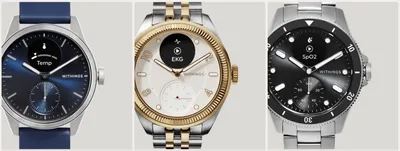
Withings Smartwatches in 2026: Lineup & Rumors
A comprehensive guide to Withings hybrid smartwatches in 2026. We review the ScanWatch 2 and Nova, and explore when to expect the next release.
AI-Powered Fitness Trackers Guide (2026)
Discover how AI-driven fitness trackers in 2026 revolutionize personal health with predictive insights, personalized coaching, and deep biometric analysis.

Best Home Office Gifts Under $100 (2026)
The best home office gifts under $100 for 2026: desk upgrades, ergonomic extras, and comfort boosters that any remote worker will actually use every day.