
Home Office Lighting Guide: Reduce Eye Strain (2026)
The complete guide to home office lighting. Best monitor light bars, desk lamps, and video call setups compared with prices and ergonomic recommendations.

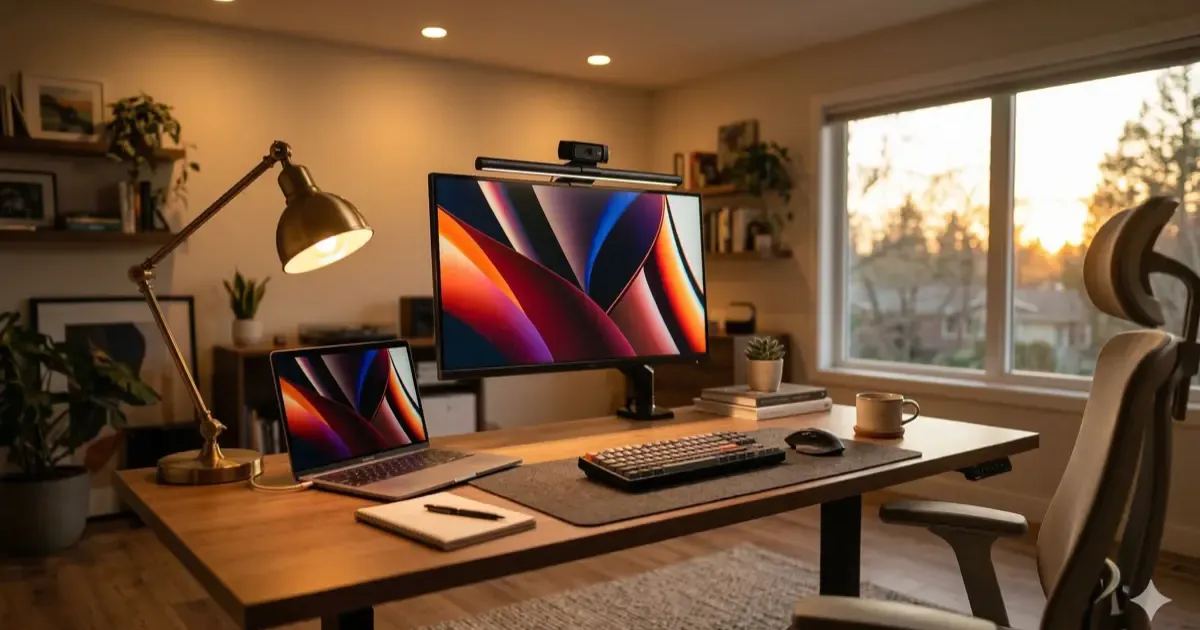
Bad lighting is the most overlooked problem in home offices. It causes eye strain, headaches, and makes you look terrible on video calls, but most people never think about it because “the room has lights.”
Here’s how to fix your home office lighting properly, from a $30 quick win to a full professional setup.
Why Lighting Matters More Than You Think
~68% of office workers experience digital eye strain symptoms. The main causes aren’t your screen, they’re the lighting around it:
| Problem | Cause | Fix |
|---|---|---|
| Eye fatigue | Too much contrast between screen and surroundings | Add ambient/bias lighting |
| Headaches | Glare on screen from overhead lights or windows | Use a monitor light bar |
| Neck strain | Squinting or leaning forward to see | Increase desk illumination |
| Looking bad on calls | Overhead-only or backlit setup | Add front-facing key light |
The Three Layers of Home Office Lighting
Good lighting isn’t one lamp, it’s three layers working together:
1. Task Lighting (Your Desk)
This is the light directly illuminating your work surface. 300-500 lux is the target.
Best option: Monitor light bar
| Product | Price | Best For |
|---|---|---|
| BenQ ScreenBar Halo 2 | ~$179 | Premium, includes backlight for wall behind monitor |
| BenQ ScreenBar | ~$109 | Best overall, 2,700K-6,500K, auto-dimming |
| Xiaomi Mi Monitor Light Bar | ~$67 | Best value, CRI >95, wireless remote |
| Quntis Monitor Light Bar | ~$30-40 | Budget, solid performance at half the price |
Why monitor light bars > desk lamps for computer work:
- Zero glare on your screen (light is directed downward)
- No desk space taken up
- Even illumination across your entire workspace
- Most have adjustable color temperature
If you buy one thing from this guide, make it a monitor light bar.
2. Ambient Lighting (The Room)
This is the general room lighting. 100-300 lux in the surrounding area prevents harsh contrast between your bright screen and a dark room.
Options:
- Overhead room lights (dimmed to avoid glare)
- Floor lamp behind or beside you
- LED strip lights behind your desk or monitor (bias lighting)
- Natural light from windows (position desk perpendicular to windows, not facing them)
The key rule: Your screen should be the brightest thing in your visual field, but not by a huge margin. If your room is dark and your screen is blasting, your eyes constantly adjust between the two, that’s what causes fatigue.
3. Video Call Lighting (Your Face)
If you’re on video calls regularly, you need light on your face. This is where most home office setups fail.
The three-point setup:
| Light | Position | Purpose |
|---|---|---|
| Key light | In front, slightly above eye level, 30-45 degrees to one side | Main face illumination |
| Fill light | Opposite side of key light | Softens shadows |
| Back/bias light | Behind you, aimed at wall or shoulders | Adds depth, separates you from background |
Product options:
| Product | Price | Best For |
|---|---|---|
| Elgato Key Light | ~$200 | Full panel, app-controlled, professional quality |
| Elgato Key Light Mini | ~$100 | Compact, wireless, USB-C |
| Logitech Litra Beam | ~$100 | TrueSoft tech, great for desk mounting |
| Logitech Litra Glow | ~$50-60 | Budget monitor-mount option |
| White foam board | Free | DIY fill light, reflects key light from opposite side |
Budget hack: You don’t need a dedicated key light. A desk lamp with adjustable color temperature, placed behind your monitor and aimed at your face, works surprisingly well. Set it to ~5,000K for natural-looking skin tones on camera.
Best Desk Lamps for Home Office
If you prefer a traditional desk lamp (or need one in addition to a light bar):
| Product | Price | Best For |
|---|---|---|
| BenQ eReading LED Desk Lamp | ~$199 | Best overall, covers 35” x 27”, auto-dimming |
| Dyson Solarcycle Morph | ~$650 | Premium, auto-adjusts to time of day and location |
| Lepro LED Desk Lamp | ~$25-30 | Budget, 5 color modes, 5 brightness levels |
For computer work, a monitor light bar is better than a desk lamp. For mixed use (reading documents, writing, crafting), a desk lamp with adjustable arm is more versatile.
Color Temperature Guide
| Time of Day | Color Temp | Feeling |
|---|---|---|
| Morning focus | 5,000-5,500K | Cool daylight, alertness |
| Midday work | 4,000-4,500K | Neutral white, balanced |
| Afternoon | 3,500-4,000K | Warm neutral |
| Evening wind-down | 2,700-3,000K | Warm, relaxed |
Why this matters: Cool light (5,000K+) boosts alertness but causes fatigue after long exposure. Warm light (3,000K) is easy on the eyes but can make you drowsy. The best setup lets you shift throughout the day.
Most monitor light bars and quality desk lamps offer adjustable color temperature. Get one that covers at least 2,700K-5,000K.
Setup Examples
Budget Setup (~$70)
| Component | Product | Price |
|---|---|---|
| Task light | Xiaomi Mi Monitor Light Bar | ~$67 |
| Ambient | Existing room lights | $0 |
| Video calls | Desk lamp behind monitor | $0 (reuse existing) |
This alone fixes 80% of lighting problems.
Mid-Range Setup (~$200)
| Component | Product | Price |
|---|---|---|
| Task light | BenQ ScreenBar | ~$109 |
| Ambient | LED strip behind desk | ~$20 |
| Video calls | Logitech Litra Glow | ~$55 |
Professional-looking video calls and comfortable all-day lighting.
Premium Setup (~$500)
| Component | Product | Price |
|---|---|---|
| Task light | BenQ ScreenBar Halo 2 | ~$179 |
| Ambient | Built-in Halo backlight + overhead dimmed | $0 |
| Video calls | Elgato Key Light Mini | ~$100 |
| Desk lamp | BenQ eReading (for non-screen tasks) | ~$199 |
The “I’m on camera a lot” setup.
Common Mistakes
1. Relying only on overhead lights. Ceiling lights create glare on your screen and unflattering shadows on video calls. They’re fine for ambient but terrible as your only light source.
2. Facing a window. Direct sunlight causes glare and forces your webcam to constantly readjust exposure. Sit perpendicular to windows, natural light from the side is ideal.
3. Ignoring bias lighting. A bright screen in a dark room is the #1 cause of eye strain. Even a $15 LED strip behind your monitor reduces the contrast dramatically.
4. Same color temperature all day. Cool light at 9 PM disrupts your sleep. Warm light at 9 AM makes you drowsy. Get adjustable lights and shift throughout the day.
5. Over-lighting for video calls. You don’t need a studio. One well-placed light in front of you is better than three badly placed ones.
The Bottom Line
Good lighting is the cheapest high-impact upgrade for a home office. A $30-70 monitor light bar reduces eye strain more than a $500 monitor upgrade would.
Priority order:
- Monitor light bar (~$30-110), immediate eye strain relief
- Bias lighting behind monitor (~$15-20), reduces contrast fatigue
- Video call light (~$50-200), only if you’re on camera regularly
Total for a solid setup: $50-130. Your eyes will thank you.
Related: Complete your setup with our desk upgrade guide, find the right monitor for working from home, and check our monitor light bar picks.
Related Articles
7 Best USB-C Docking Stations for Home Office (2026)
I compared Thunderbolt 4, USB-C, and DisplayLink docks for every budget. Here are the 7 best docking stations for your home office, from ~$25 to ~$400.
AI Room Redesign: How to Redesign Your Home with AI
Learn how to redesign your home using AI tools like Interior AI, RoomGPT, and Midjourney. Step-by-step 2026 guide to spatial prompts and 3D visual staging.
7 Best Webcams for Working From Home (I Tested Them)
The best webcams for working from home compared. From 4K options to budget picks under $70, I tested 7 webcams so you don't look terrible on your next call.