
AI Room Redesign: How to Redesign Your Home with AI
Learn how to redesign your home using AI tools like Interior AI, RoomGPT, and Midjourney. Step-by-step 2026 guide to spatial prompts and 3D visual staging.

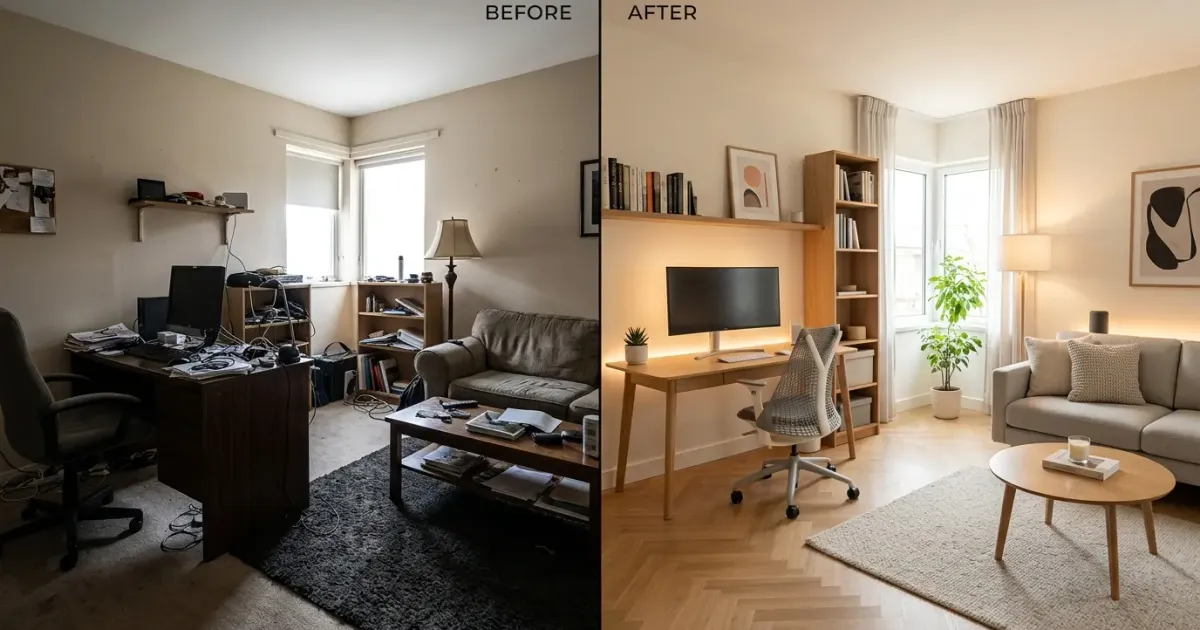
Redesigning a room traditionally required thousands of dollars, weeks of back-and-forth consultation with interior designers, and a substantial leap of faith. You had to look at tiny fabric swatches, imagine how a dark oak desk would look against olive green walls, and hope that your new modular shelving wouldn’t overpower your workspace.
Generative artificial intelligence has completely transformed home remodeling. By leveraging modern spatial vision models, control nets, and multi-modal image-to-image rendering, you can snapshot any room with your smartphone and render dozens of photorealistic redesigns within seconds.
Whether you want to convert a cluttered spare bedroom into a high-productivity home office, refresh a living room layout, or visualize custom acoustic wall paneling, AI room design software makes spatial experimentation accessible to everyone.
In this guide, we will cover how AI room redesign technology works, evaluate the top platforms in 2026, walk step-by-step through a complete room makeover workflow, and provide copy-paste prompt templates for photorealistic results.
How AI Room Redesign Technology Works
To get the most out of AI interior tools, it helps to understand what happens under the hood when you upload a photograph of your space.
Unlike standard text-to-image models that generate images from blank canvases, interior redesign applications use computer vision algorithms and depth-estimation networks (such as ControlNet) to analyze your source image:
- Structural Segmentation: The model identifies permanent architecture, including load-bearing walls, windows, doorways, ceiling heights, and floor geometry.
- Depth Masking: The AI creates a 3D depth map of your space, distinguishing between foreground objects (like old coffee tables or office chairs) and background walls.
- Inpainting and Style Transfer: When you select a design theme (such as Japandi, Industrial, Scandinavian, or Mid-Century Modern), the model replaces movable furniture and finishes while locking structural boundaries in place.
- Lighting Synthetic Rendering: The AI recalculates shadow casting, ambient light bounces, and window reflections so new virtual furniture matches natural daylight sources.
This spatial constraint mechanism ensures that your generated mockups maintain the actual physical proportions of your room, preventing the model from hallucinating impossible wall placements.
Top 6 AI Home Redesign Tools in 2026
The interior design software landscape has matured rapidly. Below are the most capable platforms currently available for homeowners, renters, and remote professionals.
| AI Tool | Primary Strength | Best For | Pricing Tier |
|---|---|---|---|
| Interior AI | Multi-style instant room transformations | Rapid layout visual exploration | Free trial / $29/mo |
| RoomGPT | One-click image rendering | Quick mood tests & simple makeovers | Free credits / Pro upgrades |
| Decor8 AI | Precise virtual staging & paint previews | Real estate & detailed room restaging | Freemium / Pay-per-render |
| Remodel AI | Mobile app interior & exterior remodeling | On-the-go smartphone visualization | $5.99/mo mobile sub |
| Midjourney | Unmatched photorealism & custom styling | Concept mood boards & lighting ideas | $10/mo to $60/mo |
| ChatGPT Plus Vision | Ergonomic evaluation & space planning | Spatial advice & sourcing assistance | $20/mo (ChatGPT Plus) |
1. Interior AI
Interior AI remains one of the pioneer applications in web-based generative architecture. By uploading a single photo, you can choose from over 30 design styles, including Minimalist, Biophilic, Coastal, Cyberpunk, and Art Deco. The platform excels at keeping structural beams and windows intact while re-imagining flooring materials, ambient lighting strips, and workspace furniture.
2. RoomGPT
RoomGPT provides an intuitive, web-based interface built specifically for fast room transformations. It allows you to select room types (such as home office, bedroom, kitchen, or gaming setup) alongside targeted theme prompts. It is ideal for testing color contrast options before buying paint or committing to big-ticket furniture items.
3. Decor8 AI
For users seeking finer control over virtual staging, Decor8 AI offers targeted segmentation editing. Rather than swapping out the entire room at once, Decor8 AI lets you highlight individual components (such as an outdated rug or a plain wall) to test specific accent colors, wooden slat paneling, or wall-mounted storage systems.
4. Remodel AI
Remodel AI is built primarily for iOS and Android devices, utilizing your smartphone’s camera feed directly. It features specialized modes for interior restaging, exterior facade remodeling, landscaping visualizer tools, and wall material replacement. It is especially useful when walking through a prospective apartment or home during open-house visits.
5. Midjourney (v6 / v7 with Image Prompts)
While not a dedicated room-staging app, Midjourney produces the highest aesthetic fidelity in generative design. By feeding your existing room photo as an image prompt (--iw 2.0) combined with detailed material descriptors, Midjourney generates high-concept visual directions that feel straight out of an architectural magazine.
6. ChatGPT & Claude with Multimodal Vision
Multimodal LLMs like ChatGPT with GPT-4o vision or Claude Sonnet 4.5 provide conversational interior design assistance. While they do not generate full 3D spatial renders directly, you can upload your room photos and ask the AI to evaluate lighting angles, suggest cable management strategies, point out ergonomic flaws, or recommend color pairings that complement existing wood tones.
Step-by-Step Guide: Redesigning Your Room with AI
To transform your current room into an optimized, aesthetically pleasing space, follow this structured five-step workflow.
Step 1: Capture a High-Quality Baseline Photo
The quality of your baseline photograph directly dictates how accurately the AI model interprets spatial depth.
- Use Wide Angles: Stand in a corner or doorway to capture as much floor space, ceiling height, and wall perimeter as possible.
- Maximize Daytime Lighting: Turn on ambient lights and open blinds. Clear daylight prevents the AI depth sensor from misinterpreting dark corners as open voids.
- Declutter Major Obstacles: Remove small stray objects like laundry, water bottles, or loose paperwork. Leave major furniture items (like desks, sofas, and beds) in place so the model understands spatial scale.
Step 2: Define Your Design Objectives and Style Vision
Before generating renders, determine the primary goal of your room makeover:
- Are you trying to maximize productivity in a dedicated workspace?
- Do you need to incorporate acoustic dampening for video calls and podcast recording?
- Are you looking to add warmth through natural timber accents, warm LED lighting, and indoor greenery?
Having a clear goal helps you select the right style preset in apps like Interior AI or craft precise text prompts in Midjourney.
Step 3: Generate Initial Style Explorations
Upload your baseline photograph to your chosen AI tool and test three distinct aesthetic directions. For example:
- Japandi / Minimalist: Light oak wood, neutral beige tones, slatted wall panels, warm hidden LED strips.
- Industrial / Modern Dark: Matte black metal fixtures, dark walnut surfaces, exposed brick accent wall, deep grey upholstery.
- Biophilic Scandinavian: Bright white walls, light maple desk surfaces, hanging plants, natural linen textures, soft ambient floor lamps.
Generating multiple variations allows you to see how different color palettes interact with your room’s natural window light.
Step 4: Refine Specific Features with Inpainting
Once you settle on a overarching theme, use targeted inpainting (available in Decor8 AI and Photoshop Generative Fill) to test individual component upgrades:
- Workspace Desk Surfaces: Swap out basic laminates for solid oak or walnut desks. If you are configuring a custom home office, check our detailed guide on desk upgrade ideas for layout inspiration.
- Organizing Modular Storage: Test how vertical shelving units affect room balance. Incorporating modular systems like 3D-printed organizers can drastically reduce desktop clutter, as covered in our Gridfinity organizer guide.
- Cable Management Solutions: Visualize hidden cable raceways and under-desk trays before buying hardware. For practical execution, refer to our complete cable management tips.
Step 5: Bridge AI Visuals to Real-World Sourcing
The biggest mistake people make with AI interior visualizers is falling in love with a render without verifying physical dimensions. AI generators create images based on visual balance, not real-world tape measurements.
- Take Physical Measurements: Measure your available wall width, desk clearance, and doorway passage space with a physical tape measure.
- Reverse Image Search Products: Crop virtual items (like a specific lamp, chair, or rug) from your AI render and use Google Lens to find closely matching real-world retail products.
- Verify Scale: Ensure that a desk shown in your mockup leaves adequate clearance for an ergonomic desk chair. If you are shopping for seating, read our breakdown of the best office chairs to ensure long-term comfort.
Proven Prompt Templates for AI Interior Design
When using prompt-based visual generators like Midjourney, DALL-E 3, or Stable Diffusion with ControlNet, precision in prompt structure is critical. Use the following structured prompt templates to get crisp, architectural-grade results.
Home Office Productivity Prompt
Photorealistic interior design render of a modern minimalist home office workspace, wide angle shot. Natural light streaming from large window on the left, warm oak wood desk, ergonomic grey mesh office chair, vertical wooden slat acoustic wall panels behind monitor, warm 3000K LED accent backlight strip behind desk, potted monstera plant in corner, herringbone oak hardwood flooring, clean cable-free desk setup, cinematic lighting, 8k resolution, architectural digest photography style --ar 16:9 --style rawLiving Room Refresh Prompt
Modern Japandi living room interior redesign, photorealistic 8k render. Neutral beige walls, low-profile cream linen sofa, round solid walnut coffee table, warm textured wool area rug, minimalist floating wall shelves with warm spotlighting, large arched floor lamp, natural light, clean cozy atmosphere, high-end interior architecture magazine style --ar 16:9ChatGPT Vision Prompt for Room Assessment
I am attaching a photo of my current home office workspace. Please analyze the layout and provide feedback on:1. Spatial ergonomics and monitor placement relative to window glare.2. Recommended wall color accents to make the room feel larger.3. Cable management and storage opportunities to reduce visual noise.4. Three specific furniture style styles (e.g., Mid-Century, Scandinavian, Industrial) that would fit this room's geometry.Pitfalls to Avoid in AI Home Redesign
While AI interior software speeds up visual brainstorming, keep these common traps in mind during your planning process:
1. Scaling and Proportional Hallucinations
Generative models occasionally render furniture items out of proportion. A floating shelf might look sleek in a render but measure 10 inches deep in real life, blocking a walkway. Always double-check real-world product dimensions against tape measurements before buying.
2. Ignoring Electrical and Outlet Placement
AI renders will freely place desks, floor lamps, and monitors in the middle of a room without considering wall outlets. Ensure your planned layout sits near wall power sockets or includes discreet floor cord covers.
3. Artificial Lighting Discrepancies
AI visualizers often add dramatic ambient glow effects that look stunning on screen but require custom electrical wiring or concealed LED channels. Plan your lighting hardware (such as monitor light bars or warm desk lamps) realistically to match the rendered aesthetic.
4. Overlooking Room Acoustics
Glass walls, bare hardwood floors, and minimal furniture look sleek in digital mockups, but they create unpleasant echo in real-world video calls. Balance hard wood surfaces with soft textiles, sound-absorbing curtains, or acoustic wall panels.
Final Thoughts: Designing Smarter with AI
AI room redesign software is not about replacing human creativity or craftsmanship. Instead, it serves as a powerful visualization sandbox that removes guesswork from home decorating.
By using tools like Interior AI or RoomGPT for rapid concept generation, refining details with multimodal vision prompts, and validating physical measurements in the real world, you can transform any space into a beautiful, functional environment with confidence.
Frequently Asked Questions
What is the best AI tool to redesign a room from a photo?
Interior AI and RoomGPT are two of the top dedicated tools for instant room makeovers from a simple photo. They preserve your room’s structural layout while allowing you to test dozens of interior design themes, lighting schemes, and furniture arrangements in seconds.
Can AI accurately measure dimensions for room redesigns?
Generative AI photo models do not measure physical room dimensions directly. To get precise spatial measurements, pair AI visual generators with spatial scanning apps like Canvas 3D or Apple RoomPlan on iOS before ordering physical furniture.
Is Midjourney effective for interior home design?
Midjourney v6 and v7 are exceptionally powerful for creating realistic mood boards, lighting inspirations, and aesthetic material combinations. Using ControlNet or image-to-image prompts allows you to guide Midjourney using your existing room’s geometry.
How much do AI room design tools cost in 2026?
Many platforms offer free trials or freemium generation tiers (such as RoomGPT and Decor8 AI). Professional subscriptions range from $15 to $30 per month for unlimited high-resolution renders, custom texture uploads, and commercial staging rights.
Top Ranked Frontier AI Models
Empirical rankings sourced from Artificial Analysis, Arena.ai, LLM Stats & BenchLM.
Related Articles

15 AI Tools That Replace Office Busywork (2026)
Automate email replies, meeting notes, report writing, and data entry. These 15 AI tools handle the office tasks you hate, tested on real workflows.

Build a Custom AI Assistant for Your Home Office (No Code)
Turn your home office into a productivity powerhouse: build a custom AI assistant with no-code tools like ChatGPT, Claude, and smart displays.
Home Office Lighting Guide: Reduce Eye Strain (2026)
The complete guide to home office lighting. Best monitor light bars, desk lamps, and video call setups compared with prices and ergonomic recommendations.