
Phone Skins vs Cases: Which Is Best for Your Device in 2026?
Choosing between a phone skin and a case? We compare dbrand, XtremeSkins, and rugged cases to help you decide the best protection for your device.

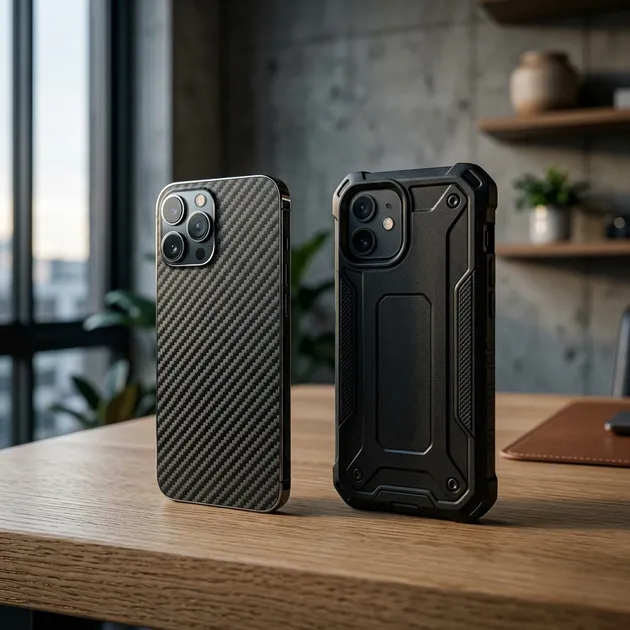
If you have recently purchased a new smartphone, tablet, or laptop, you are likely facing the age-old dilemma: how do you protect it? With devices becoming increasingly expensive and fragile, the instinct is to immediately wrap them in the thickest, most rugged case available. However, a growing number of tech enthusiasts are opting for a different route: the vinyl skin.
In this comprehensive guide, we will dive deep into the debate of skins versus cases. We will explore the pros and cons of each, highlight some of the top brands in the skin industry, such as dbrand and XtremeSkins, and help you determine which option is the right fit for your lifestyle and your precious devices.
The Case for Cases: Maximum Protection
Let’s start with the traditional route. Cases have been the go-to accessory for mobile phones since the days of the Nokia brick, though modern smartphones need them significantly more than those indestructible relics.
The Benefits of Using a Case
1. Superior Drop Protection The primary reason anyone buys a case is for drop protection. Modern smartphones are slabs of glass sandwiched between aluminum or stainless steel frames. They are slippery and incredibly prone to shattering upon impact with concrete or tile. A good case, particularly one from brands known for ruggedness like OtterBox or Spigen, provides a vital layer of shock absorption. The raised lips around the screen and camera bump also ensure that the glass never directly touches the ground when dropped flat.
2. Resale Value Preservation If you are someone who upgrades their phone every year or two, maintaining its pristine condition is crucial for maximizing resale or trade-in value. A heavy-duty case is your best bet for keeping the device looking like it just came out of the box, ensuring you get top dollar when it’s time to sell or trade in to your carrier.
3. Added Functionality Many modern cases offer more than just protection. Wallet cases let you leave your physical wallet at home. Kickstand cases are perfect for media consumption. MagSafe-compatible cases ensure you can use all of Apple’s magnetic accessories without compromising protection. Battery cases can double your device’s screen-on time, acting as a crucial backup for travelers or heavy users.
4. Environmental Resistance Some specialized cases go beyond drop protection and offer extreme environmental resistance. Waterproof cases allow you to take your phone underwater for extended periods without relying solely on the device’s built-in IP rating, while dustproof cases are essential for those working in construction or participating in outdoor sports like mountain biking.
The Drawbacks of Using a Case
1. Added Bulk and Weight The biggest complaint about cases is that they ruin the sleek, slim design that manufacturers spent millions of dollars engineering. A bulky case can make a phone difficult to comfortably hold with one hand or slide into a tight pocket.
2. Heat Retention Smartphones generate a significant amount of heat, especially during intensive tasks like gaming, video editing, or 4K video recording. Cases act as an insulating layer, trapping that heat against the device. This can lead to thermal throttling (where the phone slows down to cool itself) or, over a long period, battery degradation.
3. The Trap of Dirt and Grit Cases are not hermetically sealed. Over time, dust, lint, and hard grit inevitably find their way between the case and the phone. If you don’t regularly remove the case to clean both it and the device, this trapped grit acts like sandpaper, causing micro-scratches on the phone’s frame and glass back, ironically damaging the phone you were trying to protect.
The Appeal of Skins: Sleek Customization
A device skin is a precision-cut adhesive vinyl decal that wraps around your phone, laptop, gaming console, or even your wireless earbuds. They are designed to fit perfectly, covering the glass and metal surfaces while leaving precise cutouts for cameras, buttons, and ports.
The Benefits of Using a Skin
1. Scratch Protection Without Bulk If you are someone who is incredibly careful with their devices and rarely drops them, a case might be overkill. However, even the most careful user cannot completely avoid micro-scratches from setting a phone down on a gritty table or sliding it in and out of a pocket with keys. A skin provides an excellent barrier against scratches while maintaining the device’s original footprint. It feels like you are holding a naked phone, but with peace of mind against scuffs.
2. Ultimate Customization This is where skins truly shine. While cases come in various colors and designs, skins offer a level of customization that is unmatched. Want your iPhone to look like it’s made of matte black leather? There’s a skin for that. Prefer a vibrant pastel yellow, a futuristic carbon fiber texture, or a retro wood grain? The options are virtually limitless.
Top-tier skin manufacturers use high-quality 3M vinyl that not only looks incredible but also adds a tactile texture. The carbon fiber and leather options, for instance, provide significantly more grip than the slippery frosted glass found on most modern flagship phones.
Let’s look at some of the best brands in the business:
- dbrand: Arguably the most famous name in the skin game, thanks to their aggressive marketing and high-profile tech YouTube sponsorships. dbrand is known for its flawless precision cuts, premium 3M materials, and unique limited-edition drops (like their famous teardown skins that make your phone look transparent, or their real leather options).
- XtremeSkins: Based in the UK, XtremeSkins is a fantastic alternative, especially for European buyers looking to avoid international shipping fees. They offer an incredible variety of textures and colors, often allowing you to mix and match different colors for the camera bump and the main body. They are also known for excellent customer service and fast delivery times across the continent.
- Slickwraps: Another major player offering a massive catalog of designs, including licensed artwork and the ability to upload your own custom images. They frequently run massive sitewide sales, making them a budget-friendly option for trying out skins.
- SopiGuard: Known for having skins for a remarkably wide array of devices, including more obscure Android phones, cameras, and drones that the bigger brands might ignore. If you have a niche device, SopiGuard is usually the first place you should check.
3. Zero Heat Issues Because a skin is essentially a high-tech sticker, it adds no insulation to the device. Your phone can dissipate heat exactly as the manufacturer intended, ensuring peak performance during long gaming sessions.
4. Ease of Cleaning Unlike cases, which can harbor bacteria in their crevices, skins are incredibly easy to wipe down. A quick swipe with a microfiber cloth and a mild cleaning solution is all it takes to keep a skin looking pristine, making it a hygienic choice.
The Drawbacks of Using a Skin
1. Zero Drop Protection This cannot be overstated: a skin will not save your phone if you drop it on the sidewalk. While it might prevent the glass from shattering into a million pieces (by holding the shards together like tape), the impact will still break the screen or back glass. If you are clumsy, a skin is not for you.
2. Application Anxiety Applying a skin requires patience, a steady hand, and usually a hairdryer. You have to carefully align the tiny cutouts for the speakers and cameras. Applying heat is necessary to soften the vinyl so it wraps smoothly around the curved edges of modern devices without wrinkling. While companies like dbrand provide excellent instructional videos, it can still be a nerve-wracking process for first-timers.
3. Edge Peeling Over Time Even with a perfect application, the edges of a skin can begin to collect lint or slowly peel back after months of sliding in and out of tight jeans pockets. However, high-quality skins from reputable brands usually last the lifetime of the device before this becomes a major issue.
A Deep Dive into Material Science: What Are Skins Made Of?
It is easy to dismiss skins as mere stickers, but the technology behind them is surprisingly advanced. The vast majority of premium skins are manufactured using automotive-grade cast vinyl, most commonly produced by the 3M company.
Unlike calendered vinyl (which is cheaper and used for temporary signs), cast vinyl is poured as a liquid and baked into a thin sheet. This manufacturing process gives the vinyl dimensional stability, meaning it will not shrink or warp over time. This is why a high-quality skin will maintain its perfect cutouts around your camera lenses even after a year of use.
Furthermore, these premium vinyls use specialized adhesives featuring microscopic air release channels. These channels allow trapped air bubbles to be easily squeegeed out during application, resulting in a smooth, flawless finish. The adhesive is also designed to be semi-permanent; it holds incredibly strong during use but can be peeled off cleanly without leaving any sticky, messy residue behind when you decide to switch designs or sell the device.
The Environmental Impact: Skins vs. Cases
As sustainability becomes a more pressing concern for consumers, it is worth comparing the environmental footprints of both options.
Cases: Traditional cases, especially cheap ones, are often made from unrecyclable plastics, polycarbonates, and silicones. Because devices change sizes so frequently, a case usually only lives for two to three years before ending up in a landfill, where it will take centuries to decompose. While eco-friendly cases made from compostable materials like flax and bioplastics exist (brands like Pela lead this charge), they represent a small fraction of the total market.
Skins: Skins are made of polyvinyl chloride (PVC), which is a plastic and therefore not inherently eco-friendly. However, the sheer volume of material used in a skin is exponentially smaller than that of a case. A skin weighs mere grams and uses a tiny amount of plastic. Consequently, the carbon footprint associated with manufacturing, packaging, and shipping a thin sheet of vinyl is drastically lower than a bulky plastic case.
Detailed Application Guide for Skins
If you have decided to take the plunge and purchase a skin, here is a quick overview of the application process to help calm any nerves:
- Preparation is Key: Wash your hands thoroughly to remove natural oils. Clean your device meticulously using the microfiber cloth and alcohol wipes usually provided by the skin manufacturer. Any dust speck left behind will show up as an annoying bump under the skin.
- Align the Cutouts First: Do not peel the entire backing off at once. Peel back just enough to expose the camera cutout or the bottom speaker holes. Use these precise cutouts to align the skin perfectly.
- Smooth from the Center Out: Once aligned, slowly peel away the rest of the backing while gently smoothing the skin down from the center outwards to prevent air bubbles.
- Embrace the Heat: This is the most crucial step for devices with curved edges. Use a hairdryer on a medium setting to gently warm the edges of the vinyl. The heat makes the material pliable, allowing you to stretch it slightly and smooth it perfectly around the corners without any wrinkles.
- Final Polish: Once applied, aggressively rub the edges of the skin with a microfiber cloth. This friction creates heat and helps to permanently bond the edges to the device, preventing future peeling.
Device Specific Considerations: Beyond the Smartphone
While the skin vs. case debate is most fierce regarding smartphones, it applies to almost all modern tech.
Laptops (MacBooks, XPS, etc.): Laptops are a prime candidate for skins. Bulky hard shell cases can trap heat and add significant weight to a device that is meant to be portable. A skin protects the aluminum from scratches when sliding in and out of a backpack, allows for complete thermal dissipation, and gives a massive canvas for personal expression.
Gaming Consoles: Consoles like the PlayStation 5, Xbox Series X, and Nintendo Switch rarely need drop protection (unless you are a very intense gamer). However, their large, monolithic designs are perfect for customization. Skins allow you to seamlessly integrate your console into your living room decor or make it stand out with a wild design.
Tablets: Tablets occupy a middle ground. If you use a tablet mostly at home on the couch, a skin is perfect. However, if you frequently travel with an iPad or use it for work, a case with a built-in screen cover and keyboard is often the smarter, more practical choice.
Cost Analysis: Which is the Better Investment?
When it comes to cost, skins are generally the more affordable option. A premium skin from a brand like dbrand or XtremeSkins will typically run you between $15 and $30, depending on the device and the texture chosen.
Cases, on the other hand, have a much wider price range. You can find cheap cases on Amazon for $10, but high-quality, protective cases from reputable brands like Spigen, UAG, or OtterBox usually range from $30 to $80 or more.
If you are a budget-conscious consumer who rarely drops their phone, a skin offers excellent scratch protection and customization for a fraction of the cost of a premium case.
The Hybrid Approach: Why Not Both?
What if you want the customization of a skin but the drop protection of a case? You have two excellent options.
1. The Skin + Clear Case Combo This is a highly popular approach. You apply a gorgeous, textured skin to the back of your phone, and then snap a transparent case over it. You get to enjoy the vibrant color or unique pattern of the skin while maintaining military-grade drop protection. The only caveat is that extremely tight-fitting clear cases might push against the edges of the skin during installation, causing it to peel.
2. Grip Cases with Skin Inserts Brands like dbrand have recognized the desire for this hybrid approach and created products like the dbrand Grip Case. This is a highly protective, incredibly grippy bumper case that features a customizable backplate. You apply a skin specifically cut for the case, rather than the phone itself. This eliminates the application anxiety and the risk of peeling edges, while still letting you customize the look of your rugged protection.
Making Your Final Decision
Choosing between a skin and a case ultimately comes down to an honest assessment of your lifestyle and how you handle your tech.
Choose a Case If:
- You have a history of dropping your phone.
- You work in a physically demanding environment (construction, landscaping, etc.).
- You want to maximize the resale value of your device by keeping it flawless.
- You want added features like a kickstand, wallet slot, or battery pack.
Choose a Skin If:
- You rarely drop your devices and are extremely careful.
- You hate the bulk that cases add and want to experience the phone’s intended design.
- You find modern glass phones too slippery and just want to add some texture and grip.
- You want a level of visual customization that cases simply cannot provide.
- You are concerned about your device overheating during intensive tasks.
For many tech enthusiasts, the journey goes something like this: they buy a phone and a bulky case. After six months, they get tired of the bulk and switch to a thinner case. After a year, they decide to risk it all and go caseless, only to find the phone too slippery. Finally, they discover skins, finding the perfect middle ground of scratch protection, grip, and maintaining the device’s slim profile.
Whether you choose to armor up with a heavy-duty OtterBox or express your personality with a vibrant dbrand skin, the most important thing is that you are making a conscious choice about how to interact with the device you use most every single day. Both offer valid ways to enhance and protect your mobile experience in 2026. Ultimately, your choice should reflect your personal style and your practical needs. Enjoy customizing your tech!
Related Articles
Rumored iPhone Fold: Specs, Release Date & Price
Everything about Apple's rumored iPhone Fold: supply chain leaks, crease-free display patents, expected launch windows, pricing, and custom iOS features.

Kindle Paperwhite Review 2026: Still the One to Buy?
Our 2026 Kindle Paperwhite review: 7-inch screen, waterproofing, warm light, and weeks of battery for $159.99. Here is who should buy it and who should not.

10 Best KOReader Plugins to Upgrade Your E-Reader (2026)
Discover the 10 best KOReader plugins for Kindle, Kobo, and Android e-readers. Learn how to sync reading progress, export highlights, and connect Calibre.