
The Golden Age of $500 3D Printers: Turn-key vs. DIY
Is $500 the sweet spot for 3D printing? We compare modern plug-and-play machines against legendary DIY kits, featuring the Bambu Lab P2S and Creality K2.

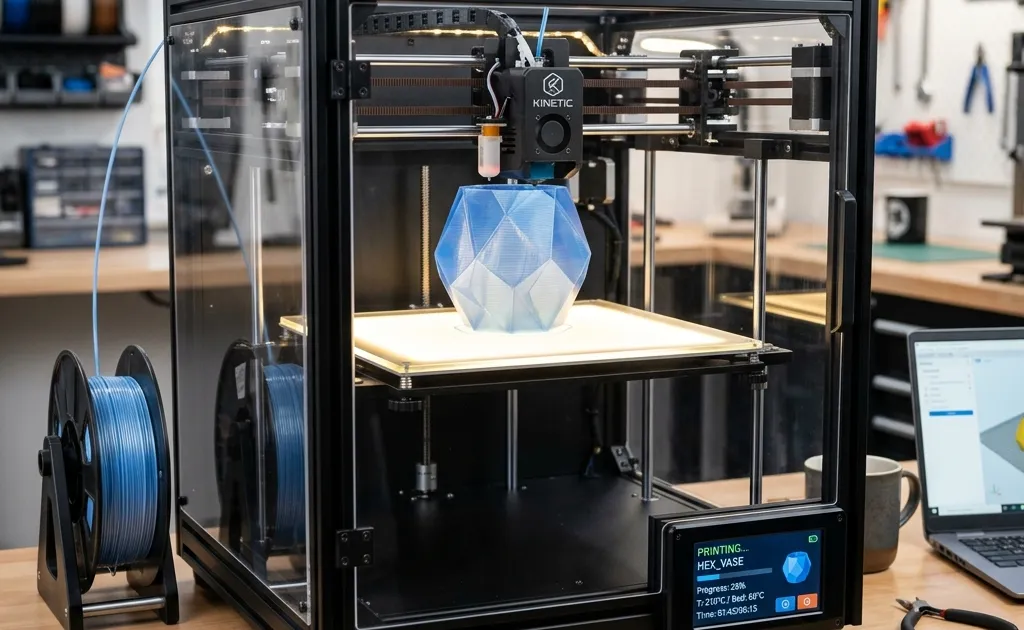
The Paradigm Shift in Desktop Manufacturing
At $500 the choice is between a turn-key enclosed CoreXY machine and a DIY-friendly open printer, and for most people the enclosed machine wins. Five years ago this budget bought a project; today it buys a printer that levels itself, prints fast, and handles PETG and ABS inside a closed chamber. The comparison below sorts the field by that single question: do you want to print, or do you want to build?
There has never been a better time to get into 3D printing. Just five years ago, spending $500 on a 3D printer meant purchasing a project. You were buying an ‘Ender clone’, a machine that required dozens of printed upgrades, custom firmware flashes, silent stepper motor board swaps, and an endless reservoir of patience just to achieve a mildly acceptable PLA print. It was a hobby for tinkerers, not a tool for creators.
Master 3D printing from start to finish: Dive into our complete 3D Printing Guide for Beginners covering printers, troubleshooting, and project ideas.
Today, the landscape is entirely unrecognizable. The $500 price bracket has transformed from a wasteland of finicky Cartesian bed-slingers into a battlefield of ultra-fast, high-precision, fully enclosed CoreXY powerhouses. Machines from titans like Bambu Lab, Creality, and Qidi have democratized speed and reliability. You are no longer buying a project; you are buying an appliance.
However, alongside this commercial revolution, the DIY community has not remained stagnant. Open-source projects like the Voron Design series and RatRig have pushed the absolute boundaries of what is mechanically possible at home. You can still spend $500 building a printer from scratch. The question is: should you?
This comprehensive guide will tear down the current state of the $500 3D printing market. We will deeply analyze what you get when you buy a modern plug-and-play machine, compare the hottest commercial models head-to-head, strictly contrast them against the grueling but rewarding path of building a DIY kit, and help you determine exactly which route aligns with your ultimate goals.
The State of the Art: The $500 Commercial Appliance
When we talk about the $500 price point today, we are almost exclusively discussing enclosed CoreXY machines running Klipper-based (or proprietary equivalent) firmware. Let’s dissect the anatomy of these modern marvels and understand exactly what your money buys you.
1. The CoreXY Motion System
The biggest shift in the sub-$1000 market has been the mass migration from Cartesian “bed-slinger” designs (where the heavy print bed moves back and forth on the Y-axis) to the CoreXY architecture.
In a CoreXY printer, the print bed only moves vertically (the Z-axis). The incredibly complex, overlapping belt path allows two stationary stepper motors at the back of the machine to drive the lightweight toolhead across the X and Y axes simultaneously.
The Advantages: Because the moving mass is drastically reduced, the printer can achieve terrifyingly high accelerations (often exceeding 10,000 to 20,000 mm/s²) without introducing ringing or ghosting artifacts into the print. This cuts print times from days to mere hours. A Benchy that took two hours in 2020 now takes 14 minutes with superior quality.
2. Klipper and Input Shaping
Hardware is only half the story. The software running these machines has undergone a quantum leap. Previously, 8-bit microcontrollers struggled to compute complex movements, bottlenecking the printer’s mechanical potential.
Today, $500 machines run Klipper (or a fork of it). Klipper offloads the heavy mathematical lifting to a more powerful secondary processor (often a Linux-based board). The crown jewel of Klipper is “Input Shaping.”
How it works: The printer uses an accelerometer mounted to the toolhead to measure the resonant frequencies (the microscopic vibrations) of the machine at various speeds. The software then intentionally introduces counter-vibrations into the motor movements to perfectly cancel out the machine’s natural resonance. It is active noise cancellation, but for physical momentum. This allows you to print at blistering speeds while maintaining perfectly smooth walls.
3. Automated Calibration
Perhaps the greatest victory for the consumer is the death of the piece of paper. Manual bed leveling, adjusting four tiny knobs under a heated plate while dragging paper under the nozzle, is effectively a relic of the past.
Modern $500 machines utilize strain gauges, inductive probes, or LiDAR to create incredibly dense mesh maps of the print bed. The printer compensates for microscopic warps in the bed perfectly on the fly. You press print, you walk away, and the first layer is flawless 99% of the time.
The Heavyweights: Comparing the Top $500 Commercial Printers
If you have decided that the appliance route is for you, the market is incredibly crowded. Let’s break down the major players battling for your $500 in 2026.
Bambu Lab P1S vs. Bambu Lab P2S
Bambu Lab single-handedly forced the rest of the industry to catch up when they released the original X1 Carbon and its budget sibling, the P1S.
- The P1S ($450): The P1S remains a legendary machine. It offers an enclosed CoreXY system, flawless auto-calibration, and access to Bambu’s incredibly polished AI-enhanced slicer and AMS (Automatic Material System) ecosystem. Its only downsides are a slightly dim screen, an older 8-bit companion board, and a closed-source ecosystem.
- The P2S ($549): The 2026 iteration, the P2S, slightly breaches the $500 mark but offers massive quality-of-life improvements. It features next-generation active chamber heating (perfect for ABS and PC), whisper-quiet TMC2240 stepper drivers, a full-color capacitive touchscreen, and a slightly expanded 270x270x270mm build volume. If you can stretch the budget by $50, the P2S is the undisputed king of reliability.
Creality K2
Creality, the creators of the original Ender 3, fired back aggressively with the K-series.
- The K2 ($499): The K2 is Creality’s refined answer to the Bambu P-series. It is fully enclosed, runs an open-source native implementation of Klipper (a huge win for tinkerers), and features a massively powerful 300°C ceramic hotend capable of flowing plastic at terrifying rates. The K2’s primary advantage over Bambu Lab is its open ecosystem. You have root access to the machine, allowing for extensive third-party modifications, custom macros, and unrestricted OctoPrint integration.
Qidi Tech Q2
Qidi has quietly carved out a massive niche for users who prioritize engineering materials over PLA miniatures.
- The Q2 ($479): The Qidi Q2 is a brutalist, function-over-form machine. It boasts the thickest, most heavily insulated chamber in the $500 bracket, actively heated to 65°C. This makes the Q2 the absolute best $500 printer for printing large ABS, ASA, or Nylon parts without warping. It lacks the slick UI of the Bambu machines, but for pure mechanical engineering applications, the Q2 is an unstoppable tank.
Anycubic Cobra (CoreXY Edition)
Anycubic’s long-running Kobra line finally abandoned the bed-slinger architecture in 2026 with the new “Cobra CoreXY.”
- The Cobra ($429): The Cobra undercuts the competition on price while offering a massive 300x300x300mm build volume. It achieves this by utilizing a slightly cheaper linear rod system instead of linear rails, and omitting the full enclosure (it comes with acrylic panels you must install yourself). It is the budget king for users who need maximum size but still want the speed benefits of Klipper and Input Shaping.
Snapmaker U1
Snapmaker is known for 3-in-1 tool-changing machines, but the U1 is their dedicated entry into the high-speed 3D printing market.
- The U1 ($499): The U1’s selling point is modularity. While it prints beautifully, its toolhead features a quick-swap magnetic coupling. Snapmaker promises future toolheads (like a 10W laser engraver or a CNC carving bit) that can attach to the same CoreXY gantry. For the maker who wants a multi-tool ecosystem down the line, the U1 is a unique proposition, though its raw 3D printing speed lags slightly behind the Bambu P2S and Creality K2.
The DIY Alternative: Building a Machine from Scratch
With commercial machines like the Bambu P2S and Creality K2 being so incredibly good, why does a massive, thriving community still exist for building DIY 3D printers? Why would someone spend $500 on a box of aluminum extrusions, bags of bolts, and bare stepper motors?
To understand this, we have to look at the flagship of the DIY world: The Voron Design project. At the $500 price point, you are typically looking at a Voron V0.2 kit, a tiny, incredibly fast, over-engineered 120mm cubed printer.
The Philosophy of the DIY Build
Building a Voron is not about getting a printer quickly; it is an intensive, multi-week masterclass in mechanical engineering, electronics wiring, and software configuration. You must crimp your own wires. You must align linear rails perfectly to the micron. You must compile the firmware yourself.
The Advantages of the DIY Route
1. Absolute, Uncompromising Knowledge: When you build a printer from the ground up, there is no black box. When a belt snaps, a wire frays, or a stepper driver overheats, you do not need to wait for a proprietary customer support ticket. You know exactly how to diagnose the issue because you put every single nut in place. You own the knowledge.
2. The Absence of Proprietary Lock-in: Commercial $500 machines are increasingly becoming closed ecosystems. Parts like the hotend, the extruder, and the mainboard are often proprietary. If the company goes bankrupt or decides to stop supporting your model, you are left with a massive paperweight.
A DIY printer is built using universally standardized, off-the-shelf components. You can swap the hotend for a competing brand. You can upgrade the mainboard. The machine is immortal because it is agnostic to corporate agendas.
3. The Extreme Performance Ceiling: While commercial machines are fast out of the box, they are built to a budget. A DIY builder can choose to allocate their $500 exactly where it matters. You can source incredibly high-quality, ultra-lightweight carbon fiber X-axis tubes. You can install ultra-high-flow hotends capable of melting plastic faster than gravity can drop it. The absolute upper echelon of 3D printing speed records is still completely dominated by custom DIY builds.
Head-to-Head: Which Path Should You Choose?
The decision between purchasing a commercial $500 appliance and building a $500 DIY kit comes down to a fundamental question: Is 3D printing your hobby, or is the 3D printer a tool for your hobby?
The Case for the Commercial Appliance ($500)
You should buy a commercial machine if:
- You want to print functional parts, miniatures, or prototypes immediately.
- Your primary hobby is CAD design, painting miniatures, or engineering, and the printer is merely a tool to manifest your ideas.
- You value your weekend time and have zero desire to spend 40 hours crimping JST connectors and reading wiring diagrams.
- You require a large build volume immediately. (A $500 commercial printer gives you a 250mm³ volume, whereas a $500 DIY kit usually limits you to a tiny 120mm³ volume due to part costs).
The Reality: For 95% of the population, this is the correct choice. The value proposition of modern commercial CoreXY machines is staggering. They represent the democratization of advanced manufacturing.
The Case for the DIY Kit ($500)
You should build a DIY kit if:
- The machine itself is the hobby. You genuinely enjoy the process of building, tuning, upgrading, and tweaking hardware. If you are looking for a challenging, deeply engaging project to combat workplace boredom, building a Voron is the ultimate remedy.
- You are an engineering student, a tinkerer, or someone who wants to deeply understand the mechanics of CNC robotics.
- You are vehemently opposed to proprietary software and cloud-locked hardware ecosystems.
- You want a secondary printer specifically for printing high-temperature engineering materials (like ABS or PC) in a perfectly tuned, ultra-reliable tiny footprint (like the Voron V0.2).
The Reality: The DIY route is a grueling crucible. You will experience intense frustration. You will likely short a board or misalign a rail. But when that first perfect cube finishes printing on a machine you birthed into existence with your own two hands, the sense of accomplishment is profound.
The Materials Factor: What Are We Printing?
When evaluating a $500 budget, it is critical to look beyond the machine itself and understand the materials you intend to print, as this often dictates the necessity of certain hardware features.
PLA and PETG: The Standard Bearers
If your goal is to print decorative items, cosplay props, or simple functional brackets, PLA (Polylactic Acid) and PETG are your go-to materials. Nearly any modern $500 printer handles these flawlessly. They do not require a heated chamber, and in fact, PLA requires massive part cooling. The massive dual-fan setups on machines like the Bambu P2S and Creality K2 excel here.
ABS, ASA, and Polycarbonate: The Engineering Grade
If you need parts that will withstand high temperatures or immense mechanical stress, you must move to ABS, ASA, or PC.
This is where the environment matters immensely. These materials shrink aggressively as they cool. If they cool too fast or unevenly, the print will warp drastically and rip itself off the build plate. Therefore, an actively heated, or heavily insulated passive chamber is mandatory.
If this is your primary goal, the Qidi Q2 or the Bambu P2S are your best commercial options. However, DIY kits like the Voron are explicitly designed around chamber thermals, often featuring thicker acrylic panels and superior heat management.
The Hidden Costs of 3D Printing
When budgeting $500, it is a common fallacy to assume the expenditure stops when the printer arrives. Whether you choose commercial or DIY, there are hidden, necessary costs that will quickly push your budget toward $600 or $700.
1. The Filament Reservoir: A printer without filament is useless. You will realistically want a minimum of 4-5 spools of quality filament in various colors and materials. At $20 a spool, that is an immediate $100 overhead.
2. Maintenance and Wear Items: Nozzles are consumables. Brass nozzles wear down, especially if you print abrasive glow-in-the-dark or carbon-fiber-filled filaments. You will eventually need hardened steel nozzles, replacement PEI build plates, and isopropyl alcohol for cleaning.
3. The Tools: While kits come with terrible, soft-metal allen keys, a dedicated maker needs a proper set of metric hex drivers, quality flush cutters, deburring tools, and a reliable digital caliper.
Conclusion: The Ultimate Winner
The debate between commercial appliances and DIY kits at the $500 price point does not have a single objective winner because they serve entirely different psychological needs.
If we define the “winner” strictly by the volume of plastic successfully extruded per dollar spent with minimal human intervention, the modern commercial CoreXY machines, led by the Bambu Lab P2S and Creality K2, are undisputed titans. They offer an almost magical experience for the average consumer.
However, if we define the “winner” by the volume of knowledge gained, the depth of the engineering journey, and the absolute ownership of the hardware, the DIY community remains untouchable.
Your choice dictates your journey. Will you buy a tool, or will you build a legacy? Whichever path you choose, the golden age of desktop manufacturing is here, and your desk is about to get a lot more interesting.
Related Articles
Bambu Lab A2L: Specs, Price & Who It's For (2026)
Bambu Lab's A2L brings a 330mm large-format build to the A-series for $469. Here's what the specs actually mean and who this budget big-bed printer is for.
Justway Review 2026: Pricing, Quality & Lead Times
Wondering if Justway is legit? Read our honest 2026 review covering on-demand 3D printing, CNC machining, turnaround speeds, and comparisons with JLCPCB.
Bambu Lab X2D Review: $649 Dual-Nozzle Heated Chamber
Bambu Lab X2D review: $649 base / $899 AMS Combo. Dual-nozzle mechanical switching, 65°C heated chamber, 256mm build, and 31 sensors. Is it worth it?