
ArtCraft: Can AI Vibe Coding Rebuild the Adobe Suite?
ArtCraft promises 12 open-source Adobe clones built in Rust with AI. We analyze PhotoCraft, the vibe coding trend, and the future of paid software models.

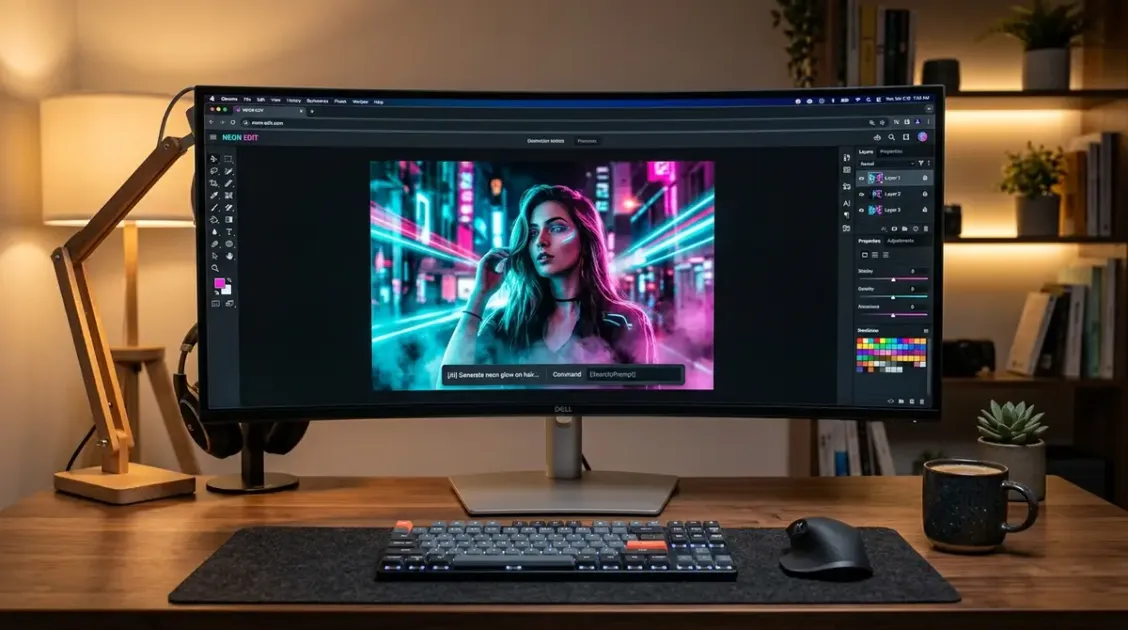
In late 2024 and early 2025, the concept of “vibe coding” emerged as a playful experiment. Prompt a conversational model, steer the vibe, and watch a working prototype appear in minutes. Most early projects were disposable toys: browser timers, retro arcade games, or minimal text formatters.
Then came ArtCraft.
Hosted at getartcraft.com/apps by developer Brandon Thomas under the storytold GitHub organization, ArtCraft did not stop at a simple canvas demo. The project announced an audacious, near-mythical objective: rebuilding the entire 12-app Adobe Creative Cloud ecosystem from scratch as native, open-source software written in Rust, with zero subscriptions, zero cloud telemetry, and zero vendor lock-in.
The flagship application, PhotoCraft, is an explicit recreation of Adobe Photoshop. Beside it sit VectorCraft (Illustrator), FilmCraft (Premiere Pro), LightCraft (Lightroom), EffectCraft (After Effects), and seven others spanning audio, page layout, CAD, and spreadsheets.
The project went viral across Hacker News, GitHub, and developer forums, igniting intense debate. Is ArtCraft proof that conversational AI can dismantle a multi-billion-dollar creative monopoly over a few sprints? Or is it an over-ambitious alpha that reveals the harsh limits of prompt-generated code?
More importantly, ArtCraft forces us to confront an uncomfortable question for the tech industry: When AI reduces the cost of producing complex desktop software to near zero, what is the future of paid software?
If you want to understand how modern language models are transforming engineering workflows, check out our Master AI Guide for an architectural breakdown of modern development pipelines.
Quick Picks: ArtCraft Apps vs. Adobe Creative Cloud at a Glance
The ArtCraft project organizes 12 distinct tools managed by a unified desktop launcher. Here is how the core apps compare directly against their commercial Adobe targets.
| ArtCraft App | Adobe Target | Primary Function | Core Technology | Current Status |
|---|---|---|---|---|
| PhotoCraft | Photoshop | Raster image editing & layer compositing | Pure Rust, PSD/PSB parser | Alpha (Usable for basic edits) |
| VectorCraft | Illustrator | Vector illustration & path manipulation | Rust Bezier engine, SVG | Early Alpha (Basic paths) |
| FilmCraft | Premiere Pro | Non-linear video timeline editing | Rust media pipeline, FFmpeg | Experimental Prototype |
| LightCraft | Lightroom | Non-destructive RAW photo development | Native image processing | Alpha (Basic exposure adjustments) |
| EffectCraft | After Effects | Motion graphics & procedural keyframing | Shader engine | Prototype |
| DesignCraft | InDesign | Multi-page desktop publishing & layout | Rust typography engine | Experimental |
| PdfCraft | Acrobat Pro | PDF inspection, merging, and annotation | Local PDF parser | Functional Utility |
1. The ArtCraft Phenomenon: Twelve Apps in Pure Rust
To understand why ArtCraft captured so much attention, you have to understand the tech stack.
Many modern creative alternatives (such as Figma or Canva) are web applications packaged in Electron. While accessible, Electron apps carry significant memory overhead, battery drain, and perceived latency compared to native C++ suites.
ArtCraft took the opposite approach. Every application in the suite is built as a native binary written in Rust.
Rust provides memory safety without the performance penalty of a garbage collector. It compiles directly to native machine code on macOS, Windows, and Linux. When an application written in Rust opens an image, it interacts directly with your CPU and GPU without intermediary web container layers.
The apps ship as native installers for macOS, Windows, and Linux plus a WebAssembly build that runs in a browser tab, dual-licensed MIT or Apache-2.0, with the code on GitHub. There is no account, no license check, and no cloud sync: each tool runs offline and stores project files in your local filesystem.
For millions of creators frustrated by Adobe’s escalating subscription costs, mandatory cloud synchronization, and controversial terms of service updates, ArtCraft looks like the ultimate antidote.
2. How Vibe Coding Built an Entire Creative Suite
Under normal circumstances, building 12 native creative applications from scratch would require a studio of 150 engineers, millions of dollars in venture capital, and four to five years of development.
The developer did not hire an army of engineers. Instead, they leaned heavily into AI-assisted development and vibe coding workflows.
The Scaffolding Pipeline
Rather than manually writing thousands of lines of boilerplate for user interface widgets, event loops, and file system handlers, the developer used Claude Opus 5.5 through Claude Code, according to his own account and the launch coverage, to generate entire subsystems:
- Format Decoders: Reverse-engineering legacy formats like Photoshop’s proprietary
.psdand.psbspecification is notorious for messy byte-alignment edge cases. Modern LLMs excel at translating dense format documentation into clean, idiomatic Rust struct definitions and bitwise parser logic. - UI Component Replication: Creating identical docking panels, color pickers, layer list trees, and histogram monitors was accelerated by feeding screenshots and functional specifications into multimodal AI agents, generating native Rust GUI code in minutes.
- Mathematical Primitives: Transforming affine matrices, calculating blend mode algorithms (Multiply, Screen, Color Dodge), and handling spatial coordinate mapping are well-documented mathematical problems where AI code generation achieves near 100% accuracy on first attempt.
By delegating the mechanical volume of software construction to AI, a small core group of maintainers could act as systems architects and project managers, pushing dozens of commits per day across multiple repositories simultaneously.
3. Deep Dive: What PhotoCraft Actually Delivers
Because PhotoCraft is the flagship of the suite, it is the one to judge the project by. We have not put the alpha through a full test yet; what follows is based on the project’s own status page, the launch coverage, and early user reports, and we will add our own numbers once a build has been through a week of real use here.
┌──────────────────────────────────────────────────────────────┐│ PhotoCraft Native Interface (Pure Rust) │├───────┬──────────────────────────────────────────────┬───────┤│ Tools │ Central Canvas Viewport │ Layers││ [V] │ ┌──────────────────────────────────────────┐ │ [Eye] ││ [M] │ │ │ │ Layer3││ [B] │ │ Zoomable Viewport │ │ [Eye] ││ [E] │ │ Native GPU / WGPU Pipeline │ │ Layer2││ [T] │ │ │ │ [Eye] ││ [G] │ └──────────────────────────────────────────┘ │ Layer1│├───────┴──────────────────────────────────────────────┴───────┤│ Status Bar: canvas size | color space | zoom level │└──────────────────────────────────────────────────────────────┘What Works Surprisingly Well
- Speed and Memory Footprint: Early users report fast launches and a small idle memory footprint next to Photoshop, which is what a native Rust binary without an Electron shell should deliver. We will publish measured numbers once a build has been through our own hands.
- Familiar Spatial Layout: Anyone who has spent ten minutes in Photoshop feels immediately at home. The left toolbar houses the marquee, move, brush, eraser, and text tools. The right panel displays an intuitive layer stack with visibility toggles, opacity sliders, and blend mode dropdowns.
- PSD File Ingestion: PSD import is on the alpha’s feature list. How faithfully it preserves complex layer hierarchies, masks, and effects is exactly the kind of thing an alpha gets wrong, so keep a copy of the original file.
- Local Privacy: No login screens, no mandatory cloud backups, and zero network calls. The software behaves like classic software from the 1990s: it opens, does its job, and saves to your hard drive.
The Code Behind the Canvas
PhotoCraft avoids web-style DOM rendering by leveraging native graphics crates. Below is a conceptual illustration of how the Rust engine structures its layer composition loop:
// Simplified representation of PhotoCraft's layer composition pipelinepub struct Layer {    pub id: u64,    pub name: String,    pub visible: bool,    pub opacity: f32,    pub blend_mode: BlendMode,    pub buffer: Vec<u8>, // RGBA8 raw pixel data    pub bounds: Rect,}
pub fn composite_layers(layers: &[Layer], output: &mut [u8], width: usize, height: usize) {    // Clear output target    output.fill(0);
    for layer in layers.iter().filter(|l| l.visible) {        let alpha = layer.opacity.clamp(0.0, 1.0);
        // Fast SIMD-accelerated pixel blend across bounding rectangle        for y in layer.bounds.top..layer.bounds.bottom {            for x in layer.bounds.left..layer.bounds.right {                let src_idx = calculate_pixel_index(x, y, layer.bounds.width);                let dst_idx = calculate_pixel_index(x, y, width);
                blend_pixel(                    &layer.buffer[src_idx..src_idx + 4],                    &mut output[dst_idx..dst_idx + 4],                    layer.blend_mode,                    alpha,                );            }        }    }}
Because this logic compiles to native assembly without runtime interpretation, basic raster rendering feels remarkably fluid.
4. The Reality Check: Where Vibe Coding Hits the Wall
Despite the excitement, early reports from people doing genuine graphic design work in PhotoCraft point to why Adobe has stayed dominant for four decades.
Building a photo editor is not just about drawing pixels onto an array. It is an iceberg of extreme domain specialization, and ArtCraft currently crashes into several critical blocks:
1. Stability and Edge-Case Handling
The current builds are unapologetically in alpha, and the project says so on its own status page. Users report that simple operations, such as importing an unusually sized image or rapidly pressing undo while transforming a layer, can trigger unhandled panics that close the app without saving.
This is the classic symptom of AI-assisted scaffolding: the model writes the “happy path” with stunning competence, but subtle state transitions and asynchronous event conflicts get overlooked.
2. Missing Deep Tooling
While basic rectangular selections and brush strokes work, the nuanced tools professional retouchers rely on daily are either incomplete or missing:
- Vector Pen Tool: Creating and editing smooth Bezier curves with tension handles requires tactile responsiveness that prompt engineering has not yet perfected.
- Content-Aware Fill & Healing: Photoshop utilizes sophisticated generative synthesis and patch algorithms. PhotoCraft has basic clone stamping, but nothing approaching modern generative inpainting.
- Complex Masking: Layer masks work in basic scenarios, but clipping masks, vector masks, and luminance-based selection channels remain rough.
3. Color Science and Print Standards
For web design, sRGB 8-bit color is generally sufficient. But for commercial print and high-end photography, Photoshop’s real power lies in color management:
- Support for 16-bit and 32-bit floating-point color channels.
- Accurate CMYK separation curves for physical printing presses.
- Custom ICC color profile embedding and soft-proofing.
In ArtCraft, deep color management remains largely on the roadmap. Exporting a commercial print file today would risk unexpected color shifts.
4. The 12-App Dispersion Dilemma
Perhaps the biggest critique from the open-source community is focus. Instead of concentrating all energy on making PhotoCraft a bulletproof, rock-solid alternative to Photoshop (in the way Blender focused exclusively on 3D or Krita focused on digital painting), the project split its attention across 12 massive applications, seven shipped and five more announced, simultaneously.
Rebuilding InDesign, Premiere Pro, and AutoCAD alongside Photoshop is an astronomical undertaking. Without disciplined focus, there is a risk of ending up with 12 half-finished prototypes rather than one truly production-ready tool.
5. The Collapse of Software Moats: How AI Is Demonetizing Code
Even with its current alpha limitations, dismissing ArtCraft would be a massive strategic mistake. What matters is not whether PhotoCraft beats Photoshop in October 2026.
What matters is how fast ArtCraft got here, and what that signals for the economics of software development.
Historically, complex software possessed a deep defensive moat built on accumulated engineering hours. If a company spent 30 years writing 20 million lines of C++ code, competitors simply could not catch up. The barrier to entry was measured in hundreds of millions of dollars.
Generative AI fundamentally fractures that economic reality:
Traditional Software Era:High Engineering Cost ──► Massive Proprietary Moat ──► High Subscription Pricing
The Vibe Coding Era:Near-Zero Code Cost   ──► Fragile Technical Moats   ──► Software Commoditization
When an AI model can generate working graphics pipelines, format parsers, and UI components from natural language prompts, the cost of writing software approaches zero.
Code itself ceases to be a scarce asset. A developer with deep domain understanding and strong prompt architecture can reproduce features in an afternoon that once required an entire engineering team.
As a result, proprietary desktop software that merely acts as an interface for standard algorithms (cropping images, organizing layers, converting video clips) is becoming rapidly commoditized.
6. The Death of the Subscription Tax
For the past decade, the software industry operated on an uncontested playbook: everything must be a monthly subscription.
Companies transitioned from one-time perpetual licenses to perpetual rent-seeking. Users no longer owned their tools; they rented access. For a professional designer, paying $60 per month for the Adobe Creative Cloud suite is often acceptable as a business expense. But for millions of hobbyists, students, small business owners, and occasional creators, paying $720 every year just to crop photos and edit occasional graphics feels like an extortionate subscription tax.
This subscription fatigue created massive pent-up demand. Whenever an open-source or one-time-purchase alternative appears, users flock to it:
- Affinity Photo, Designer, and Publisher gained millions of loyal users simply by offering a traditional one-time purchase license.
- Blender completely took over the 3D industry from Maya and 3ds Max through relentless open-source community refinement.
- DaVinci Resolve captured massive market share from Premiere Pro with a generous free tier and a lifetime license.
ArtCraft taps directly into this frustration. Even if PhotoCraft only achieves 30% of Photoshop’s capabilities over the next year, that 30% covers the exact everyday needs of 80% of casual users.
When users realize they can perform their daily creative tasks inside a free, native, open-source tool without paying monthly fees, the financial foundation of the subscription monopoly begins to crumble.
7. What the Future of Paid Software Looks Like
If pure code is becoming a commodity and subscriptions for basic desktop utilities are losing their grip, how will software creators survive? What does the future of paid software actually look like?
The rise of projects like ArtCraft points toward a fundamental restructuring of digital business models:
1. Local-First Open Source with Paid Compute
The base software (the canvas, the timeline, the brush engine) will be free, open-source, and run 100% locally on your hardware. Developers will charge not for the interface, but for optional cloud compute:
- Cloud rendering farms for complex 3D or 8K video exports.
- Heavy AI generative models that cannot run efficiently on local consumer hardware.
- Real-time team collaboration, version history synchronization, and asset libraries.
Users who want simple, local, offline tools pay nothing. Teams that need enterprise compute and collaboration pay for the actual cloud resources they consume.
2. The Rise of the Hyper-Focused Micro-Utility
The era of the all-in-one monolithic creative suite is giving way to hyper-focused micro-tools. Instead of installing a 5-gigabyte application to resize social media assets or generate product mockups, developers will vibe-code lightweight, single-purpose utilities that execute instantly without bloat.
Indie developers can build and sustain profitable micro-businesses not by charging recurring $30 subscriptions, but by offering lifetime licenses for $15 to $29 that solve one specific problem with absolute perfection.
3. The Shift from Code Writing to Taste and Curation
When anyone can prompt an application into existence, the differentiator is no longer who can write code the fastest.
The differentiator becomes product taste, workflow design, and community trust:
- Which tool has the most intuitive keyboard shortcuts?
- Which editor feels fastest and respects user attention?
- Which ecosystem protects user data and ensures long-term format compatibility?
The winners of the next software era will not be companies with the largest engineering departments, but developers with the best design sensibilities who use AI to build responsive, respectful tools.
The Bottom Line
ArtCraft is not yet ready to replace Adobe inside Fortune 500 design agencies or Hollywood post-production suites. PhotoCraft remains an early alpha with rough edges, missing features, and stability risks.
Yet, ArtCraft is a watershed moment. It proves that the era where building a professional desktop creative suite required a decade of proprietary development is officially over.
By marrying the performance and safety of native Rust with the rapid synthesis power of modern AI prompting, the ArtCraft team has fired a loud warning shot across the bow of the software industry: The subscription tax is expiring, and the future of creative tools belongs to local, native, and open-source software.
Top AI Models for Coding & Software Engineering
Empirical rankings sourced from Artificial Analysis, Arena.ai, LLM Stats & BenchLM.
Related Articles
Best AI Note-Taking Apps 2026 (Organize Your Brain)
The best AI note-taking apps in 2026: tools that capture, organize, and resurface your notes with AI, from Notion to Obsidian, plus how to pick the right one.

How to Set Up a Cozy Reading Nook (2026 Guide)
How to set up a cozy reading nook in 2026: the seating, lighting, and small touches that turn any corner into an inviting place to actually finish your books.
Best Home Office Gifts Under $100 (2026)
The best home office gifts under $100 for 2026: desk upgrades, ergonomic extras, and comfort boosters that any remote worker will actually use every day.