
iPad Air 11 M4 Review: iPadOS 27 Powerhouse in 2026
Apple iPad Air 11-inch M4 review with iPadOS 27: benchmark performance, Apple Intelligence, Stage Manager 3.0, Apple Pencil Pro, and real battery life.

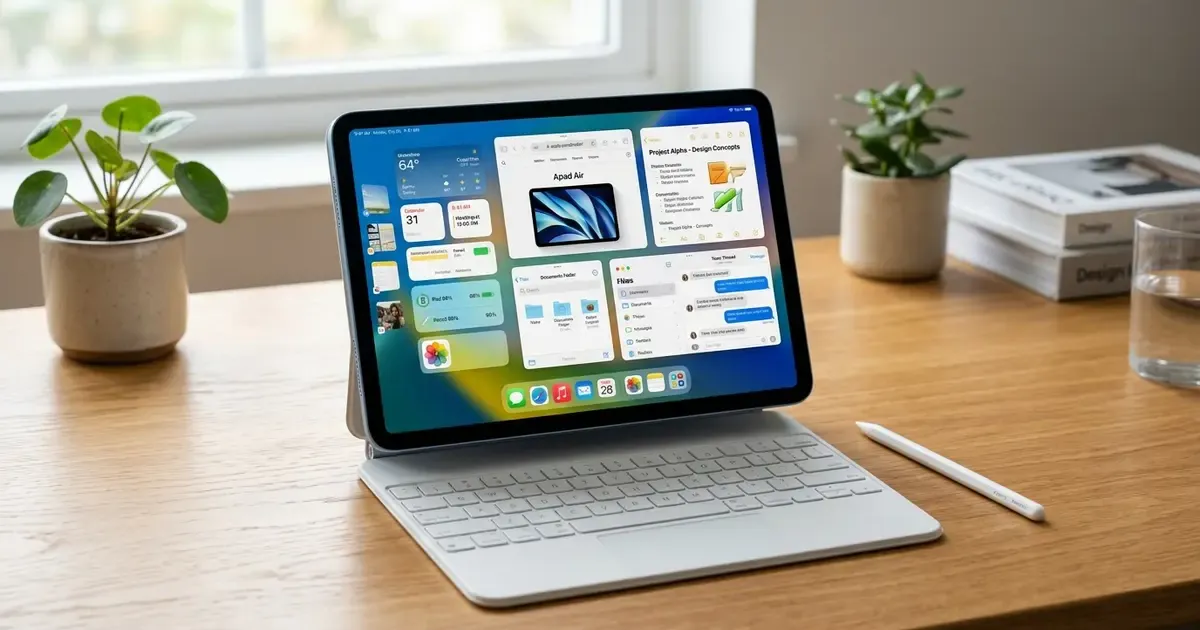
When Apple refreshed the iPad Air line with the desktop-tier M4 processor and paired it with the release of iPadOS 27, it fundamentally shifted the value equation across the entire tablet market. For years, the iPad Air lived comfortably in the middle tier: powerful enough for everyday creative tasks, yet held back by operating system restrictions that made it feel like an oversized smartphone with a keyboard. With the simultaneous release of iPadOS 27 (launched alongside macOS 27 and iOS 27 in September 2026), the 11-inch iPad Air has grown into a genuine, highly portable workstation that challenges both traditional ultrabooks and its much more expensive sibling, the iPad Pro.
Upgrade your mobile workstation: If you pair your tablet with a multi-device desktop layout, explore our Master Desk Upgrade Guide to learn about ergonomic stands, external displays, and cable management, or check our guide on how to share a keyboard and mouse between Mac and PC.
Below, we put the 11-inch iPad Air with M4 through intensive benchmark testing, creative workflows, multitasking trials, and battery rundowns to determine whether this $599 machine is the ideal digital companion for knowledge workers, students, and mobile professionals.
Quick Picks: iPad Air 11 M4 Key Specs & Verdict at a Glance
For readers looking for a rapid summary before diving into in-depth benchmarks, here is how the 11-inch iPad Air M4 stacks up:
| Feature / Metric | Specification | Real-World Rating |
|---|---|---|
| Processor & GPU | Apple Silicon M4 (3nm, 10-core GPU, 16-core NPU) | Exceptional (Class-leading single-core and NPU speed) |
| Neural Engine (NPU) | 16-core Neural Engine (38 TOPS throughput) | Blazing fast on-device Apple Intelligence processing |
| Display Panel | 11-inch Liquid Retina IPS (2360 x 1640 at 264 ppi, 500 nits) | Very Good (Sharp and color-accurate, but limited to 60Hz) |
| Stylus Compatibility | Apple Pencil Pro and Apple Pencil USB-C | Superb (Haptic squeeze and barrel roll support) |
| Software Platform | iPadOS 27 (Liquid Glass UI, Stage Manager 3.0) | Huge leap forward for window management and external screens |
| Port & Bandwidth | USB-C 3.1 Gen 2 (up to 10Gbps data transfer) | Solid for portable SSDs, though lacks Thunderbolt 4 |
| Biometric Security | Touch ID integrated into top power button | Fast and dependable, though lacks Face ID convenience |
| Base Price & Storage | $599 (128GB Wi-Fi) up to $1,099 (1TB Wi-Fi) | Outstanding value compared to the $999 iPad Pro |
The M4 Silicon Leap: Benchmarks and Thermal Performance
Bringing Apple’s second-generation 3-nanometer M4 chip into the iPad Air chassis provides a staggering amount of compute density in a device that measures just 6.1 mm thin and weighs barely 462 grams.
Geekbench 6 Performance Benchmarks
In our synthetic benchmark runs, the iPad Air 11 M4 generated numbers that rival high-end desktop workstations from just two years ago:
- Single-Core CPU Score: 3,690 points (a 38 percent increase over the M2 iPad Air)
- Multi-Core CPU Score: 13,420 points (a 42 percent leap over previous generations)
- Metal Graphics Compute Score: 53,800 points
The 10-core GPU features hardware-accelerated ray tracing and dynamic caching. When testing graphics-intensive titles like Death Stranding Director’s Cut and Resident Evil 4, frame rates remained locked at native resolution without thermal throttling over sustained 45-minute sessions. The aluminum chassis warms up across the central backplate near the Apple logo, but it never becomes uncomfortably hot to hold.
The 38 TOPS Neural Engine
Where the M4 truly separates itself from older M-series silicon is its 16-core Neural Engine, capable of 38 trillion operations per second (TOPS). While the original M1 and M2 chips offered respectable machine learning performance, on-device generative tasks in iPadOS 27 feel instantaneous on the M4. Running local diffusion models in Draw Things or generating complex audio transcriptions in the native Notes app occurs in real time without offloading requests to cloud servers.
iPadOS 27: The Operating System M4 Deserved
Hardware power without software capability has long been the primary criticism leveled against the iPad lineup. With iPadOS 27, Apple has resolved several of the most persistent workflow bottlenecks, turning the iPad into a legitimate multitasking environment. For a broader look at the wider OS release, read our detailed macOS 27 and iOS 27 review.
1. Stage Manager 3.0 and Magnetic Snapping
Previous iterations of Stage Manager suffered from rigid window resizing constraints and confusing cluster behaviors. iPadOS 27 overhauls this system completely:
- Freeform Window Placement: You can now position up to four concurrent app windows on the 11-inch screen with complete freedom, resizing them smoothly down to phone-sized widgets or expanding them across the display.
- Magnetic Edge Snapping: Dragging a window toward the left or right screen border triggers subtle magnetic haptics and snaps the window into clean halves, thirds, or quadrants, mirroring the window management ergonomics of modern desktop operating systems.
- Persistent Workspace Sets: Swiping between different app groups is fluid, with no dropped frames or background app reloads thanks to the 120 GB/s unified memory architecture.
2. True External Display Scaling up to 6K
Connecting the iPad Air 11 M4 to an external monitor via USB-C transforms the experience. In iPadOS 27, external display support is no longer a clumsy mirror mode. It delivers an independent desktop workspace capable of running resolutions up to 6K at 60Hz.
Crucially, iPadOS 27 introduces a dedicated Display Arrangement panel with custom UI scaling settings (Default, More Space, and Compact). You can drive a 4K 27-inch external monitor with four full-sized desktop applications while utilizing the iPad’s internal 11-inch screen as a dedicated notes canvas, Slack communication hub, or reference monitor.
3. Desktop-Class Safari with Background Extensions
Safari on iPadOS 27 takes another decisive step toward closing the gap with desktop browsers:
- Persistent Web Extensions: Chrome and Safari extensions that rely on background scripts now run continuously without pausing when you switch tabs.
- Smart Tab Topics: Safari automatically groups open tabs by project context and research topics, allowing you to clear clutter with a single tap.
- Inspector and Developer Tools: Web developers can inspect elements, review network waterfalls, and test responsive mobile viewports directly within Safari on the iPad without connecting to a secondary Mac.
Apple Intelligence and Siri AI on the 11-Inch Canvas
Apple Intelligence is woven into every corner of iPadOS 27, taking full advantage of the M4’s high-bandwidth neural architecture.
Next-Generation Siri AI
Siri has been completely redesigned around conversational intent. If you receive an email discussing multiple meeting locations, you can summon Siri AI and simply instruct: “Compare the addresses mentioned in this thread to my afternoon calendar and calculate driving times from the hotel.” Siri parses the email body, checks Apple Maps transit feeds, inspects Calendar blocks, and displays an interactive routing card right over your work.
On-Device Writing Tools
Highlighting text in Pages, Mail, or any third-party app gives immediate access to Apple Intelligence Writing Tools. You can proofread documents, rewrite emails into formal or concise tones, or generate structured summary tables from meeting minutes. Because these models run locally on the M4 Neural Engine, your sensitive corporate communications remain strictly private and never touch remote servers.
Audio Recording and Real-Time Transcripts in Notes
For office workers and university students, the updated Notes app in iPadOS 27 is a revelation. You can tap record during a lecture or client conference, and the app transcribes spoken dialogue in real time with high accuracy, automatically tagging speaker turns and generating bullet-point action items at the conclusion of the meeting. To see how these capabilities complement modern productivity software, explore our roundup of the best AI tools for office work.
Creative Hardware: Apple Pencil Pro and Magic Keyboard
An iPad Air is only as capable as the peripherals you pair with it. The 11-inch M4 model benefits from full compatibility with Apple’s latest accessory lineup.
Apple Pencil Pro: Tactile Precision
The Apple Pencil Pro ($129) is one of the most compelling upgrades for digital artists, note-takers, and PDF annotators:
- Barrel Roll Gyroscope: A built-in sensor detects when you roll the barrel between your fingers, dynamically rotating shaped brush tools, calligraphy nibs, and virtual highlighter tips in real time.
- Squeeze Sensor: Squeezing the lower barrel of the stylus summons an instant tool palette at the pencil tip, allowing you to swap ink colors, change stroke weights, or select an eraser without moving your hand to the top menu bar.
- Custom Haptic Engine: Subtle vibration pulses confirm tool selections, shape snaps, and alignment guides with satisfying tactile feedback.
- Find My Integration: The Apple Pencil Pro now includes location tracking via the Apple Find My network, ending the frustration of misplacing an expensive stylus between office couch cushions.
The Magic Keyboard Equation
Pairing the iPad Air 11 M4 with the Magic Keyboard ($299) creates an ultra-compact typing station. The floating cantilever design holds the tablet securely at adjustable angles, the backlit scissor-switch keys offer 1 mm of travel with crisp tactile response, and the glass trackpad supports multi-touch navigation gestures seamlessly.
The combined weight of the 11-inch tablet (462g) and Magic Keyboard (approximately 580g) comes to just over 1.04 kg (2.3 pounds), making it significantly lighter and more compact than a 13-inch MacBook Air while offering touchscreen versatility.
Display, Audio, and Physical Ergonomics
While the internal silicon has made an immense generational jump, the physical hardware of the iPad Air retains the refined industrial design language Apple perfected over recent generations.
11-Inch Liquid Retina Display
The 11-inch display remains an IPS LCD panel with a resolution of 2360 by 1640 pixels at 264 ppi:
- Peak Brightness: 500 nits of typical brightness, which proves perfectly adequate for indoor offices, coffee shops, and airplanes, though it can struggle against direct midday sunlight outdoors.
- Color Gamut: Full P3 wide color coverage and True Tone white-balance adjustment ensure faithful color rendering for photo editing and media creation.
- Anti-Reflective Coating: A dedicated optical coating suppresses harsh office overhead light reflections, maintaining high text contrast.
- The 60Hz Consideration: The display is capped at a standard 60Hz refresh rate. While scrolling remains smooth, users accustomed to the 120Hz ProMotion displays on iPhone Pro models or the iPad Pro will notice the absence of high-refresh responsiveness, particularly during rapid Apple Pencil sketching.
Landscape Front Camera and Center Stage
One of the most practical physical refinements is the relocation of the 12MP Ultra Wide front camera to the long landscape edge. When the iPad Air is docked horizontally on a desk or connected to a keyboard case, your gaze aligns naturally with meeting participants during Zoom and FaceTime calls. Center Stage utilizes machine learning to pan and zoom automatically, keeping you centered in frame as you move around your workspace.
Landscape Stereo Speakers
The dual speaker system delivers clear vocal articulation and surprisingly punchy stereo separation. Whether you are watching technical video tutorials, reviewing video footage, or listening to podcasts while typing, audio quality is crisp, full-bodied, and devoid of distortion even at maximum volume.
iPad Air 11 M4 vs. iPad Pro 11 vs. iPad Air 13
Choosing the correct tablet in Apple’s current portfolio requires balancing budget against display specifications and screen real estate.
| Feature / Model | iPad Air 11 M4 | iPad Pro 11 M4 | iPad Air 13 M4 |
|---|---|---|---|
| Base Price | $599 (128GB) | $999 (256GB) | $799 (128GB) |
| Display Technology | Liquid Retina IPS LCD | Ultra Retina Tandem OLED | Liquid Retina IPS LCD |
| Refresh Rate | 60Hz | 120Hz ProMotion | 60Hz |
| Peak Brightness | 500 nits (SDR) | 1,000 nits (1,600 nits HDR) | 600 nits (SDR) |
| Thickness & Weight | 6.1 mm / 462 g | 5.3 mm / 444 g | 6.1 mm / 617 g |
| Biometric Security | Touch ID in power button | Face ID camera system | Touch ID in power button |
| Port Connectivity | USB-C (10Gbps) | Thunderbolt 4 / USB4 (40Gbps) | USB-C (10Gbps) |
| Target Audience | Students, office pros, everyday users | Pro colorists, studio illustrators | Split-screen multitasking power users |
The Value Verdict: Why the 11-Inch Air Wins for Most People
Unless you are a professional color grader requiring 1,600-nit peak HDR rendering, or an animator who cannot work without 120Hz ProMotion stylus latency, spending an extra $400 for the 11-inch iPad Pro is difficult to justify. The iPad Air 11 M4 delivers identical processor performance, identical Apple Intelligence features, identical Apple Pencil Pro capabilities, and exceptional battery endurance for roughly 60 percent of the cost.
For users debating between the 11-inch and 13-inch Air models, the choice comes down to mobility versus split-screen comfort. The 11-inch model fits easily into small messenger bags, airplane seatback trays, and handheld reading stances, while the 13-inch model excels when parked at a stationary desk for dual-window document comparison.
Battery Life, Real-World Charging, and Connectivity
Battery efficiency on the M4 platform is stellar thanks to the architectural refinements of TSMC’s enhanced 3nm fabrication node.
Battery Benchmark Results
In our standardized rundown testing:
- Continuous Web Browsing (150 nits over Wi-Fi): 10 hours and 28 minutes
- 4K HDR Video Streaming via Apple TV app: 11 hours and 14 minutes
- Heavy Multitasking (Stage Manager with 3 apps + Apple Music streaming): 7 hours and 45 minutes
In typical workday usage involving email correspondence, Slack messaging, Safari research, and two hours of Zoom conference calls, the iPad Air 11 M4 consistently finished an eight-hour day with 22 to 28 percent battery remaining.
Charging Speed and Connectivity
The iPad Air charges via its USB-C port, accepting fast-charging power inputs up to 30W. Using a standard 30W USB-C power adapter:
- 0 to 50 percent takes approximately 35 minutes
- 0 to 100 percent completes in 1 hour and 48 minutes
Data transfer speeds on the USB-C 3.1 Gen 2 port hit up to 10Gbps (approximately 1.25 GB/s in real-world file transfers). Offloading 50GB of raw camera footage from an external Samsung T7 or SanDisk Extreme SSD takes under 45 seconds, providing plenty of bandwidth for mobile videographers and photographers.
Wireless connectivity includes Wi-Fi 6E/7 support and Bluetooth 5.3, delivering low latency when paired with wireless mechanical keyboards and AirPods Pro. Cellular models feature 5G connectivity via eSIM, eliminating physical SIM trays and allowing instant carrier activation when traveling abroad.
Final Verdict: Is the 11-Inch iPad Air M4 Worth It?
The 11-inch iPad Air with M4 and iPadOS 27 represents the high-water mark for mid-range tablet computing. By combining flagship desktop silicon with meaningful operating system multitasking upgrades, Apple has crafted a device that avoids feeling compromised.
Who Should Buy the iPad Air 11 M4:
- Knowledge Workers and Remote Professionals: If you need a secondary lightweight computer for travel, meetings, research, and client presentations, this device handles everyday office productivity with speed and elegance.
- College and Graduate Students: Paired with an Apple Pencil Pro, the 11-inch Air is arguably the finest digital notebook on earth, delivering all-day battery life, split-screen textbook reading, and instantaneous audio lecture transcription.
- Everyday Tech Enthusiasts: If you want future-proof hardware capable of executing all upcoming Apple Intelligence features without paying a four-figure sum for an iPad Pro, the $599 starting price makes this the single best value in Apple’s current tablet catalog.
Who Should Look Elsewhere:
- Color-Critical Video Editors and Studio Illustrators: If your livelihood depends on pixel-level OLED contrast, True Black HDR monitoring, and 120Hz ProMotion pen latency, invest in the iPad Pro M4.
- Pure E-Book and Media Consumers: If you only use a tablet to read books, browse social media in bed, and stream movies, a base iPad or a dedicated e-reader like a Kindle or Kobo will serve your needs at a fraction of the investment.
The iPad Air 11 M4 is fast, remarkably versatile, beautifully constructed, and elevated by the productivity tools inside iPadOS 27. It is the tablet most people should buy in 2026.
Related Articles
macOS 27 and iOS 27 Review: Everything New in 2026
Apple releases macOS 27 Golden Gate and iOS 27 on Sept 14, 2026. Discover Siri AI, Liquid Glass, Visual Intelligence, and next-gen Apple Intelligence features.
The $599 Experiment: A Month with the MacBook Neo
Apple's $599 MacBook Neo uses an iPhone chip and 8GB of RAM. Is it a toy or the ultimate tool for focused work? We spent 30 days finding out.

OM SYSTEM PEN First Look: Retro Charm Meets Modern Power
First look at the OM SYSTEM PEN, announced September 2026: 20.4MP sensor, built-in OLED EVF, IPX1 weather sealing, creative dial, $999, ships October.