
Gridfinity 101: Organize Every Drawer with 3D Printing
Master Gridfinity, the open-source modular drawer organization system. Learn grid dimensions, slicer settings, baseplate options, and bin designs.

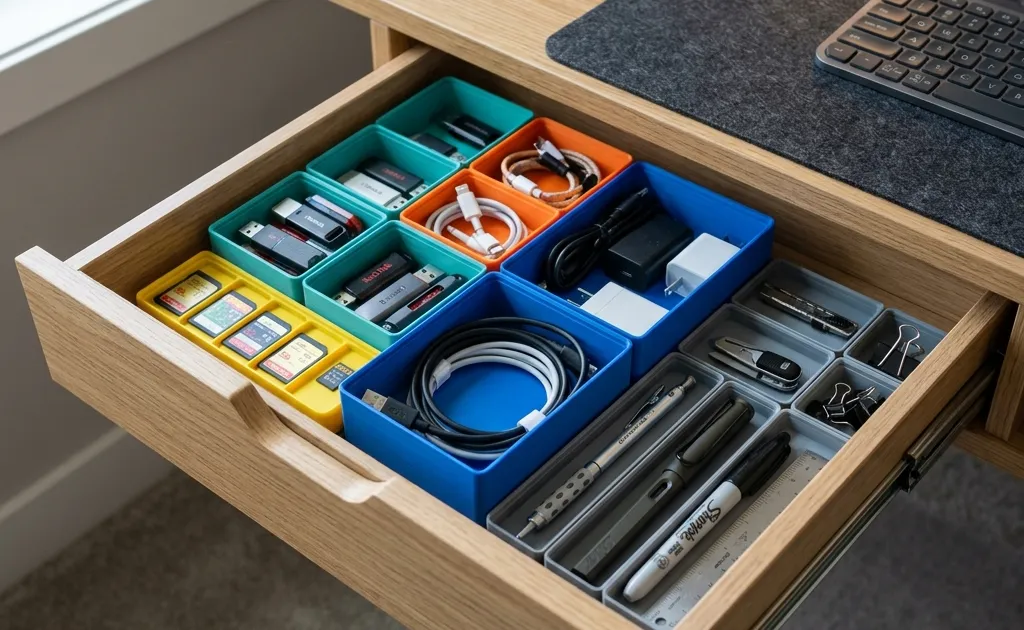
Gridfinity is a free, open-source drawer system built on a 42 mm grid: bin footprints are multiples of 42 mm and heights multiples of 7 mm, so every bin fits every baseplate. Created by Zack Freedman, it lets you print a baseplate sized to your drawer and fill it with thousands of free bin designs, from SD-card holders to screw sorters. A 1×2×3 bin measures 42 × 84 × 21 mm, and a full drawer of bins costs a few dollars in filament.
Messy desk drawers are one of the quietest thieves of everyday workplace focus. We spend minutes each day digging through tangled USB-C cables, stray SD cards, loose sticky notes, hex keys, and stationery. Traditional store-bought drawer dividers rarely fit custom furniture dimensions properly, leaving awkward gaps where small items inevitably disappear.
Enter Gridfinity, the open-source modular storage system designed specifically for 3D printing. Originally created by maker and designer Zack Freedman, Gridfinity has exploded into an ecosystem of thousands of free, customizable bin models supported by a global maker community.
Master 3D printing from start to finish: Dive into our complete 3D Printing Guide for Beginners covering printers, troubleshooting, and project ideas.
Whether you operate a compact minimalist home office or a full electronics workbench, Gridfinity turns chaotic drawers into modular, satisfying organization systems. In this comprehensive guide, we break down the core mathematics behind Gridfinity, evaluate the best baseplate designs, share optimized slicer settings for fast printing, and highlight essential bin designs for your desk setup.
The Mathematics of Gridfinity: Units & Geometry
The brilliance of Gridfinity lies in its strict geometry and strict dimensional standardization. Because every module adheres to identical spatial rules, bins printed by different creators across the world fit together seamlessly on the exact same grid.
The 42mm Horizontal Standard
The fundamental building block of Gridfinity is a 42mm by 42mm square grid cell. All baseplates feature grid sockets spaced on 42mm centers, and all bins feature matching feet designed to drop into these sockets with precise mechanical clearance.
- 1x1 Bin Footprint: 42mm x 42mm
- 1x2 Bin Footprint: 42mm x 84mm
- 2x2 Bin Footprint: 84mm x 84mm
- 3x3 Bin Footprint: 126mm x 126mm
When measuring your desk drawer, divide the internal length and width in millimeters by 42 to determine how many grid units fit inside your space.
The 7mm Vertical Height Standard (U)
Vertical height in the Gridfinity system is measured in units of U, where 1U equals 7mm.
However, there is a minor structural detail to keep in mind when measuring vertical drawer clearance: the base foot of a bin measures 5mm and sits inside the baseplate, while the top stacking lip adds an extra 2mm.
| Grid Height Rating | Total Physical Height | Typical Use Case |
|---|---|---|
| 2U | 14 mm | Ultra-shallow top drawers, SD cards, coin storage |
| 3U | 21 mm | Shallow stationery drawers, pens, USB drives, adapters |
| 6U | 42 mm | Standard desk drawers, tape rolls, small hand tools |
| 12U | 84 mm | Deep filing drawers, filament spools, bulk hardware |
Because bins stack on top of each other securely, you can stack two 3U bins in a 6U drawer space to double your storage density.
Choosing the Right Baseplate Design
The baseplate is the foundation of your Gridfinity setup. It stays at the bottom of your drawer and holds your modular bins in alignment. Over the past few years, the community has developed several distinct baseplate styles to optimize print speed, material usage, and stability.
1. Traditional Magnet Baseplates
The original Gridfinity specification features solid baseplates with press-fit pockets for 6mm x 2mm neodymium magnets at the four corners of every 42mm cell. Matching magnets are pressed into the bottoms of the bins.
- Pros: Maximum hold; bins lock down firmly with a satisfying click.
- Cons: High filament consumption, long print times, and requires buying hundreds of small magnets.
2. Weighted / Screw-Together Baseplates
Designed for workshop environments or heavy drawers, weighted baseplates include internal cavities for steel nuts, lead shot, or screws to anchor the grid to wood furniture.
- Pros: Zero movement even when yanking heavy drawers open rapidly.
- Cons: Slower to print and heavier to relocate.
3. Skeletonized / Lite Baseplates (Recommended for Office Desks)
For home office desks and stationery drawers, fully solid baseplates are unnecessary. “Click-together” or “Lite” skeletonized baseplates strip away inner floor material, keeping only the outer structural walls and alignment rails.
- Pros: Uses up to 60% less filament, prints up to 2x faster, and requires no magnets.
- Cons: Light overall assembly; requires double-sided tape or drawer spacer corner blocks to prevent sliding if the grid does not cover the full drawer floor.
Pro Tip for Perfect Drawer Fit: If your drawer dimensions leave a gap (e.g., your drawer width fits 5.5 units), print modular Gridfinity Spacer Trim models to bridge the gap between the grid edges and the drawer walls. This locks the baseplate completely in place without gluing.
Recommended Slicer Settings for Gridfinity Bins
Printing dozens of storage bins can consume significant filament if your slicer profiles are unoptimized. Because Gridfinity bins are functional interior organizers rather than high-stress structural parts, you can tune your settings for maximum speed and minimal material consumption.
Layer Height & Wall Count
- Nozzle Size: Standard 0.4mm nozzle (or a 0.6mm nozzle for ultra-fast bin wall printing).
- Layer Height: 0.20mm or 0.28mm. Fine 0.12mm layers offer no visual benefit inside drawers and double your print time.
- Wall Perimeters: 2 walls (for 0.4mm nozzles) or 1 wall (for 0.6mm nozzles). Two perimeters provide plenty of rigidity for desk organization.
- Top / Bottom Layers: 3 bottom shell layers, 3 top shell layers.
Infill Optimization
- Infill Percentage: 10% to 15%. Higher infill percentages simply waste filament and add unnecessary weight.
- Infill Pattern: Gyroid or Grid. Gyroid provides smooth omnidirectional support and prints reliably at high speeds without nozzle scraping.
Essential Slicer Feature Flags
- Detect Thin Walls / Print Thin Walls: Enable this setting in OrcaSlicer or Bambu Studio to ensure thin bin dividers and top stacking lips render cleanly without hollow gaps.
- Seam Position: Set to Aligned or Back to keep Z-seams hidden along internal corners.
If you are tuning your print speeds and flow calibration for crisp bin corners, refer to our step-by-step walkthrough on how to tune pressure advance and flow rate in OrcaSlicer.
Top Essential Gridfinity Bin Designs for Home Office Desks
With the baseplates printed and slicer profiles dialed in, you can choose from thousands of pre-designed bins available on MakerWorld, Printables, and Thangs. To quickly design custom parametric bins, dividers, or baseplate sizes directly in your browser without needing CAD software, check out web generators like Gridfinity.tools.
Here are the most practical bin configurations for everyday home office setups:
1. The Cable & Dongle Tray (1x2x6 & 2x2x6)
Tangled USB cables and dongles are the primary source of desk drawer clutter. Curved-bottom “scoop” bins feature a sweeping interior radius along the bottom floor, allowing small USB-C adapters, SD cards, and paperclips to slide out effortlessly under your fingertip without hooking against sharp corners.
2. The SD & MicroSD Memory Card Holder (1x1x3)
For photographers and tech enthusiasts, dedicated SD card modules feature laser-precise slots that hold full-sized SD cards, MicroSD adapters, and USB thumb drives vertically. Keep your active memory cards organized and protected from scratch damage.
3. The Pen & Marker Tray (1x4x3 & 1x5x3)
Standard pens, highlighters, and mechanical pencils fit perfectly inside elongated 1x4 and 1x5 unit bins. Angled dividers let you separate gel pens, dry-erase markers, and precision calipers cleanly.
4. The Sticky Note & Index Card Dock (2x2x4)
Standard 3-inch by 3-inch Post-it note pads fit neatly inside a 2x2 Gridfinity footprint. Add a side cut-out slot so you can grab a single sheet without lifting the entire pad out of the bin.
5. Multi-Tool & Hex Key Racks
If your desk setup includes maintenance tools for 3D printers, monitors, or mechanical keyboards, vertical tool-holder bins keep hex keys, tweezers, hobby knives, and flush cutters upright and instantly accessible.
PLA vs PETG: Which Filament Should You Use?
Choosing the right material for Gridfinity depends on where your drawers are located and how heavy your stored items are.
| Material Property | PLA (Polylactic Acid) | PETG (Polyethylene Terephthalate Glycol) |
|---|---|---|
| Ease of Printing | Exceptional; low warping, clean bridges | Excellent; minor stringing possible |
| Rigidity | Very High; stiff bin walls | High; slightly flexible, impact resistant |
| Heat Resistance | Up to 55°C (131°F) | Up to 75°C (167°F) |
| Color Variety | Infinite (Matte, Silk, Pastel, Two-Tone) | High (Translucent, Solid, Carbon Fiber) |
| Best For | Indoor office desk drawers | Garage workshops, toolboxes, hot environments |
For standard indoor home office applications, PLA is the clear winner. It prints faster, comes in a wider spectrum of clean aesthetic colors (such as matte pastel tones), and exhibits zero warping on large baseplate prints.
If you are organizing heavy metal tools in a hot garage workbench where temperatures rise in the summer, opt for PETG for added impact and heat resistance.
Step-by-Step Workflow: Transforming Your First Drawer
Ready to build your first Gridfinity setup? Follow this structured workflow to ensure a smooth transformation:
- Empty & Clean the Drawer: Remove all items and wipe down the drawer floor.
- Measure Precise Dimensions: Use a ruler or digital calipers to record the internal length, width, and vertical clearance height in millimeters.
- Calculate Grid Units: Divide length and width by 42. (Example: A 340mm x 430mm drawer fits an 8x10 grid cell layout with minor perimeter clearance).
- Print Baseplates First: Print your chosen skeletonized baseplate tiles and lay them flat in the drawer floor.
- Print Functional Bins: Start with 3 to 4 essential bins for your most frequently used items (cables, pens, SD cards).
- Iterate & Expand: As your workflow evolves, rearrange or print new modules without needing to redesign the entire drawer layout.
Final Thoughts: The Joy of Modular Organization
The true magic of Gridfinity is that it turns organization from a static purchase into a dynamic, evolving hobby. As your tech stack changes, whether you buy new camera batteries, switch to a different mechanical keyboard, or accumulate new adapter cables, you can simply print a new 1x2 bin and drop it into place.
By leveraging open-source designs, low-cost PLA filament, and optimized slicer profiles, you can completely transform every drawer in your home office for less than the cost of a single store-bought organizer.
Frequently Asked Questions
What is Gridfinity and how does it work?
Gridfinity is an open-source, modular drawer organization system created by Zack Freedman. It uses a standardized 42mm x 42mm grid baseplate that fits securely into drawers, allowing custom 3D printed bins to snap into place without sliding around.
What is the standard unit size of a Gridfinity module?
A single Gridfinity unit (1x1) has a footprint of 42mm by 42mm. The standard vertical unit height (1U) is 7mm. Bins are specified in multi-grid dimensions like 1x2x3 (42mm x 84mm x 21mm tall).
Do I need magnets for Gridfinity baseplates and bins?
No, magnets are optional. Baseplates and bins feature 6mm x 2mm magnet pockets for extra security, but gravity and the interlocking profile keep bins firmly aligned in desk drawers during normal opening and closing.
What filament and slicer settings should I use for Gridfinity?
Standard PLA or PETG is ideal. Use a 0.4mm nozzle with 0.2mm layer height, 15% infill (Gyroid or Grid), 2 perimeters, and 3 top/bottom shell layers. Enable print thin walls for bin lip alignment.
Related Articles
20 Best Functional 3D Prints That Are Actually Useful (2026)
Skip the toys, these 20 functional 3D prints solve real problems at your desk, home, and tech setup. Print times, difficulty, and STL sources included.
10 Practical Desk Upgrades You Can 3D Print for Under $1
Transform your workspace from a cable-cluttered mess to a productivity powerhouse with these 10 cheap, fast, and functional 3D prints.
IKEA 3D Printing Hacks: Upgrade Your Furniture in 2026
Transform standard IKEA furniture with 3D printing. Discover custom Skadis hooks, Alex drawer dividers, Kallax modifiers, and desk cable management clips.