
20 Best Functional 3D Prints That Are Actually Useful (2026)
Skip the toys, these 20 functional 3D prints solve real problems at your desk, home, and tech setup. Print times, difficulty, and STL sources included.

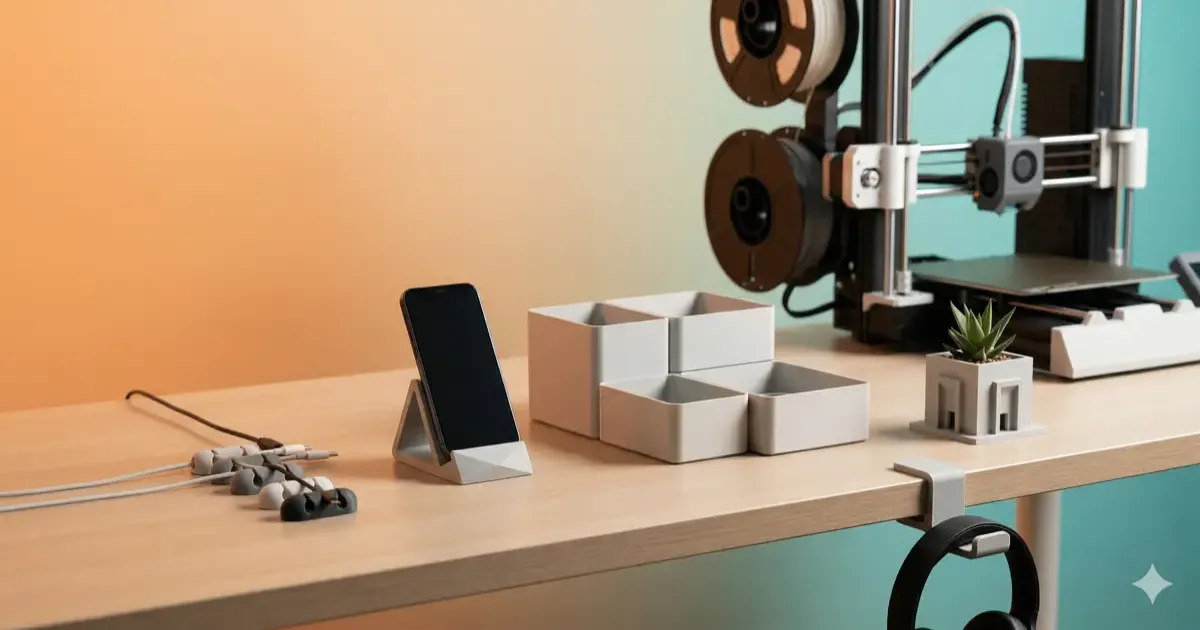
The prints below use 10 to 80 g of filament each, so between roughly 20 cents and $1.60 in PLA at about $20 per kilogram. A full Gridfinity drawer setup runs $3 to $5 in material against $15 to $40 for equivalent store-bought organizers, which is the whole argument for functional printing in one number. Each of the 20 items lists print time, difficulty, and a link to the STL file.
There is a massive difference between 3D printing a decorative dragon and 3D printing something that actually makes your life easier. The novelty prints collect dust. The functional prints get used every single day.
This guide covers 20 of the most genuinely useful things you can 3D print, organized by category so you can jump straight to what you need. Every item includes estimated print time, difficulty level, and where to grab the STL file.
Master 3D printing from start to finish: Dive into our complete 3D Printing Guide for Beginners covering printers, troubleshooting, and project ideas.
If you are brand new to 3D printing, start with what to 3D print first to get your printer calibrated. If you already know your way around a slicer, keep reading.
Desk Organization
1. Gridfinity Modular Bins
The open-source organization system that took the 3D printing community by storm. Print a baseplate, then snap in custom-sized bins for pens, SD cards, batteries, screws, whatever lives in your drawers. Designed by Zack Freedman, with thousands of community-made bin variations. My Gridfinity 101 guide walks through the grid math, slicer settings, and a first drawer.
- Print time: 1-2 hours per baseplate, 20-45 min per bin
- Difficulty: Easy
- Where to find: Printables, search “Gridfinity” for 3,000+ bin designs
2. Honeycomb Storage Wall (HSW)
A wall-mounted organization system using interlocking hexagonal tiles. Mount it above your desk or in a workshop and snap on hooks, holders, shelves, and bins. Modular, expandable, and one of the best-looking functional print systems out there.
- Print time: 30-60 min per tile, 15-30 min per accessory
- Difficulty: Easy
- Where to find: MakerWorld, search “Honeycomb Storage Wall”
3. Cable Clips and Management Channels
Small, fast, and solve one of the most annoying desk problems: charging cables that slide off the edge and vanish behind the desk. Print adhesive-backed clips for your desk edge or snap-fit channels to route cables along the underside. Pairs perfectly with a proper cable management setup.
- Print time: 5-15 min per clip, 30-60 min per channel
- Difficulty: Easy
- Where to find: Printables, search “cable clip desk” or “cable management channel”
4. Under-Desk Slide-Out Tray
A shallow tray that mounts under your desk with screws or adhesive, giving you a hidden compartment for pens, sticky notes, an external SSD, or anything else you want within reach but off the surface. A small print that reclaims a surprising amount of desk real estate.
- Print time: 2-4 hours
- Difficulty: Medium (needs precise measurements for your desk thickness)
- Where to find: Thingiverse, search “under desk tray slide”
5. Headphone Hook / Stand
A desk-mount or adhesive hook that keeps over-ear headphones off your desk surface. The best designs feature a wide arc to avoid denting the headband padding. Choose between a desk-clamp version (no adhesive needed) or a minimalist wall-mount style.
- Print time: 1-2 hours
- Difficulty: Easy
- Where to find: Printables, search “headphone hook desk mount”
Ergonomics
6. Keyboard Tilt Stands
Custom-angle risers that sit under your keyboard, especially useful for split keyboards like the Keychron Q11 or ZSA Voyager where finding the right tenting angle is half the battle. Print a few at different angles to find your sweet spot.
- Print time: 1-2 hours per pair
- Difficulty: Easy
- Where to find: Printables, search “keyboard tilt stand” or “split keyboard tent”
7. Vertical Laptop Stand
If your laptop spends most of its life connected to an external monitor, a vertical clamshell stand frees up 20-30% of your desk surface. The 3D-printed advantage over store-bought stands: you can size the slot to your exact laptop thickness.
- Print time: 2-4 hours
- Difficulty: Easy
- Where to find: Printables, search “vertical laptop stand adjustable”
8. Monitor Riser with Storage
A set of riser legs or a full platform that elevates your monitor to proper eye level while creating storage space underneath for a keyboard, notebook, or small drawer. Poor monitor height is one of the most common desk setup mistakes, this solves it for under a dollar.
- Print time: 3-6 hours (full platform) or 1-2 hours (legs only)
- Difficulty: Medium (load-bearing, use thick walls and higher infill)
- Where to find: Thingiverse, search “monitor riser storage”
9. Phone / Tablet Stand (Adjustable Angle)
A stand with a hinge or stepped base that lets you adjust the viewing angle. Use your phone as a secondary screen for Slack, a calendar, or a timer. The best designs include a cable routing channel so you can charge while it sits in the stand.
- Print time: 1-2 hours
- Difficulty: Easy
- Where to find: Printables, search “phone stand adjustable angle”
10. Keyboard Wrist Rest
A contoured rest that sits in front of your keyboard to keep your wrists at a neutral angle during long typing sessions. Print in PLA for a firm rest, or in TPU for a softer, flexible feel. Custom-sizing it to your exact keyboard width is where 3D printing beats store-bought.
- Print time: 2-4 hours
- Difficulty: Easy (PLA) / Medium (TPU requires tuned settings)
- Where to find: Thingiverse, search “keyboard wrist rest ergonomic”
Home and Kitchen
11. Magnetic Spice Rack Labels / Holders
Small containers or label holders with embedded magnet slots that snap onto a metal surface like a fridge or a magnetic knife strip. Keeps spices visible, organized, and easy to swap. Print in PETG if they will be near heat sources.
- Print time: 20-40 min per holder
- Difficulty: Easy (requires small magnets, typically 6mm x 3mm neodymium)
- Where to find: Printables, search “magnetic spice rack” or “spice jar label holder”
12. Wall-Mount Soap Dispenser Holder
A bracket that holds a standard soap or lotion dispenser against the wall, freeing up counter space in the kitchen or bathroom. One of those prints that looks simple but you will never go back after installing it.
- Print time: 1-2 hours
- Difficulty: Easy
- Where to find: Thingiverse, search “soap dispenser wall mount”
13. Plant Pot with Built-In Drainage
A two-piece pot with a removable inner basket and drainage holes, plus an outer shell that catches excess water. No more overwatering, no more water rings on your desk. Available in dozens of styles from minimalist geometric to textured designs.
- Print time: 2-4 hours
- Difficulty: Easy
- Where to find: Printables, search “plant pot drainage tray”
14. Key Holder / Wall Mount
A wall-mounted rack with hooks, slots, or magnetic insets for keys, plus optional compartments for sunglasses, wallets, or mail. Mounts with screws or Command strips. One of the most popular functional prints for a reason, it eliminates the “where are my keys” problem permanently.
- Print time: 1-3 hours
- Difficulty: Easy
- Where to find: MakerWorld, search “key holder wall mount”
15. Bag Clip / Chip Clip
A spring-loaded or snap-fit clip for sealing open bags of chips, coffee, cereal, or anything else. These take 10 minutes to print, cost essentially nothing, and are the kind of print you end up making 20 of because everyone in the house wants them.
- Print time: 10-20 min per clip
- Difficulty: Easy
- Where to find: Printables, search “bag clip” or “chip clip”
Tech and Gadgets
16. MagSafe Charging Stand
A stand that holds a MagSafe puck at the perfect angle for your iPhone, functioning as a nightstand dock or desk charger. The best designs include a spot for an Apple Watch charger and a cable routing path to keep things clean.
- Print time: 2-3 hours
- Difficulty: Medium (tolerances need to be dialed in for MagSafe puck fit)
- Where to find: Printables, search “MagSafe stand” or “MagSafe dock”
17. AirPods / Earbuds Case Holder
A small dock or wall mount for your AirPods, Galaxy Buds, or any wireless earbuds case. Keeps them in one consistent spot so you stop patting down every pocket when you leave the house. Some designs include a charging cable pass-through.
- Print time: 30-60 min
- Difficulty: Easy
- Where to find: Thingiverse, search “AirPods stand” or “earbuds holder”
18. SD Card / USB Drive Organizer
A compact holder with labeled slots for SD cards, MicroSD cards, and USB drives. Essential if you work with photography, video, or just have a collection of thumb drives floating around in drawers. Some designs integrate into Gridfinity baseplates.
- Print time: 30-60 min
- Difficulty: Easy
- Where to find: Printables, search “SD card organizer” or “USB holder”
19. Raspberry Pi Case
A snap-fit or screw-together enclosure for your Raspberry Pi (models 4, 5, or Zero). Good cases include ventilation slots, GPIO access, mounting holes, and space for a fan or heatsink. If you run a Pi-hole, Home Assistant, or OctoPrint server, a proper case keeps it protected and tidy.
- Print time: 1-3 hours
- Difficulty: Easy to Medium (tight tolerances for port alignment)
- Where to find: Printables, search “Raspberry Pi 5 case” (specify your model)
20. Under-Desk Power Strip Mount
A bracket that screws or adhesive-mounts your power strip to the underside of your desk, hiding it completely from view. Dramatically cleans up the floor area and pairs well with cable clips (#3) for a fully routed setup. Measure your specific power strip before printing.
- Print time: 1-2 hours
- Difficulty: Easy (measure twice, print once)
- Where to find: Thingiverse, search “power strip mount under desk”
Getting Started: What You Need
If you do not already own a 3D printer, here is the short version:
Printer: A budget FDM printer in the $150-300 range handles every print on this list. The Bambu Lab A1 Mini and Creality Ender 3 V3 are the two most recommended entry points in 2026. Both print PLA and PETG without any issues.
Filament: PLA is the default for functional prints, it is stiff, easy to print, and available in every color. For items that need heat resistance or impact strength (kitchen items, mounts that might get bumped), step up to PETG. A 1kg spool runs about $15-25 and will last you through most of this list. See the full 3D printing cost breakdown for real numbers.
Software: You need a slicer to convert STL files into printer instructions. Bambu Studio and Cura are free and cover most printers. If you want to design your own modifications, check out the best free CAD software for 3D printing.
STL sources: The three sites linked throughout this article, Printables, Thingiverse, and MakerWorld, collectively have millions of free models. Search by the project names listed above and sort by “most makes” or “most popular” to find the best-tested versions.
For a deeper walkthrough of getting your first printer running and calibrated, the 3D printing beginners guide covers everything from unboxing to your first successful print.
Final Thought
The real value of a 3D printer is not in what it can make, it is in the problems it can solve. Every item on this list exists because someone looked at a specific annoyance in their daily life and decided to fix it with a $0.50 piece of plastic. Once you start thinking that way, you will never run out of things to print, like a 3D-printed coffee station for your desk, where every accessory is custom-fit to your specific gear.
Related Articles
Gridfinity 101: Organize Every Drawer with 3D Printing
Master Gridfinity, the open-source modular drawer organization system. Learn grid dimensions, slicer settings, baseplate options, and bin designs.
10 Practical Desk Upgrades You Can 3D Print for Under $1
Transform your workspace from a cable-cluttered mess to a productivity powerhouse with these 10 cheap, fast, and functional 3D prints.
IKEA 3D Printing Hacks: Upgrade Your Furniture in 2026
Transform standard IKEA furniture with 3D printing. Discover custom Skadis hooks, Alex drawer dividers, Kallax modifiers, and desk cable management clips.