
IKEA 3D Printing Hacks: Upgrade Your Furniture in 2026
Transform standard IKEA furniture with 3D printing. Discover custom Skadis hooks, Alex drawer dividers, Kallax modifiers, and desk cable management clips.

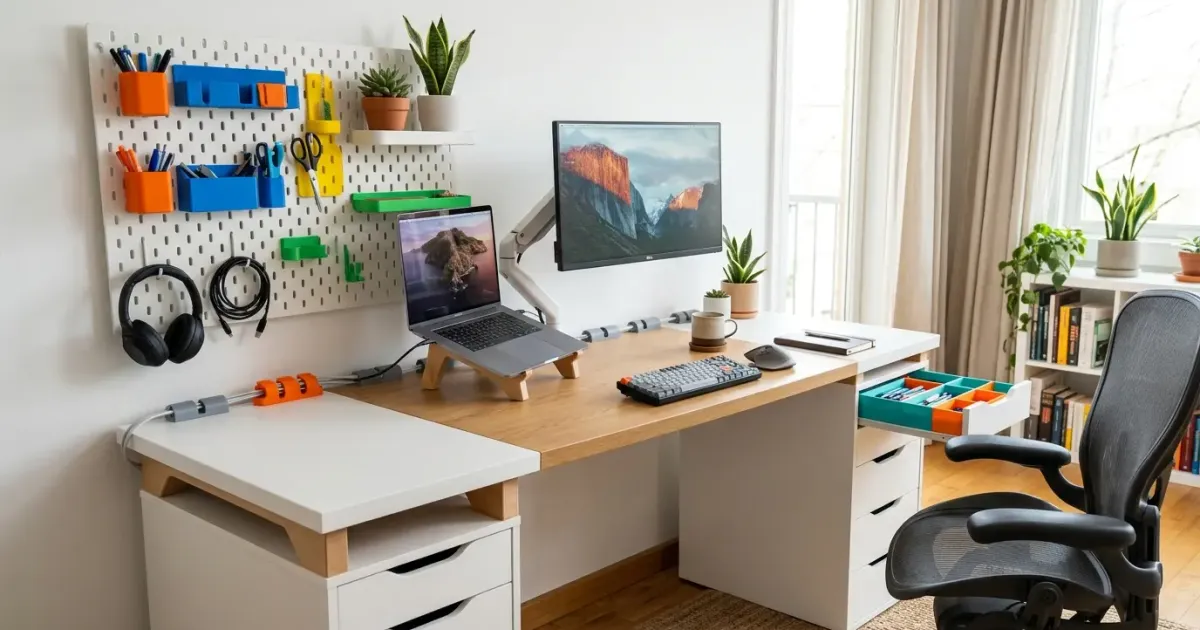
IKEA flat-pack furniture is renowned worldwide for its minimalist aesthetic, affordability, and modularity. From the ubiquitous Alex drawer towers to the versatile Skadis pegboards and budget-friendly Kallax shelving units, IKEA pieces serve as the foundational bedrock for millions of home offices, workshops, and living spaces.
However, mass-produced furniture comes with inherent limitations. IKEA products are designed to appeal to the broadest possible audience, which often leaves gaps in specialized functionality. Drawer interiors lack tailored organizer compartments, cable management options can be rudimentary, and mounting custom hardware often requires drilling into hollow particle board.
Master 3D printing from start to finish: Dive into our complete 3D Printing Guide for Beginners covering printers, troubleshooting, and project ideas.
This is where desktop 3D printing creates magic.
Combining additive manufacturing with IKEA’s standardized furniture dimensions unlocks infinite customization options. With a 3D printer, you can turn a basic $40 desk or pegboard into a tailored, professional-grade workstation without spending hundreds of dollars on custom carpentry.
In this guide, we will explore the best IKEA furniture series for 3D printing upgrades, analyze optimal filament choices, review top community-designed accessories in 2026, and provide practical tips for designing your own custom mods.
Why IKEA Furniture and 3D Printing are a Perfect Match
The synergy between IKEA furniture and 3D printing stems from standardized dimensional engineering. IKEA manufactures millions of identical furniture components worldwide. A Skadis pegboard purchased in Tokyo has the exact same slot spacing and hole dimensions as one purchased in London or New York.
This global consistency allows 3D printing communities to create universal accessories that work for everyone:
- Perfect Tolerances: Designers can measure a standard IKEA component once with digital calipers and publish an STL file that thousands of makers can print with press-fit precision.
- Tool-Free Installation: Many 3D printed IKEA hacks utilize snap-fit joints, friction clamps, or existing screw channels, eliminating the need to drill holes or damage veneer surfaces.
- Cost Efficiency: Commercial aftermarket organizers for IKEA desks can be expensive. 3D printing a custom drawer divider set or cable tray costs only a few dollars in raw filament. If you are curious about production costs, read our detailed guide on 3D printing filament costs.
- Zero-Waste Customization: Rather than replacing an entire furniture unit when your organizational needs change, you can simply unclip your old 3D printed brackets and print new ones.
Top 5 IKEA Furniture Series to Upgrade with 3D Printing
Certain IKEA product lines have inspired massive online repositories of community-designed 3D models on platforms like Printables and MakerWorld. Below are the top five series to hack with additive manufacturing.
1. IKEA Skadis Pegboard
The IKEA Skadis pegboard is perhaps the most popular target for 3D printing enthusiasts. Unlike traditional pegboards with round holes, the Skadis system uses elongated vertical slots. While official IKEA hooks are functional, the 3D printing community has elevated the platform into an organizational masterpiece.
- Locking Peg Hooks: Official IKEA hooks often wobble or fall out when lifting tools. 3D printed locking hooks (such as the popular Skadis T-Nut or Cam-Lock systems) secure accessories firmly into place.
- Custom Tool Holders: Print custom-fit holders for screwdrivers, calipers, game controllers, USB cables, and SD cards.
- Headphone & Controller Hangers: Ergonomic curved mounts that clip directly into Skadis slots, keeping workspace clutter off your desk surface.
- Gridfinity Adapter Plates: Mount modular organizer trays directly onto your Skadis board using standard Gridfinity mounting plates. To learn more about setting up a modular grid system, check out our Gridfinity 101 guide.
2. IKEA Alex Drawer Units
The IKEA Alex drawer unit is the undisputed king of budget home office desk setups. However, the deep drawers quickly become chaotic without internal organization.
- Modular Drawer Dividers: Custom interlocking grid walls convert deep Alex drawers into neat compartments for pens, cables, hard drives, and office supplies.
- Gridfinity Drawer Baseplates: Print 5x5 or 4x5 Gridfinity baseplates tailored precisely to the internal footprint of Alex drawers, allowing you to drop in removable organizer bins.
- Drawer Stop Clips: Prevent drawers from pulling out too far or sagging when loaded with heavy tools.
- Custom Handle Pulls: Replace standard recessed drawer cutouts with ergonomic, color-matched 3D printed handles or label card holders.
3. IKEA Kallax Shelving System
Kallax cube shelves are legendary for storing vinyl records, books, and board games. However, their open square dimensions leave significant unused vertical space.
- Shelf Splitter Brackets: 3D print corner brackets to insert secondary horizontal wooden or acrylic shelves inside a single Kallax cube.
- Backing Stop Blocks: Clamp 3D printed stop blocks to the rear of Kallax cubes to align books or record jackets perfectly flush with the front frame.
- Vinyl Record Dividers: Print decorative vertical dividers to categorize albums by genre.
- Integrated LED Strip Channels: Print clips that snap into Kallax interior corners, routing concealed LED light strips to illuminate displayed collectibles.
4. IKEA Desks (Linnmon, Lagkapten, Karlby, & Bekant)
Customizing an IKEA tabletop workspace is essential for maintaining an ergonomic home office. Combining IKEA countertops with 3D printed accessories can yield a high-end custom desk setup.
- Desk Riser Furniture Feet: Elevate Karlby or Lagkapten tops off Alex drawers by printing heavy-duty spacer blocks. This creates a stylish gap beneath the desktop for storing keyboards or slim laptops. If you are building a workspace, explore our complete desk upgrade guide.
- Under-Desk Laptop & Mac Mini Mounts: Print custom bracket cradles that screw under the desktop, keeping hardware hidden while maintaining airflow.
- Under-Desk Cable Raceways: Clean up messy power strips and monitor cords with modular cable channels and clips. For comprehensive wiring advice, read our guide on cable management tips.
5. IKEA Lack Side Tables
The basic $15 IKEA Lack table holds iconic status in the maker community. Because of its cheap price tag and hollow legs, makers frequently use Lack tables to build custom enclosures for 3D printers.
- Lack 3D Printer Enclosure Modules: Print corner leg extenders, acrylic panel guide slots, and door hinges to convert two stacked Lack tables into a fully enclosed 3D printing chamber.
- Stacking Couplers: Interlock multiple Lack tables vertically to build modular plant stands or equipment racks.
Filament Selection & Print Settings for IKEA Upgrades
Choosing the correct 3D printing filament and slicer settings is critical when manufacturing functional furniture modifications. A poorly printed bracket can fail under load, leading to damaged electronics or fallen shelves.
| Filament Type | Tensile Strength | Layer Adhesion | Flexibility | Recommended IKEA Applications |
|---|---|---|---|---|
| PLA | High | Moderate | Low | Drawer organizers, label tags, light Skadis bins |
| PETG | High | Excellent | Moderate | Weight-bearing hooks, desk risers, cable raceways |
| ABS / ASA | High | Excellent | Low | Enclosure parts, heavy tool mounts, outdoor furniture |
| TPU | Moderate | Superior | High | Anti-slip desk pads, protective feet covers |
Material Guidelines
- PLA (Polylactic Acid): Great for indoor decorative elements and drawer organizer bins like Gridfinity modules. However, PLA is prone to brittle fracture under sudden stress and can deform under sustained heavy weight (filament creep).
- PETG (Polyethylene Terephthalate Glycol): The absolute best choice for structural IKEA mods. PETG offers superior layer adhesion, high impact resistance, and slight flexibility under load. Use PETG for desk risers, shelf support brackets, and heavy headphone hooks. For a detailed material breakdown, consult our PLA vs PETG vs ABS guide.
- TPU (Thermoplastic Polyurethane): Use flexible TPU filament to print non-slip feet for desk riser blocks or soft lining inserts for under-desk laptop cradles.
Essential Slicer Settings for Structural Strength
When slicing models intended to support weight or clamp onto furniture, prioritize wall count over infill percentage:
- Wall Perimeter Count: Increase perimeter wall loops to at least 4 to 5 walls. Mechanical strength in 3D prints comes primarily from outer walls, not internal infill.
- Top & Bottom Layers: Use at least 4 top and 4 bottom solid layers to prevent surface compression under bolt heads or clamps.
- Infill Pattern & Density: Use 25% to 35% Gyroid or Grid infill. Gyroid infill provides balanced strength in all 3 axes while reducing print time and material consumption.
- Layer Height: Print with a 0.20mm layer height for optimal layer bonding. Thinner layer heights (like 0.12mm) increase print time without adding mechanical strength.
Step-by-Step Guide: Designing & Printing Custom IKEA Accessories
If existing models on 3D printing repositories do not fit your specific layout, you can easily design your own custom accessories using free CAD software like Tinkercad or Fusion 360.
Step 1: Measure Precise Dimensions with Digital Calipers
Never guess IKEA product dimensions. Use a digital caliper to measure critical features:
- Skadis Slot Dimensions: Slot width is approximately 5.0mm, slot length is 15.0mm, and horizontal hole pitch is 40mm center-to-center.
- Board Thickness: Measure actual veneer or board thickness (e.g., Alex drawer fronts are approximately 16mm thick, while Linnmon desktops measure 34mm thick).
- Tolerance Offsets: Always add a 0.2mm to 0.3mm clearance offset in your 3D CAD design for press-fit joints to account for printer plastic expansion.
Step 2: Download or Draft the Base Geometry
You can download free pre-made mounting clips and brackets from platforms like Thingiverse or Printables. For tips on finding high-quality STL files, see our roundup of the best free 3D model sites.
If designing from scratch in CAD:
- Create a sketch of the IKEA attachment interface (e.g., the Skadis T-hook profile or desktop clamp rim).
- Extrude the base bracket shape.
- Add your custom functional feature (e.g., a cup holder ring, headphone hook arm, or cable clip loop).
Step 3: Print a Test Slice (Prototype)
Before printing a full 10-hour organizer tray, print a small test slice of the mounting attachment (e.g., just the hook mechanism). Test the fit against your IKEA furniture:
- Does it snap cleanly into place without scratching the paint?
- Is the friction fit tight enough to prevent sliding?
- Adjust tolerance parameters in your slicer if necessary before running the full print job.
Step 4: Installation & Mounting Best Practices
Depending on the application, choose the appropriate installation method:
- Friction & Press-Fit: Ideal for Skadis pegboard hooks and cable clips.
- Heat-Set Threaded Inserts: For heavy-duty brackets that require bolts (such as under-desk mounts), melt brass heat-set M3 or M4 inserts into your 3D print using a soldering iron for ultra-strong machine screw threads.
- Removable Command Strips: Use double-sided damage-free adhesive strips for mounting non-structural organizer bins onto Kallax shelf walls without leaving marks.
Key Pitfalls to Avoid When Hacking IKEA Furniture
While 3D printing opens immense creative freedom, working with flat-pack particle board requires special care:
1. Over-Torquing Screws into Hollow Desks
Budget IKEA desktops (like Linnmon and Lagkapten) consist of a thin fiberboard outer skin surrounding a hollow paper honeycomb interior. Only the outer corners containing leg screw plates feature solid wood blocking. Avoid driving heavy wood screws directly into the center of these desktops. Instead, use wide-area adhesive mounts or clamp brackets.
2. Ignoring Long-Term Thermal & Mechanical Creep
PLA plastic will slowly bend and warp under constant tension over several months, especially in warm environments or near sunlit windows. For items under continuous mechanical strain (such as heavy monitor arm supports or desk risers), always use PETG, ABS, or carbon-fiber reinforced filaments like PETG-CF. To learn more about advanced carbon fiber materials, explore our PETG-CF filament guide.
3. Scratching Powder-Coated and Veneer Surfaces
Raw 3D printed layer lines can act like mild sandpaper against glossy IKEA finishes. Apply small felt pads or TPU rubber cushions to the inside surfaces of 3D printed clamps to protect paint and wood veneers from abrasion.
Final Thoughts: Crafting a Tailored Workspace
Combining 3D printing technology with IKEA furniture unlocks an unparalleled balance between cost, structural integrity, and personalized aesthetics. Whether you are adding modular drawer storage, organizing your workshop tools on a Skadis board, or taming cable clutter beneath your workstation desk, additive manufacturing turns mass-produced products into custom equipment tailored specifically to your workflow.
By selecting the right filament materials, applying smart slicer settings, and measuring precise tolerances, you can upgrade your furniture into a hyper-productive, clutter-free environment.
Frequently Asked Questions
Which IKEA furniture series has the most 3D printed accessories?
The IKEA Skadis pegboard system and IKEA Alex drawer units have the largest ecosystem of community-designed 3D models online. Designers on Printables and MakerWorld have created thousands of custom hooks, tray organizers, and mounting brackets tailored specifically to these models.
What filament is best for 3D printing IKEA furniture upgrades?
PETG is generally the best all-around filament for structural IKEA upgrades like shelf brackets, desk riser blocks, and heavy headphone hangers. For internal drawer organizers, standard PLA works exceptionally well.
Can 3D printed parts hold heavy weight on IKEA desks?
Yes, when printed with proper wall perimeters (4 to 5 walls) and 30%+ gyroid infill, PETG or ABS functional brackets can easily support hundreds of pounds. However, always distribute load across solid particle board framing rather than thin hollow honeycombed table surfaces.
Where can I find free 3D models for IKEA hacks?
Major 3D model repositories like Printables, MakerWorld, and Thingiverse feature dedicated ‘IKEA Hacks’ categories where makers share free STL and 3MF files specifically designed to snap, clamp, or bolt onto IKEA products.
Looking for more functional practical prints? Check out our favorite 3D printable car gadgets.
Related Articles
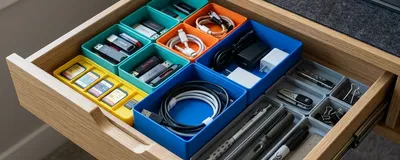
Gridfinity 101: Organize Every Drawer with 3D Printing
Master Gridfinity, the open-source modular drawer organization system. Learn grid dimensions, slicer settings, baseplate options, and bin designs.
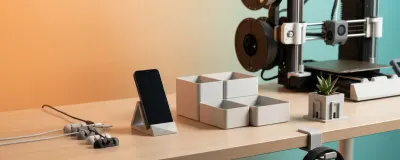
20 Best Functional 3D Prints That Are Actually Useful (2026)
Skip the toys, these 20 functional 3D prints solve real problems at your desk, home, and tech setup. Print times, difficulty, and STL sources included.

How to Convince Your Wife You Need a 3D Printer
Struggling with the 'approval process' for a 3D printer? Here is the roadmap to winning the argument with logic, aesthetics, and practical value.