
What Is Home Assistant? The Ultimate Beginner's Guide
Discover what Home Assistant is and why it beats Apple Home and Google Home. Learn about local control, Zigbee, Z-Wave, hardware setups, and automations.

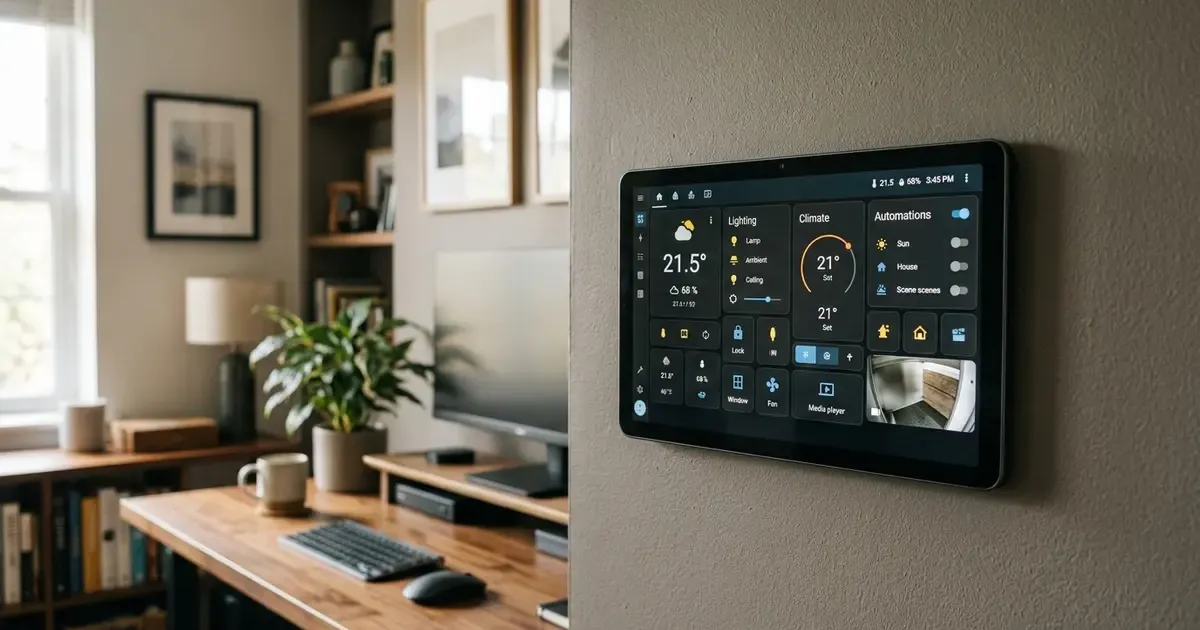
If you have ever bought smart home devices from different brands, you have almost certainly encountered the “walled garden” frustration. Your Philips Hue lights need one app, your Roborock vacuum uses another, your smart thermostat requires a third, and getting them to work together seamlessly across Apple HomeKit, Google Home, or Amazon Alexa feels like an exercise in compromise.
Worse, when your internet connection drops or a cloud server suffers an outage, your lights refuse to turn on and your automations break down completely.
Home Assistant was built to solve exactly this problem. It is a free, open-source, privacy-first smart home platform designed to unify all your connected devices into a single local brain.
Upgrading your workstation? See our all-in-one Desk Upgrade & Home Office Guide to build a comfortable, productive workspace.
Whether you want to automate your home office lighting based on motion, monitor your energy consumption in real time, or create complex multi-step routines that commercial hubs cannot handle, Home Assistant is the gold standard of modern home automation.
In this beginner guide, we break down what Home Assistant actually is, how it works, why local control matters, what hardware you need to get started, and five essential automations to inspire your setup.
1. What Is Home Assistant?
At its core, Home Assistant is an operating system and application that runs locally on a small computer inside your home (such as a mini PC, Raspberry Pi, or home server).
Unlike commercial smart home ecosystems from Amazon, Google, or Apple, Home Assistant does not rely on external cloud servers to process your commands or execute your automations:
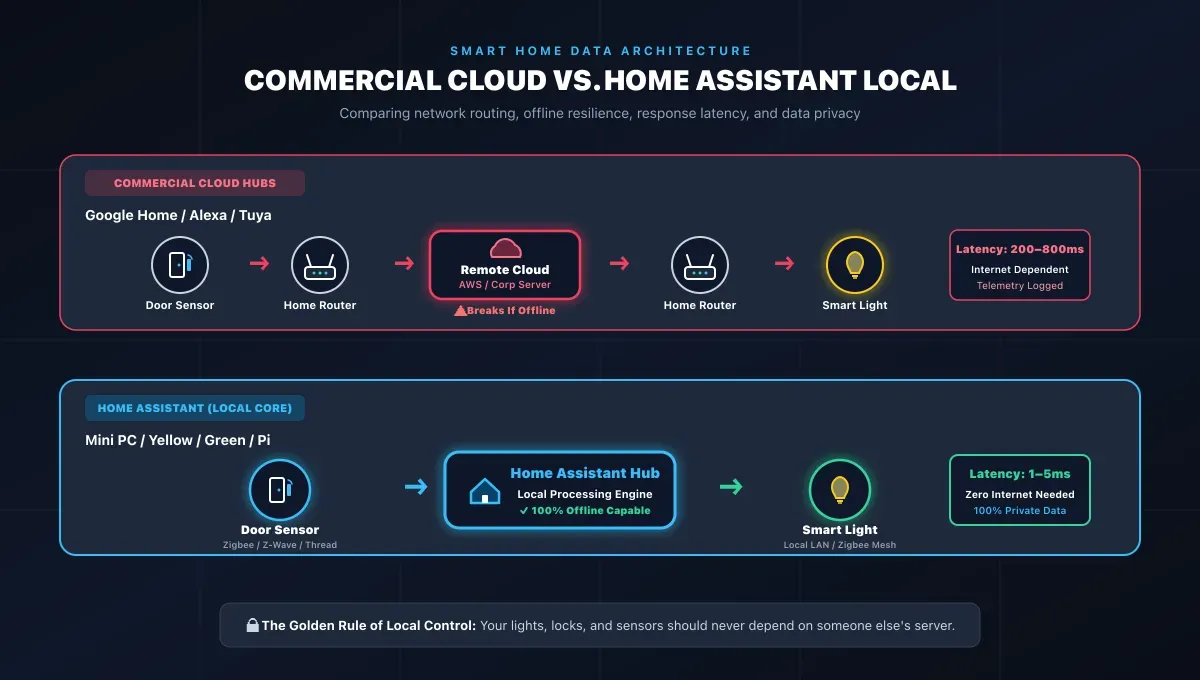
| Architecture Model | Communication Path | Latency & Reliability | Cloud Privacy |
|---|---|---|---|
| Commercial Cloud Ecosystems | Sensor -> Router -> Cloud Data Center -> Router -> Light | High Latency; breaks during internet outage | Telemetry stored on corporate ad servers |
| Home Assistant Local Core | Sensor -> Local Hub / LAN -> Light | Instant (1–5ms); 100% offline functionality | 100% Private (On-premise hardware) |
Instead of sending your sensor data to a remote corporate data center and waiting for a response, Home Assistant communicates directly with your devices over your local Wi-Fi, Ethernet, Zigbee, Z-Wave, Bluetooth, Matter, and Thread networks.
The Problem with Cloud-Based Smart Homes
Traditional commercial smart home platforms suffer from four major vulnerabilities:
- Vendor Lock-In: Proprietary ecosystems force you into purchasing approved hardware, locking you into specific manufacturers.
- Cloud Dependency & Outages: If your internet connection falters or an AWS server goes offline, basic home functionality ceases.
- Data Privacy Concerns: Commercial smart hubs transmit motion logs, camera feeds, and occupancy patterns to corporate marketing clouds.
- Subscription Creep & Abandonment: Companies routinely paywall basic features behind monthly subscriptions or discontinue cloud support for older hardware, bricking functional devices overnight.
Home Assistant eliminates these weaknesses by keeping all data, processing, and automation rules inside your own four walls.
2. Why Home Assistant Is Superior: Key Advantages
Why do millions of homeowners, software engineers, and smart home enthusiasts run Home Assistant over conventional retail hubs?
Universal Compatibility (Over 2,500 Integrations)
Home Assistant boasts the largest integration catalog in the smart home industry. With more than 2,500 official integrations and thousands more available via the Home Assistant Community Store (HACS), you can bridge devices that were never intended to interact:
- Lighting: Philips Hue, IKEA Home Smart, Nanoleaf, Govee, LIFX, Lutron Caséta.
- Climate & Energy: Ecobee, Nest, Sensibo, Shelly relays, SolarEdge inverters.
- Media & Entertainment: Sonos, Apple TV, Android TV, Spotify, Plex, Roku.
- Appliances & Robotics: Roborock, Dreame, Home Connect (Bosch/Siemens), Bambu Lab 3D printers.
- Presence & Security: Reolink, Frigate NVR, UniFi Protect, Aqara sensors.
True Local Privacy
Your smart home data is among the most sensitive personal data you generate. It reveals when you wake up, when you leave for work, which rooms you occupy, and when you sleep. Home Assistant stores all telemetry, camera streams, and sensor histories locally on your hardware drive, never selling or sharing your habits.
Lightning-Fast Execution Speed
Because commands travel across your local Gigabit network or direct radio frequencies rather than routing through transatlantic cloud servers, device responsiveness is near-instantaneous. Motion sensors trigger lights within milliseconds.
Endless Automation Depth
While Google Home and Apple Home offer basic “if time is X, turn on Y” routines, Home Assistant enables multi-condition logic, templating, mathematical state calculations, and dynamic variables:
- “If office motion is detected, only turn on the desk lamp if the ambient illuminance is below 50 lux AND my calendar does not show a live Zoom meeting.”
- “If the 3D printer finishes a print job, flash the living room light green for 3 seconds and send a notification with a snapshot to my phone.”
3. Home Assistant vs. Apple Home vs. Google Home vs. Alexa
| Feature | Home Assistant | Apple Home | Google Home | Amazon Alexa |
|---|---|---|---|---|
| Primary Execution | 100% Local | Hybrid / Cloud | Cloud-Dominant | Cloud-Dominant |
| Works Offline | Yes (Complete) | Partial | No | No |
| Device Compatibility | 2,500+ Integrations | Medium (HomeKit/Matter) | High | High |
| Automation Power | Unlimited (Visual + YAML) | Moderate | Basic | Basic |
| Dashboard Customization | Total Freedom | Rigid Tiles | Rigid Tiles | Rigid Cards |
| Subscription Cost | $0 (Free) | $0 | $0 | $0 |
| Privacy & Data Security | Complete (On-Premise) | High | Low (Ad Targeting) | Low (Data Mining) |
| Ease of Setup | Moderate | Very Easy | Very Easy | Very Easy |
4. What Hardware Do You Need to Run Home Assistant?
Home Assistant is designed to run 24 hours a day, 7 days a week with minimal power consumption. You have several hardware paths depending on your budget and technical comfort:
| Hardware Tier | Recommended Device | Approximate Cost | Best For |
|---|---|---|---|
| Plug & Play Appliance | Home Assistant Green | ~$99 | Beginners wanting zero-config turnkey setup |
| Best Overall Value | Intel N100 Mini PC | ~$130 – $160 | Blazing speed, NVMe SSD, expandable RAM & storage |
| Compact Single-Board | Raspberry Pi 5 (4GB/8GB) | ~$100 – $130 (with kit) | Compact footprint; requires SSD HAT for reliability |
Option A: The Intel N100 Mini PC (The Best Overall Value)
In 2026, refurbished or budget Intel N100 / N97 mini PCs (brands like Beelink, Minisforum, or GMKtec) have become the gold standard hardware for Home Assistant.
- Why it wins: For $130 to $160, you get a fast x86 quad-core processor, 8GB to 16GB of DDR5 RAM, and a fast 256GB or 512GB NVMe SSD included in a compact metal enclosure.
- Power draw: Modern mini PCs idle at just 6W to 9W of electrical power, costing only a few dollars per year to run continuously.
- Reliability: Unlike Raspberry Pis running on fragile microSD cards (which frequently corrupt over years of database writes), NVMe SSDs provide bulletproof long-term durability.
Option B: Home Assistant Green (The Easiest Turnkey Setup)
Manufactured directly by Nabu Casa (the official commercial steward of Home Assistant), the Home Assistant Green ($99) is an out-of-the-box hardware appliance.
- Why it wins: You simply plug in the power cable and Ethernet cord. Home Assistant OS comes pre-installed, guiding you through a friendly web setup wizard within minutes.
- Limitation: Lacks built-in Zigbee or Thread radios (requires an external USB dongle) and has modest CPU power for heavy video analytics.
Option C: The Universal Radio Dongle (SkyConnect / Sonoff ZBDongle-E)
To connect low-power battery sensors, wireless buttons, and smart bulbs without clogging your Wi-Fi router, you will want a dedicated radio coordinator:
- Sonoff ZBDongle-E or Home Assistant SkyConnect: Plugs into any standard USB port on your mini PC, instantly providing Zigbee 3.0, Thread, and Matter communication across your entire home.
5. Understanding the Software Flavors: Which Should You Install?
When installing Home Assistant, you will encounter four distinct installation methods:
- Home Assistant OS (HAOS): The recommended installation method for 95% of users. It is an all-in-one appliance operating system that handles the Linux kernel, Home Assistant core, automated backups, and one-click add-ons.
- Home Assistant Container: Runs Home Assistant inside a Docker container on an existing Linux machine. Fast and flexible, but lacks the native Add-on Store.
- Home Assistant Supervised: Provides the full HAOS experience inside a custom Debian Linux OS. Intended strictly for advanced Linux system administrators.
- Home Assistant Core: Runs directly inside a Python virtual environment.
Recommendation: Always start with Home Assistant OS (HAOS) via a bare-metal mini PC flash or dedicated hardware appliance.
6. Five Game-Changing Automations for Beginners
Once Home Assistant discovers your devices, the true magic begins. Here are five practical automations that demonstrate the power of local smart homes:
1. The Dynamic Home Office Presence Automation
Turn your workspace into an adaptive cockpit:
- Trigger: Desk chair pressure sensor or mmWave radar detects occupancy.
- Condition: Time is between 8:00 AM and 6:00 PM on weekdays.
- Action: Turn on monitor backlights, set key lights to 5000K crisp daylight, adjust standing desk to preset height, and power on audio speakers.
- Exit Action: When no motion is detected for 10 minutes, gracefully power down workstation accessories to conserve electricity.
2. The Smart Laundry Finished Alert
Never forget wet clothes in the washing machine:
- Trigger: Smart power monitoring plug on the washing machine drops below 3 Watts for 2 consecutive minutes after having exceeded 100 Watts.
- Action: Broadcast a gentle voice announcement over Sonos speakers: “The washing machine cycle is complete”, and send an actionable push notification to family smartphones.
3. Automated Humidity-Based Bathroom Exhaust Fan
Prevent mold without running fans unnecessarily:
- Trigger: Bathroom humidity sensor detects a sudden spike of +10% within 3 minutes (shower running).
- Action: Turn on bathroom extractor fan relay.
- Exit Action: Turn off fan once humidity returns to the baseline humidity of the adjacent hallway.
4. Adaptive Circadian Lighting
Improve sleep hygiene effortlessly:
- Trigger: Sun elevation angle changes throughout the day.
- Action: Smoothly adjust the color temperature of all living room and bedroom smart bulbs from energizing cool white (6000K) at noon to warm candle amber (2200K) at sunset, dimming brightness automatically after 10:00 PM.
5. Whole-Home “Leaving Home” Lockdown
Leave the house with complete peace of mind:
- Trigger: Smartphone geofence detects all family members have left the home zone.
- Action: Lock all smart deadbolts, verify garage door is shut, set thermostat to eco mode, arm security sensors, and command the robot vacuum to clean high-traffic areas.
7. How to Get Started in 3 Simple Steps
Getting into Home Assistant no longer requires deep computer science knowledge:
- Acquire Hardware: Grab a budget Intel N100 mini PC (or a Home Assistant Green) along with a Zigbee USB coordinator like the Sonoff ZBDongle-E.
- Flash Home Assistant OS: Download the free Raspberry Pi Imager or BalenaEtcher, select the Home Assistant OS image, and flash it directly to your drive.
- Connect to Your Network: Plug the machine into your home router with an Ethernet cable. Open your browser and navigate to
http://homeassistant.local:8123to complete the welcome onboarding.
Summary
Home Assistant puts you back in control of your home technology. By trading closed commercial ecosystems for an open, locally executed platform, you gain complete data privacy, lightning-fast response times, and the creative freedom to automate virtually any physical task in your daily life.
Start with a single room or a handful of lights, explore the vast integration library, and experience what a truly smart home feels like.
Related Articles

Build an AI Flight Search Agent (No Coding)
Learn how AI agents work by building a flight search assistant. From no-code tools to Python scripts, find the cheapest flights automatically.
Build a Custom AI Assistant for Your Home Office (No Code)
Turn your home office into a productivity powerhouse: build a custom AI assistant with no-code tools like ChatGPT, Claude, and smart displays.
Apple HomeView: Specs, Siri AI, Pricing & Release Date
Apple has announced HomeView, a $299 smart display powered by Siri AI and A18 silicon. Discover the 7-inch screen, multi-user privacy, audio, and specs.