
Apple HomeView: Specs, Siri AI, Pricing & Release Date
Apple has announced HomeView, a $299 smart display powered by Siri AI and A18 silicon. Discover the 7-inch screen, multi-user privacy, audio, and specs.

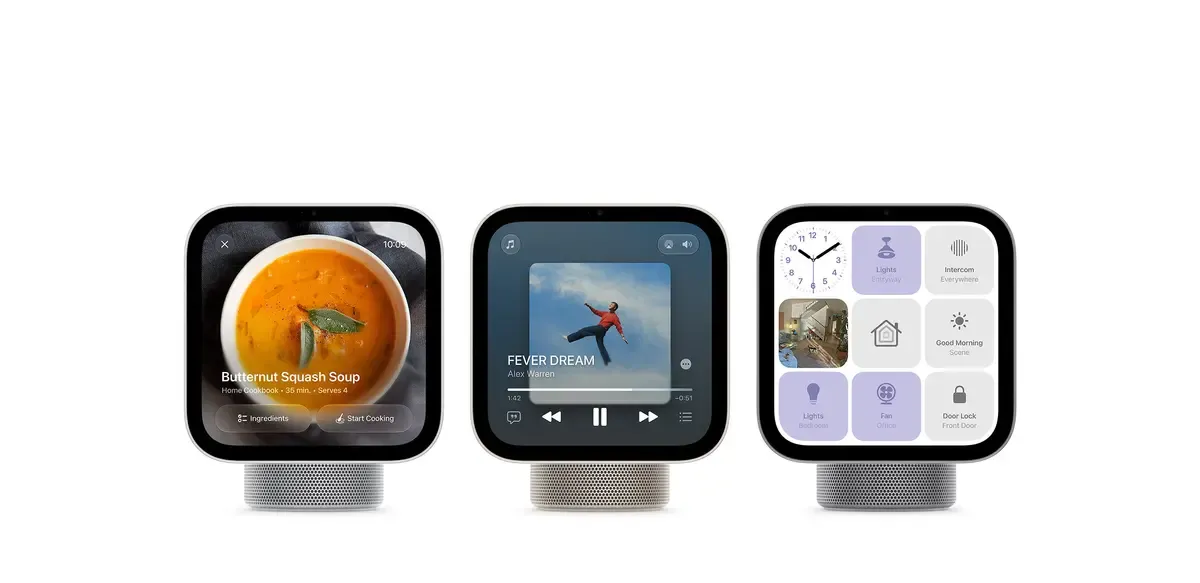
After years of persistent rumors, code leaks, and mounting customer anticipation, Apple has officially unveiled its first dedicated smart display: the Apple HomeView. Rather than repurposing an existing iPad or bolting a basic speaker to a generic touchscreen, Apple engineered HomeView from the ground up to serve as the unified command center for modern connected households.
Priced at $299 and launching on November 13, 2026, the Apple HomeView directly challenges long-standing market incumbents like the Amazon Echo Show and Google Nest Hub. However, Apple brings two defining advantages to the table that competitors have struggled to deliver: uncompromising on-device privacy and deep ecosystem intelligence driven by Siri AI and Apple silicon.
Whether resting on a kitchen island to guide dinner prep or mounted flush against an entryway wall as a whole-home security dashboard, HomeView represents Apple’s most ambitious push into smart living since the original HomePod. Here is a comprehensive technical breakdown of everything Apple announced.
Quick Summary: Apple HomeView Specs at a Glance
For readers looking for a rapid overview of the announcement, here is how the specifications break down across both hardware form factors:
| Feature | Tabletop Stand Model | Wall-Mounted Model |
|---|---|---|
| Display | 7-inch Liquid Retina, True Tone | 7-inch Liquid Retina, True Tone |
| Brightness Range | 500 nits peak to 0.3 nits minimum | 500 nits peak to 0.3 nits minimum |
| Processor | Apple A18 with Secure Exclaves | Apple A18 with Secure Exclaves |
| Camera | 12MP with Center Stage auto-framing | 12MP with Center Stage auto-framing |
| Audio Setup | Down-firing woofer, dual radiators, 2 drivers | Dual custom drivers tuned for on-wall acoustics |
| Microphones | 4-microphone beamforming array | 4-microphone beamforming array |
| Biometrics | Facial recognition & voice (up to 6 users) | Facial recognition & voice (up to 6 users) |
| Connectivity | Wi-Fi 7, Bluetooth 5.4, Thread, Matter | Wi-Fi 7, Bluetooth 5.4, Thread, Matter |
| Available Finishes | White with brushed silver base | Space Gray, Silver |
| Power Method | Braided AC power cord | Wired in-wall box or plug-in cable |
| Retail Price | $299 USD | $299 USD |
| Availability | Pre-orders open; delivers Nov 13, 2026 | Pre-orders open; delivers Nov 13, 2026 |
1. Two Purpose-Built Form Factors: Tabletop and Wall-Mounted
Apple recognized early on that a smart display cannot follow a one-size-fits-all approach. Placement in a busy kitchen demands different acoustics and ergonomics than an architectural installation in an entrance foyer. Consequently, Apple announced HomeView in two distinct hardware variations, both sharing the exact same $299 price tag.
Form Factor Highlights:
- Tabletop Stand Version: Angled 7-inch display, cylindrical acoustic base, down-firing subwoofer, designed for 360-degree room presence on counters and nightstands.
- Wall-Mounted Version: Low-profile flush frame in Space Gray or Silver, hardwired in-wall or plug-in options, tailored for hallways, entryways, and home security stations.
The Tabletop Model
The standard HomeView features a floating 7-inch panel permanently perched atop a compact, domed acoustic base reminiscent of a truncated HomePod mini. The base houses high-excursion speaker hardware, grounding the unit securely on kitchen counters, desks, or bedside nightstands. The display rests at a comfortable upward viewing angle, making touch interactions natural whether you are standing over a countertop or sitting at a table.
The Wall-Mounted Model
For homeowners seeking a minimalist, integrated aesthetic, the Apple HomeView (Wall Mounted) eliminates the speaker pedestal entirely. Available in sleek Space Gray and classic Silver finishes, this version mounts cleanly to drywall.
Apple offers two mounting installations:
- Plug-In Mount: A discreet low-voltage color-matched cable runs to a nearby wall outlet.
- Hardwired In-Wall Mount: Connects directly into standard electrical gang boxes for a completely wireless appearance. Apple even partnered with professional smart home installers (including nationwide ADT integration in select regions) to help homeowners retrofit existing intercom boxes.
If you are currently optimizing your home work environment, check out our Desk Upgrade Guide for tips on routing low-voltage cables and positioning screens cleanly.
2. The 7-Inch Liquid Retina Display: From Daylight to 0.3 Nits
At the heart of both HomeView models is a custom 7-inch Liquid Retina touchscreen. While competitive smart displays often use cheap, low-contrast LCD panels with washed-out viewing angles, Apple outfitted HomeView with optical clarity derived from iPad engineering.
- Bedside Mode (0.3 Nits): Zero circadian disruption with a warm amber night clock, providing effortless legibility in dark rooms without lighting up the space.
- Daylight Mode (500 Nits): Full daylight readability powered by True Tone, keeping calendar blocks, photos, and video calls high-contrast even on sunny countertops.
Proximity-Aware Sensing
HomeView features built-in optical proximity sensors that alter the interface based on your physical distance:
- Across the Room (Far State): Displays bold, high-contrast glanceable information such as a giant analog clock, upcoming calendar blocks, or current outdoor temperatures.
- Walking Closer (Near State): Smoothly transitions to reveal granular interactive elements, including individual checklist items, smart light brightness sliders, and media playback scrubbers.
The 0.3-Nit Bedside Breakthrough
One of the most impressive technical specifications is the dynamic brightness range. In sunny breakfast nooks, HomeView pushes up to 500 nits of brightness with True Tone ambient color matching.
When placed in a bedroom, however, HomeView dims down to an unprecedented 0.3 nits. Conventional smart displays emit a faint backlight glow that disturbs sleep cycles. At 0.3 nits with a warm amber night clock face, HomeView provides nocturnal visibility without lighting up dark rooms. To balance your home lighting setup, review our Home Office Lighting Guide.
Expressive Dynamic Faces
HomeView introduces a suite of customizable faces:
- Photos Face: Acts as an automated digital photo frame, curating memories from shared iCloud Photo Libraries.
- Flow Face: A dynamic digital artwork face that responds in real time to movements in the room with fluid colors.
- Snoopy & Classic Clocks: Animated character faces that wake up with household members in the morning and wind down at sunset.
- Home Modular & Camera Faces: Tailored for power users, displaying quick-action toggles or streaming up to nine security camera feeds simultaneously.
3. A18 Silicon and Hardware-Isolated Secure Exclaves
Under the hood, Apple made a decisive engineering move: powering HomeView with the flagship Apple A18 chip.
In an era where smart home gadgets typically rely on cut-rate budget microcontrollers, the inclusion of the A18 provides enormous computational headroom for local machine learning models, real-time audio tuning, and high-framerate interface animations.
| A18 Hardware Block | Core Configuration | Dedicated Workload |
|---|---|---|
| CPU Complex | 6-Core (2 Performance + 4 Efficiency) | OS responsiveness, fluid UI rendering, and network sync |
| Neural Engine | 16-Core Neural Processor | Local speech recognition, vision models, and proactive suggestions |
| Secure Exclaves | Hardware-Isolated Sensor Partition | Direct camera and mic stream processing for private on-device biometric matching |
The Role of Secure Exclaves
The standout architectural feature in the A18 processor is Secure Exclaves.
When building a communal device equipped with a camera and always-listening microphones, consumer distrust is the single biggest barrier to adoption. Secure Exclaves solve this by isolating sensor data in a dedicated hardware partition:
- Video frames from the 12MP camera and audio streams from the 4-microphone array pass directly into the Secure Exclave.
- The biometric recognition algorithms match household faces and voices entirely inside this walled off enclave.
- Neither the HomeView operating system nor Apple servers can ever read the raw pixel data or audio recordings used for recognition.
This hardware-level isolation allows HomeView to identify who is looking at the screen without compromising privacy. For power users seeking deeper control over Apple hardware and system services, see our collection of macOS Tahoe tricks and hacks.
4. Multi-User Architecture: True Communal Privacy
The fatal flaw of smart displays has always been the communal privacy paradox. If a device sits on a family kitchen counter, should it display your private text messages, work calendar reminders, or banking alerts?
Competitors tackled this clumsily by either requiring manual profile switching or disabling private notifications altogether. HomeView solves this through dynamic multi-user recognition for up to six people.
- User A Approaches: Camera recognizes face locally, displaying personal calendar entries, unread messages, and reminders.
- User B Approaches: Smoothly transitions the active interface to surface their unique work schedule, notes, and music playlists.
- Guest Approaches: Unrecognized face locks all private data, keeping the interface restricted to communal smart home controls.
How Multi-User Verification Works
- Facial & Voice Profile Sync: Up to six family members can link their Apple Accounts through the Apple Home app.
- Proximity Authentication: For private data to appear, two criteria must be satisfied simultaneously:
- The user must be recognized by face or voice through the Secure Exclave.
- The user’s paired iPhone or iPad must be present on the same local Wi-Fi network and recently unlocked.
- Instantaneous Profile Switching: When Parent A walks up to make coffee, HomeView displays their upcoming meetings and unread messages. When Teenager B steps in front of the screen, the interface transitions immediately to their school schedule and personal music recommendations.
- Guest Mode: If an unrecognized guest taps the display, private messages and personal calendars remain completely hidden. Guests can still operate smart lights, set kitchen timers, adjust room temperature, and play Apple Music.
5. Siri AI: Powered by Apple Intelligence
Running on the upcoming HomeView software version 27.2, Apple’s virtual assistant receives a monumental upgrade under the banner of Siri AI.
Unlike legacy voice assistants that rely on rigid syntax patterns, Siri AI leverages on-device foundation models running directly across the A18 Neural Engine.
Core Siri AI Capabilities on HomeView:
- Personal Context: Locates RSVPs in Messages, parses flight confirmations from Mail, and checks shared calendars.
- World Knowledge: Provides real-time answers for cooking substitutes, DIY home fixes, and general trivia.
- Multi-Turn Memory: Maintains conversational state across questions without repeated wake phrases.
- Ecosystem Handoff: Carries conversations and active tasks smoothly between iPhone, iPad, and Mac.
Multi-Turn Natural Dialogue
Users can converse with Siri AI without robotic wake words repeated between every sentence. You can ask: “Siri, what is on my calendar this afternoon?” Followed immediately by: “Move that three o’clock meeting back thirty minutes and text Sarah that I am running late.” Siri AI understands pronouns, contextual references, and household dynamics.
Deep Ecosystem Context
Because Siri AI integrates with paired household devices, it can synthesize data across apps. Asking “What time is Mom’s flight landing?” triggers an intelligent query that cross-references flight confirmation emails, shared calendars, and real-time radar tracking without requiring third-party plugins.
To explore how modern generative models handle context across productivity tools, read our comprehensive Learn AI Guide and our roundup of the best AI note-taking apps.
6. Acoustic Architecture and Spatial Audio
Apple has consistently led the market in compact acoustic engineering, and HomeView continues this legacy. Rather than settling for tinny speech speakers, Apple treated HomeView as a high-fidelity sound system.
| Acoustic Component | Physical Placement | Engineering Function |
|---|---|---|
| Dual Full-Range Drivers | Integrated into display panel | High-frequency vocal clarity and dynamic stereo separation |
| Down-Firing Subwoofer | Heavyweight base pedestal | Neodymium motor driving deep low-end resonance down to 60Hz |
| Dual Passive Radiators | Force-cancelling base mounts | Cancels physical cabinet vibrations on kitchen countertops |
Computational Sound Optimization
- Tabletop Model: Combines two full-range front drivers mounted inside the display enclosure with a down-firing woofer and dual force-cancelling radiators inside the base. This architecture delivers deep, distortion-free bass that does not rattle plates on kitchen counters.
- Wall-Mounted Model: Features dual custom drivers with acoustic chambers specifically equalized for drywall reflections. Computational audio dynamically measures wall distance and room resonance to prevent hollow, muddy sound.
- Spatial Audio & Multiroom: HomeView supports Spatial Audio with Dolby Atmos. Using AirPlay 2, it pairs seamlessly with existing HomePod speakers, HomePod mini units, and Apple TV 4K systems for synchronized whole-home audio. If you want to compare personal audio gear for work, see our AirPods Pro review.
Smoke and Carbon Monoxide Acoustic Detection
HomeView acts as a safety sentry even when idle. Utilizing its four-microphone array, the device constantly listens for the specific acoustic frequency patterns of traditional smoke and carbon monoxide detectors. If an alarm sounds while you are away from home, HomeView sends immediate critical alerts to your iPhone, iPad, and Apple Watch.
7. The Ultimate Apple Home and Matter Command Hub
HomeView serves as a standalone Apple Home Hub, eliminating the need for an Apple TV or HomePod to handle remote access and home automations.
Unified Smart Home Architecture:
- Matter Standard: Universal multi-platform onboarding for bulbs, switches, locks, and sensors.
- Thread Network: Low-latency, self-healing mesh communication for battery-powered accessories.
- Apple HomeKit: End-to-end encrypted iCloud syncing and local HomeKit Secure Video feeds.
Full Matter and Thread Border Router
With built-in Thread border routing and native Matter compatibility, HomeView connects directly to thousands of smart bulbs, smart plugs, locks, and sensors from third-party manufacturers. Mesh network setup happens automatically in the background.
Introducing the Apple Home Collection
Alongside HomeView, Apple unveiled the Apple Home Collection, a curated suite of accessories developed in close partnership with premier hardware brands. The collection includes smart cameras, precision thermostats, and keyless door locks featuring:
- Native Apple Home end-to-end encryption.
- Simple zero-touch setup via NFC tap.
- Instant video history saved to iCloud+ HomeKit Secure Video.
On HomeView, the new Home Camera face allows users to monitor up to nine active camera feeds simultaneously on a single grid screen, transforming the display into an enterprise-grade home security console.
8. Everyday Living: Cooking Mode, Handoff, and Center Stage
Beyond smart home toggles, HomeView incorporates thoughtful software touches designed for domestic life:
Streamlined “Start Cooking” Mode
When browsing recipes in Safari on iPhone or iPad, users can tap a new “Start Cooking” button to beam the recipe directly to HomeView. The display formats the webpage into a clean, distraction-free cooking card:
- Large, legible typography readable from six feet away.
- Hands-free voice navigation: “Siri, what is step three?” or “Set an eight-minute timer for pasta.”
- Multiple concurrent timers visible at a glance via Live Activities on the home screen.
Interactive Cooking Interface:
- Step Overview: High-contrast step-by-step instructions readable from six feet away across kitchen islands.
- Simultaneous Timers: Live Activities tracks concurrent tasks side by side (for example, a 4-minute chicken sear alongside an 8-minute pasta boil).
- Hands-Free Control: Speak naturally to advance instructions without touching the glass with messy kitchen hands.
12MP Center Stage FaceTime
Making video calls while preparing dinner or cleaning is seamless. The ultra-wide 12MP front camera features Center Stage machine learning, smoothly panning and zooming to keep you centered as you move around the room. When additional family members enter the kitchen, the camera automatically widens its field of view to include everyone.
Seamless Media Handoff
If you are listening to a podcast or Apple Music playlist on your iPhone as you arrive home, simply bring your phone near HomeView. Ultra-Wideband (UWB) detection transfers audio and visual lyrics instantly to the smart display without interrupting playback.
9. Pricing, Availability, and Environmental Impact
Apple confirmed that the HomeView lineup is positioned aggressively within the premium smart display segment.
| Product Model | Storage / Finish | US Retail Price | Availability Date |
|---|---|---|---|
| Apple HomeView | Tabletop Stand (White / Silver) | $299 USD | Delivers Nov 13, 2026 |
| Apple HomeView (Wall Mounted) | Space Gray or Silver | $299 USD | Delivers Nov 13, 2026 |
| Hardwired In-Wall Kit | Gang box adapter | $39 USD | Delivers Nov 13, 2026 |
| ADT Professional Installation | In-home installation service | Select regions | Available at checkout |
Launch Timeline
- Pre-Orders Open: Started Tuesday, October 13, 2026 on Apple.com and the Apple Store app.
- Store Availability & Shipping: Begins Friday, November 13, 2026 across more than 30 countries and regions.
Environmental Credentials
As part of Apple 2030, HomeView features 100% recycled aluminum in its hinge and internal frames, 100% recycled gold in circuit board plating, and 100% recycled rare earth elements across all acoustic magnets. Packaging is completely fiber-based, eliminating plastic shrink wrap.
10. Apple HomeView vs. Echo Show & Nest Hub: Which Hub Wins?
How does Apple HomeView compare to established competitors in the smart display arena?
| Feature | Apple HomeView | Amazon Echo Show 8 |
|---|---|---|
| Base Price | $299 | ~$150 |
| Privacy Model | Hardware Secure Exclaves | Cloud-heavy profile |
| Display Dimming | 0.3 Nits (Bedside safe) | ~2 Nits (Backlight glow) |
| Multi-User Auth | On-Device Face and Voice Sync | Voice profiles only |
| Processor | Apple A18 Flagship Silicon | Budget MediaTek SoC |
| Video Calling | 12MP Center Stage Camera | 13MP Auto-frame Camera |
| Advertising | Zero Sponsored Ads | Sponsored Home Ads and Promos |
Why HomeView Justifies Its $299 Price
While budget smart displays cost half as much, they come with substantial user experience compromises:
- Ad-Free Clean Interface: Amazon Echo Show devices frequently rotate unwanted sponsored advertisements, shopping recommendations, and celebrity news across the home screen. HomeView is 100% ad-free, displaying only your art, photos, and personal widgets.
- True Bedroom Compatibility: Most smart displays emit a noticeable backlight glow even at minimum brightness. HomeView’s 0.3-nit ultra-dim display makes it a genuine alarm clock replacement.
- Ironclad Privacy: With Secure Exclaves handling biometrics on-device, your camera and microphone feeds never leave your home network.
Frequently Asked Questions
How much does the Apple HomeView cost?
Both the tabletop stand version and the dedicated wall-mounted model of Apple HomeView retail for $299 in the United States.
When will the Apple HomeView be released?
Pre-orders began on October 13, 2026. Official shipping and retail availability in Apple Stores will commence on Friday, November 13, 2026.
Can multiple people in a household use Apple HomeView privately?
Yes. HomeView supports up to six recognized users. Using facial and voice recognition processed inside the A18 Secure Exclaves, it keeps personal calendars, messages, and reminders isolated, displaying them only when the recognized user is nearby and their paired iPhone or iPad is on the same local Wi-Fi network.
Does Apple HomeView require a subscription for Siri AI?
No basic subscription is required for everyday smart home automation, timers, music playback, or on-device Siri AI requests. Certain advanced Apple Intelligence features powered by server-side foundation models have generous daily usage limits, with expanded access available for an optional fee in the future.
Does Apple HomeView support Matter and Thread?
Yes. Apple HomeView includes built-in Thread border router capabilities and full Matter compatibility, allowing it to communicate with smart home accessories from Apple, Google, Amazon, and third-party smart home ecosystems.
Can guests use Apple HomeView?
Yes. Guests and unrecognized users can interact with HomeView to play music, check the weather, adjust lights, and set timers. However, personal content like text messages, photo libraries, and private calendars remain strictly locked and invisible to guests.
Related Articles
iPad vs. Android Tablet: Which Should You Buy in 2026?
A comprehensive 2026 comparison between iPads and Android tablets to help you decide which platform best suits your creative and professional needs.
Rumored iPhone Fold: Specs, Release Date & Price
Everything about Apple's rumored iPhone Fold: supply chain leaks, crease-free display patents, expected launch windows, pricing, and custom iOS features.

AI Smart Appliances: How the AI Kitchen Reclaims Your 5-to-9
AI-powered smart appliances are transforming home management. From meal-planning fridges to precision ovens, see the future of the AI kitchen.