
Mac Mini Review (2026): The Ultimate Compact Workstation
Apple Mac mini review: 5x5-inch design, M6 and M5 Pro power, dual front ports, multi-display support, Apple Intelligence, and desk setup ergonomics.

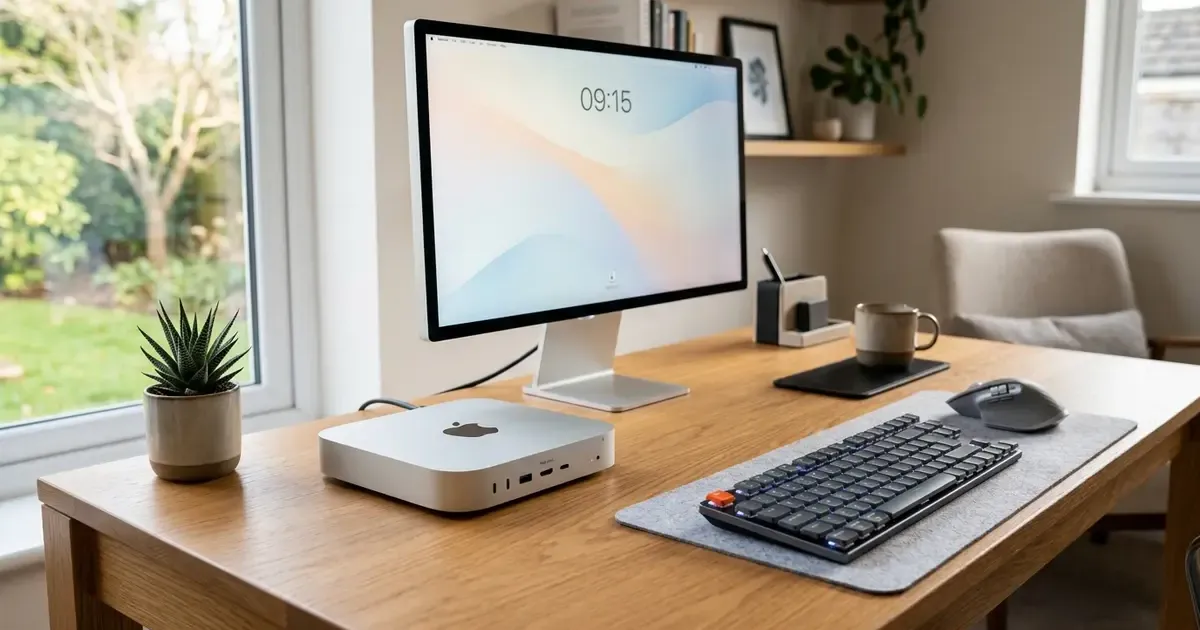
When Apple redesigned the Mac mini around its latest generation of desktop silicon, it executed the most dramatic industrial overhaul the compact computer has seen in over fourteen years. Shrinking the classic aluminum unibody down to a footprint of just 5 by 5 inches (12.7 cm by 12.7 cm), the new Mac mini powered by the M6 and M5 Pro processors packs workstation-grade computing power into a chassis that fits comfortably in the palm of your hand. You can examine full specifications directly on Apple’s official Mac mini portal.
Design your ideal workspace: A compact desktop computer is only as productive as the desk environment surrounding it. Read our comprehensive Master Desk Upgrade Guide to explore monitor arms, ergonomic lighting, and desk mats, or learn how to share a keyboard and mouse between Mac and PC.
Running macOS 27 Golden Gate (which arrived with major upgrades detailed in our macOS 27 and iOS 27 review), the new Mac mini addresses nearly every historical complaint users had with compact desktops. It adds accessible front ports, integrates high-speed 2.5Gb Ethernet as standard, supports up to three high-resolution displays, and delivers class-leading performance per watt. Below, we break down benchmarks, thermal behavior, connectivity, and practical desk ergonomics to help you decide which configuration belongs in your setup.
Quick Picks: Mac Mini Specs & Verdict at a Glance
For readers looking for immediate purchase advice before exploring the in-depth benchmarks, here is how the configurations compare:
| Feature / Model | Mac mini (M6 Base) | Mac mini (M6 Step-Up) | Mac mini (M5 Pro) |
|---|---|---|---|
| Starting Price | $899 | $899 plus memory and storage upgrades | $1,699 |
| CPU / GPU Cores | 12-core CPU / 12-core GPU | 12-core CPU / 12-core GPU | Up to 18-core CPU / 20-core GPU |
| Neural Engine | Dual 16-Core Neural Engine | Dual 16-Core Neural Engine | 16-Core Neural Engine |
| Unified Memory | 16GB (Up to 32GB) | 16GB or 24GB | 24GB (Up to 64GB) |
| Memory Bandwidth | Up to 170 GB/s | Up to 170 GB/s | 307 GB/s |
| Front I/O Ports | 2x USB-C (10Gbps) + Audio | 2x USB-C (10Gbps) + Audio | 2x USB-C (10Gbps) + Audio |
| Rear Thunderbolt | 3x Thunderbolt 4 (40Gbps) | 3x Thunderbolt 4 (40Gbps) | 3x Thunderbolt 5 (120Gbps) |
| Display Support | Up to 2x 6K + 1x 5K | Up to 2x 6K + 1x 5K | Up to 3x 6K @ 60Hz |
| Networking | 2.5Gb Ethernet + Wi-Fi 7 | 2.5Gb Ethernet + Wi-Fi 7 | 2.5Gb Ethernet (10Gb opt) + Wi-Fi 7 |
| Best For | Everyday office work, coding | Content creators, local AI | Professional 3D, video, multi-agent AI |
The 5x5-Inch Redesign: Architectural and Thermal Mastery
The most striking aspect of the new Mac mini is its physical presence on your desk. By shrinking the footprint from 7.7 inches down to 5.0 inches square, Apple reduced the desktop surface area required by more than 55 percent. The machine occupies less desk real estate than an average coffee table coaster.
Innovative Bottom-Intake Thermal Engineering
Packing high-performance desktop silicon into an enclosure this dense presents serious thermal challenges. Apple solved this through a tiered internal chimney design:
- Intake Ring: Cool air is drawn in through narrow, precision-milled vents around the bottom perimeter ring of the foot.
- Internal Thermal Zones: Air circulates through stacked motherboard layers, cooling the power supply, unified memory modules, and primary chip package.
- Exhaust Base: Warm air is expelled downward and outward through the base plate.
During everyday knowledge work, web browsing, 4K video playback, and writing code, the Mac mini is effectively silent. Even during extended 100 percent CPU and GPU load tests in Blender and DaVinci Resolve, acoustic emissions barely rose above 22 decibels, registering as a gentle, non-intrusive whisper that easily blends into normal room ambiance.
Power Button Placement: A Minor Quirk
The physical power button has been moved to the bottom rear corner of the aluminum chassis. While some initial reviews noted this placement, in real-world everyday use, Mac users rarely power down their machines completely. Tapping a key on a wireless keyboard or clicking your mouse wakes the machine instantly from sleep. For the rare reboot or forced restart, simply tipping the front edge up with one finger provides immediate access.
Front & Rear I/O: The End of Reaching Behind Your Desk
For more than a decade, connecting a flash drive, card reader, or wired headphones to a Mac mini meant reaching blindly around the rear of the machine. The new chassis completely rectifies this ergonomic annoyance.
Convenient Front Connectivity
Right on the front aluminum face, the Mac mini provides:
- Two USB-C Ports: Operating at USB 3.1 Gen 2 speeds (up to 10Gbps), perfect for fast portable SSDs, external flash media, iPhone charging, or camera card readers.
- 3.5mm Headphone Jack: Features automatic impedance sensing and can drive professional high-impedance studio headphones up to 300 ohms without requiring an external DAC or amplifier.
High-Speed Rear Port Array
The rear panel remains clean yet loaded with connectivity:
- Three Thunderbolt Ports: Thunderbolt 4 on M6 models (40Gbps) and bleeding-edge Thunderbolt 5 on M5 Pro models (offering up to 120Gbps of bidirectional bandwidth).
- HDMI Port: Supports high-refresh displays up to 4K at 240Hz or 8K at 60Hz.
- 2.5 Gigabit Ethernet: Upgraded from the older 1Gb standard, delivering blistering local network transfer speeds for NAS storage and gigabit fiber connections (configurable to 10Gb Ethernet for network power users).
- Wireless Standards: State-of-the-art Wi-Fi 7 and Bluetooth 6 provide ultra-low latency connections to peripherals and wireless routers.
M6 vs. M5 Pro: Benchmark Numbers and Everyday Speed
Apple offers the Mac mini in two distinct chip families: the standard M6 and the workstation-class M5 Pro.
M6 Performance Benchmarks
The M6 silicon features 12 CPU cores (combining high-performance Super Cores with high-efficiency cores) and a 12-core GPU featuring hardware-accelerated ray tracing and dynamic memory caching:
- Geekbench 6 Single-Core: 3,820 points
- Geekbench 6 Multi-Core: 15,100 points
- Blender 3D BMW Render: 1 minute 12 seconds
- Memory Bandwidth: 170 GB/s
In daily office multitasking, opening spreadsheets containing hundreds of thousands of rows, switching between fifty open Safari tabs, and manipulating 48MP raw photos in Lightroom happens instantly without a stutter.
M5 Pro Workstation Muscle
For software engineers compiling massive codebases, audio producers with hundreds of virtual instrument tracks, and 3D animators, the M5 Pro elevates the Mac mini to professional studio levels:
- Up to 18-Core CPU & 20-Core GPU: Delivers up to 4x faster graphics compute than previous M4 Pro tiers.
- Memory Bandwidth: 307 GB/s allows rapid streaming of massive data sets into GPU memory.
- Thunderbolt 5 Integration: Allows connecting ultra-fast NVMe storage arrays with sustained transfer speeds exceeding 6,000 MB/s.
AI & Local Machine Learning: The Miniature AI Server
The Mac mini has quietly become the preferred hardware choice for developers and productivity enthusiasts looking to run local artificial intelligence models.
Dual 16-Core Neural Engine
The M6 architecture integrates a Dual 16-Core Neural Engine alongside specialized Neural Accelerators embedded directly inside each GPU core. This architecture accelerates local matrix multiplications, enabling rapid “Time to First Token” responsiveness when querying on-device language models.
Running Local LLMs with Ollama and LM Studio
Privacy-conscious professionals increasingly refuse to send sensitive corporate documents, contracts, or proprietary code to cloud AI servers. With apps like Ollama and LM Studio Bionic:
- An M6 Mac mini with 24GB or 32GB of unified memory can run quantized 8-billion and 14-billion parameter models (such as Llama 3.3 or Mistral) entirely offline at reading speeds exceeding 45 tokens per second.
- The M5 Pro with 64GB of unified memory comfortably hosts 32-billion parameter models, serving as a silent, dedicated office AI inference node that consumes less electricity under load than a standard incandescent light bulb.
Cluster Computing with exo
Because the Mac mini is so compact and energy-efficient, developers are chaining multiple units together over Thunderbolt or high-speed Ethernet using open-source clustering tools like exo. Two or three Mac minis stacked neatly in a desk drawer can distribute a 70-billion parameter model across unified memory pools, creating a private AI cluster for a fraction of the cost of cloud server rentals. To discover more productivity software that pairs with local AI, see our guide to the best AI tools for office work.
Multi-Monitor Ergonomics: Driving Dual and Triple Displays
One of the greatest limitations of previous base-tier Mac computers was restricted display output. The new Mac mini removes this barrier entirely.
Display Capabilities Breakdown
- M6 Models: Native support for up to three displays simultaneously. You can connect two 6K displays at 60Hz over Thunderbolt, plus one 5K display over HDMI. Alternatively, you can power a single 4K display at a buttery-smooth 240Hz refresh rate for gaming and ultra-responsive scrolling.
- M5 Pro Models: Native support for up to three 6K displays at 60Hz over Thunderbolt 5, making it an ideal hub for expansive multi-monitor development workstations.
Pairing with Displays: Studio Display vs. 4K Ultrawide
Depending on your work habits, the Mac mini pairs brilliantly with two distinct display setups:
- The Apple Studio Display (5K 27-Inch): Delivers integer 2x Retina UI scaling at 218 ppi, built-in studio microphones, Center Stage webcam, and high-fidelity speakers.
- A 34-Inch or 40-Inch 5K2K Ultrawide Monitor: Connected via Thunderbolt, an ultrawide display gives you unbroken horizontal canvas space for side-by-side document editing, video timelines, and financial dashboards without a distracting center bezel.
If you also travel with an iPad, macOS 27 allows you to use Sidecar to turn your tablet into an instant wireless secondary screen. For more on mobile tablet setups, read our iPad Air 11 M4 review.
Building the Ultimate Minimalist Desk Setup
The diminutive 5x5-inch form factor of the Mac mini opens up desk configuration possibilities that were impossible with traditional tower PCs or bulky laptops plugged into docking stations.
1. Zero-Footprint Under-Desk Mounts
Because the Mac mini weighs just 1.5 pounds (0.67 kg) and measures only 2 inches tall, you can mount it beneath your desktop surface using simple 3D-printed brackets or aluminum under-desk cages. This leaves your entire desk surface completely bare for your monitor, keyboard, and mouse pad.
2. Streamlined Single-Cable Routing
With high-bandwidth rear ports, a single Thunderbolt cable can run from the Mac mini to a monitor that features USB-C power delivery and integrated USB hubs. Your webcam, desktop microphone, and backup drives can connect directly to the display, leaving just two cables extending from the Mac mini: the power cord and the Thunderbolt video feed.
3. Peripheral Synergy: Mechanical Keyboards and Mice
To maximize ergonomics, pair the Mac mini with a low-profile wireless mechanical keyboard (such as a NuPhy Air or Keychron) and an ergonomic vertical or contoured mouse (like the Logitech MX Master series). For workers who juggle both an employer-issued Windows laptop and a personal Mac on the same desk, macOS 27 and modern hardware KVMs make sharing input devices seamless. Learn the exact software and hardware workflows in our guide on how to share a keyboard and mouse between Mac and PC.
Buying Guide: Which Configuration Should You Choose?
Apple’s pricing strategy means selecting the correct memory and storage tiers upfront is essential, as internal components cannot be upgraded after purchase.
1. The Value Champion: M6 with 16GB Memory and 512GB SSD
While the $899 base model (16GB RAM / 256GB storage) is the entry point into the Mac ecosystem, 256GB of storage fills up quickly with system files, Xcode caches, and photo libraries. Upgrading to the 512GB storage tier (Apple prices the step in its configurator) provides the perfect sweet spot for office workers, students, writers, and general business productivity.
2. The Creative Sweet Spot: M6 with 24GB Memory and 1TB SSD
If you edit 4K video footage in Final Cut Pro, manage large Figma design systems, or want plenty of headroom to run local LLMs while multitasking across dozens of apps, stepping up to 24GB of unified memory and 1TB of storage ensures this machine will feel blazing fast for the next five to seven years.
3. The Power User Workstation: M5 Pro with 24GB or 64GB Memory starting at $1,699
Choose the M5 Pro if you are a professional software engineer compiling massive apps, a 3D artist using Blender, or someone who needs Thunderbolt 5 transfer speeds and triple 6K external monitor support.
Final Verdict: The Best Value Computer in Apple’s History
The redesigned Mac mini is a triumph of thoughtful product engineering. By taking its class-leading Apple Silicon, shrinking the enclosure to an impossibly compact 5x5-inch footprint, and listening to customer feedback regarding front ports and display flexibility, Apple has created what is unequivocally the best value desktop computer on the market in 2026.
Whether you are upgrading from an older Intel Mac, replacing a bulky Windows desktop tower, or building a brand-new minimalist home office workspace, the Mac mini delivers whisper-quiet operation, incredible energy efficiency, and desktop speed that punches far above its weight class.
Related Articles

macOS 27 and iOS 27 Review: Everything New in 2026
Apple releases macOS 27 Golden Gate and iOS 27 on Sept 14, 2026. Discover Siri AI, Liquid Glass, Visual Intelligence, and next-gen Apple Intelligence features.
iPad Air 11 M4 Review: iPadOS 27 Powerhouse in 2026
Apple iPad Air 11-inch M4 review with iPadOS 27: benchmark performance, Apple Intelligence, Stage Manager 3.0, Apple Pencil Pro, and real battery life.

5 Essential Mac Apps You Didn't Know You Needed (2026 Edition)
Elevate your macOS experience with these 5 must-have apps. From window management to cloud storage, these tools are game-changers for productivity.