
10 Best KOReader Plugins to Upgrade Your E-Reader (2026)
Discover the 10 best community KOReader plugins for Kindle and Kobo: LocalSend, Storefront, SimpleUI, ZenUI, ZenMTP, KindleFetch, Glimpse, and AI Assistant.

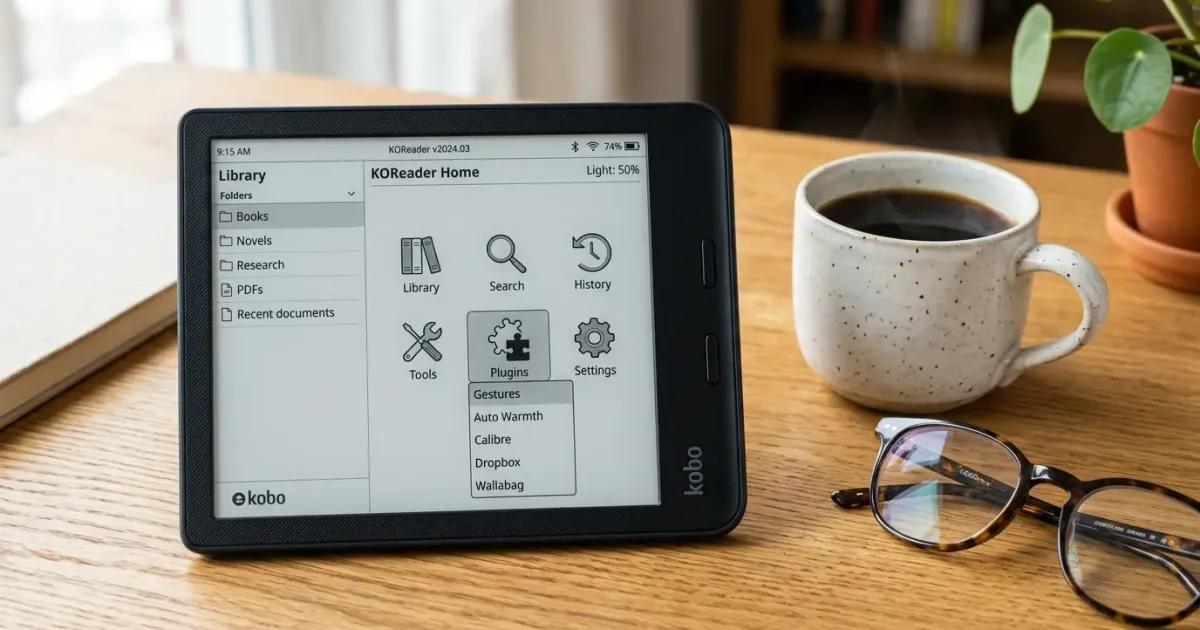
KOReader is widely regarded as the ultimate software upgrade for dedicated e-readers. Whether you run it on a jailbroken Kindle, a Kobo, a PocketBook, or an Android E Ink device like an Onyx Boox, KOReader unlocks unmatched control over document rendering, typography, pixel-precise margin adjustments, and native PDF reflow. However, what truly elevates KOReader from a superior ebook viewer into a complete digital reading workstation is its active third-party plugin ecosystem.
While KOReader works reliably out of the box with built-in stock tools, its default interface still looks like a 1995 Unix directory browser, and sideloading books across different devices can still feel cumbersome. The open-source developer community has stepped in to bridge these gaps. Today, you can beam books wirelessly from your smartphone in seconds via LocalSend, fix USB MTP connection headaches on newer Kindles, browse community extensions directly on your screen via Storefront, and peek at fantasy maps without losing your page.
In this comprehensive guide, we focus exclusively on the 10 best community KOReader plugins that you can install additionally. We skip the pre-installed default settings to highlight genuine third-party extensions that upgrade your reading workflow, modernize your interface, and eliminate daily friction.
Before diving into configurations, if you haven’t installed KOReader yet, follow our step-by-step Kindle KOReader installation guide or review firmware requirements in our Kindle modding guide.
Quick Picks: Best KOReader Plugins at a Glance
If you want wireless file drops, an on-device app store, a complete visual dashboard redesign, or AI-powered definitions on your e-reader, start with these top recommendations:
| Plugin Name | Category | Primary Developer | Key Advantage |
|---|---|---|---|
| 1. LocalSend | Wireless File Transfer | kaikozlov | Beam books directly from your phone, Mac, or PC over local Wi-Fi |
| 2. Storefront | App Store & Package Manager | ultimatejimmy | Install and update third-party plugins directly over Wi-Fi without a PC |
| 3. SimpleUI | Interface & Home Screen | doctorhetfield-cmd | Replaces the file list with a modern book cover dashboard and streaks |
| 4. ZenUI / ZenOS | Interface & Home Screen | AnthonyGress | Distraction-free, lightweight layout for pure reading focus |
| 5. ZenMTP / KindleMTP | USB Connectivity & MTP | danihrndzld / xZenLabs | Enables USB MTP file transfers on Kindle Scribe, PW11/12, and Basic |
| 6. KindleFetch | Content & Digital Archives | william-spongberg | Search and download public archives directly on your e-reader |
| 7. Glimpse | Reading Experience & Reference | Fank1 | Peek at fantasy maps and character trees without losing your place |
| 8. AI Assistant | AI & Language Comprehension | omer-faruq | Summarize, explain, and translate book passages using modern LLMs |
| 9. Bookends | UI & Status Bar Customization | AndyHazz | Granular header and footer status bars with battery and chapter tokens |
| 10. Reading Style | Layout & Formatting | omer-faruq | Visual style controls for margins and chapters without touching raw CSS |
1. LocalSend (AirDrop-Style Wireless File Sharing)
Getting a newly purchased or downloaded book onto an e-reader has historically involved finding a USB cable, setting up complex desktop servers, or dealing with sluggish web upload forms. LocalSend for KOReader (localsend.koplugin, created by community developer kaikozlov) brings open-source, AirDrop-like wireless file transfers directly to your e-reader screen.
Because the official LocalSend client runs natively on iOS, Android, macOS, Windows, and Linux, you can send an EPUB, PDF, or custom font file from any device in your house straight to your Kindle or Kobo in seconds.
How the LocalSend Transfer Works
- Open the LocalSend app on your phone, laptop, or desktop computer.
- Select your EPUB, MOBI, or PDF file and choose your e-reader target on the local Wi-Fi network.
- The KOReader plugin receives the payload silently and routes the file straight into your documents directory.
Key Capabilities
- Seamless Cross-Platform Sharing: Beam books, articles, custom OTF or TTF fonts, or even new
.kopluginfolders from an iPhone, Mac, Windows laptop, or Android tablet over your local Wi-Fi network. - Automatic Extension Sorting: Incoming files are intelligently categorized. Book formats route directly to your designated reading folder, while font files route to your fonts directory.
- Zero Cloud Dependency: LocalSend operates strictly on your local network (LAN) using end-to-end HTTPS encryption; your files never touch an external third-party server.
- Integrated Self-Updater: Includes an update check under
Menu -> Network -> LocalSendto pull new plugin updates directly over Wi-Fi.
Verdict: An absolute must-have quality-of-life extension. It completely frees you from carrying a USB cable when you buy or download an ebook on your phone while traveling.
2. Storefront (On-Device Community Plugin Store)
Historically, installing community-made KOReader plugins was a chore: you had to browse GitHub on a computer, download .zip archives, mount your e-reader over USB, and manually extract folders inside koreader/plugins/. Storefront (storefront.koplugin, developed by ultimatejimmy) completely eliminates this friction.
Originally developed as a modern overhaul of the older community appstore concept, Storefront gives KOReader an integrated, on-device package manager accessible directly over Wi-Fi.
Key Capabilities
- In-App Discovery and Installation: Browse a curated catalog of community plugins, Lua user patches, custom typography fonts, and screensavers directly on your E Ink screen.
- Built-in Documentation Viewer: Read the full GitHub README and changelog of any extension inside a native dialog before choosing to install it.
- One-Tap Automated Updates: Storefront checks local commit hashes against upstream GitHub releases, letting you update all your third-party mods with a single tap.
- Device Blueprints: Export a snapshot of your entire modded setup (active plugins, patches, typography, and settings) into a portable 6-digit code to instantly clone your configuration to a secondary e-reader.
Verdict: The single most important third-party plugin to install first. Once Storefront is running, every other community plugin on this list can be downloaded in seconds without touching a USB cable.
3. SimpleUI (Modern Dashboard & Home Screen)
The number one complaint newcomers have when launching KOReader is its interface: by default, it looks like a 1995 desktop file manager with plain directory lists. SimpleUI (simpleui.koplugin, created by doctorhetfield-cmd) replaces that sterile file list with a rich, modern home dashboard inspired by modern tablet operating systems and Kobo Home.
Key Capabilities
- Visual Book Cover Grid: Displays recent books with high-resolution cover thumbnails, current reading percentage bars, and estimated time remaining in the current chapter.
- Reading Streaks and Goal Widgets: Tracks your consecutive reading days and daily page goals right on the home screen, keeping motivation high.
- Custom Navigation Bar: Replaces clunky nested menus with an intuitive bottom bar for one-tap switching between your active book, library collections, and settings.
- Modular Dashboard Layout: Choose exactly which widgets appear on your home screen, including battery health metrics, current clock, and custom shortcuts.
Verdict: If KOReader’s stock file browser has ever made you miss your Kindle’s polished stock home screen, SimpleUI is the definitive visual remedy.
4. ZenUI / ZenOS (Ultra-Minimalist Reading Suite)
While SimpleUI focuses on rich widgets and statistics, ZenUI (zen_ui.koplugin, created by AnthonyGress and distributed through the xZenLabs ecosystem) goes in the exact opposite direction: extreme, distraction-free minimalism.
Designed specifically for readers who find modern notification-heavy interfaces overwhelming, ZenUI strips away all visual clutter to maximize screen real estate and E Ink battery endurance.
Key Capabilities
- Zero-Distraction Typography: A stripped-down typography layout that removes status headers and unnecessary borders while navigating menus.
- Lightweight Memory Footprint: Built with streamlined Lua scripts that consume minimal RAM, making it particularly lightning-fast on older 512MB Kindles (such as the Paperwhite 2, 3, and Voyage).
- Integrated ZenFM File Navigation: Pairs seamlessly with ZenFM for a high-contrast, clean file browser that prioritizes clean book titles over raw file extensions.
Verdict: The ultimate home screen replacement for purists reading on older or budget hardware where every millisecond of E Ink responsiveness counts.
5. ZenMTP / KindleMTP (USB File Transfers for Newer Kindles)
If you use KOReader on an older Kindle (like the Paperwhite 3 or Voyage), plugging in a USB cable mounts the storage drive using traditional USB Mass Storage (UMS). However, modern Kindles, including the Kindle Scribe, Paperwhite 11th and 12th Gen, Basic 11, and Kindle Colorsoft, use Media Transfer Protocol (MTP).
Under stock Amazon software, MTP connects automatically. But when running KOReader, connecting a USB cable does not mount the drive to your PC. Historically, users had to completely exit KOReader back to the stock Kindle OS, plug in the cable, transfer books, unplug, and relaunch KOReader.
ZenMTP (xZenLabs/zen-mtp) and KindleMTP (kindlemtp.koplugin by danihrndzld) solve this friction completely.
Key Capabilities
- On-Demand MTP Activation: Trigger an MTP session directly from KOReader’s top menu or assign it to a custom screen gesture without touching the stock Kindle UI.
- No Cable Re-plugging Required: Switches between reading mode and PC file transfer mode seamlessly on MediaTek-based Kindle architectures.
- Clean System Restore: Once the USB cable is unplugged, the script automatically restores KOReader’s display refresh and frontlight brightness parameters.
Verdict: Essential for owners of the Kindle Scribe, Paperwhite 11 or 12, or Basic 11 who still prefer high-speed wired USB book transfers.
6. KindleFetch (Direct On-Device Book Downloads)
For readers using open-source archives, downloading books often means browsing on a computer, running Calibre, and tethering via USB. KindleFetch (KindleFetch.koplugin, developed by william-spongberg and justrals) brings unified digital library search directly onto your e-reader screen.
Key Capabilities
- Direct Multi-Archive Search: Query major public book databases, open repositories, and public-domain archives (like Project Gutenberg and the Internet Archive) through a single search prompt on your e-reader.
- One-Tap Background Download: Downloads
.epubfiles directly into your specified KOReader reading directory over Wi-Fi without exiting to an external browser. - Automatic Metadata Indexing: Instantly fetches author, book cover, and publication year so the newly downloaded title appears immediately in your library with proper formatting.
Note: Always verify copyright status and regional public domain licensing before downloading titles over public digital networks.
Verdict: An indispensable companion for traveling light. If you finish a book while away from home, KindleFetch lets you find and load your next read without a laptop.
7. Glimpse (Reference Peeking for Maps & Lore)
If you read epic fantasy novels, historical non-fiction, or dense multi-POV sagas (like The Lord of the Rings, The Stormlight Archive, or A Song of Ice and Fire), you constantly need to refer back to world maps, character lists, and family genealogies. On a physical paperback, you simply keep your finger in the front map page. On an e-reader, flipping back and forth loses your place and destroys your reading flow.
Glimpse (glimpse.koplugin, developed by Fank1) solves this elegantly for KOReader.
How Glimpse Works
- While reading any chapter, trigger a custom gesture (such as a corner tap or two-finger press).
- A floating reference window appears over your page displaying your designated high-resolution map, battle plan, or character tree.
- Zoom in or pan around using touch gestures.
- Tap anywhere outside to dismiss the window and resume reading instantly on the exact same sentence.
Key Capabilities
- Floating Reference Viewer: Bind a simple screen gesture to open a reference gallery over your active page without reloading the underlying book layout.
- Instant Map Zoom and Pan: Inspect high-resolution map details, battle schematics, and appendices using fast multi-touch pinch-to-zoom.
- Multi-Image Support: Save multiple reference sheets per book (such as a continent map, city map, and dramatis personae) and flip between them in seconds.
Verdict: An absolute game-changer for fantasy and history buffs. It single-handedly restores the best physical advantage of print books to digital screens.
8. AI Assistant (On-Device LLM Explanations & Summaries)
Reading dense philosophy, historical classics, or technical non-fiction often presents passages filled with obsolete idioms, complex metaphors, or dense arguments. While KOReader includes offline dictionary lookup, it cannot synthesize context. AI Assistant (assistant.koplugin, created by omer-faruq) integrates modern language models directly into your reading flow.
Key Capabilities
- Contextual Explanations: Highlight a paragraph or dialogue exchange and ask the AI to explain the underlying philosophical reference or subtext in simple terms.
- Nuanced Translations: Translate idiomatic foreign phrases that traditional bilingual dictionaries fail to interpret accurately.
- Chapter Summaries: Generate concise chapter bullet points to refresh your memory after putting a complex book down for several weeks.
- Flexible Provider Support: Connect your personal API keys for OpenAI, Anthropic Claude, Google Gemini, DeepSeek, or connect to a local self-hosted Ollama server on your home network for complete privacy.
Verdict: A powerful modern reading companion that turns any classic or dense non-fiction volume into an interactive seminar.
9. Bookends (Custom Status Bar & Header-Footer Engine)
KOReader’s stock status bar is functional, but customizing what information appears at the top and bottom of your screen normally requires digging through nested menus. Bookends (bookends.koplugin, created by AndyHazz) gives you a powerful visual engine to build custom header and footer layouts.
Key Capabilities
- Modular Status Tokens: Mix and match dynamic tokens including exact pages left in chapter, estimated reading time, battery percentage, real-time clock, book title, and chapter heading.
- Visual Icon Sets: Replace plain text percentages with clean battery icons, book progress bars, and custom separator glyphs.
- Independent Header and Footer Rules: Display clean chapter progress along the top border while keeping page numbers and clock indicators neatly anchored at the bottom.
- Community Layout Presets: Import popular community configurations designed to mirror the refined aesthetics of commercial reading apps.
Verdict: The best way to personalize your on-screen reading telemetry without cluttering the page.
10. Reading Style (Visual Book Layout & Typography Controls)
Achieving perfect typography in KOReader has traditionally required tinkering with complex “Style Tweaks” or writing custom CSS snippets. For readers who simply want clean paragraph indents, balanced line heights, and elegant chapter headings, Reading Style (readingstyle.koplugin, created by omer-faruq) provides a clean, visual control panel.
Key Capabilities
- One-Tap Layout Profiles: Switch between classic book typography (indented paragraphs, zero vertical gap) and modern web layout (flush paragraphs with paragraph spacing) with one tap.
- Drop Cap and Chapter Header Styling: Add styled drop caps and decorative chapter dividers to plain EPUB files automatically.
- Dynamic Margins and Hyphenation: Fine-tune justified text spacing and hyphenation frequency without breaking book formatting.
- Per-Book or Global Profiles: Save your preferred reading style as the global default for all incoming EPUBs or tune specific settings for individual titles.
Verdict: Eliminates the steep CSS learning curve, giving every reader publisher-quality typography in seconds.
What About KOReader’s Built-in Features?
You might wonder where foundational tools like KOSync (reading position sync), Calibre SmartDevice (wireless desktop library sync), Wallabag (read-it-later articles), Auto-Warmth (circadian frontlight schedules), or the Readwise Highlight Exporter fit into this list.
KOReader’s core architecture is built modularly in Lua. Those features are already built directly into official KOReader releases under the default koreader/plugins/ directory. You do not need to download them from GitHub or install them via Storefront; they are ready to configure out of the box under the Tools menu. The 10 plugins featured in this guide are genuine community creations that expand KOReader beyond its factory capabilities.
How to Install Community Plugins (Storefront vs. Manual USB)
Installing third-party community plugins in KOReader is straightforward and follows two distinct paths:
Method A: The Modern Storefront Path (Recommended)
- Download
storefront.kopluginfrom its official GitHub repository onto your computer. - Connect your e-reader to your PC via USB once, copy the folder into
koreader/plugins/, and safely eject. - On your e-reader, turn on Wi-Fi and navigate to Tools -> Storefront.
- Browse and install LocalSend, SimpleUI, ZenMTP, KindleFetch, Glimpse, and AI Assistant directly on your device with a single tap.
- Restart KOReader to activate your newly installed tools.
Method B: Manual USB Installation
- Download any community plugin repository (such as
localsend.kopluginorglimpse.koplugin) as a.ziparchive from GitHub. - Connect your e-reader to your computer via USB (using ZenMTP if you run KOReader on a modern Kindle Scribe or Paperwhite).
- Open the
koreader/plugins/folder on your e-reader drive. - Extract the folder so that the
.koplugindirectory sits directly insideplugins/(for example,koreader/plugins/localsend.koplugin/). - Safely eject your device and restart KOReader. The new extension will appear under Tools -> Plugins or in its dedicated menu category.
Final Verdict: Building Your Ultimate Reading Rig
KOReader is already the most capable document rendering engine available for E Ink screens, but its community plugin ecosystem transforms it from a reading tool into a personalized, open operating system.
If you are upgrading your e-reader today:
- Start by installing Storefront to establish an on-device app store.
- Add LocalSend for effortless wireless book drops from your smartphone, and install ZenMTP if you run KOReader on a modern Kindle.
- Apply SimpleUI or ZenUI to replace the vintage directory browser with a modern reading dashboard.
- Add Glimpse if you read fantasy maps or history, and integrate AI Assistant for deep non-fiction comprehension.
With these community extensions running, your e-reader becomes faster, cleaner, and completely autonomous from corporate walled gardens. For further reading on hardware and physical workspace upgrades, explore our Kindle modding guide, compare reading formats in Kindle vs Kobo, or browse our complete Kindle guide and cozy reading nook setup guide.
Related Articles

Kindle Paperwhite Review 2026: Still the One to Buy?
Our 2026 Kindle Paperwhite review: 7-inch screen, waterproofing, warm light, and weeks of battery for $199.99. Here is who should buy it and who should not.
How to Install KOReader on a Kindle (2026 Guide)
Step-by-step 2026 guide to installing KOReader on a jailbroken Kindle: prerequisites, the safe install method, EPUB and PDF support, and the risks.
Kindle Modding Guide: Jailbreak, Mods & KOReader (2026)
The complete Kindle modding wiki: jailbreak, KOReader, custom fonts, screensavers, and EPUB sideloading. Works on Paperwhite, basic Kindle, and Scribe.