
Bambu Lab X2D vs P1S (2026): Which Should You Buy?
Bambu Lab X2D vs P1S compared: $649 dual-nozzle X2D with heated chamber, or $549 P1S workhorse. Specs, real-world use, and who should buy which.
 Mehdi
Mehdi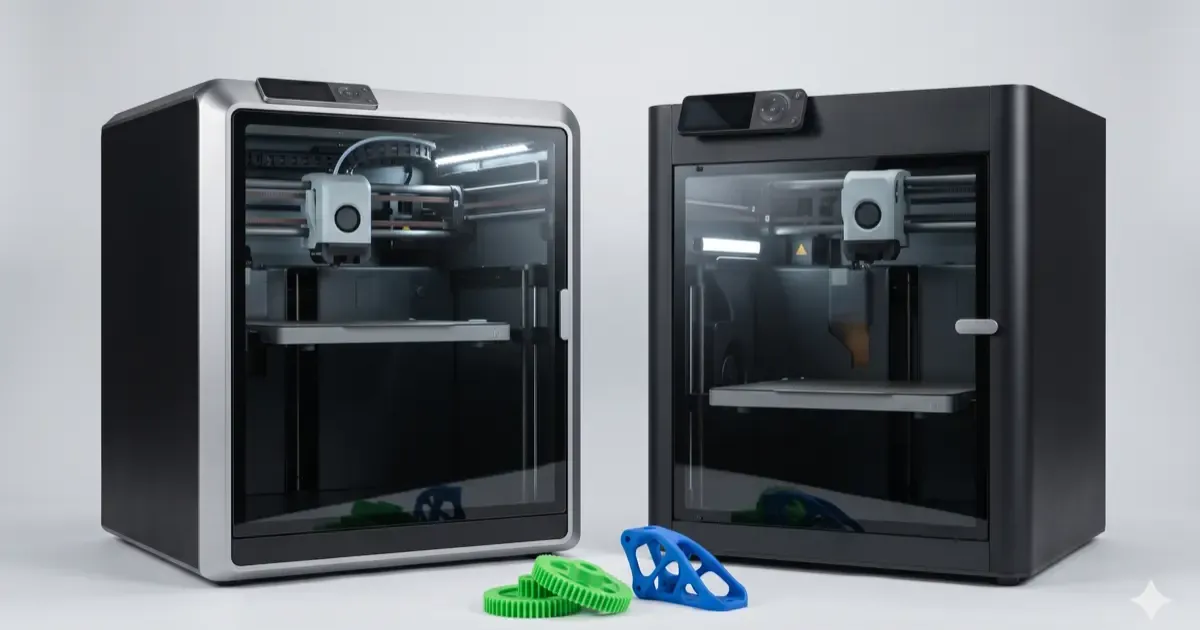
The X2D is worth the extra $100 over the P1S if you print engineering materials or multi-color; for PLA and PETG the P1S remains the better buy. Both share a 256 mm build volume (the X2D gives up about 20 mm in dual-nozzle mode), the X2D adds a heated chamber and a second nozzle, and the P1S got a price cut when the X2D arrived. The rest of this comparison is the list of things the heated chamber actually changes in daily printing.
Bambu Lab launched the X2D in April 2026 as the new mid-range flagship. The P1S, launched in 2023 and price-dropped after the X2D arrived, is still the volume-seller for enthusiasts.
At $549 (P1S) vs $649 base / $899 AMS Combo (X2D), the price gap is real but small. The question is whether the X2D’s upgrades justify the difference for your specific use case.
Master 3D printing from start to finish: Dive into our complete 3D Printing Guide for Beginners covering printers, troubleshooting, and project ideas.
Here’s the honest comparison after enough community testing data to draw real conclusions.
Quick Verdict
| Best Pick For… | Choice |
|---|---|
| First-time 3D printer | P1S |
| Pure PLA/PETG hobby | P1S |
| Multi-material printing | X2D |
| Engineering materials (ABS, ASA, PC) | X2D |
| TPU / flexibles | X2D |
| Tight budget | P1S |
| Production reliability | Either (tie) |
| Latest tech / future-proofing | X2D |
Specs Side-by-Side
| Spec | Bambu Lab P1S | Bambu Lab X2D |
|---|---|---|
| Base price | $549 | $649 |
| AMS Combo price | $799 | $899 |
| Build volume (single nozzle) | 256 × 256 × 256 mm | 256 × 256 × 260 mm |
| Build volume (dual nozzle) | N/A | 235.5 × 256 × 256 mm |
| Extrusion | Single nozzle | Dual nozzle (mechanical switching) |
| Max nozzle temp | 300°C | 300°C |
| Max bed temp | 100°C | 120°C |
| Chamber | Passive enclosure | Active heat (Cool Mode / Heat Mode up to 65°C) |
| AI sensors | Few (LiDAR, AI camera) | 31 sensors with full filament-path AI detection |
| Air filtration | Activated carbon | 3-stage (G3 + H12 HEPA + activated carbon) |
| Dedicated TPU feeder | No | Yes |
| AMS compatibility | AMS 2 | AMS 2 Pro, AMS HT |
| Noise level | Below 50 dB | Below 50 dB |
| Print speed | Up to 500 mm/s | Up to 1000 mm/s |
What the $100 Extra Actually Buys You
The headline upgrades from P1S to X2D are real, but their importance depends on what you print.
1. Dual-Nozzle Printing (Big Deal If You Use It)
The P1S has one nozzle. To switch colors or materials, the AMS purges the old filament, wasting 30-100g per swap on complex prints.
The X2D has two physical nozzles with mechanical switching (a PMSM servo motor swaps them). Zero purge required. Print PLA + PVA supports, or rigid + flexible in one job.
Worth it if: You regularly do multi-material work, dissolvable supports, or color-heavy prints Not worth it if: You print one material at a time
2. Heated Chamber (Critical for Engineering Materials)
The P1S has a passive enclosure that traps heat from the bed and nozzle. Typical interior temps reach 30-40°C during prints, which is enough for ABS and ASA in mild conditions.
The X2D actively heats the chamber to 65°C. This is the difference between “works most of the time” and “works reliably” for materials like ABS, ASA, polycarbonate, and nylon.
Worth it if: You print engineering plastics, large warping-prone parts, or live in a cold room Not worth it if: Your projects are 95% PLA and PETG
3. 31 Sensors + AI Detection
The X2D adds 31 sensors monitoring filament path, temperature, and safety. The P1S has fewer sensors and relies more on its AI camera.
In practice, this means:
- Better detection of failed prints (catches problems earlier)
- More reliable filament-out detection
- More accurate temperature stability
- Less thermal runaway risk
Worth it if: You run long unattended prints (overnight, weekend prints) and want maximum reliability Not worth it if: You watch your prints and don’t run multi-day jobs
4. Dedicated TPU Feeder
TPU (flexible filament) is notoriously hard to feed through standard extruders because it buckles and binds. The X2D has a dedicated feeder path designed specifically for flexibles.
Worth it if: You print TPU regularly (phone cases, gaskets, wheels) Not worth it if: You’ve never printed TPU or only do occasional simple parts
5. Better Air Filtration
The P1S has activated carbon filtration. The X2D adds a G3 pre-filter and H12 HEPA stage on top.
This matters more than people realize for ABS, ASA, and resin-adjacent materials, which release VOCs and ultra-fine particles. For PLA/PETG, the difference is negligible.
Worth it if: You print engineering materials in a small room or near where people sleep Not worth it if: You print PLA only in a workshop or garage
6. Faster Theoretical Print Speed
X2D goes up to 1000 mm/s, P1S up to 500 mm/s. In practice, you won’t print at these speeds, quality degrades sharply. Most users settle around 200-300 mm/s on both printers for normal prints.
The X2D’s higher ceiling matters more for repetitive simple parts (drafts, jigs, brackets) where speed wins over surface quality.
Worth it if: You print production quantities of simple parts Not worth it if: Quality matters more than throughput
What You Don’t Get Going from P1S to X2D
Two things to note:
P1S build volume isn’t smaller. Both are 256x256x256 (X2D adds 4mm height in single-nozzle mode). The X2D actually loses width in dual-nozzle mode (235.5mm). Build volume isn’t a reason to upgrade.
P1S isn’t slow. At reasonable quality settings, both printers finish similar parts in similar times. The X2D’s higher max speed mostly matters at the extremes.
Real-World Use Cases
“I’m Buying My First Bambu” → P1S
If you’ve never owned a Bambu printer, the P1S is the right starting point. Less to configure, simpler material selection, smaller upgrade temptation. The $100 savings funds your first AMS or hardened nozzle.
You’ll hit the limits of single-nozzle PLA/PETG before you hit the limits of the P1S hardware. Upgrade when you’re actually being held back.
“I Print PLA Art and Functional Prints” → P1S
Cosplayers, miniature painters, prop makers, and hobby print farms running PLA don’t benefit from the X2D’s upgrades. Stick with P1S, save the $100, and put it toward better filament or a Wham Bam flex plate. If your main constraint is print size rather than materials, helmets, big props, large functional parts, the large-format Bambu Lab A2L gives you a 330mm bed for less than the P1S.
“I Print Engineering Parts” → X2D
If you print ABS for car interior parts, ASA for outdoor brackets, PC for tools, or nylon for hinges, the X2D’s heated chamber is a real reliability upgrade. The 31 sensors also matter more for long industrial-style prints.
“I Want Multi-Material” → X2D
Dissolvable supports (PLA + PVA), rigid + flexible combos, color-heavy prints, these all benefit from the X2D’s dual-nozzle approach. The P1S can do some of this with AMS, but with purge waste and color-mixing limitations.
“I’m Upgrading from X1C” → Probably Skip Both
The X1C, while older, has features (lidar, dual-belt motion, similar enclosure to P1S) that make it competitive with the P1S. If you already own an X1C, the marginal gains from a P1S aren’t worth it. Wait for X1C-class replacement or jump to the H-series for a real upgrade.
(For the broader Bambu lineup decision, see our Bambu Lab H2 series comparison.)
Hidden Costs
The base prices ignore add-ons most people end up buying:
| Add-on | Typical Cost | Worth it? |
|---|---|---|
| AMS 2 (P1S) / AMS 2 Pro (X2D) | $250 | Yes for multi-color users |
| Hardened steel nozzles | $15-30 each | Yes for carbon-fiber filaments |
| Filament dryer | $60-120 | Yes if you print PETG, TPU, nylon |
| Spare PEI plate | $20-30 | Optional, but nice for parallel prints |
| Hot-end replacement (1 year) | $50 | Inevitable eventually |
Plan for $200-400 in accessories on top of either printer’s base price. The X2D’s AMS Combo at $899 includes the AMS; the P1S at $799 also includes it. Both are better deals than buying components separately.
Long-Term Considerations
Resale value: The P1S has 3 years of resale history and holds value well. Used P1S units go for $350-400. The X2D is too new for reliable resale data, but premium pricing suggests strong resale.
Software support: Both run Bambu Studio with continuous updates. Bambu has a track record of supporting older printers (the X1C is still getting updates after 4 years).
Repair and parts: Both have widely available replacement parts. P1S parts are slightly cheaper due to more units in the field.
Verdict
The P1S remains the better default choice for most makers in 2026. It’s $100 cheaper, simpler to operate, and handles 90% of what hobbyists print. The post-X2D price drop makes it an especially good value.
The X2D earns its premium for specific use cases: multi-material work, engineering materials, and serious production reliability. If those describe your workflow, the $100 (or $100 + AMS Combo upgrade) is well spent.
For most people: buy the P1S, save the $100, put it toward filament and a hardened nozzle. You can always upgrade later if you genuinely outgrow the simpler machine.
For the full Bambu lineup including H-series options, see our Bambu H2 series review and X2D first look.
Related Reading
Related Articles
Bambu A1 Mini vs Creality Ender 3 for Beginners
Bambu Lab A1 Mini or Creality Ender 3 V3? The ultimate comparison of the two most popular beginner 3D printers in 2026 with all pros and cons.
FDM vs Resin 3D Printing: Which One Should You Choose?
FDM vs resin 3D printing, we compare cost, print quality, safety, and ease of use with real examples to help you pick the right technology for your project.
Best 3D Printers Under $300 in 2026
Find the best budget 3D printer without the guesswork. We tested Bambu Lab A1 Mini, Creality Ender 3 V3, Anycubic Kobra, and more. See our top pick.