
Bambu Lab A2L: Specs, Price & Who It's For (2026)
Bambu Lab's A2L brings a 330mm large-format build to the A-series for $469. Here's what the specs actually mean and who this budget big-bed printer is for.

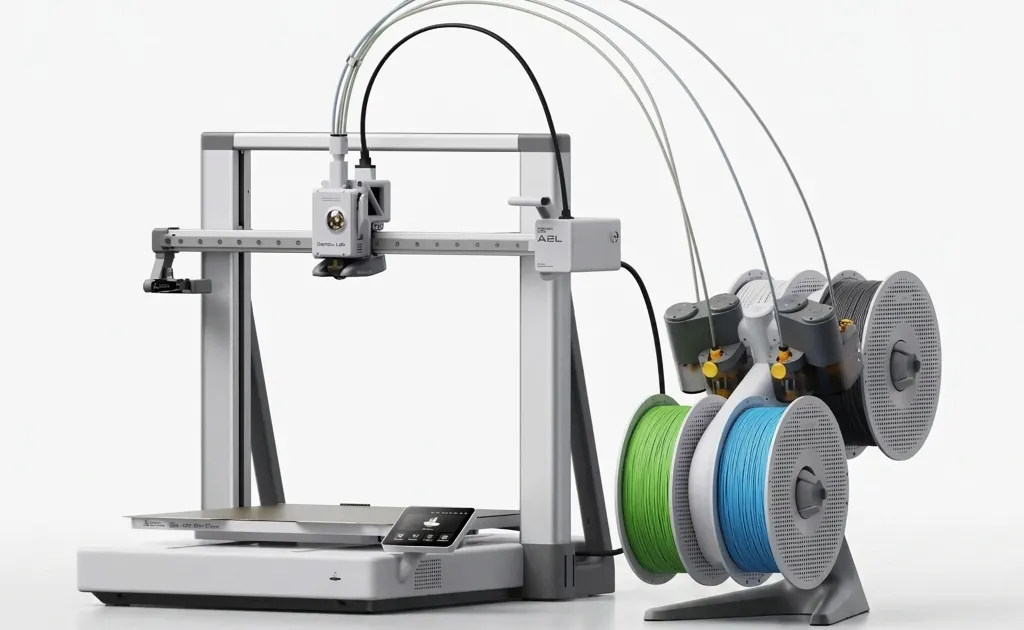
Just when it looked like Bambu Lab was done with bed-slingers, they added a bigger one to the lineup.
The A2L started shipping globally on June 1, 2026. If the A1 was the machine that made 3D printing feel like an “appliance,” the A2L is Bambu’s attempt to do the same for large-format printing. For years, if you wanted to print something bigger than 256mm, you either paid industrial-machine money or spent weekends troubleshooting a finicky budget “max” printer.
Master 3D printing from start to finish: Dive into our complete 3D Printing Guide for Beginners covering printers, troubleshooting, and project ideas.
The A2L enters the market at $469 ($569 with the AMS Lite), aiming squarely at the maker who has outgrown a standard 256mm bed but doesn’t want to jump to a flagship enclosed machine. Here’s what the specs actually mean, and who this printer is, and isn’t, for.
The Specs at a Glance
Bambu didn’t just stretch the A1’s frame. The A2L pairs a much larger bed with a redesigned extrusion and motion system meant to keep quality high despite all that extra moving mass.
| Feature | Bambu Lab A2L | Bambu Lab A1 |
|---|---|---|
| Build Volume | 330 × 320 × 325 mm | 256 × 256 × 256 mm |
| Extruder | Closed-loop PMSM servo | Standard stepper |
| Max Speed | Up to 500 mm/s | Up to 500 mm/s |
| Acceleration | Up to 10,000 mm/s² | 10,000 mm/s² |
| Max Nozzle Temp | 300°C | 300°C |
| Max Bed Temp | 80°C | 80°C |
| Auto-Leveling | Force sensor | Force sensor |
| Multicolor | AMS Lite (Combo) | AMS Lite (Combo) |
| Price | $469 (Base) / $569 (Combo) | $399 (Launch) |
Footprint: 544 × 529 × 505 mm, net weight ~12.8 kg. The A2L does not include the Lidar or BirdsEye camera used on Bambu’s H2-series laser models.
1. The Build Volume: A One-Piece Helmet Printer
The headline upgrade is size. At 256mm, the standard X1/P1/A1 dimension, most adult-sized helmets have to be sliced into pieces and glued together. It’s messy, it creates weak seams, and the post-processing is tedious.
The A2L’s 330 × 320 × 325 mm volume is about 105% more space than a 256mm-class machine. That’s enough for most standard wearables, helmets, chest pieces, gauntlets, to fit in a single print. For cosplay and prop makers, printing a helmet in one piece rather than seaming it together is the single biggest practical reason to consider this printer.
But size creates a problem for bed-slingers. A 330mm spring-steel bed is a lot of mass moving back and forth. Historically, “max”-sized bed-slingers were slow, because moving that much weight quickly causes “ghosting” (ringing artifacts) or shakes the whole printer. Bambu’s answer is in the extrusion and vibration systems below.
2. Servo Extruder + Vibration Control
Instead of a standard stepper, the A2L uses a closed-loop PMSM servo motor in the extruder. In practice, closed-loop means the motor constantly checks its own position and torque rather than assuming it hit the target, which helps deliver stable extrusion at speed and actively monitor for extrusion anomalies (clogs, skips) as they happen.
On the motion side, the A2L is the first A-series model with adaptive vibration compensation, using multi-point calibration and load adaptation, plus two granular dampers built into the frame that physically absorb resonance. Together, these are how Bambu keeps ghosting and ringing under control on a heavy, large-format bed, the mechanical problem that used to make big bed-slingers a compromise.
Note the speed ceiling: the A2L tops out at up to 500 mm/s with 10,000 mm/s² acceleration. That’s fast for a large bed-slinger, but it’s the same class as the A1 rather than a leap beyond it, the engineering here went into holding quality at size, not chasing a higher top speed.
3. What It Doesn’t Have
It’s worth being clear about what the A2L leaves out, because a couple of “premium” features people expect from Bambu aren’t here:
- No Lidar / BirdsEye camera. Camera-based first-layer inspection and Live Spatial Alignment are reserved for the H2-series laser models. The A2L uses force-sensor bed leveling, reliable and well-proven from the A1, but not the same as optical inspection.
- No enclosure. It’s open-frame, which caps the bed at 80°C and makes ABS, ASA, and nylon impractical (they warp without a hot, stable chamber).
- No laser module support. Because of the open-frame design, the A2L can’t take a laser module.
4. Multicolor and the Cutting Kit
The A2L Combo ($569) bundles an AMS Lite, Bambu’s open-spool multicolor unit that sits beside the printer. The A2L can be expanded further, it supports up to four AMS units plus one AMS Lite, for a theoretical maximum of 19 colors, though that’s an enthusiast-tier setup most buyers won’t need.
A more unusual option is the Blade Cutting Upgrade Kit, which adds a cutting module, pen module, and cutting mat. It turns the A2L into a precision cutter for stickers, leather, and fabric, and a drawing plotter, a genuinely different use case for the same hardware, and a nice bonus if you already do craft or maker projects beyond printing.
5. Noise and Heat: Office Compatibility
The bigger practical caveat for a home office isn’t noise, it’s heat. Because this is an open-frame printer with a large heated bed, it radiates warmth into the room like a small space heater. For PLA and PETG that’s a non-issue, but if you’re printing in a small room in summer, expect your AC to work harder.
If you want an enclosed, actively-heated machine for engineering materials, or the optical inspection the A2L skips, Bambu’s X2D sits in that tier instead.
6. How It Compares
Large-format printing on a budget usually means a belt-driven bed-slinger from Creality or Anycubic, often for a little less money than the A2L. The trade-off Bambu is betting on is the software and ecosystem: Bambu Studio, one-tap calibration, and the AMS multicolor path are still smoother than most competitors, and the servo extruder plus vibration control target the exact quality problem that big belt-driven beds struggle with.
If your priority is the absolute lowest price for a large bed, the competition wins on the sticker. If you want the large volume plus the “it just works” Bambu workflow, that’s the A2L’s pitch.
7. Verdict: Who Is the A2L For?
The A2L isn’t for everyone. If you only print small miniatures or brackets, the extra size is wasted desk space and electricity, the smaller A1 Mini makes more sense.
The A2L is a strong fit if:
- You print wearables and props: Helmets, armor, and large cosplay pieces in one piece are its clearest advantage.
- You want a large bed with Bambu’s workflow: The ecosystem and calibration are the reason to pay a little more than a belt-driven competitor.
- You mostly print PLA and PETG: The open frame is fine for these everyday materials.
- You might branch into cutting/plotting: The Blade Cutting Kit is a genuinely useful add-on.
Skip it if:
- You have limited desk space: The footprint is large and bed travel needs clearance front and back.
- You print engineering materials: Without an enclosure, ABS, ASA, and nylon will warp, look at the X2D or H2 series instead.
- You expected Lidar or a leap in speed: Neither is here; this is about size and reliability, not new flagship tech.
Final Thoughts
The A2L takes one of the more frustrating categories, the large budget bed-slinger, and applies Bambu’s reliability-first approach to it. It doesn’t reinvent the printer, and it deliberately leaves out some flagship features to hit $469. But for makers who print big and want the size without giving up the Bambu workflow, it’s a sensible, well-priced option. Just go in knowing what it is: a large, dependable PLA/PETG workhorse, not a feature-loaded flagship.
Want more 2026 3D printing guides?
- Compare the lineup: Bambu Lab X2D vs P1S
- Master the software: Bambu Studio Filament Mixing Guide
- Choose the right plastic: PLA vs PETG vs PETG-CF: Which should you print?
- Fix common issues: 10 Common 3D Printing Mistakes
- Scale your hobby: How to build a 3D printing side hustle in 2026
- Official specs: Bambu Lab A2L product page
Related Articles
Bambu Lab X2D Review: $649 Dual-Nozzle Heated Chamber
Bambu Lab X2D review: $649 base / $899 AMS Combo. Dual-nozzle mechanical switching, 65°C heated chamber, 256mm build, and 31 sensors. Is it worth it?
The Golden Age of $500 3D Printers: Turn-key vs. DIY
Is $500 the sweet spot for 3D printing? We compare modern plug-and-play machines against legendary DIY kits, featuring the Bambu Lab P2S and Creality K2.
Bambu Lab H2 Series in 2026: Does It Still Matter?
Is the Bambu Lab H2 series still relevant after the X2D launch? We revisit the H2S, H2D, and H2C to see how they hold up in the 2026 3D printing landscape.