
Best Accessories for Kindle Paperwhite in 2026 (Tested)
Discover the best accessories for Kindle Paperwhite and basic Kindles in 2026. Top tested cases, remote page turners, grips, stands, and screen protectors.

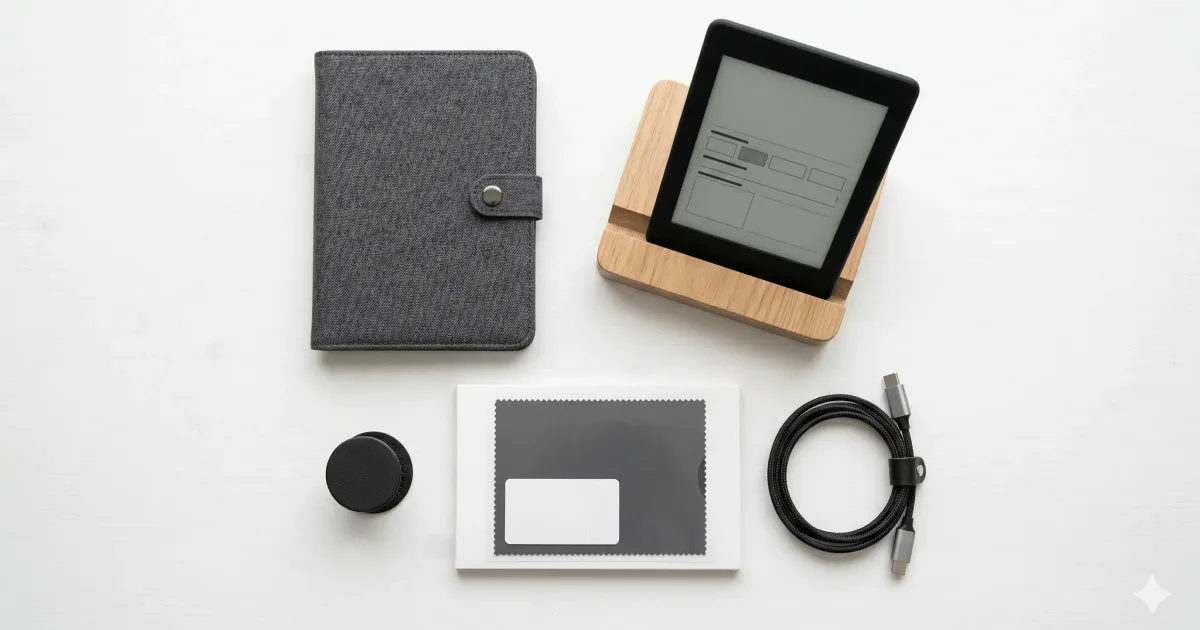
Four accessories cover almost every Kindle owner: a case ($15 to $35), a page-turn remote if you read in bed, a stand for hands-free reading, and a screen protector only if you share the device with kids. Everything else on this list is a nice-to-have, and each entry says which Kindle models it fits.
You got a Kindle. Great choice. (Not sure which one? Check our Kindle vs Kobo comparison or our guide on whether a Kindle is worth it.)
Now here’s the thing, the Kindle itself is almost perfect out of the box. You don’t need accessories. But a few well-chosen ones can make your reading experience significantly better.
Here are the accessories I actually recommend after years of Kindle ownership.
The Quick Overview
| Accessory | Best For | Price Range |
|---|---|---|
| Remote Page Turner + Ring | Hands-free reading in bed | ~$20–30 |
| Gooseneck Bed Mount / Floor Stand | Total hands-free cozy setup | ~$18–35 |
| Slim Fabric / PU Case | Everyday protection | ~$15–25 |
| Magnetic MagSafe Ring Adapter | Fast swapping grips/stands | ~$8–12 |
| Matte Anti-Glare Screen Protector | Beach & outdoor readers | ~$8–12 |
| Adjustable Desktop Stand | Desk/nightstand reading | ~$10–20 |
| PopSocket / Elastic Hand Strap | One-handed subway reading | ~$8–15 |
| Felt Travel Sleeve | Minimalist bag protection | ~$12–20 |
| Fast USB-C Cable (Braided) | Charging & Calibre sideloading | ~$8–12 |
| Qi Wireless Charging Dock | Paperwhite Signature Edition | ~$18–28 |
1. Remote Page Turner + Ring Remote (~$20–30)
The single biggest upgrade for cozy bedtime reading.
If there is one accessory that has completely taken over the e-reader community, it is the RF remote page turner (popularized by brands like SYUKRO, Datify, and SKTC).
How It Works
Unlike tablets, standard Kindles do not natively support Bluetooth page-turning devices without custom jailbreaks. These physical remote page turners solve this with a clever hardware workaround: a small, non-damaging physical clip attaches to the bezel and presses against the edge of the e-ink screen using capacitive touch pulses. You hold a tiny wireless ring in your hand.
Why It’s a Game-Changer
- Winter Bed Reading: You can bury yourself completely under warm blankets during cold months and turn pages without ever exposing your arms to the cold air.
- Treadmill & Exercise: Clip your Kindle to a gym machine or stand and turn pages seamlessly without reaching up and breaking your stride.
- Zero Ergonomic Strain: Completely eliminates wrist and thumb fatigue during 3+ hour reading marathons.
Pair this with a gooseneck bed clamp (see below) for the ultimate “hands-free cocoon” reading setup.
2. Gooseneck Tablet Clamp or Floor Stand (~$18–35)
The ultimate pairing with a remote page turner.
If you enjoy reading in bed or on a recliner, holding a device upright for hours inevitably leads to neck and shoulder tension. A flexible 360-degree gooseneck tablet mount clamps onto your headboard, nightstand, or desk and suspends the Kindle directly in front of your natural line of sight.
- Bed Headboards: Look for reinforced aluminum alloy arms (like Lamicall or Tryone) with rubber-padded clamps that will not scratch wooden furniture.
- Stability Tip: Coil the gooseneck into an “S” or “Z” shape near the base to prevent wobbling when adjusting positions.
When combined with the remote page-turner ring, you achieve a 100% hands-free reading posture that feels like living in the future.
3. Slim Magnetic Case with Auto Sleep/Wake (~$15–25)
Everyday protection without ruining portability.
This is the baseline accessory almost everyone should get. While the flush-glass front of the modern Kindle Paperwhite is durable, everyday micro-scratches from keys, coins, or zippers in your backpack will degrade the e-ink contrast over time.
- Third-Party vs. Official: Amazon’s official fabric cover (
$40) is well-made, but third-party options from MoKo, Fintie, and CoBak cost half as much ($15–20) and offer the exact same functionality: magnetic sleep/wake sensors, full corner bumpers, and precise port cutouts. - Weight Factor: Look for cases under 110 grams. A Kindle Paperwhite weighs approximately 205g to 213g; adding a heavy case defeats the purpose of lightweight e-ink. For comprehensive model-by-model comparisons, check our guide on the best Kindle cases in 2026.
4. MagSafe Magnetic Ring Adapter (~$8–12)
Modularity for power users.
If you love using phone grips like PopSockets or magnetic wallets, you don’t have to permanently glue them to your Kindle case. By adhering a thin metal MagSafe ring sticker (from Spigen or ESR) to the back of your Kindle’s slim case, you unlock full MagSafe modularity.
- Snap On / Snap Off: Snap on a magnetic PopSocket or finger loop for one-handed commute reading on the train, then pull it off instantly when sliding the Kindle into a tight bag sleeve or mounting it flat on a desk stand.
- Wireless Charging Compatibility: Align the ring around the Qi charging coil (if using a Paperwhite Signature Edition) so wireless charging continues to work uninterrupted.
5. Matte Anti-Glare Screen Protector (~$8–12)
Preserving the raw e-ink aesthetic in harsh light.
While e-ink displays are naturally glare-free compared to glossy OLED smartphone screens, the flush plastic/glass top layer on modern Paperwhites can still catch harsh reflections under direct sunlight or overhead office fluorescent lamps.
- Reflection Reduction: A high-quality matte film (such as Supershieldz Matte) diffuses directional light, maintaining high text contrast outdoors.
- Paper-Like Tactile Feel: Matte protectors add a subtle micro-texture that feels remarkably similar to premium book paper under your fingertips.
- Avoid Tempered Glass: Skip heavy tempered glass protectors on Kindles. E-ink screens do not experience the high-impact drops of smartphones, and thick glass introduces unwanted parallax distance between the touch surface and the e-ink layer.
6. Adjustable Aluminum Desktop Stand (~$10–20)
For desk reading, meal times, and reference material.
If you use your Kindle at your workspace to study non-fiction, read technical documentation, or enjoy a book during lunch breaks, a folding aluminum desk stand (such as the Lamicall Multi-Angle Stand or MoKo Desktop Holder) keeps your screen elevated at ergonomic eye level.
- Dual-Hinge Design: Look for dual-hinge stands that allow independent height and tilt adjustment.
- Desk Cable Pass-Through: Quality stands include rubber cable channels, allowing you to charge the device while reading.
7. PopSocket & Elastic Finger Straps (~$8–15)
Ergonomic one-handed comfort for commute reading.
Holding a 6.8-inch Paperwhite with one hand while balancing on a crowded train often leads to “pinky shelf fatigue.” Adding an adhesive grip to the lower third of the device distributes the weight across your palm.
- PopSockets: Great for pinching between your index and middle fingers.
- Elastic Hand Straps: Flat fabric straps (like TFY Security Hand Strap) lay flat inside bags and allow you to relax your hand completely without gripping.
8. Premium Felt or Neoprene Travel Sleeve (~$12–20)
The minimalist purist’s choice.
If you prefer reading your Kindle completely “naked” without the added weight or thickness of a flip cover, a protective travel sleeve offers the ideal middle ground.
- Protection in Transit: Slip the Kindle into the cushioned sleeve before tossing it into your backpack or tote bag.
- Naked Reading Experience: Pull it out at your destination to enjoy the featherweight 205-gram ergonomics exactly as the hardware designers intended.
9. Braided Fast-Charging USB-C Cable (~$8–12)
For reliable charging and Calibre book management.
While the Kindle battery lasts weeks, a high-quality braided USB-C cable (from Anker or Baseus) ensures reliable data transfer speeds when sideloading custom EPUBs, MOBIs, or personal documents via Calibre.
- Keep a dedicated 3-foot cable at your bedside and a longer 6-foot cable at your desk.
10. Qi Wireless Charging Dock (~$18–28)
Seamless charging for Signature Edition owners.
If you own the Kindle Paperwhite Signature Edition, you have built-in wireless charging. Instead of fiddling with plugs in the dark, place an upright Qi charging dock (such as the Anker Wireless Charging Stand) on your nightstand.
- The upright stand design allows you to continue reading or using the Kindle as an ambient clock while it powers up effortlessly.
Recommended Accessory Kits by Budget
The Minimalist Commuter ($25 Total)
- MoKo Slim Protective Case: ~$15
- Elastic Finger Grip or PopSocket: ~$10
- Result: Lightweight, scratch-proof, and effortless one-handed subway reading.
The Ultimate “Cozy Bedtime” Setup ($55 Total)
- RF Remote Page Turner + Ring Remote: ~$22
- Gooseneck Flexible Bed Clamp: ~$20
- Slim Back Case: ~$13
- Result: 100% hands-free reading tucked under the duvet with zero arm fatigue.
The Power Reader & Travel Kit ($85 Total)
- Slim PU Leather Smart Cover: ~$18
- Matte Screen Protector (2-Pack): ~$9
- Remote Page Turner Ring: ~$22
- MagSafe Ring Adapter + Magnetic Grip: ~$18
- Braided USB-C Data Cable: ~$8
- Padded Travel Sleeve: ~$10
Kindle Model Compatibility Matrix (2026)
Before buying accessories, ensure the physical dimensions match your specific hardware iteration. Amazon regularly updates case molds and port positions between generations:
| Kindle Generation | Screen Size | Charging | Waterproof | Critical Accessory Tip |
|---|---|---|---|---|
| Kindle Paperwhite (11th & 12th Gen) | 6.8” – 7.0” | USB-C | IPX8 (2 meters) | Requires cases with modern thin bezels; older 6.0” cases will not fit. |
| Paperwhite Signature Edition | 6.8” – 7.0” | USB-C + Qi Wireless | IPX8 | Avoid metal plate PopSockets directly in the center, which block Qi induction coils. |
| Kindle Basic (11th Gen - 2022/2024) | 6.0” | USB-C | No | Highly recommend a waterproof travel pouch if reading near bathtubs or pools. |
| Kindle Colorsoft (1st Gen) | 7.0” | USB-C + Wireless | IPX8 | Best paired with ultra-clear matte protectors to avoid muting color saturation. |
| Kindle Scribe (1st & 2nd Gen) | 10.2” | USB-C | No | Requires a folio case with dedicated magnetic stylus loop and tip replacement slots. |
E-Ink Care: How to Clean & Maintain Your Gear
To keep your e-reader and accessories performing flawlessly for years:
- Screen Cleaning: Never use alcohol-based glass cleaners or ammonia sprays (like Windex) on e-ink displays. They degrade the anti-reflective matte coating. Use a dry microfiber cloth, or lightly dampen the cloth with distilled water for stubborn fingerprints.
- Port Longevity: If you read frequently at sandy beaches or in dusty environments, consider small silicone USB-C dust plugs (~$3 for a pack of 10) to prevent pocket lint and grit from fouling the charging port.
- Battery Health: E-ink devices consume power almost exclusively during page turns and Wi-Fi syncs. For maximum battery longevity, keep Airplane Mode turned on when reading offline books, and avoid storing the device in direct freezing temperatures or hot car dashboards.
How to Get More Out of Your Kindle
Hardware accessories are only half the equation. To truly optimize your reading workflow:
- Master Your Software & Libraries: Dive into our Complete Kindle Guide for hidden shortcuts, vocabulary builders, and Send-to-Kindle workflows.
- Unlock Custom Fonts & Systems: Explore our Kindle Modding & KOReader Guide to install custom typography and bypass Amazon file limitations.
- Build an Ergonomic Reading Space: Pair your e-reader setup with the best monitor light bars to illuminate ambient reading notes without creating harsh screen reflections, or organize your desk queue with our desk organizers guide.
Investing in 2 or 3 intentional accessories transforms your Kindle from a simple gadget into the most relaxing, friction-free reading habit of your daily routine.
Related Articles

Is a Kindle Worth It in 2026? (Honest Answer After 3 Years)
After 3 years with a Kindle, here's my honest take on whether it's worth buying. Pros, cons, cost, and who should (and shouldn't) get one in 2026.
Kindle Scribe vs reMarkable 2026: Which Should You Buy?
Kindle Scribe vs reMarkable in 2026: price, note-taking, reading, and ecosystem compared, with a clear pick for writers, readers, and everyone in between.

Best Kindle for Seniors 2026: Easy Reading for Older Eyes
The best Kindle for seniors in 2026: bigger screen, adjustable fonts, warm light, and simple setup. Our top picks for older readers, plus what to look for.