
Emby vs Plex vs Jellyfin: Best Media Server 2026
Plex, Emby, or Jellyfin? We compare the top three home media servers in 2026 based on pricing, hardware transcoding, privacy, and ease of use.

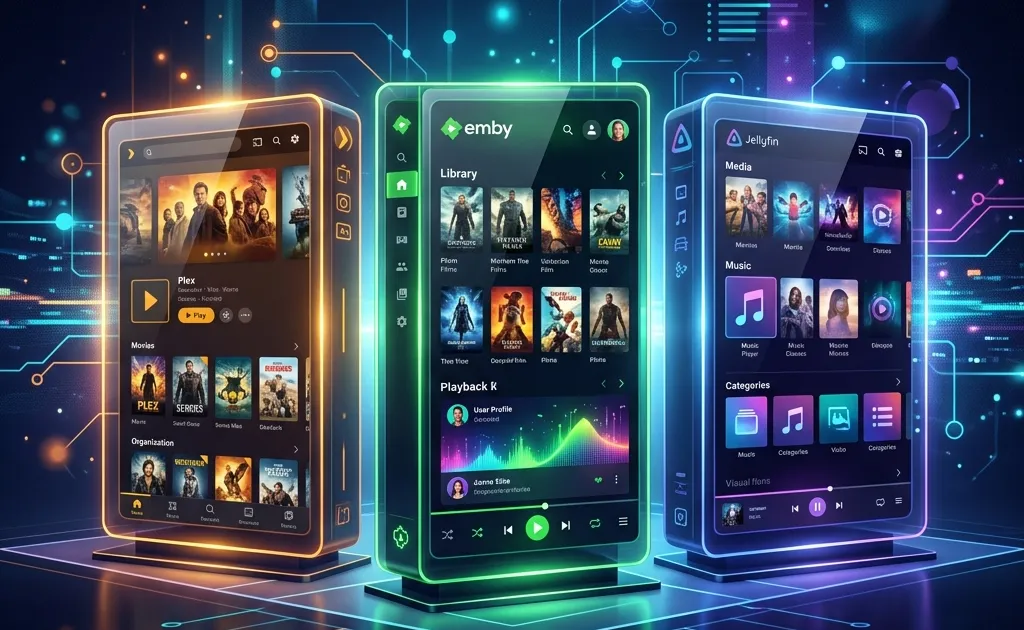
The landscape of streaming video in 2026 is a fragmented, expensive mess. The golden age of paying ten dollars a month for a single service that housed everything is long dead. Today, consumers are forced to navigate half a dozen platforms, endure frequent price hikes, and tolerate aggressive advertisements even on premium tiers. It is no wonder that millions of people are turning back the clock, dusting off their physical media collections, and building their own private Netflix clones.
Enter the home media server. By installing specialized software on a desktop computer, a Network Attached Storage (NAS) device, or a dedicated mini PC, you can curate, organize, and stream your own movies, television shows, and music to any device in the world.
For the past decade, three major names have dominated the conversation: Plex, Emby, and Jellyfin. While they all fundamentally achieve the same goal, their philosophies, pricing models, and target audiences differ wildly. In this comprehensive 2026 guide, we will break down the strengths, weaknesses, and ideal use cases for each platform.
1. The Heavyweight Champion: Plex
Plex is the undisputed king of the home media server space. For many, the word “Plex” is completely synonymous with self-hosting media. It is polished, heavily funded, and designed to be as frictionless as humanly possible.
The Setup Experience
Setting up Plex is remarkably simple. You download the server application, point it to the folder holding your video files, and the software handles the rest. Plex automatically reaches out to massive online databases to download movie posters, cast lists, plot summaries, and even theme music. Within minutes, a messy folder of poorly named files transforms into a gorgeous, highly visual library.
The true magic of Plex lies in its client availability. Whether you are using a ten-year-old Roku, a brand new Apple TV, an obscure smart TV operating system, or a PlayStation, there is an official, highly optimized Plex app waiting for you.
Remote Access and Ease of Use
Plex handles remote access better than anyone else. If you want to watch a movie on your phone while riding the train to work, Plex uses a brokered connection through its own cloud servers to securely route the video from your home to your device. You do not need to understand port forwarding, dynamic DNS, or reverse proxies. You just log in with your email and it works.
The Drawbacks: Corporate Shift and Bloat
However, the Plex of 2026 is not the Plex of 2016. As a venture-backed company, Plex has aggressively pivoted toward monetization and mainstream streaming. Your beautiful, carefully curated home library is now heavily flanked by ad-supported free movies, live TV channels you did not ask for, and aggressive push notifications about trending content. While you can disable most of these features, the constant push toward third-party integration frustrates longtime users.
Furthermore, Plex is highly reliant on central authentication. If the Plex corporate servers go offline, or if your home internet drops, accessing your local media on your local network becomes surprisingly difficult. You have to specifically configure local network bypasses ahead of time, which betrays the core ethos of self-hosting.
Plex Pass Pricing
While the core software is free, advanced features require a “Plex Pass.” This unlocks hardware-accelerated transcoding (using your graphics card to efficiently convert video formats on the fly), mobile downloads for offline viewing, and advanced music features. In 2026, a lifetime Plex Pass remains a significant investment, pushing many users to look for alternatives.
Verdict for Plex: Best for beginners, people who share their libraries with non-technical friends and family, and those who prioritize maximum device compatibility over ultimate control.
2. The Balanced Alternative: Emby
Emby exists in a fascinating middle ground. It offers the polish and premium feel of Plex, but retains a stronger focus on the core mission: serving your personal media without pushing you toward ad-supported cloud services.
A Focus on Your Media
When you launch Emby, you see your media. There are no sponsored movie rows, no mandatory free TV channels, and no attempts to become a universal search engine for streaming services. Emby respects the sanctity of your private collection.
The user interface is clean, customizable, and highly responsive. Many users argue that Emby handles massive libraries (we are talking tens of thousands of episodes) noticeably faster than Plex, particularly on underpowered client devices.
Live TV and DVR Integration
Where Emby truly shines is in its Live TV and DVR capabilities. If you connect a digital antenna and a tuner (like an HDHomeRun) to your network, Emby integrates the live broadcast feed flawlessly into its interface. The electronic program guide is robust, and recording live sports or news broadcasts directly to your server storage feels seamless. Plex offers this feature as well, but Emby’s implementation is widely considered more stable and customizable by home theater enthusiasts.
The Open Source Betrayal
To understand Emby, you have to understand its history. Emby originally started as a beloved open-source project. However, to ensure financial stability and secure licensing deals for app stores, the development team eventually transitioned the software to a closed-source, proprietary model. This angered a vocal segment of the self-hosting community, leading directly to the creation of Jellyfin (which we will cover next).
Emby Premiere
Like Plex, Emby operates on a freemium model. The free tier allows basic streaming, but you will need an “Emby Premiere” subscription to unlock hardware transcoding, mobile syncing, and the aforementioned live TV features. Emby’s pricing structure is similar to Plex, offering monthly, yearly, and lifetime options.
Another sticking point for Emby is client access. While Plex apps are free to download (with a one-time unlock fee for mobile), Emby often requires a Premiere subscription just to use certain TV apps, which can be frustrating if you only want the basic features.
Verdict for Emby: Best for intermediate users who are tired of the bloatware in Plex, users who prioritize live TV integration, and those willing to pay a premium for a focused, private media experience.
3. The Open-Source Rebel: Jellyfin
When Emby went closed-source, a group of dedicated developers forked the last open-source version of the code and created Jellyfin. Over the years, Jellyfin has evolved from a scrappy, somewhat buggy alternative into a remarkably stable, incredibly powerful media server that rivals the big corporate players.
100% Free and Open Source
The defining characteristic of Jellyfin is its price: zero dollars. There is no premium tier, no lifetime pass, and no hidden fees. Every single feature that Plex and Emby lock behind a paywall is available in Jellyfin for free. This includes the highly coveted hardware-accelerated transcoding, mobile sync, and live TV integration.
Because it is open-source, Jellyfin is completely transparent. There is absolutely no telemetry, no tracking, and no corporate entity analyzing your viewing habits. Your data stays entirely on your hardware.
Total Local Control
Jellyfin does not rely on a central authentication server. You create your users locally on your machine. If your internet goes down, you can still seamlessly stream movies to your living room TV using your local network. It is the purest expression of data sovereignty and self-hosting.
The Catch: The DIY Tax
The cost of “free” is your time. Jellyfin requires a significantly higher level of technical competence to set up securely. While local playback is straightforward, accessing your Jellyfin server remotely (outside your house) is a manual process. You cannot just log in with an email. You must set up a reverse proxy (like Nginx or Traefik), manage your own SSL certificates, or configure a VPN (like Tailscale or WireGuard) to securely tunnel into your home network. For a tech-savvy user, this is a fun weekend project. For a beginner, it is an insurmountable wall of jargon.
Furthermore, client support is good, but not universal. While there are excellent apps for Android, iOS, Roku, and Android TV, you might struggle to find a native app for older Samsung Tizen TVs or specific gaming consoles. You often have to rely on third-party clients (like Infuse on Apple TV) to get the best playback experience.
Verdict for Jellyfin: Best for privacy advocates, home lab enthusiasts, budget-conscious users, and anyone who fundamentally believes that software should be free and open.
Transcoding and Hardware Acceleration
One of the most critical aspects of any media server is transcoding. Imagine you have a massive, 80-gigabyte 4K Blu-ray rip saved on your server. You want to watch it on your smartphone while sitting in a coffee shop. Your phone cannot physically handle the massive bitrate, and the coffee shop Wi-Fi is too slow to stream it anyway.
The media server must “transcode” the video. It essentially plays the movie in real-time on the server, crushes it down to a manageable 1080p or 720p file, and sends that smaller stream to your phone.
Doing this with a computer’s central processor (CPU) is incredibly taxing. If two people try to transcode a movie at the same time, a standard CPU will choke, resulting in endless buffering. The solution is hardware acceleration, which offloads the heavy lifting to a graphics card (GPU) or the integrated graphics chip (like Intel Quick Sync) inside the processor.
- Plex: Requires a paid Plex Pass for hardware transcoding.
- Emby: Requires a paid Emby Premiere subscription for hardware transcoding.
- Jellyfin: Includes hardware transcoding out of the box for free.
If you are buying a mini PC (like an Intel N100 or a cheap NUC) specifically to run a media server, Jellyfin provides massive value here. You can leverage the Intel Quick Sync chip to handle half a dozen simultaneous transcodes without spending a dime on software licenses.
Plugin Ecosystems and Customization
A media server is only as good as its metadata. When you add a niche anime, an obscure foreign film, or a massive collection of audiobooks, you rely on plugins and scrapers to pull down the correct artwork and descriptions.
Plex has largely locked down its plugin ecosystem. Years ago, they officially deprecated third-party plugins in favor of maintaining strict control over the user experience. While their built-in scanners are excellent for 99 percent of mainstream movies and television, customizing edge cases is difficult.
Emby supports a healthy variety of plugins, allowing users to integrate with services like Trakt.tv for play-state syncing, or specialized scrapers for anime and music.
Jellyfin, being open-source, thrives on community contributions. The plugin repository is vast and highly experimental. You can install plugins to sync watch progress across multiple servers, generate custom intro skip markers (similar to Netflix’s “Skip Intro” button), and pull metadata from incredibly obscure databases.
Which Hardware Should You Buy?
Building a media server in 2026 does not require a massive, noisy tower PC. The efficiency of modern processors has completely changed the hardware landscape.
1. The Budget Mini PC Route: The most popular and cost-effective method is buying a small form-factor PC (often manufactured by companies like Beelink or Minisforum) powered by an Intel processor (such as the N100 or a Core i3/i5). Intel’s integrated graphics (Quick Sync) are astonishingly good at video transcoding. You can connect a large external USB hard drive for storage, install Linux or Windows, and run Jellyfin or Plex with incredible efficiency.
2. The Turnkey NAS Route: If you want something simpler, a pre-built NAS from Synology or QNAP is an excellent choice. These devices are designed to hold multiple hard drives securely and run media server applications natively through their app stores. However, you pay a premium for the hardware, and the processors inside them are often weaker than a dedicated Mini PC.
3. The Enthusiast Home Lab: For those with massive collections (50+ terabytes), a custom-built Unraid or TrueNAS server is the endgame. This allows you to mix and match hard drives, run your media servers inside isolated Docker containers, and scale your storage infinitely.
Final Verdict: The Right Tool for the Right Job
Ultimately, there is no objective winner in the battle of Emby vs Plex vs Jellyfin. The best choice depends entirely on your technical comfort level and what you value most.
If you want the absolute easiest setup, stunning visual polish, and you plan to share your library with non-technical family members across the country, Plex is still the undisputed king. It just works, everywhere, all the time.
If you resent the direction Plex is heading with its ad-supported content, you value extreme stability, and you rely heavily on live TV integration, Emby is a phenomenal, focused piece of software that respects your media collection.
If you refuse to pay subscription fees, you value privacy above all else, you want total control over your data, and you do not mind spending a Saturday reading networking tutorials, Jellyfin is the greatest gift the open-source community has ever provided to media hoarders.
Whichever you choose, you are taking a crucial step toward reclaiming ownership of your entertainment. In an era of digital rentals and disappearing streaming libraries, building your own media server is not just a fun tech project; it is a declaration of digital independence.
Frequently Asked Questions
Which media server is best for beginners?
Plex is widely considered the best media server for beginners. Its setup process is highly polished, and its client apps are available on virtually every smart TV, gaming console, and mobile device without requiring complex network configurations.
Does Jellyfin support hardware transcoding for free?
Yes. Unlike Plex and Emby which lock hardware acceleration behind their premium paid tiers, Jellyfin is entirely open-source and provides full hardware transcoding support absolutely free of charge.
Is Emby open source?
No. Emby started as an open-source project, but transitioned to a proprietary, closed-source model a few years ago. Jellyfin is actually a fork of the last open-source version of Emby.
Can I use these servers without internet access?
Jellyfin and Emby function perfectly on a local network without an active internet connection. Plex, however, relies heavily on its central authentication servers and can sometimes struggle or refuse to authenticate local users during an internet outage unless specifically pre-configured.
Related Articles

Kindle Scribe vs reMarkable 2026: Which Should You Buy?
Kindle Scribe vs reMarkable in 2026: price, note-taking, reading, and ecosystem compared, with a clear pick for writers, readers, and everyone in between.
Shopify vs Competitors: Best E-Commerce Platforms (2026)
Compare top e-commerce platforms including Shopify, WooCommerce, BigCommerce, Squarespace, and Wix. Full breakdown of fees, scalability, and features.
Can Your Hobby Be a Business? Turn Passion into Profit
Learn how to evaluate if your hobby can become a profitable business. Discover market validation, pricing formulas, tax setup, and side hustle transitions.