
Kindle Colorsoft vs Paperwhite (2026): Is Color Worth It?
Kindle Colorsoft ($289.99) vs Paperwhite ($199.99) in 2026: color e-ink, contrast, battery and price compared. Find out who should really pay for color.

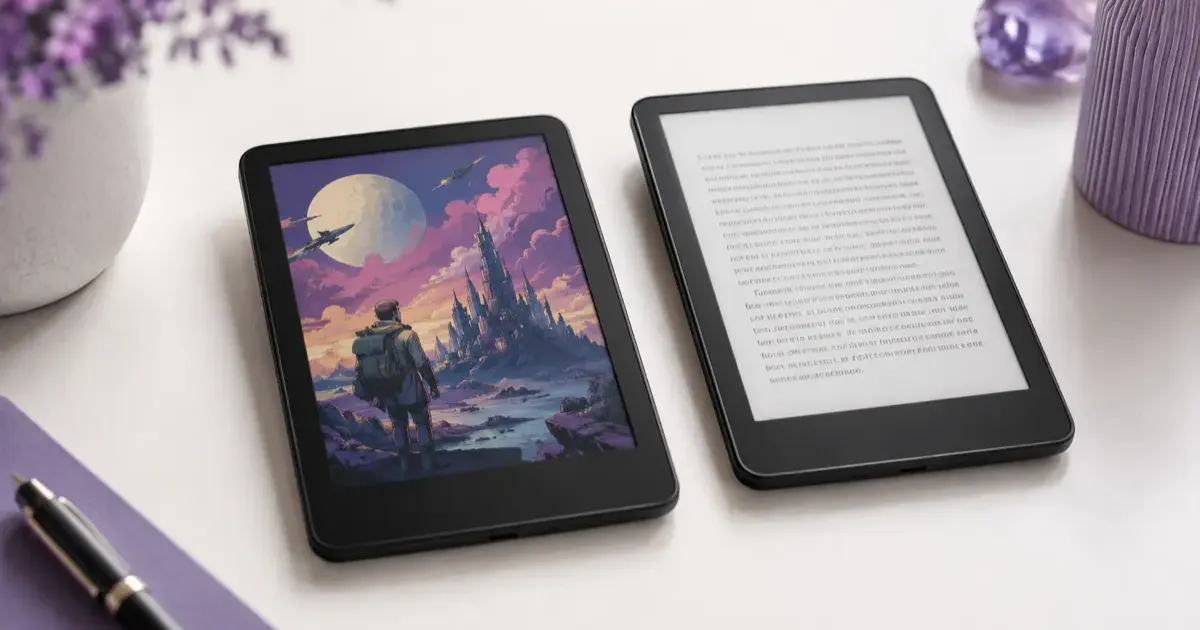
Buy the Paperwhite ($199.99) for novels; buy the Colorsoft ($289.99) only if you read comics, magazines, or anything where color carries meaning. The Paperwhite’s monochrome panel is sharper for text, costs $90 less, and lasts longer per charge; the Colorsoft’s color layer looks muted next to a tablet but transforms covers and illustrations. Prices are Amazon’s US list prices for the lineup announced on September 29, 2026.
Amazon spent over a decade letting Kobo own the color e-reader space. Then it shipped the Kindle Colorsoft, its first e-reader with a color screen, now in its second generation, and suddenly the question every Kindle shopper asks is: do I pay extra for color, or stick with the proven Paperwhite?
I’ve read on both. Here is the honest breakdown of who color actually helps, and who is better off keeping their $90.
Quick Answer: Which Should You Buy?
- Buy the Colorsoft (from $289.99) if you read comics, manga, magazines, cookbooks, kids’ books, or PDFs and textbooks with charts and diagrams. Color makes those genuinely better.
- Buy the Paperwhite ($199.99) if you mostly read novels and plain text. It’s sharper, cheaper, and lasts longer on a charge.
- Buy the Paperwhite Signature Edition ($249.99) if you want the premium extras (32 GB, aluminum back, dock charging, auto-adjusting light) without paying for color.
- The deciding question: Look at your library. If most of it is black text on white pages, color is a luxury you won’t use.
The Lineup at a Glance
| Feature | Kindle Paperwhite | Paperwhite Signature | Kindle Colorsoft | Colorsoft Signature |
|---|---|---|---|---|
| Price (October 2026) | $199.99 | $249.99 | $289.99 | $319.99 |
| Display | 7” mono e-ink | 7” mono e-ink | 7” color e-ink | 7” color e-ink |
| Color | No | No | Yes | Yes |
| Storage | 16 GB | 32 GB | 16 GB | 32 GB |
| Aluminum housing | No | Yes | No | Yes |
| Dock charging (pogo pin) | No | Yes | No | Yes |
| Auto-adjusting light | No | Yes | No | Yes |
| Waterproof (IPX8) | Yes | Yes | Yes | Yes |
| Battery (Amazon rating) | Up to 12 weeks | Weeks | Up to 8 weeks | Weeks |
Prices fluctuate with Amazon sales, so always check the current listing before buying.
What the Colorsoft Gets Right
The Colorsoft uses a color e-ink panel, the same family of technology Kobo has shipped for a couple of years, now in Amazon’s second generation. The result is a screen that still looks like paper, with no glare and no backlight glow, but now renders color.
Book covers come alive. Your library grid goes from gray thumbnails to actual cover art. It sounds trivial until you see it, and then the monochrome view feels dated.
Comics and manga are the killer use case. This is where color e-ink earns its price. Reading a graphic novel on a Paperwhite means losing half the artwork to grayscale. On the Colorsoft, panels read the way the artist intended, without the eye strain of a glowing tablet.
Highlights finally make sense. You can highlight passages in yellow, orange, blue, and pink, which turns a Kindle into something genuinely useful for studying or annotating, where color-coding actually means something.
Magazines, cookbooks, and kids’ books all benefit. Recipe photos, children’s illustrations, and infographic-heavy content look far better than they ever did in grayscale.
Where the Colorsoft Falls Short
Color e-ink is a compromise, and it’s important to understand the trade-off before you spend the extra money.
Color is lower resolution than text. Black-and-white text stays razor sharp (the previous generation was 300 ppi, and Amazon has not published a different figure for the 2026 models). But the color layer renders at a lower effective resolution, so images look closer to newspaper print than a glossy page or a backlit tablet. If you’re expecting iPad-quality color, you’ll be disappointed.
Colors are muted. E-ink color is naturally subdued. It’s pleasant and easy on the eyes, but it’s pastel, not punchy. Again, this is the nature of the technology, not a flaw specific to Amazon.
You pay a premium. At $289.99, the Colorsoft costs $90 more than the Paperwhite and $40 more than the Paperwhite Signature Edition, and the Colorsoft Signature Edition pushes that to $319.99. That’s a real gap, and for a lot of readers it buys a feature they’ll rarely use.
Battery takes a small hit. Driving a color layer uses more power than pure monochrome, so heavy color readers will charge a little more often: Amazon rates the Colorsoft at up to 8 weeks against up to 12 weeks for the Paperwhite, though you’re still measuring battery life in weeks, not days.
Why the Paperwhite Is Still the Default
For most people, the Paperwhite remains the smart pick, and the 2026 model is better than ever. The previous generation moved to a 7-inch display with noticeably faster page turns than older Kindles, and the 2026 model adds an oxide thin-film transistor panel that Amazon says gives it the highest contrast of any Kindle.
If you read novels, the Paperwhite gives you the crispest text, the lowest price, and the longest battery life. There is nothing color adds to a wall of text. The Signature Edition splits the difference: you get 32 GB of storage, an aluminum back, dock charging, and an auto-adjusting front light, minus the color screen, for $40 less than the base Colorsoft and $70 less than the Colorsoft Signature Edition.
Put simply: color is the only reason to choose the Colorsoft. If you don’t need it, you’re paying for hardware that sits idle.
Colorsoft vs the Competition
Amazon isn’t the only game in town. Kobo has shipped color e-readers like the Libra Colour for a while, and if you’re not locked into Amazon’s ecosystem, it’s worth seeing how the platforms stack up in our Kindle vs Kobo comparison and the closer Paperwhite vs Kobo Clara matchup. Kobo’s openness to library formats and ePub is a genuine advantage for some readers, while Amazon wins on store size and ecosystem polish.
Who Should Buy Which
Get the Colorsoft if you are:
- A comics, manga, or graphic novel reader
- A student or professional reading PDFs, textbooks, and diagrams
- Someone who reads magazines, cookbooks, or illustrated nonfiction
- A heavy highlighter who wants color-coded notes
Get the Paperwhite if you are:
- A primarily-novels reader
- Budget-conscious and want the best value
- Someone who prioritizes the sharpest possible text and longest battery
Get the Paperwhite Signature Edition if you are:
- A novel reader who still wants dock charging, 32 GB, and the auto light, without paying for color
The Verdict
The Colorsoft, now in its second generation, is legitimately impressive, and it’s the most exciting hardware Amazon has shipped in years. But “exciting” and “worth it for you” are different questions. Color e-ink is a niche superpower: transformative for visual content, irrelevant for plain text.
Look honestly at what you read. If your shelf is mostly novels, buy the Paperwhite and spend the $90 you save on books. If comics, magazines, or study material fill your library, the Colorsoft is the first Kindle that does them justice, and it’s worth every dollar.
Still deciding whether an e-reader belongs in your life at all? Start with is a Kindle worth it, then browse the full field in our best e-readers guide.
Related Guides
- Is a Kindle Worth It?, An honest take before you spend a dime
- Kindle vs Kobo, The full ecosystem comparison
- Kindle Paperwhite vs Kobo Clara, The closest head-to-head
- Best E-Readers, Every top pick ranked
Prices and specs verified as of October 2026 against Amazon’s September 29, 2026 lineup announcement. E-reader prices fluctuate with Amazon promotions, always check the current listing before buying.
Related Articles
Kindle Paperwhite vs Kobo Clara BW: Which One to Buy?
Kindle Paperwhite vs Kobo Clara BW compared, specs, display, ecosystem, library support, and value. A clear recommendation for each type of reader.
Kindle Scribe vs reMarkable 2026: Which Should You Buy?
Kindle Scribe vs reMarkable in 2026: price, note-taking, reading, and ecosystem compared, with a clear pick for writers, readers, and everyone in between.
Which Kindle Should You Buy in 2026? Full Lineup Compared
Which Kindle should you buy in 2026? Compare the base Kindle, Paperwhite, Colorsoft, and Scribe by price, screen, and use case, with a pick for every reader.