
Kindle Paperwhite vs Kobo Clara BW: Which One to Buy?
Kindle Paperwhite vs Kobo Clara BW compared, specs, display, ecosystem, library support, and value. A clear recommendation for each type of reader.

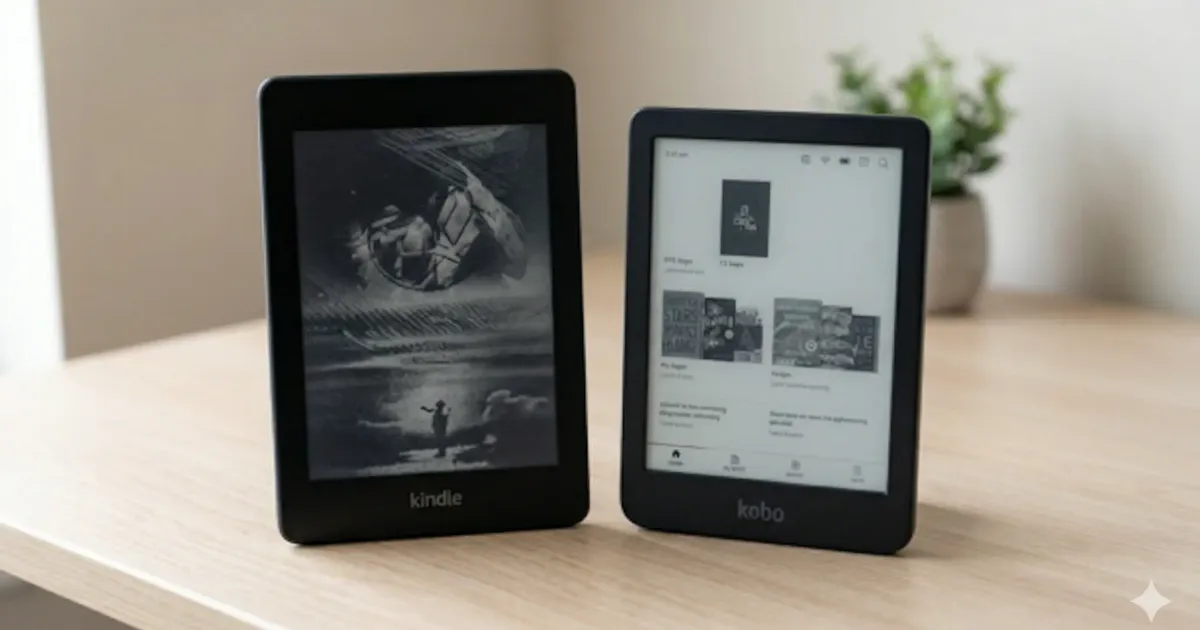
Same price, different ecosystems: the Kindle Paperwhite wins on screen size, store, and Audible; the Kobo Clara BW wins on library borrowing, EPUB support, and price. Both cost about $150 to $160 and will last years. The comparison below puts the two devices side by side on the same criteria and ends with who should buy which.
So you’ve narrowed it down to two e-readers: the Kindle Paperwhite and the Kobo Clara BW. Both cost about the same, both have sharp screens, and both will last you years.
But they’re built on very different philosophies. Here’s how they actually compare. (For the bigger picture, Kindle vs Kobo as ecosystems, check our full Kindle vs Kobo comparison.)
Specs at a Glance
| Feature | Kindle Paperwhite (2024) | Kobo Clara BW |
|---|---|---|
| Display | 7” E Ink Carta 1300 | 6” E Ink Carta 1200 |
| Resolution | 300 PPI | 300 PPI |
| Color | No | No (B&W only; see Clara Colour for color) |
| Storage | 16 GB | 16 GB |
| Waterproof | IPX8 | IPX8 |
| Weight | ~205g | ~174g |
| USB-C | Yes | Yes |
| Audiobooks | Bluetooth (Audible) | No |
| Battery | ~12 weeks | ~6 weeks |
| Price | ~$160 | ~$150 |
Design and Build
The Paperwhite grew to 7 inches with the 2024 model, noticeably larger than the Clara’s 6 inches. Whether that’s a pro or con depends on you. Bigger screen means more text per page and less frequent page turns. But it also means a slightly heavier device (205g vs 174g).
Both feel premium for their price. Both are waterproof (IPX8, submersible up to 2 meters for 60 minutes). Both charge via USB-C.
The Clara is more pocketable. The Paperwhite is more comfortable for long reading sessions. Personally, I prefer the larger screen.
Display Quality
At 300 PPI, both screens are equally sharp. Text is crisp on either device, and you won’t notice a quality difference reading the same book side by side.
The Paperwhite uses the newer Carta 1300 display, which has marginally better contrast. In practice, the difference is subtle, you’d have to look closely to notice.
The Kobo Clara BW uses a standard E Ink Carta 1200 display, black and white only. It does not have color capability. (Color is available in the separate Kobo Clara Colour model, which uses the Kaleido 3 display.)
Both have adjustable warm-light frontlights. The Paperwhite’s auto-brightness is convenient. Both reduce blue light for nighttime reading.
Ecosystem and Book Store
This is where the real difference lies.
Kindle locks you into Amazon’s ecosystem. You buy books from the Kindle Store, period. The upside: the Kindle Store has the largest ebook selection on the planet, competitive pricing, and Whispersync (syncs your position across devices). If you already have an Amazon account, it just works.
Kobo uses the Kobo Store (owned by Rakuten). The selection is slightly smaller but still massive. Kobo also supports Pocket integration for saving web articles to read on your e-reader, a feature Kindle doesn’t have.
Neither ecosystem makes it easy to switch. Books purchased on one platform don’t transfer to the other without some effort and Calibre.
Library Support
Kobo wins here. OverDrive (Libby) is built directly into the Kobo. You link your library card in settings, browse the library catalog on the device, and borrow with one tap. It’s seamless.
Kindle works with Libby too, but the process is indirect: you borrow in the Libby app on your phone, choose “Send to Kindle,” and it arrives on your device. It works, but it’s extra steps every time.
If you’re a heavy library user, this alone might tip the scale toward Kobo. If you want to maximize free books on your Kindle, the extra steps are manageable, but Kobo makes it effortless.
File Format Support
Kobo: Reads EPUB, PDF, MOBI, CBR/CBZ, and more natively. EPUB is the universal ebook standard, and Kobo handles it without conversion.
Kindle: Reads EPUB (since 2022), MOBI, AZW3, PDF, and DOC. Amazon finally added native EPUB support, which was a major gap for years. You can sideload EPUBs via Send to Kindle email or USB.
Kobo still has an edge here, it handles a wider range of formats out of the box. But the gap has narrowed significantly. If you want to go deeper into sideloading and custom readers, check our Kindle modding guide.
Subscription Services: Kindle Unlimited vs Kobo Plus
Both devices have a subscription option for unlimited reading, and the math behind each one is very different.
Kindle Unlimited costs $11.99/month and gives access to over 4 million titles, including a selection of Audible-narrated audiobooks. The catalog skews toward genre fiction, indie authors, and back catalogs of major publishers. New releases from Big 5 publishers are usually not included. (We did the full math on whether Kindle Unlimited is actually worth it, check our breakdown here.)
Kobo Plus comes in two tiers: Read ($7.99/month) for ebooks only, or Read & Listen ($9.99/month) which adds audiobooks. The catalog is smaller (around 1.5 million titles), but the entry price is lower and the audiobook integration is smoother because it works on the device itself rather than only over Bluetooth.
If you read 2+ books a month, either subscription pays for itself. The choice usually comes down to whether your favorite authors are available on each platform, and that’s worth checking before you commit.
Reading Experience: Typography and Customization
This is the area where personal taste matters most, and both devices give you genuine control.
Kindle ships with around a dozen fonts, including Bookerly (Amazon’s in-house typeface designed for E Ink), Open Dyslexic, and several traditional serifs. You can adjust font size, weight, line spacing, and margins. The “Aa” menu is well-designed and changes are instant.
Kobo ships with about 15 fonts plus the option to sideload your own (something Kindle does not allow without modding). Line height, weight, justification, and even hyphenation are individually adjustable. Power users prefer Kobo’s typography controls because they’re genuinely unlimited.
Page turning feels nearly identical on both, but the gesture controls differ. Kindle gives you tap zones (left to go back, right or center to go forward) plus swipe. Kobo adds pinch-to-zoom on text size, which is a small but useful detail when reading PDFs.
Both devices track your reading stats (books finished, time read, pages per session). Kobo’s stats display is slightly more detailed and includes reading goals, which appeals to people who like quantifying their habits.
Long-Term Support and Build Quality
Both Amazon and Kobo have decent track records on software updates. A 2018-era Kindle still receives security updates, and Kobo’s older devices typically get 4 to 6 years of feature updates after launch.
Build quality is comparable. Both use a soft-touch plastic back that resists fingerprints. Both have flush front bezels. Neither cracks easily under normal use, but you’ll want a case if you’re tossing it in a backpack.
The one difference: replacement parts. Kindles are easier to repair via third-party services because the volume is so much higher. Kobo replacement parts are harder to find, especially in the US where Kobo’s market share is smaller.
Battery Life
Kindle claims up to 12 weeks on a single charge. Kobo claims about 6 weeks. Real-world usage puts the Paperwhite at roughly 3–4 weeks of heavy daily reading, and the Clara at about 2–3 weeks.
Both are excellent compared to a tablet or phone. You’re charging your Kindle maybe twice a month. Not a dealbreaker either way.
Value
The Paperwhite costs ~$160, the Clara BW ~$150. A $10 difference that barely matters.
For that price, the Paperwhite gives you a larger screen, longer battery, Bluetooth audiobook support (Audible), and Amazon’s massive store. The Clara gives you lighter weight, native library integration, and better format support.
The Verdict
Buy the Kindle Paperwhite if:
- You already buy books on Amazon
- You want the larger 7” screen
- You listen to Audible audiobooks
- Battery life matters to you
- You want the biggest ebook store
Buy the Kobo Clara BW if:
- You borrow library books regularly
- You prefer EPUB as a format
- You want a lighter, more pocketable device
- You like Pocket integration for articles
- You want to avoid Amazon’s ecosystem
For most people, the Kindle Paperwhite is the better buy. The larger screen, longer battery, and Amazon’s store are hard to beat. But if library access is a priority, the Kobo Clara makes a strong case.
Either way, you’re getting a great e-reader. The gap between these two is smaller than ever. Still not sure if an e-reader is right for you? Read our honest take on whether a Kindle is worth it.
Looking for accessories for either device? Check our guide to the best Kindle accessories. And if you’ve decided on a Kindle, our complete Kindle guide walks through setup, sourcing books, and customization.
If you make a lot of these head-to-head buying decisions, our AirPods vs Galaxy Buds vs Sony earbud comparison uses the same approach. Looking to round out your gear list on a budget? See the best tech gifts under $50.
Related Articles
Kindle Scribe vs reMarkable 2026: Which Should You Buy?
Kindle Scribe vs reMarkable in 2026: price, note-taking, reading, and ecosystem compared, with a clear pick for writers, readers, and everyone in between.
Which Kindle Should You Buy in 2026? Full Lineup Compared
Which Kindle should you buy in 2026? Compare the base Kindle, Paperwhite, Colorsoft, and Scribe by price, screen, and use case, with a pick for every reader.
Kindle Colorsoft vs Paperwhite (2026): Is Color Worth It?
Kindle Colorsoft ($279) vs Paperwhite ($160) in 2026: color e-ink, contrast, battery and price compared. Find out who should actually pay for color.