
Kindle or iPad: Which One You Actually Read On
Screen, battery, weight, distractions and price side by side, and the honest question underneath: which of the two you will still be reading on in a year.

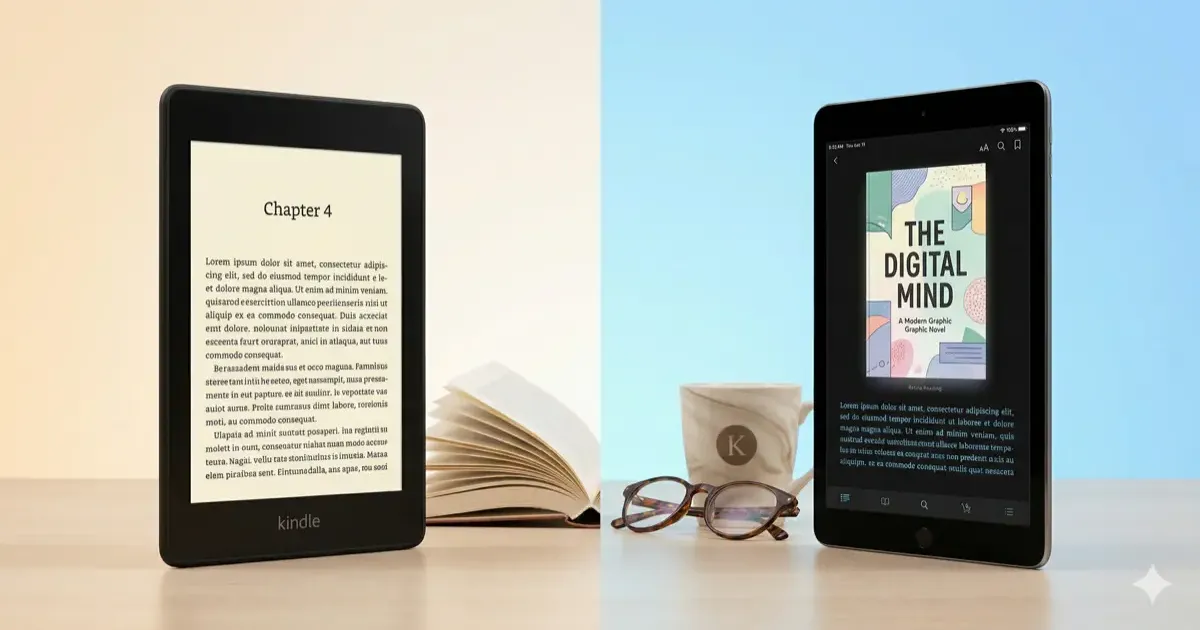
For reading books, a Kindle wins on eye comfort, weight, battery, and the absence of notifications; an iPad wins the moment you need color, PDFs, comics, or anything beyond books. A Paperwhite costs about $160 against $350 and up for an iPad, and it lasts weeks per charge rather than a day. If you already own an iPad and read a book a month, you do not need a Kindle; if you read every night, you will read more on one.
This is a question I hear constantly: should I buy a Kindle or just read on my iPad?
The short answer, it depends on what kind of reader you are. The long answer involves screen technology, battery life, distractions, and how you actually spend your lunch breaks. Let me break it down.
If you’re still on the fence about e-readers in general, check out our guide on whether a Kindle is worth it first.
The Quick Comparison
| Feature | Kindle Paperwhite | iPad (10th gen) |
|---|---|---|
| Screen | 7” E Ink, 300 PPI | 10.9” LCD, 264 PPI |
| Colors | No (Colorsoft: yes) | Yes |
| Battery | ~12 weeks | ~10 hours |
| Weight | ~200g | ~477g |
| Storage | 16 GB | 64–256 GB |
| Price | ~$160 | ~$350–450 |
| Sunlight | Excellent | Poor (glare) |
| Eye strain | Minimal | Moderate–high |
| Distractions | None | Unlimited |
| File formats | Kindle, EPUB, PDF | Everything |
I’m comparing the Kindle Paperwhite to the base iPad here because they’re the most popular options in each category. The Paperwhite hits the sweet spot for Kindle users, and the 10th gen iPad is the entry-level tablet most people consider.
Screen: E Ink vs LCD
This is the single biggest difference, and it affects everything else.
E Ink reflects light just like paper. There’s no backlight blasting into your eyes, just a gentle front light for reading in the dark. In direct sunlight, the screen gets easier to read, not harder. After two hours of reading on a Kindle, my eyes feel exactly the same as when I started.
LCD (on the iPad) emits light directly at your face. It looks great, sharp, vibrant, full color. But after 45 minutes of reading, I start noticing fatigue. In bright sunlight, you’re fighting glare and cranking brightness to max, which kills the battery faster.
If you read manga, comics, or magazines with color illustrations, the iPad wins here. For everything else, novels, non-fiction, articles, E Ink is objectively easier on the eyes.
Want color E Ink? The Kindle Colorsoft (~$250) offers color E Ink, which is a middle ground: better for color content than a standard Kindle, but nowhere near iPad-level vibrancy.
Battery Life: Weeks vs Hours
This isn’t even close.
A Kindle Paperwhite lasts up to 12 weeks on a single charge with typical use. That’s not a typo. You charge it once every two to three months. I’ve gone on two-week vacations without packing a Kindle charger.
An iPad lasts about 10 hours of active screen time. For reading-only use, you might stretch that a bit, but you’re still charging it every couple of days.
For office workers, this matters more than you’d think. Throw a Kindle in your bag on Monday and forget about it until next month. With an iPad, you’re sharing that battery with email, Slack, YouTube, and whatever else you do on it.
Portability and Weight
The Kindle Paperwhite weighs roughly 200 grams, lighter than most smartphones. The basic Kindle is even lighter at about 158g. You can hold either one-handed for an hour without fatigue.
The base iPad comes in at 477 grams. The iPad mini (8.3”, ~$499) is lighter at about 297g, making it the better iPad for reading. But even the mini is heavier than a Kindle.
For commuters and lunch-break readers, weight adds up. Holding a 10.9” iPad on a crowded train isn’t comfortable. A Kindle slips into a coat pocket.
The Distraction Factor
Let’s be honest, this is the real reason many people buy a Kindle.
An iPad is a full computer. You open the Kindle app to read, and within ten minutes you’ve checked email, scrolled Twitter, watched a YouTube video, and somehow ended up on Amazon buying something you don’t need. I’ve been there. Repeatedly.
A Kindle does one thing: display text. There’s a basic web browser buried in the settings, but it’s so bad that nobody uses it. No notifications. No social media. No “just one more video.” You pick it up, you read, you put it down.
For office workers trying to use their lunch break productively, this is a genuine productivity feature. A Kindle protects your reading time in a way an iPad simply can’t.
Content and Ecosystem
Kindle gives you access to the Amazon Kindle Store (the largest ebook store), Kindle Unlimited ($11.99/month for a huge library), and Audible audiobooks via Bluetooth. It reads Kindle formats and EPUB natively. For more ways to find free content, see our guide on free books for Kindle.
iPad reads everything. Kindle app, Apple Books, Kobo, Libby (library books), PDF readers, Pocket, Instapaper, you name it. If you buy books from multiple stores or read a lot of PDFs for work, the iPad is far more flexible.
The iPad also handles audiobooks and podcasts without needing a separate device, and it displays PDFs the way they were meant to be seen, full color, proper formatting, zoomable.
When to Choose a Kindle
Pick a Kindle if:
- Reading is the primary goal. You want a device that does one thing exceptionally well.
- You read for 30+ minutes at a time. E Ink reduces eye strain significantly over long sessions.
- You commute or travel frequently. The weight and battery life make it effortless to carry.
- You struggle with phone/tablet distractions. A Kindle removes the temptation entirely.
- Budget matters. A Kindle Paperwhite costs less than half the price of a base iPad.
Which Kindle? The Paperwhite ($160) is the best value for most people. The basic Kindle ($110) works fine if you want the cheapest option. The Scribe (~$500) is overkill unless you want to take handwritten notes. For a deeper comparison of all models, check our best e-readers guide.
Once you’ve picked one up, our Kindle tips and tricks guide will help you get the most out of it. And if you want a case or screen protector, we’ve got a best Kindle accessories roundup too.
When to Choose an iPad
Pick an iPad if:
- You need a multi-purpose device. Reading is one of several things you’ll use it for.
- You read comics, manga, or illustrated content. Color and screen size matter here.
- You annotate PDFs for work. The iPad with an Apple Pencil is unmatched for markup.
- You already own an iPad. Don’t buy a Kindle just because, try the Kindle app first and see if you actually miss E Ink.
- You want one device, not two. If carrying a separate reader feels redundant, the iPad consolidates everything.
Which iPad? The 10th gen iPad ($350) is the budget pick. The iPad mini ($499) is better for reading specifically, the 8.3” screen is more book-sized and easier to hold one-handed. Not sold on Apple at all? Our iPad vs Android tablet comparison weighs both platforms before you commit.
The Lunch Break Test
Here’s my real-world take as someone who reads during lunch at work:
I used my iPad for reading for about six months. I finished maybe two books. Not because the iPad is bad, it’s great, but because every time I opened it, something else grabbed my attention.
I switched to a Kindle Paperwhite. In the same six months, I finished eleven books. Same lunch breaks, same amount of free time. The only difference was removing the option to do anything other than read.
That’s the trade-off in one sentence: the iPad can do everything, and that’s exactly why the Kindle is better at reading.
The Verdict
For dedicated reading, buy a Kindle. The Paperwhite at ~$160 is the sweet spot, great screen, waterproof, weeks of battery, distraction-free. It’s the best $160 you can spend if you want to read more.
For everything else plus some reading, use an iPad. It won’t match the Kindle’s reading experience, but it does a hundred other things a Kindle can’t.
And if you’re torn? Buy the Kindle first. It’s cheaper, and you can always use the Kindle app on your phone or tablet for color content. You’re not locked in.
For more e-reader comparisons, check out our Kindle vs Kobo breakdown, Kobo is the main alternative if you want an e-reader but don’t love Amazon’s ecosystem. If you’ve decided on a Kindle, our complete Kindle guide covers setup, books, and customization.
Sticking with the Apple ecosystem? Our MacBook Neo one-month review covers the new $599 Mac that pairs surprisingly well with an iPad for reading-plus-work setups, and AirPods vs Galaxy Buds vs Sony compares the best earbuds to round out the device.
Related Articles
Kindle Scribe vs reMarkable 2026: Which Should You Buy?
Kindle Scribe vs reMarkable in 2026: price, note-taking, reading, and ecosystem compared, with a clear pick for writers, readers, and everyone in between.
Which Kindle Should You Buy in 2026? Full Lineup Compared
Which Kindle should you buy in 2026? Compare the base Kindle, Paperwhite, Colorsoft, and Scribe by price, screen, and use case, with a pick for every reader.
Kindle Colorsoft vs Paperwhite (2026): Is Color Worth It?
Kindle Colorsoft ($279) vs Paperwhite ($160) in 2026: color e-ink, contrast, battery and price compared. Find out who should actually pay for color.