
TRMNL: The E-Ink Dashboard That Reclaims Your Desk and Focus
Is your desk setup missing something? Discover TRMNL, the minimalist E-ink display that gives you glanceable data without the distraction of a standard monitor.

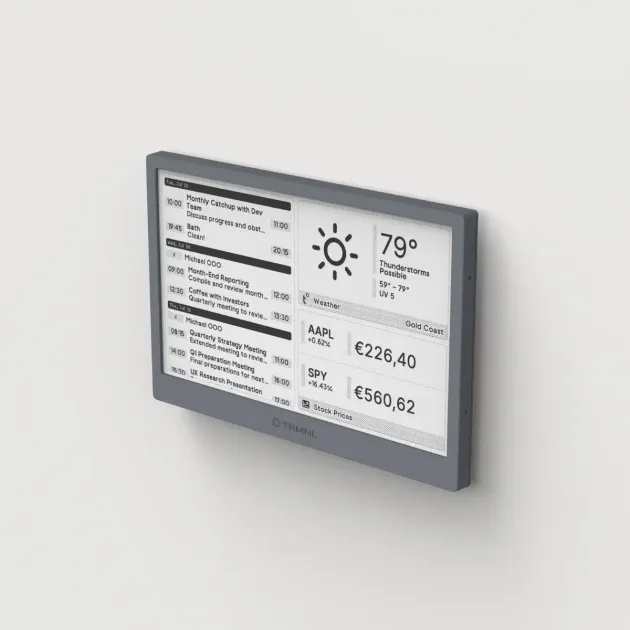
We live in an age of “Screen Fatigue.” Between your ultra-wide monitor, your smartphone, and your tablet, there is constantly a backlit screen fighting for your attention. Even if you’re just checking the weather or your GitHub contributions, the simple act of opening a browser tab is a gateway drug to distraction.
Every pixel on your main monitor is a battleground for your focus. This is where TRMNL enters the chat. It’s not just another screen; it’s an intentional choice to move your secondary data into a tertiary space.
Upgrading your workstation? See our all-in-one Desk Upgrade & Home Office Guide to build a comfortable, productive workspace.
I’ve been obsessed with E-ink technology ever since I bought my first Kindle (read my Kindle vs Kobo guide here). There is something inherently calm about a screen that doesn’t emit light. TRMNL takes that technology and moves it from your hand to your desk, acting as a “living paper” that keeps you informed without demanding your soul.
What exactly is TRMNL?
At its core, TRMNL is a minimalist, Wi-Fi-connected E-ink display (typically 7.5 inches). It is powered by an ESP32 microcontroller, meaning it is incredibly energy-efficient. It’s designed to do one thing: show you “glanceable” information.
Unlike a secondary monitor, TRMNL has:
- No Backlight: It reflects ambient light, making it look like a physical object or a printed page.
- No Touch Screen: You don’t “interact” with it in the traditional sense; you curate it from a web dashboard.
- Zero Distraction: No pop-ups, no animations, and a refresh rate measured in minutes, not milliseconds.
The Psychology of the “Peripheral Glance”
The biggest problem with modern productivity is the “just for a second” trap. You want to check your earnings, your calendar, or the news, so you Alt-Tab. Suddenly, you’re on Twitter, and 20 minutes are gone. This is known as Context Switching, and it’s a productivity killer.
TRMNL breaks this cycle by utilizing your Peripheral Awareness. Because the screen doesn’t glow, it doesn’t “pull” your eyes toward it. However, when you naturally hit a wall in your work and look away for a split second, the information is there. It’s passive consumption at its finest. It gives you the “peace of mind” of being informed without the “anxiety of being connected.”
The Backend: Where the Magic Happens
TRMNL isn’t just a piece of hardware; it’s backed by a sophisticated cloud (or self-hosted) dashboard. From there, you can install “Plugins.”
Popular Plugins for Your 9-to-5:
- Calendar & Tasks: See what’s next without opening Outlook or Google Calendar. It supports Google, Outlook, and Todoist.
- GitHub Stats: Keep an eye on your PRs, issues, and contributions.
- Crypto & Stocks: Monitor your portfolio during slow work hours without having a ticker running on your main screen.
- RSS Feeds: Get headlines from your favorite blogs (maybe even this one!) without the algorithmic noise of a news app.
The Developer’s Playground: JSON & Liquid
While the pre-built plugins are great, the real power of TRMNL for the Boredom at Work crowd is its open-source friendliness. This is a device built for people who like to tinker.
If you’ve been following my Gemini-enhanced coding workflow, you’ll realize how easy it is to create custom integrations for TRMNL. The device uses Liquid, the same templating engine used by Shopify, to render its screens.
How to Build a Custom Screen:
- The Data: You provide a JSON endpoint. This could be a simple serverless function or a Python script running on your local machine.
- The Logic: TRMNL’s dashboard fetches your JSON data.
- The Design: You use HTML, CSS, and Liquid tags to tell TRMNL how to display that data.
For example, I built a “Boredom Monitor” that pulls my Google Analytics real-time data and displays it as a simple bar chart. It took me less than 30 minutes with the help of an AI agent to write the Python backend and the Liquid frontend.
Hardware Specs & Battery Life
TRMNL is remarkably well-built. It has a clean, matte finish that doesn’t attract fingerprints.
- Display: 7.5” E-ink (Black and White).
- Connectivity: 2.4GHz Wi-Fi.
- Power: Internal rechargeable battery via USB-C.
- Battery Life: Depending on your refresh rate (e.g., once every 15 minutes), the battery can last 3 to 6 months on a single charge.
Because E-ink only consumes power when the pixels change, it can sit on your desk for weeks without needing a cable. This allows for a “clean desk” setup (no wires!) that looks incredible in photos and feels even better in person.
TRMNL vs. The Competition (Tidbyt & DIY)
You might be thinking: “Can’t I just use a Tidbyt or an old iPad?”
Tidbyt is cool, but it uses bright LEDs. It’s essentially a glowing neon sign on your desk. It’s great for a living room, but in a focused office environment, the flickering LEDs can be annoying.
An old iPad is a backlight nightmare. It emits blue light, requires constant charging, and will eventually overheat if left on 24/7. Plus, the temptations of the App Store are just a swipe away.
TRMNL occupies a “Goldilocks” zone: it’s as smart as a tablet but as quiet as a piece of paper.
Reclaiming Your Work-Life Balance
The name of this blog is Boredom at Work. We often talk about how to use downtime to learn. TRMNL helps you manage that downtime by showing you exactly when you have a gap. If your calendar shows a clear two-hour block on your TRMNL screen, you know it’s safe to dive into a 3D printing guide or a photography tutorial.
It turns your workspace into a cockpit of relevant information without the mental tax of another glowing screen. It allows you to finish your work efficiently by removing the tiny “micro-distractions” that add up to hours of wasted time.
Final Verdict: Is It Worth It?
At around $99 to $149 (depending on the model and early-bird pricing), TRMNL is an investment in your mental health as much as your desk setup.
It’s the ultimate “Stealth Tech.” It doesn’t scream for attention, it doesn’t notify you with pings or buzzes, and it doesn’t track your every move. It just sits there, looking like a piece of art, waiting for the one second you decide to glance at it.
If you’re a developer, a writer, or anyone who spends 8+ hours a day at a desk, TRMNL is the upgrade you didn’t know you needed. It’s the final piece of the minimalist productivity puzzle.
What would you put on your E-ink dashboard? A stock ticker? A random quote generator? Or maybe just a countdown to 5:00 PM? Let me know in the comments or via email!
Related Articles
Best Desk Upgrades Under $100 That Are Actually Worth It
The best desk upgrades under $100 in 2026, ranked by real impact on comfort and focus. Small, high-ROI changes that make working at your desk noticeably better.

The Top 10 Must-Have Gadgets to Upgrade Your Commute in 2026
From intelligent noise-canceling headphones to smart travel mugs, these 10 gadgets will make your daily commute more productive, comfortable, and enjoyable.

Dumb Phones for Deep Work: Reclaiming Focus in 2026
Why high-performers are intentionally ditching their flagship smartphones for minimalist 'dumb phones' to reclaim their attention, focus, and productivity.