
Best Desk Upgrades Under $100 That Are Actually Worth It
The best desk upgrades under $100 in 2026, ranked by real impact on comfort and focus. Small, high-ROI changes that make working at your desk noticeably better.

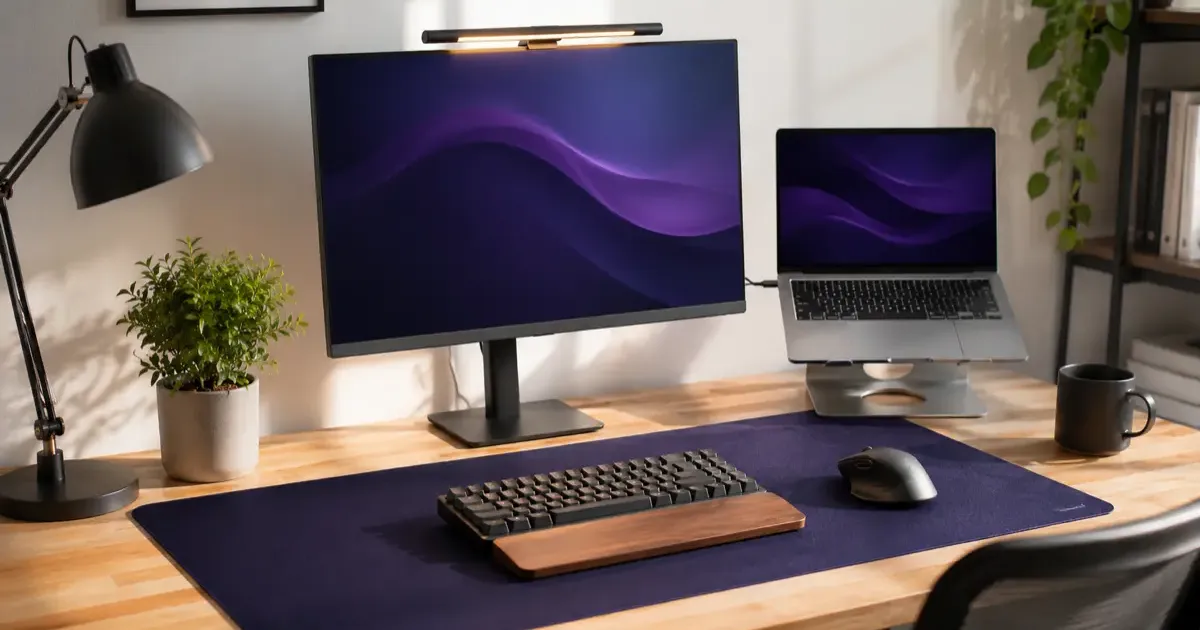
You do not need to spend a fortune to make your desk a much better place to work. The upgrades that actually move the needle, better posture, better light, less wrist strain, are surprisingly cheap. Here are the best desk upgrades under $100, ranked by how much difference they make.
(Want the full picture, including the bigger-ticket items? Our desk upgrade guide is the complete hub.)
1. Monitor Light Bar (Biggest Bang for the Buck)
If you change one thing, make it lighting. A monitor light bar clips to the top of your screen and lights your desk and keyboard without shining in your eyes or reflecting off the display. Better light means less eye strain on long days, and it makes any desk look instantly more premium. See our best monitor light bars roundup for picks.
2. Laptop Stand (The Ergonomic Fix)
If you work on a laptop, you are almost certainly hunching. A laptop stand raises the screen toward eye level, which straightens your neck and back for free. Pair it with an external keyboard and mouse and you have a proper ergonomic setup for under $100. Our best laptop stands guide covers foldable and adjustable options.
3. Ergonomic Mouse (Save Your Wrist)
If you click all day, an ergonomic mouse is a small change you will feel within a week. Vertical and contoured shapes keep your wrist in a more natural position and ease the strain that builds up over months. Our best ergonomic mice roundup helps you find a shape that fits your hand.
4. Large Desk Mat (Instant Glow-Up)
A big desk mat does two things: it gives your mouse a smooth surface edge to edge, and it makes the whole desk look intentional. It is the cheapest way to go from cluttered to clean. See our best desk mats guide for sizes and materials.
5. Footrest (Underrated Comfort)
If your feet dangle or you shift around looking for a comfortable position, a footrest quietly fixes your posture from the ground up. It is one of the most underrated sub-$50 upgrades. Our best footrests guide has options.
6. Cable Management (Finish the Look)
Nothing undoes a nice desk like a tangle of cables. A cable tray, sleeves, or clips hide the mess and make cleaning easier. It costs almost nothing and finishes the whole setup. Our cable management tips show the simplest ways to do it.
Quick Wins Under $30
- A wrist rest for the keyboard and mouse.
- A phone or tablet stand to keep your desk clear during calls.
- A small plant to soften the space.
- A desk lamp for warm afternoon light.
Where to Start
| Your main complaint | The upgrade to buy first |
|---|---|
| My eyes are tired by the afternoon | Monitor light bar |
| My neck and shoulders ache | Laptop stand |
| My wrist hurts | Ergonomic mouse + wrist rest |
| My desk feels messy | Desk mat + cable management |
The Bottom Line
The best desk upgrades under $100 are the ones that fix a daily annoyance: a light bar for tired eyes, a laptop stand for your neck, an ergonomic mouse for your wrist. Start with whatever bugs you most, and you will feel the difference immediately, no expensive chair or standing desk required.
Shopping for someone else’s desk instead of your own? Our home office gifts under $100 guide is built for that.
Shopping for college or high school learners? Check out our list of the best gifts for students.
Related Articles
TRMNL: The E-Ink Dashboard That Reclaims Your Desk and Focus
Is your desk setup missing something? Discover TRMNL, the minimalist E-ink display that gives you glanceable data without the distraction of a standard monitor.
Boox vs Supernote: Best E-Ink Tablets for Note-Taking
Compare Boox and Supernote e-ink tablets for note-taking, Android flexibility, pen feel, organization features, and office productivity in our 2026 guide.
IKEA 3D Printing Hacks: Upgrade Your Furniture in 2026
Transform standard IKEA furniture with 3D printing. Discover custom Skadis hooks, Alex drawer dividers, Kallax modifiers, and desk cable management clips.