
12 Best Back to School Tech Gadgets for Students (2026)
Discover the best back to school tech gadgets for 2026. Practical dorm, study, and productivity tools from ANC headphones to digital note-takers.

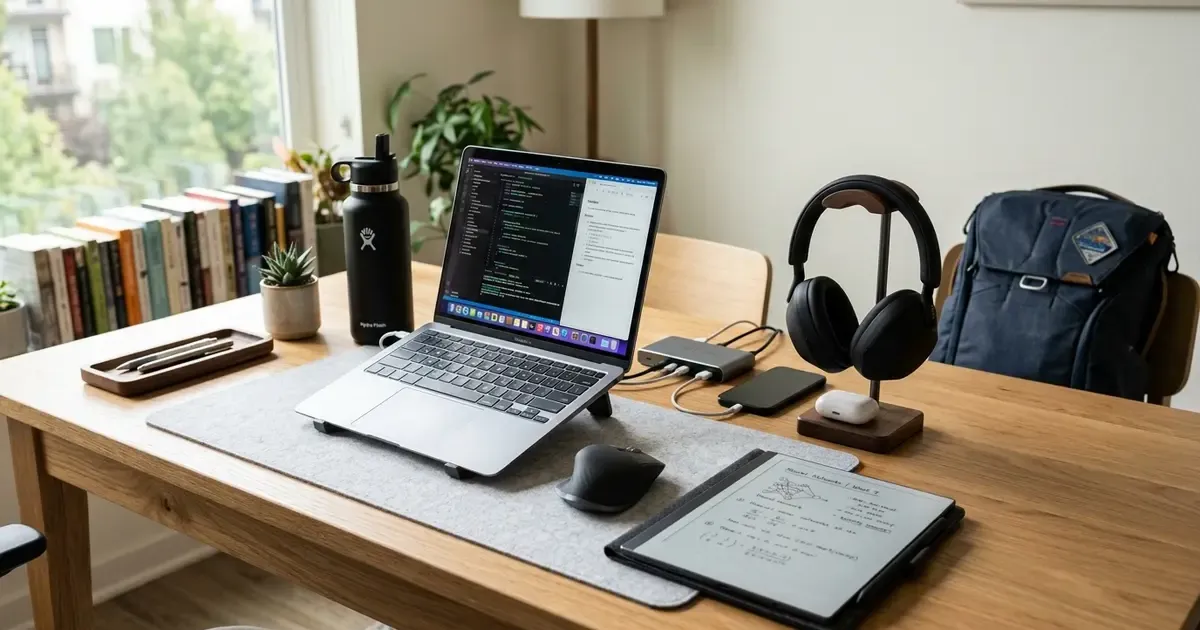
Heading back to campus or starting a new academic year in 2026 requires more than a backpack full of spiral notebooks and highlighters. Today’s academic workflows happen across digital syllabi, collaborative cloud documents, AI research tools, and hybrid lectures.
Yet, walking into an electronics store or browsing online deals can easily lead to wasting money on flashy, gimmicky gadgets that end up abandoned in a dorm drawer by midterm season. The secret to choosing the best back to school tech is focusing on friction removers: tools that protect your focus, save your posture during marathon study sessions, keep your devices powered through 12-hour campus days, and eliminate digital clutter.
Upgrading your workstation? See our all-in-one Desk Upgrade & Home Office Guide to build a comfortable, ergonomic workspace.
Quick Picks: Best Back to School Gadgets at a Glance
In a hurry? Here are the top 4 tested gadgets that deliver the highest day-to-day impact for students:
- Best Overall Focus Tool: Sony WH-1000XM5 / Bose QuietComfort (~$320-$380) – Unbeatable active noise cancellation for loud libraries and shared dorm rooms.
- Best Value Earbuds: Anker Soundcore Liberty 4 NC (~$80-$99) – 90% of premium ANC performance, multipoint laptop-to-phone pairing, and wireless charging.
- Best for Deep Study & Reading: Supernote Nomad / Kindle Scribe (~$299-$370) – Glare-free E-Ink writing and textbook annotation with zero notification distractions.
- Best Daily Carry Essential: Anker Prime 67W GaN Charger (~$45-$60) – Replaces 3 bulky wall bricks in a form factor barely larger than an AirPods case.
Quick Comparison Table
| Gadget Category | Top Pick | Price Range | Standout Feature | Best For |
|---|---|---|---|---|
| Over-Ear ANC | Sony WH-1000XM5 | ~$320-$380 | 30h battery, class-leading silence | Deep focus in dorms & flights |
| Budget ANC Earbuds | Anker Soundcore Liberty 4 NC | ~$80-$99 | Multipoint Bluetooth, 50h total playtime | Daily campus commute & gym |
| Distraction-Free Notes | Supernote Nomad / Kindle Scribe | ~$299-$370 | Weeks of battery, real pen feel | Lecture notes & PDF reading |
| E-Reader | Kindle Paperwhite | ~$140-$160 | 6.8-inch glare-free, waterproof | Literature & course readings |
| GaN Fast Charger | Anker Prime 67W / 100W | ~$45-$60 | 2x USB-C + 1x USB-A, ultra-compact | Single-charger backpack kit |
| Laptop Power Bank | Baseus Blade 100W (20,000mAh) | ~$60-$90 | 100W fast output, flat slim design | Lecture halls without wall outlets |
| Ergonomic Stand | Roost V3 / Nillkin Aluminum | ~$25-$75 | Eye-level elevation, foldable | Preventing neck & back strain |
| Desk Lighting | Clip-On Monitor Light Bar | ~$35-$60 | Zero screen glare, saves desk space | Late-night dorm study sessions |
| Item Finder | Apple AirTag / SmartTag2 | ~$25-$29 | Global tracking network | Securing backpack & tech pouch |
| Portable Mouse | Logitech MX Anywhere 3S | ~$70-$80 | Silent switches, tracks on glass | Quiet library study desks |
| Cable Management | Tomtoc / Bellroy Tech Pouch | ~$25-$45 | Elastic webbing, water-resistant | Tangle-free cords and adapters |
| Smart Hydration | Owala FreeSip / Ember Mug | ~$35-$99 | Leakproof or exact temperature | 8:00 AM lectures to late nights |
1. Focus & Audio: Active Noise Canceling (ANC)
Dorm hallways, shared apartments, and crowded campus dining areas are rarely quiet. A top-tier pair of noise-canceling headphones or earbuds is not a luxury; it is your personal portable focus sanctuary.
1. Sony WH-1000XM5 / Bose QuietComfort (~$320-$380)
- Best For: Students who need complete acoustic isolation for deep work marathons in noisy dorms or busy coffee shops.
- Why It Wins: Industry-leading active noise cancellation cuts out background conversation, air conditioning hums, and campus maintenance noise with surgical precision. Soft memory foam ear cushions distribute clamping pressure evenly, preventing headaches during 6-hour revision sessions.
- Battery Life & Charging: 30+ hours of continuous playback with ANC enabled. A rapid 3-minute USB-C top-up delivers 3 full hours of listening when you are running late for class.
- Key Consideration: The earcups do not fold inwards into a tiny ball like older generations, requiring a bit more space inside your backpack.
2. Anker Soundcore Liberty 4 NC (Best Budget Pick, ~$80-$99)
- Best For: Everyday campus commutes, lecture review, and workouts without risking $250+ earbuds.
- Why It Wins: Delivers approximately 90% of premium flagship ANC performance at one-third of the price. The adaptive noise canceling constantly samples external frequencies and adjusts isolation levels in real time.
- Features: Wireless charging case, multi-point Bluetooth pairing (smoothly switch audio between your laptop lecture and phone notifications), and IPX4 water resistance for rainy walks between campus buildings.
- Battery Life: 10 hours per earbud on a single charge (50 hours total with the charging case).
2. Digital Note-Taking & Textbooks: Distraction-Free Study
Carrying five heavy physical textbooks across campus causes severe back strain. While iPads and tablets are versatile, their notifications, games, and social media apps destroy deep study focus.
Digital Note-Taking Comparison:
- Traditional Tablets (iPad / Galaxy Tab): High screen glare, 10-hour battery life, constant app notifications, and temptation to multitask.
- E-Ink Digital Notepads (Kindle Scribe / Supernote): Paper-like tactile friction, 2-3 week battery life, zero eye strain, and 100% distraction-free offline deep work.
3. Supernote Nomad (A6X2) / Kindle Scribe (~$299-$370)
- Best For: STEM students doing heavy formula work, handwriting enthusiasts, and graduate researchers annotating academic papers.
- Why It Wins: E-Ink screens reflect natural ambient light rather than blasting blue light into your eyes, preventing severe fatigue during late-night exam prep. The tactile feel mimics actual pen on paper without the slippery glass sensation of standard tablets.
- Organization: Organize notes into searchable digital folders, annotate PDF textbooks directly in the margins, and convert handwritten cursive to digital text.
- Battery: Lasts several weeks on a single charge, freeing you from hunting for campus wall outlets.
4. Amazon Kindle Paperwhite (~$140-$160)
- Best For: Humanities, literature, and social science students reading hundreds of pages weekly.
- Why It Wins: For reading required literature and assigned papers, a dedicated e-reader is unmatched. Check our detailed guide on the best Kindle for students to see why the Paperwhite’s 6.8-inch glare-free display and waterproofing make it an indispensable dorm companion.
- Key Advantage: Built-in adjustable warm light lets you read comfortably in bed without disturbing your roommate with a bright overhead lamp.
3. Power & Charging: Campus Survival Gear
Nothing derails a study session faster than a dead laptop battery in a lecture hall with zero open wall sockets.
5. Anker Prime 67W / 100W GaN Wall Charger (~$45-$60)
- Best For: Students carrying a laptop, phone, and tablet who hate packing multiple bulky power bricks.
- Why It Wins: Gallium Nitride (GaN) semiconductor technology packs massive charging capacity into a wall plug barely larger than an AirPods case. It runs cooler and draws power more efficiently than factory OEM chargers.
- Multi-Port Setup: Features two USB-C Power Delivery ports and one USB-A legacy port. You can fast-charge a MacBook Air, an iPhone, and wireless earbuds simultaneously from a single crowded wall socket.
- Foldable Prongs: Prongs fold flat into the housing, preventing scratches on your laptop lid inside your backpack.
6. Baseus Blade 100W / Anker 20,000mAh Laptop Power Bank (~$60-$90)
- Best For: Long study marathons on outdoor campus quads, old library desks without plugs, or group study rooms.
- Why It Wins: Most budget power banks only output 15W to 20W for phones. The Baseus Blade outputs a full 65W to 100W over USB-C Power Delivery, fast-charging an entire MacBook Air, Dell XPS, or ThinkPad from 0 to 80% in about an hour.
- Ultra-Slim Profile: Built with a flat form factor that slips directly into your backpack laptop sleeve alongside your notebook without creating an awkward bulge.
- Digital Status Display: A real-time LED screen shows exact remaining battery percentage, output wattage, and estimated charging time.
4. Ergonomics & Desk Upgrades for Dorms
Dorm room desks are notoriously cramped, poorly lit, and ergonomically atrocious. Spending 8 hours hunched over a laptop leads to chronic neck stiffness, shoulder knots, and tension headaches.
7. Roost V3 / Nillkin Foldable Aluminum Laptop Stand (~$25-$75)
- Best For: Ergonomic posture correction in dorm rooms, campus libraries, and coffee shops.
- Why It Matters: Elevates your laptop screen by 6 to 10 inches directly to natural eye level, preventing the painful forward-head posture known as “tech neck.”
- Portability: High-end models fold down into a compact baton that fits in any backpack side pocket, allowing you to set up an ergonomic workstation anywhere on campus.
- Pairing Recommendation: Pair with a compact wireless mouse and keyboard (like the Logitech Pebble 2 combo) for the ultimate mobile setup. If you want to optimize your study room further, explore our Budget Home Office & Desk Setup Guide.
8. ScreenBar / Clip-on Monitor Light Bar (~$35-$60)
- Best For: Shared dorm rooms with harsh fluorescent ceiling lighting or dark study corners.
- Why It Wins: Clips directly onto the top bezel of your external monitor or laptop stand, requiring zero square inches of valuable desktop space.
- Eye Comfort: Casts an asymmetrical pool of soft, glare-free light across your keyboard and physical notebook without reflecting off your screen or disturbing a sleeping roommate. Check out our Desk Lighting Guide for optimal placement.
5. Daily Organization & Campus Essentials
Small everyday quality-of-life gadgets often deliver the highest return on investment throughout a grueling semester.
The 2026 Student Essentials Stack:
- Power: Laptop + 67W Multi-Port GaN Wall Charger
- Focus: Active Noise-Canceling (ANC) Earbuds
- Posture: Foldable Aluminum Laptop Stand
- Reading: E-Ink Notepad or Kindle Paperwhite
- Security: Smart AirTag or SmartTag2 in Backpack Liner
9. Apple AirTag / Samsung SmartTag2 / Tile Pro (~$25-$29)
- Best For: Tracking backpacks, laptop bags, instrument cases, and gym gear.
- Why It Is Essential: College students misplace backpacks, jackets, and gym bags constantly during campus transitions. Tucking an AirTag or SmartTag into an interior zippered lining gives you pinpoint global tracking across campus using crowdsourced device networks.
- Battery Life: Runs for over a year on a replaceable standard CR2032 coin cell battery.
10. Logitech MX Anywhere 3S Mouse (~$70-$80)
- Best For: Mobile productivity on unpredictable campus surfaces.
- Why It Wins: Unlike standard optical mice that stutter on wooden dorm desks or glossy library tables, the MX Anywhere tracks flawlessly on virtually any surface (including clear glass coffee tables).
- Quiet Clicks: Features silent electromagnetic micro-switches that eliminate loud clicking sounds in dead-silent library study zones.
- MagSpeed Wheel: Scrolls up to 1,000 lines per second to fly through 100-page syllabus documents and legal cases effortlessly.
11. Bellroy / Tomtoc Compact Tech Pouch (~$25-$45)
- Best For: Preventing tangled cable chaos in student backpacks.
- Why It Matters: Digging through the bottom of a dark backpack for tangled charging cords, dongles, and flash drives wastes valuable time and frays expensive cables.
- Design: Structured elastic loops and zippered compartments keep your GaN charger, cables, stylus, and flash drives organized, protected from spills, and instantly accessible.
12. Smart Insulated Travel Mug (Ember / Owala 32oz) (~$35-$99)
- Best For: Staying fueled through early morning lectures and all-night library study sessions.
- Why It Matters: Staying hydrated and caffeinated through 8:00 AM lectures is essential. The Owala FreeSip delivers leakproof, ice-cold hydration all day, while an Ember smart temperature-controlled mug keeps your study tea or coffee at your exact preferred temperature (e.g., 135°F) for hours.
6. Digital Software & AI Study Stack (2026 Edition)
Hardware only solves half the equation. The modern student toolkit requires smart, privacy-conscious software workflows to manage research papers, lecture recordings, and group projects.
Local vs. Cloud Note-Taking Apps
- Obsidian (Free, 100% Local): For students who want an interconnected “second brain” without recurring subscriptions. Your notes live in open Markdown files on your laptop drive. When paired with the Canvas plugin, you can visually map complex course concepts across terms.
- Notion (Free Student Pro Plan): Ideal for collaborative group projects, syllabus tracking, and dynamic course dashboards. Log in with your school
.eduemail to unlock unlimited file uploads and collaborative workspaces.
AI Study Assistants & Audio Transcription
- NotebookLM by Google (Free): The standout study tool for 2026. Upload up to 50 PDFs, lecture slide decks, or textbook chapters, and NotebookLM creates a grounded AI research assistant that only cites your uploaded course materials. Its automatic “Audio Overview” feature generates a conversational podcast discussing your notes, perfect for listening during campus commutes.
- Otter.ai / Plaud Note: Ideal for capturing live lecture audio and converting speech into timestamped, speaker-separated text summaries so you never miss crucial exam hints while listening actively in lecture halls. If you are looking for free AI tools to streamline research, see our guide on 15 AI Tools That Replace Office Busywork.
7. The Ultimate 3-2-1 Campus Backup Strategy
Losing a semester-long thesis paper or capstone project to a stolen backpack, spilled coffee, or hard drive failure is every student’s worst nightmare. Implement the 3-2-1 backup rule on day one:
- 3 Copies of Important Data: Keep your primary working project, one local backup, and one off-site cloud copy.
- 2 Different Media Types: Store files on your laptop NVMe drive and an external rugged portable SSD (such as a SanDisk Extreme or Samsung T7 Shield).
- 1 Off-Site Cloud Sync: Leverage your free university OneDrive, Google Drive, or iCloud storage for automatic continuous background synchronization.
3 Tips to Maximize Student Discounts
Before buying any tech hardware for the new school year, always take advantage of these student savings programs:
- UNiDAYS and Student Beans: Register with your university
.eduor student email address to unlock 10% to 25% off brands like Sony, Logitech, Apple, Samsung, and Dell. - Apple Education Pricing & Freebies: Apple offers year-round educational discounts on MacBooks and iPads, frequently bundling free gift cards or accessories during the summer Back to School promotion.
- Refurbished Official Channels: Buy certified refurbished gear directly from Apple, Dell Outlet, or manufacturer eBay stores. You receive identical warranties with 20% to 40% price reductions.
Summary
You do not need to spend thousands of dollars to create a high-performance academic setup. By investing in practical, durable tools (such as pocketable GaN fast charging, comfortable active noise cancellation, and proper ergonomic laptop elevation), you can eliminate daily friction and make studying significantly more rewarding.
Choose two or three essentials that solve your biggest pain points, take advantage of educational discounts, and start the semester with complete confidence.
Next Read for Desk & Tech Lovers: Upgrading your workspace further on a budget? Check out our 25 Best Tech Gifts Under $50 or build your dream study setup with our Ultimate Desk Upgrade Guide.
Related Articles
Related Articles
Best Gifts for Students in 2026 (Useful, Not Junk)
The best gifts for students in 2026: practical tech and study tools they will actually use, from e-readers to earbuds, with picks for every budget.
Boox vs Supernote: Best E-Ink Tablets for Note-Taking
Compare Boox and Supernote e-ink tablets for note-taking, Android flexibility, pen feel, organization features, and office productivity in our 2026 guide.

Offline Travel Tech: Essential Apps & Devices for No-Data Regions
Prepare your smartphone, Kindle, and gear for zero-connectivity travel. Discover offline maps, offline translation packs, travel guides, and power tips.