
E-Ink vs. OLED for Reading: Eye Strain & Battery Tested
Is an E-Ink e-reader actually better for your eyes than an OLED tablet? Compare eye fatigue, PWM flicker, outdoor glare, battery life, and focus in 2026.

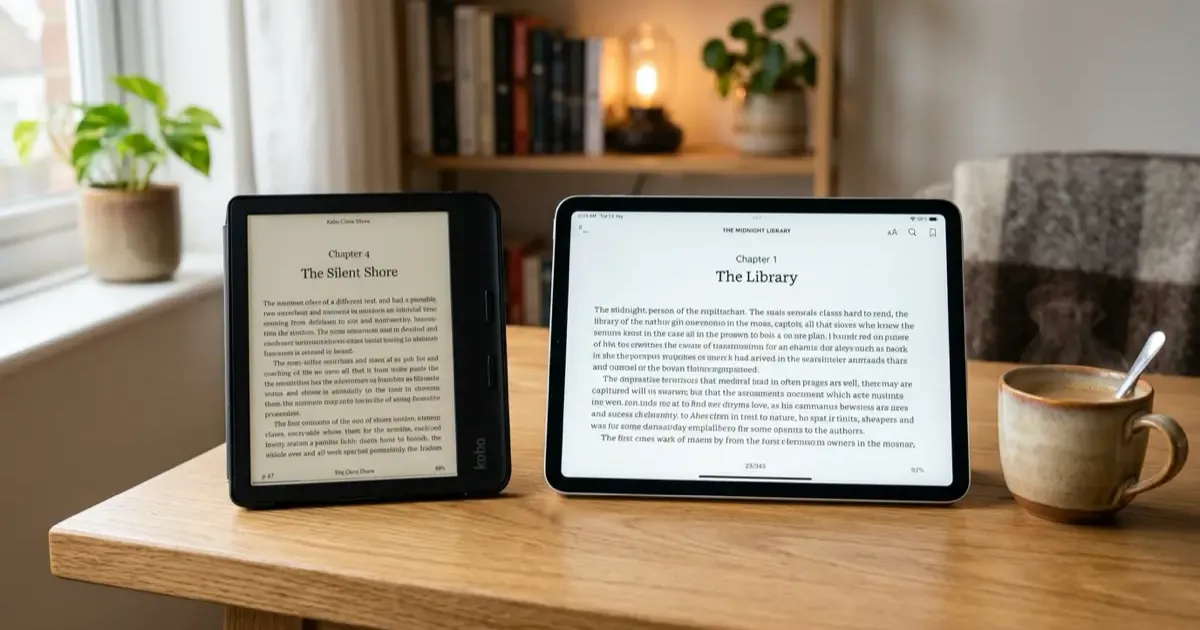
Every avid reader in 2026 faces a modern dilemma: Do you really need a dedicated E-Ink e-reader like a Kindle, Kobo, or Boox when you already own a stunning OLED smartphone and a 120Hz OLED tablet?
On paper, modern OLED screens seem unbeatable. With individual self-lit pixels, infinite contrast ratios, deep inky blacks, and rich 10-bit color, reading an ebook on an iPad Pro, Galaxy Tab, or flagship phone in dark mode looks visually gorgeous.
Yet, anyone who has attempted a 3-hour reading marathon on an OLED screen knows the familiar aftermath: dry eyes, subtle tension headaches, and the inevitable cognitive derailment caused by incoming notifications.
The battle between Electronic Ink (E-Ink) and Organic Light Emitting Diodes (OLED) is not just about display specifications; it is about how our eyes interact with light and how our brains process long-form information.
Upgrading your digital reading setup? Explore our tested guide on the Best Kindle for Students and learn how to optimize your reading environment in our Home Office Lighting & Eye Health Guide.
Quick Summary: E-Ink vs. OLED at a Glance
In a hurry? Here is how the two display technologies compare for reading and study workflows:
- Choose E-Ink if: You read text for 45+ minutes daily, read outdoors in bright sunlight, suffer from eye fatigue or screen headaches, and want 4 to 8 weeks of battery life with zero notification distractions.
- Choose OLED if: You consume rich color textbooks, medical diagrams, magazines, graphic novels, mixed video lectures, and require 120Hz fluid scrolling.
- The Hybrid Solution: Use an OLED tablet for quick daytime research and interactive apps; keep a dedicated E-Ink reader on your nightstand for deep reading and sleep preservation.
E-Ink vs. OLED: Technical Comparison Matrix
| Feature / Trait | E-Ink Display (Carta 1200 / 1300) | OLED Display (AMOLED / Tandem OLED) |
|---|---|---|
| Light Mechanism | Reflective (Reflects natural ambient light) | Emissive (Shoots light directly into the eyes) |
| Eye Fatigue Impact | Extremely low (Equivalent to physical book paper) | Moderate to High (Direct photons, glare, blue light) |
| Flicker (PWM) | 0% Flicker (Static physical microcapsules) | High-frequency PWM flicker at lower brightness |
| Sunlight Legibility | Flawless (Higher ambient light = Sharper text) | Poor to Mediocre (Severe mirror reflections & glare) |
| Battery Endurance | 4 to 10 Weeks (Power only drawn on page turns) | 8 to 14 Hours (Continuous active pixel power) |
| Refresh Rate | 1Hz to 15Hz (Text optimized, slow for video) | 60Hz to 120Hz (Ultra-fluid motion & scrolling) |
| Color Reproduction | Monochromatic (or muted Kaleido 3 / Gallery 3 color) | Vibrant, wide-gamut DCI-P3 10-bit HDR |
| Psychological Focus | Single-purpose, distraction-free environment | Multitasking hub (Notifications, apps, browsers) |
1. The Physics of Light: Emissive vs. Reflective Displays
The fundamental biological difference between E-Ink and OLED lies in light directionality.
Emissive Screens (OLED)
An OLED screen is a light source. Millions of tiny red, green, and blue organic diodes emit photons directly outward, firing light straight into your retinas.
Even when you enable dark mode (white text on black background), the white letterforms are still clusters of illuminated light bulbs shining into your eyes. Over hours of reading, your ciliary eye muscles must constantly contract to regulate the incoming light beam, reducing your natural blink rate from an average of 15–20 blinks per minute down to just 5–7 blinks per minute, causing dry eye syndrome and ocular strain.
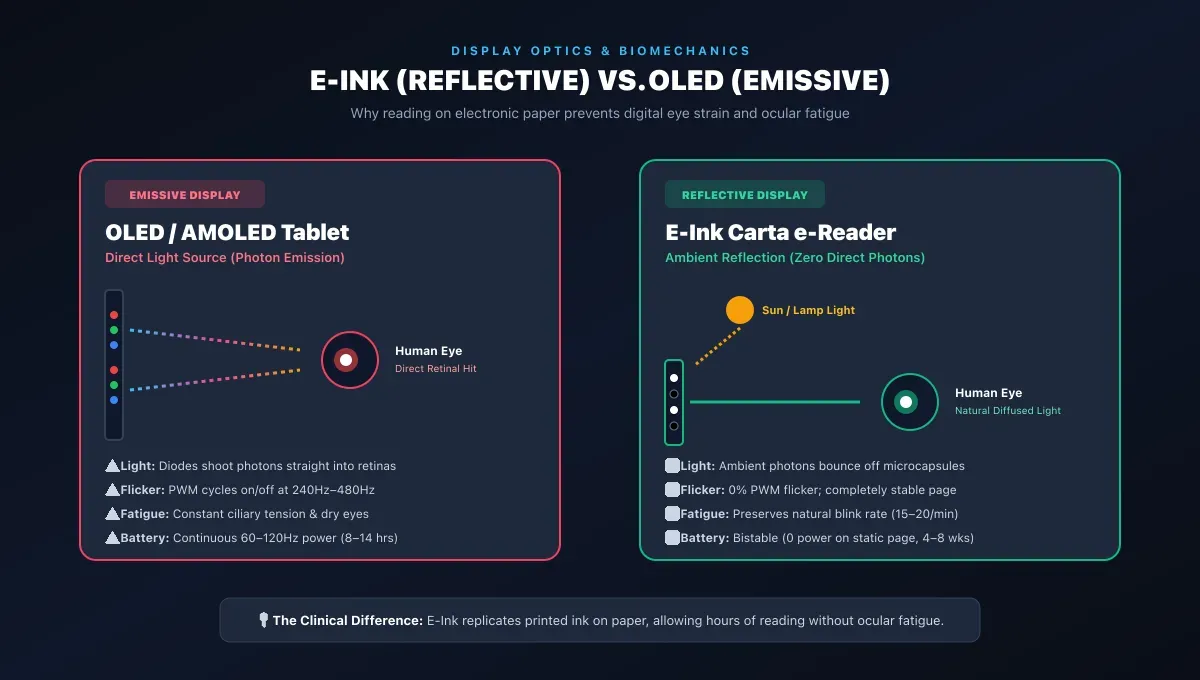
Light Directionality Comparison:
- Emissive Displays (OLED Tablet / Smartphone): Pixels fire photons directly into your eyes, creating high-intensity glare, pupil strain, and suppressing your natural blink rate.
- Reflective Displays (E-Ink E-Reader): Microcapsules reflect ambient room light or sunlight naturally into your eyes, identical to physical ink on printed paper.
Reflective Screens (E-Ink)
E-Ink does not emit light. An E-Ink panel consists of millions of microscopic microcapsules containing positively charged white titanium dioxide particles and negatively charged black carbon particles suspended in clear fluid.
When electrical charges arrange the particles, they physically stay in place. Ambient light from your room lamp or the sun bounces off the page and enters your eye naturally, identical to reading a physical printed paper book.
If you read in the dark, modern e-readers use front-lights (diffused LED strips along the outer bezel that cast soft light across the face of the screen, rather than shooting straight out into your pupils).
2. The PWM Flicker Factor: The Hidden Cause of Screen Headaches
One of the most overlooked health hazards of OLED screens is Pulse Width Modulation (PWM).
To dim an OLED screen, manufacturers do not simply reduce the voltage (which can cause color tint shifting). Instead, they rapidly cycle the pixels on and off hundreds of times per second.
Why PWM Causes Eye Strain:
- At 100% brightness, the OLED pixels stay on continuously.
- At 30% brightness (common for night reading), the pixels flash completely on and off at 240Hz to 480Hz.
- While your conscious brain perceives this rapid strobing as a dimmer screen, your ocular nerves and brainstem still process the micro-flickers, triggering pupil micro-spasms, migraine auras, and eye fatigue.
E-Ink has zero PWM flicker. Once a page of text is rendered, the particles are physically locked in position until you tap the screen to turn the page. The image is completely static and stable.
3. Sunlight and Outdoor Readability: Day vs. Night
Have you ever tried reading an OLED smartphone or tablet while sitting in a park or on a sunny beach?
- The OLED Struggle: In direct sunlight, ambient light overpoweringly washes out the screen. The glossy glass acts like a vanity mirror, forcing you to crank screen brightness to 1,000+ nits. This causes the device to overheat, throttle performance, and burn through 40% of its battery in an hour.
- The E-Ink Triumph: Because E-Ink relies on reflective physics, the brighter the sun, the crisper the text becomes. The matte anti-glare screen coating eliminates reflections entirely, making it feel exactly like holding a paperback novel on the beach.
If you are looking for an ultra-portable outdoor companion, check our comprehensive review of the Kindle Paperwhite and its 300 PPI glare-free Carta 1200 panel.
4. Bistable Battery Endurance: Weeks vs. Hours
The architectural magic of E-Ink is its bistability.
An OLED screen requires continuous electrical current every single millisecond to keep pixels lit. If you stop providing electricity, the screen goes black instantly.
An E-Ink screen only draws electrical power when the microcapsules are moving. Once you open Chapter 4 of a book, you can disconnect the battery completely, and the text will remain visible on the screen for years.
- Real-World Result: An OLED tablet requires charging every 1 to 2 days (8–12 hours of screen-on time). An E-Ink reader requires charging once every 6 to 10 weeks, freeing you from carrying charging adapters on vacations and daily commutes.
5. Psychological Focus: The Monotasking Superpower
The greatest advantage of an E-Ink reader is not physical; it is cognitive.
When you read a book on an iPad, Galaxy Tab, or smartphone, you are reading on an interactive slot machine:
- A Slack message pops up from your manager.
- An Instagram notification banner slides down.
- You hit a slightly boring sentence and impulsively switch tabs to check Reddit or YouTube.
E-Ink devices are intentionally slow. Their 10Hz to 15Hz refresh rate makes web browsing clunky and video playback impossible. This limitation is their greatest feature: it converts the device into an impenetrable sanctuary for deep, uninterrupted reading.
As we explored in our guide on digital decluttering and focus, removing notification friction is the single most effective way to rebuild your attention span.
Which One Should You Buy? The Decision Framework
E-Ink vs. OLED Quick Decision Matrix:
- Novels, Biographies, and Long-Form Non-Fiction: Choose E-Ink (Kindle Paperwhite, Kobo Clara, Boox Palma) for zero eye strain and weeks of battery life.
- Graphic Novels, Color Magazines, and Video Lectures: Choose OLED (iPad Pro, iPad Mini, Galaxy Tab S9/S10) for fluid 120Hz color and dynamic multitasking.
- Academic PDFs with Margin Handwriting: Choose a Large E-Ink Notepad (Supernote Nomad, Kindle Scribe, Boox Note Air) for glare-free stylus precision.
Buy an E-Ink E-Reader If:
- You read books for more than 30 minutes in a single sitting.
- You frequently read in bed before sleeping and want to preserve your circadian melatonin levels.
- You read outdoors on patios, transit, or vacations.
- You want a lightweight device that fits in a jacket pocket and never needs daily charging.
Buy an OLED Tablet If:
- Your primary content is manga with intricate color pages, art magazines, or multimedia course materials.
- You need to rapidly switch between split-screen video lectures, note-taking apps, and cloud drives.
- You need a single device for travel that handles Netflix, email, web browsing, and casual reading.
Summary
OLED screens are technological masterpieces for movies, gaming, and creative video editing. But when it comes to the ancient, quiet art of reading long-form text, E-Ink remains undefeated.
By reflecting natural ambient light, eliminating harmful PWM flicker, and offering distraction-free battery endurance that lasts for months, an E-Ink screen is an investment in your eyesight, your sleep quality, and your ability to focus deeply.
Related Articles
Related Articles

12 Best Back to School Tech Gadgets for Students (2026)
Discover the best back to school tech gadgets for 2026. Practical dorm, study, and productivity tools from ANC headphones to digital note-takers.
TRMNL: The E-Ink Dashboard That Reclaims Your Desk and Focus
Is your desk setup missing something? Discover TRMNL, the minimalist E-ink display that gives you glanceable data without the distraction of a standard monitor.

Best Standing Desks Under $600 (2026): Tested & Compared
Find the perfect standing desk for your home office. We compare FlexiSpot, Uplift, Autonomous, and Branch, with real specs, honest reviews, and current prices.