
Why I Moved Back to VS Code in 2026: The Clean Setup
Why I moved back to VS Code after using AI forks: extension stability, vendor lock-in, terminal agent freedom, corporate compliance, and battery performance.

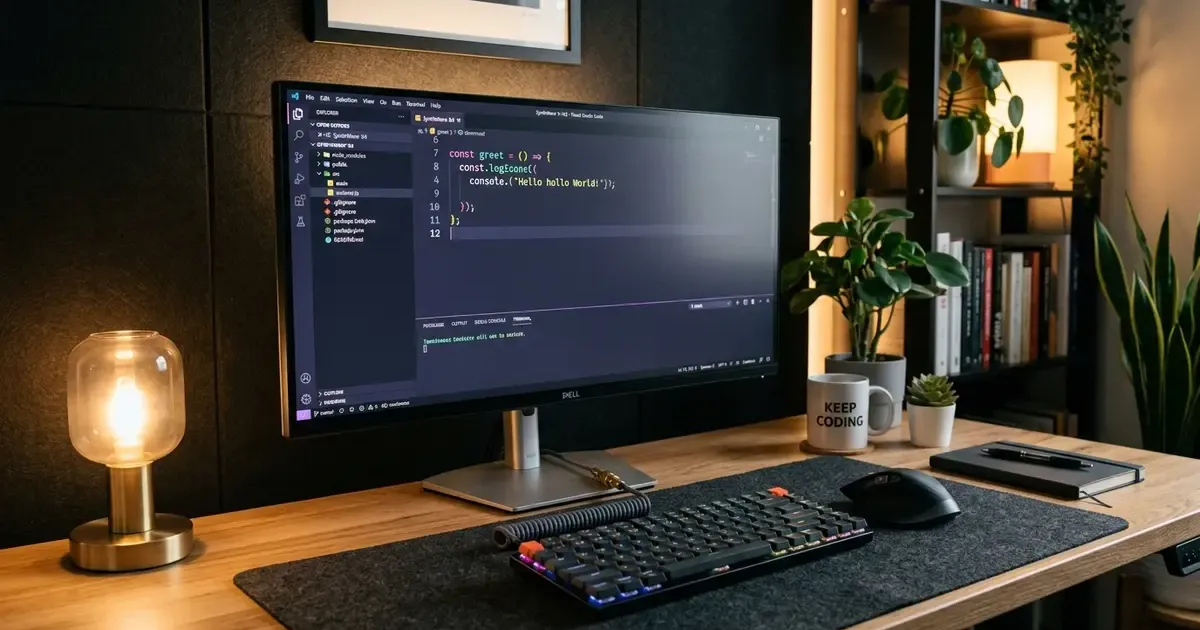
Like thousands of developers over the past two years, I eagerly joined the great migration away from standard Visual Studio Code. When specialized AI-first IDEs like Cursor and Windsurf exploded in popularity, they felt like magic. Having an editor that understood whole-codebase context, executed multi-file refactors with a single shortcut, and anticipated entire functions before I could type them felt like jumping ten years into the future. For our detailed breakdown of how that generation compared, see our OpenCode vs Cursor vs Codex vs Antigravity guide.
For roughly eighteen months, an AI fork was my daily driver. It wrote boilerplate, generated test suites, and made me feel remarkably fast.
Yet, by late 2026, the cracks in the foundation became impossible to ignore. What began as minor quirks evolved into daily friction: broken remote SSH tunnels, mysterious extension incompatibilities, aggressive background indexing draining my laptop battery on flights, vendor subscription price hikes, and strict corporate security roadblocks.
Last month, I wiped my customized fork configurations and moved back to stock Visual Studio Code. Not only did my daily development velocity remain intact, but my workstation also felt cleaner, snappier, and far more dependable.
Upgrade your physical workspace: Software tooling is only half of the developer experience equation. Explore our Master Desk Upgrade Guide to optimize your display ergonomics and cable routing, or check our guide on how to share a keyboard and mouse between Mac and PC.
Here is why the AI-first editor honeymoon ended, why decoupling your editor from your AI agent is the superior architectural choice, and how I built a modern, high-velocity VS Code setup in 2026.
Quick Picks: Stock VS Code vs. AI-First IDE Forks at a Glance
For developers deciding whether to remain in a specialized AI fork or return to upstream VS Code, here is how the two paradigms compare across daily engineering criteria:
| Evaluation Factor | Stock Visual Studio Code | AI-First IDE Forks (Cursor, Windsurf) |
|---|---|---|
| Upstream Updates & Security | Immediate official releases and zero-day patches | Weeks or months behind upstream Code-OSS |
| Remote Development (SSH / Containers) | Flawless, battle-tested Microsoft implementations | Frequent licensing breaks, proxy bugs, or workarounds |
| AI Model Freedom | Bring-your-own-key (Anthropic, OpenAI, local Ollama) | Proprietary credit systems, proxy markups, rate limits |
| System Footprint & Battery | Extremely lean; customizable profiles | Heavy background indexing, vector databases, high RAM |
| Agentic Workflow Architecture | Decoupled terminal agents, sidecars, and extensions | Monolithic, embedded directly into editor chrome |
| Enterprise IT & Compliance | Universally approved, SOC2, strict SSO, telemetry toggles | Frequently blocked by corporate firewalls and security audits |
| Cost | 100% Free (Pay only for direct API usage if used) | $20/month base plus metered overage charges |
1. The Extension Ecosystem Lag and Upstream Fragility
The primary engineering reality that every AI-first editor fork must confront is that maintaining a downstream fork of Microsoft’s Code-OSS repository is a relentless, thankless uphill battle.
Microsoft updates VS Code every single month with hundreds of subtle engine improvements, accessibility fixes, Language Server Protocol (LSP) refinements, and terminal enhancements. Specialized forks must constantly merge these upstream changes while preserving their proprietary diffing algorithms, chat sidebars, and custom keybinding interceptors.
Inevitably, this creates an update lag:
- Remote Development Issues: Proprietary Microsoft extensions (such as Dev Containers, Remote - SSH, and WSL2 integration) rely on closed-source server binaries that check client signatures. Whenever Microsoft updates the remote server protocol, downstream forks break, leaving developers unable to access remote cloud servers or dev containers until the fork maintainers issue a hotfix.
- Extension Marketplace Quirks: Because third-party forks cannot legally point to the official Microsoft Visual Studio Marketplace by default, they rely on Open VSX or proprietary proxy mirrors. Obscure linters, language syntax extensions, or corporate internal tools often fail to sync or require manual
.vsixsideloading. - Security Patch Delays: When a critical vulnerability is patched in Chromium, Electron, or Node.js within upstream VS Code, users of downstream forks remain exposed for weeks until the fork team finishes testing their customized build.
In stock VS Code, things simply work. When macOS 27 Golden Gate rolled out (reviewed in our macOS 27 and iOS 27 review), official VS Code updated with day-one support for new window management, Liquid Glass UI scaling, and native system permissions.
2. Decoupling the Editor from the Agent
When AI coding first emerged, embedding the chat interface and diff viewer directly into the editor UI felt revolutionary. Having an inline prompt box directly above your cursor was convenient.
However, in late 2026, software development workflows have evolved past the “editor-centric” AI paradigm. We have entered the era of agentic pair programming, where the most capable AI tools operate as autonomous co-developers rather than simple auto-completers.
The Problem with Monolithic AI Editors
When your AI agent is tightly coupled to your editor:
- If the AI background process hangs while generating a 500-line refactor, your editor UI stutters.
- The AI context is confined to what the editor’s proprietary indexer chose to parse, often missing shell environmental variables, local Docker container states, and external CLI tool outputs.
- You are forced to adopt the vendor’s opinionated keyboard shortcuts and UI layouts, cluttering your screen with side panels, floating pill buttons, and unsolicited diff prompts.
The Modern Decoupled Alternative: Terminal Agents & Sidecars
The most productive engineering setup today decouples the code editor from the reasoning agent:
- The Editor Does What It Does Best: Visual Studio Code remains a dedicated, lightning-fast workspace for viewing files, navigating symbol definitions, staging fine-grained git commits, and setting interactive debugger breakpoints.
- The Agent Lives in the Terminal or Background: Tools like OpenCode, Claude Code, Aider, and Antigravity run inside VS Code’s integrated terminal or as a floating companion window. They have full access to your terminal shell, can run test runners (
pnpm test), inspect lint failures, execute git commands, and write changes directly to disk.
Because VS Code features instant file-watcher synchronization and exceptional built-in git diff rendering, watching a terminal agent refactor your codebase while VS Code’s native Source Control panel updates in real time provides total visibility without editor bloat.
3. Subscription Fatigue and Model Vendor Lock-In
During the height of the AI IDE gold rush, paying $20 per month for an editor subscription felt trivial compared to the time saved. But as usage patterns matured, the economics of proprietary AI forks became frustrating.
The Markup on API Tokens
AI IDE startups do not train frontier foundation models; they rent compute from OpenAI, Anthropic, or Google, wrap requests in prompt engineering layers, and resell them to you.
- When high-demand models experience traffic spikes, vendors introduce “fast requests” versus “slow requests,” limiting your daily quota.
- Complex multi-file prompts burn through monthly allowances in days, forcing you into expensive per-token overage billings.
- You are tied to whichever models the fork maintainer decides to support in their dropdown menu.
True Independence in Stock VS Code
Returning to standard VS Code liberates your wallet and your workflow:
- Bring Your Own Keys (BYOK): Using modern, open-source VS Code extensions like Continue, Cline, or Roo Code, you plug your own API keys directly into the editor. You pay wholesale prices with zero middleman markup.
- Instant Model Switching: When a new state-of-the-art model drops, you do not have to wait weeks for a fork startup to update its backend proxy. You paste the new model endpoint and start coding within minutes.
- Local LLM Privacy via Ollama: For sensitive codebases or offline travel, you can route completion requests directly to a local model running on your laptop via Ollama or LM Studio. On an Apple Silicon machine like the new M4 or M6 desktop setups (covered in our Mac mini review), local 8B and 14B models run with virtually zero latency and zero data egress.
4. Performance, RAM Hunger, and Battery Longevity
One of the most noticeable benefits of switching back to a clean VS Code installation is how much cooler and quieter my laptop runs.
To provide codebase-wide intelligence, AI forks continuously run background vector embedding processes. They parse every directory, generate semantic chunk embeddings, and store them in local SQLite or vector databases.
While useful on a desktop with unlimited power, on a laptop:
- Battery Drain: The continuous background indexing prevents your CPU from entering deep C-states, reducing MacBook battery life from fourteen hours down to barely six.
- Fan Noise & Thermal Throttling: On large monorepos containing thousands of files and extensive
node_modulestrees, fork indexers frequently spike CPU cores to 100 percent, spinning up fans during casual Zoom calls or coffee shop work sessions. - Memory Consumption: It was not uncommon for customized AI forks to consume 6GB to 8GB of RAM with just three project windows open, squeezing memory pressure and slowing down local Docker containers.
A lean VS Code profile, stripped of unneeded background indexers and configured with targeted language servers, consumes barely 800MB of RAM and sips battery power. When traveling without a power outlet, that difference is monumental.
5. Enterprise Security, Privacy, and Corporate Compliance
In an individual side project, sending code snippets through an early-stage startup’s proxy server carries minimal risk. In a professional enterprise environment, it is an IT nightmare.
Over the past year, enterprise information security (InfoSec) teams have cracked down aggressively on unvetted developer tools:
- Proprietary Proxy Risk: Many AI forks route your entire project tree through their cloud infrastructure to compute context graphs. Even if the vendor promises zero data retention, security teams cannot verify where transient tokens are cached.
- SOC2 and Compliance Red Tape: Getting a venture-backed developer startup approved through corporate procurement, legal review, and data privacy assessments can take months, and is frequently rejected outright in banking, healthcare, and defense sectors.
- Zero-Trust Environments: Corporate laptops behind strict VPNs, SSL-inspecting proxies, and custom certificate authorities routinely break third-party AI forks.
Standard Visual Studio Code is the gold standard of enterprise developer software. It offers complete transparency, verified Microsoft single sign-on (SSO), configurable telemetry kill-switches, and native support for enterprise-approved GitHub Copilot or internal private LLM gateways. Returning to VS Code eliminated the constant headache of juggling two separate editors for work and personal projects.
6. My Rebuilt VS Code Stack for 2026
Moving back to VS Code does not mean sacrificing modern AI superpowers. By combining official extensions with lightweight terminal harnesses, I built a setup that matches the intelligence of specialized forks while preserving the speed and reliability of upstream VS Code.
The Core Extension Arsenal
- GitHub Copilot & Copilot Chat: The official Copilot extension has matured significantly. Its tab completion is instantaneous, its inline editing handles complex multi-line logic, and its integrated workspace agent understands project structure without heavy background battery drain.
- Continue.dev or Cline: For tasks where I want to experiment with custom models (like Claude Sonnet or local Ollama checkpoints), these open-source extensions provide clean sidebar chat, multi-file code editing, and full BYOK cost control.
- GitLens: Unmatched git repository visualization, inline blame annotations, and branch comparisons that far exceed the basic diff viewers in AI forks.
- Error Lens: Renders linter warnings and compiler errors directly inline in your editor buffer, allowing you and your AI assistant to spot bugs without constantly hovering over squiggly lines.
- Project Manager: Quick keyboard shortcuts to jump across dozens of active client repositories without reopening file trees manually.
The Terminal Companion Workflow
Instead of relying on an editor sidebar to run terminal commands, I keep VS Code’s integrated terminal open with:
- Claude Code / OpenCode: When I need an autonomous agent to refactor a directory, write unit tests for an API route, or fix a failing build, I invoke the agent in the terminal. It inspects files, runs tests, and applies edits directly.
- Native Git Staging: As the agent modifies files, I review the changes inside VS Code’s native visual diff editor. If I approve the changes, I stage them with a single click.
This separation of concerns preserves mental clarity: the agent works like a dedicated junior developer in the terminal, while I remain the lead architect reviewing diffs in a pristine editor buffer. You can also automate your entire tooling stack seamlessly using the newly updated package management tools detailed in our Homebrew 7 and BrewUI review.
To explore how complementary productivity tools and AI automations enhance modern office workflows, check out our curated guide on the best AI tools for office work.
Final Verdict: Why Boring Tools Win the Long Game
In software engineering, there is an enduring adage: Choose boring technology.
Exciting new forks generate headlines, produce dazzling Twitter demos, and offer intoxicating short-term novelty. But software development is a marathon of daily problem-solving, where reliability, muscle memory, extension stability, and predictable performance matter far more than flashy UI gimmicks.
The AI capabilities that once made specialized forks unique have become commoditized. They now exist as open standards, lightweight extensions, and command-line agents that run anywhere.
By moving back to Visual Studio Code, I reclaimed the stability of an ecosystem supported by thousands of extension authors, eliminated subscription markups, restored all-day battery life to my laptop, and built a workflow that remains fully under my control. If you have felt the creeping friction of specialized AI forks over the past few months, try stripping your setup back to stock VS Code. You might be surprised by how liberating it feels.
Related Articles
Must-Have VS Code Extensions for Developers in 2026
Discover the must-have VS Code extensions in 2026: enhance coding velocity, git workflows, AI pair programming, remote containers, and code aesthetics.
Homebrew 7 Review: Official BrewUI App and Top Features
Homebrew 7 review: explore the official BrewUI native macOS app, vulnerability scanning with brew vulns, faster concurrency, and Intel Mac deprecation.
OpenCode vs Cursor vs Codex vs Antigravity: AI Coding Tools
Compare OpenCode, Cursor, Codex, and Antigravity. Discover features, workflow fits, agentic capabilities, and pricing to pick the best AI coding tool.