
Why Smartphone Photos Look Lifeless (And How to Fix It)
Ever wonder why smartphone photos look flat, over-processed, and clinical? Discover the physics behind smartphone computational HDR and how to get soul back.

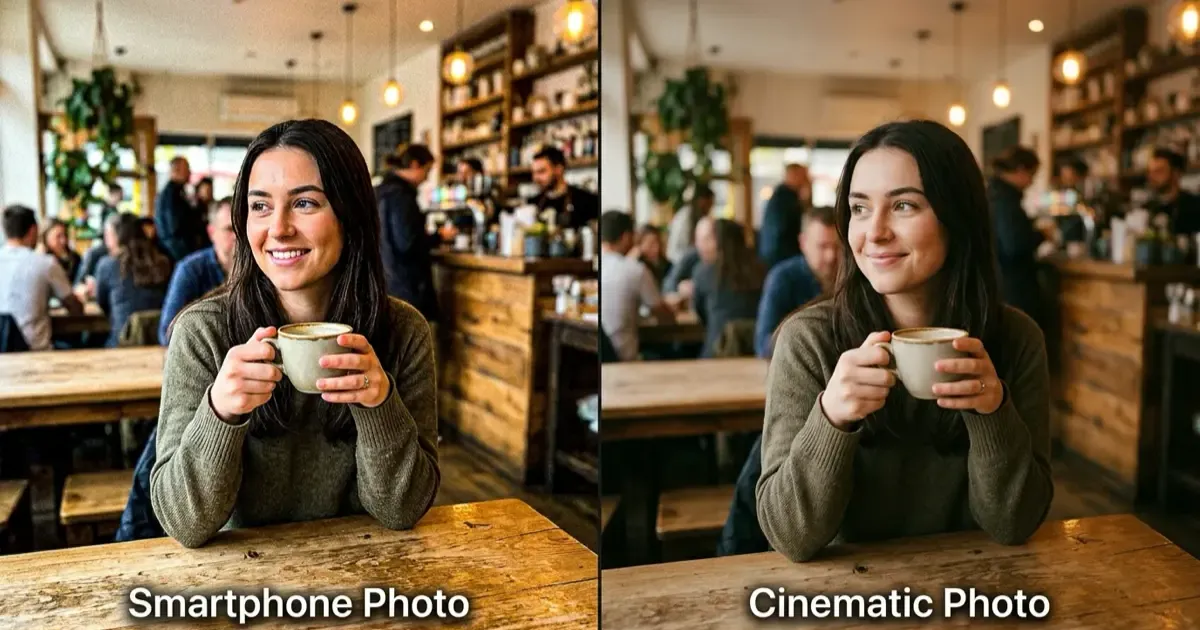
You pull out your $1,200 flagship smartphone, tap the shutter, and inspect the photo. Technically, it is flawless: the sky is not blown out, the person in the dark shadow is fully illuminated, every eyelash is edge-sharpened, and the colors are punchy.
Yet, when you look at it for more than three seconds, an unmistakable feeling sets in: the image feels completely lifeless.
It looks clinical, flat, and synthetic. It feels less like a captured human memory and more like a computer rendering of reality.
If you have ever compared a modern smartphone snapshot to a photograph taken on an actual mirrorless camera or 35mm film, the difference is night and day. But why does this happen? Why do smartphones with 48MP, 100MP, and 200MP sensors consistently produce photos that lack emotional weight?
The answer lies in the battle between optical physics and computational brute force.
Exploring photography beyond your phone? Check out our Camera vs. Smartphone Guide and our breakdown of Camera Lens Types Explained to see how real glass transforms image depth.
Quick Summary: Why Phone Photos Feel Sterile
In a hurry? Here are the 5 core technical reasons modern smartphone photos look synthetic:
- Shadow Destruction (Over-HDR): Algorithms lift every natural shadow, eliminating mood, drama, and 3D contrast.
- Aggressive Edge Sharpening: Digital processing draws artificial black halos around edges, making skin look leathery and foliage look crunchy.
- Sensor Physics & Tiny Glass: A phone sensor is 15 to 30 times smaller than a full-frame sensor, capturing flat light with zero physical depth.
- Synthetic Bokeh Cutouts: AI Portrait Mode creates harsh, unnatural digital blur transitions that struggle with hair and transparent objects.
- Noise Reduction Smearing: Algorithms smooth out micro-textures (pores, fabric, wood grain), turning surfaces into plastic smudges.
Smartphone Processing vs. Dedicated Camera: Technical Comparison
| Feature / Trait | Modern Flagship Smartphone (Auto) | Dedicated Mirrorless / DSLR Camera |
|---|---|---|
| Physical Sensor Area | ~25mm² to ~70mm² (Tiny) | ~370mm² (APS-C) to ~860mm² (Full-Frame) |
| Shadow Treatment | Auto-lifted, completely flat | Deep, natural, mood-defining contrast |
| Sharpness Rendering | High-pass software edge halos | Optical resolving power from glass |
| Background Blur (Bokeh) | AI depth-map masking (often glitchy) | Natural optical falloff governed by physics |
| Texture Fidelity | Denoised and smoothed into plastic | Organic micro-contrast and fine grain |
| Dynamic Range Style | Hyper-real HDR (everything exposed equally) | Realistic light gradients from highlights to shadows |
| Shooting Experience | Screen tap, disconnected | Tactile dials, intentional composition |
1. The Death of Shadows: Aggressive Computational HDR
The primary culprit behind lifeless smartphone photos is hyperactive multi-frame HDR (High Dynamic Range).
When you tap the shutter button on an iPhone, Samsung Galaxy, or Google Pixel, the phone does not take a single photo. In milliseconds, it captures between 5 and 15 individual frames at varying exposure values (underexposed for the sky, overexposed for the shadows) and merges them into a single composite frame.
How Smartphone HDR Flattens a Scene:
- Natural Scene Lighting: Bright highlights transition into rich midtones and deep moody shadows, providing visual depth and 3D volume.
- Smartphone Auto HDR: Automatically compresses highlights and violently lifts shadows, resulting in uniform, billboard-flat lighting with zero atmospheric mystery.
Why Shadows Matter for Emotion
Shadows are not mistakes; they are the foundation of visual depth. Renaissance painters called this chiaroscuro (the contrast between light and dark to create the illusion of three-dimensional volume on a flat surface).
When a smartphone algorithm decides that every corner of an image must be equally bright and readable, it flattens the world. A moody candlelit dinner looks like it was lit by dental office fluorescent tubes. A dramatic sunset landscape loses its twilight mystery because the grass in the foreground is illuminated like midday.
Without dark shadows, your brain cannot perceive depth, and the photo feels flat.
2. Artificial Edge Sharpening and Texture Smearing
Because smartphone camera lenses and tiny sensors cannot resolve true optical micro-contrast, smartphone image processing chips (ISPs) compensate using aggressive software sharpening filters.
The “Crunchy” Foliage Problem
Have you ever zoomed in on trees, grass, or hair in a smartphone photo? Instead of individual organic strands, you see crunchy, jagged lines with weird glowing halos around high-contrast edges.
- Denoising Smear: First, because tiny sensors generate severe electronic noise in low light, the algorithm violently scrubs away the noise. In doing so, it smudges away real surface textures (skin pores, subtle fabric weaves, brick mortar).
- High-Pass Sharpening: To make the image look sharp on a 6-inch phone screen, the software runs an unsharp mask over the smudged image, drawing hard artificial outlines around subjects.
The result is skin that looks simultaneously wax-like and overly gritty, and hair that looks like a compressed video game asset.
3. Tiny Sensor Physics vs. Large Optical Glass
You cannot cheat the laws of physics with software code alone.
A standard full-frame camera sensor has a surface area of approximately 864mm². The main camera sensor in an iPhone or Galaxy smartphone is typically between 45mm² and 70mm².
| Sensor Class | Typical Dimensions | Approximate Surface Area | Photon Collection vs. Smartphone |
|---|---|---|---|
| Full-Frame Sensor (35mm) | 36.0 x 24.0 mm | ~864 mm² | ~15x to 20x larger |
| APS-C Sensor (Crop) | 23.5 x 15.6 mm | ~370 mm² | ~7x to 9x larger |
| Micro Four Thirds (MFT) | 17.3 x 13.0 mm | ~225 mm² | ~4x to 5x larger |
| Flagship Smartphone Main (1/1.3”) | ~9.6 x 7.2 mm | ~50 to 70 mm² | Baseline (1.0x) |
As we explained in our MFT vs. APS-C vs. Full-Frame Sensor Guide, a larger physical sensor collects exponentially more physical photons per second.
- Tonal Gradations: More photons mean smoother, richer transitions from pure white to deep black. A dedicated camera captures hundreds of subtle midtone steps between light and dark that a phone sensor simply misses.
- True Color Depth: Real optical sensors render natural skin undertones (subsurface scattering through human skin) with organic warmth. Phone cameras often guess color values through AI neural networks, leading to yellowish or overly saturated skin tones.
4. Fake “Portrait Mode” vs. Real Optical Bokeh
Smartphones have tried to replicate the dreamy, blurred background of fast prime lenses using computational “Portrait Mode.” But software depth estimation is fundamentally flawed.
How Real Optical Bokeh Works
When you shoot with an affordable 50mm f/1.8 prime lens, optical physics creates a natural, gradual plane of focus:
- The eyelashes are razor-sharp.
- The ears are softly blurred.
- The shoulders begin to dissolve.
- The distant city lights melt into smooth, circular orbs of light.
How Smartphone Portrait Mode Works
A smartphone uses lidar or dual-camera parallax to generate a 2D depth map. It cuts out the subject like a cardboard cutout and applies a uniform Gaussian blur filter to everything behind it.
- The Glitch Factor: It routinely cuts off stray hairs, blurs the arms of eyeglasses, fails on the gap between an arm and a torso, and renders blurry holes through clear drinking glasses.
- Abrupt Falloff: Instead of a gentle gradient from front to back, Portrait Mode produces an unnatural “sheet of blur” directly behind the subject, triggering an uncanny valley response in your subconscious.
5. The “Cognitive Detachment” of Screen Tapping
There is also a psychological and artistic reason smartphone photos feel disposable: the lack of physical intention.
When taking a photo with a smartphone:
- You hold an everyday communication rectangle at arm’s length.
- You look at a screen that is already vibrating with Slack notifications and text messages.
- You tap a glass circle, relying entirely on the phone to decide the exposure, focus point, color profile, and shutter speed.
When taking a photo with a dedicated camera:
- You raise the viewfinder to your eye, isolating yourself from the surrounding distraction.
- You physically dial the aperture ring and adjust shutter speed to match your creative vision.
- You look through actual optical glass and choose what to highlight and what to leave in darkness.
This physical friction forces you to slow down, compose deliberately, and connect with your subject. Check out our guide on Why We Buy Tech We Don’t Need and why slowing down with tactile gear improves creative fulfillment.
How to Get Soul Back into Your Phone Photos (5 Actionable Fixes)
If you are not ready to carry a dedicated camera everywhere, you can drastically improve your smartphone images by disabling automated processing:
5 Ways to Fix Lifeless Smartphone Photos:
- Pull Down the Exposure Slider (-0.7 to -1.3 EV): Preserve deep, natural shadows and prevent washed-out highlights.
- Shoot in RAW (ProRAW / Expert RAW): Bypass aggressive built-in sharpening and digital noise smearing filters.
- Step Back and Use the 2x or 3x Optical Lens: Eliminate facial perspective distortion caused by the wide 24mm main lens.
- Clean Your Lens With a Microfiber Cloth: Remove skin oils and fingerprints for instant contrast and flare reduction.
- Grade in Lightroom Mobile: Add warm color grading, gentle film grain, and drop clarity slightly for an organic film-like texture.
1. Manually Pull Down Exposure (-0.7 to -1.3 EV)
Never let your phone shoot at default auto-exposure. Tap your subject on the screen, grab the small sun icon, and drag it down by 15% to 30%. This instantly restores deep, dramatic shadows and protects bright highlights from washing out.
2. Shoot in RAW (ProRAW, Expert RAW, or Halide)
By capturing uncompressed 12-bit or 14-bit RAW files, you bypass the phone’s built-in edge-sharpening and noise-reduction engines. You can then open the image in Lightroom Mobile or Snapseed and add subtle, organic contrast yourself.
3. Use the 2x or 3x Telephoto Lens for People
The primary 1x lens on modern smartphones is an ultra-wide 24mm equivalent optic. Shooting people up close at 24mm distorts facial features (making noses appear huge and ears disappear). Step 6 feet back and switch to your phone’s dedicated 2x, 3x, or 5x optical telephoto camera for flattering facial proportions.
4. Wipe Your Camera Lens Every Single Time
Your phone spends its entire day inside dusty pockets and greasy hands. A thin layer of fingerprint oil over the tiny camera glass causes hazy light blooming, lowered contrast, and mushy focus. A 2-second wipe with your cotton shirt or microfiber cloth restores maximum optical clarity.
5. Embrace Creative Imperfection: Add Warmth & Grain
Digital perfection is boring. In your editing app, gently warm the color temperature, drop the clarity/texture slider slightly to counteract digital sharpness, and add a subtle 15% film grain. This breaks up the clinical digital smoothness and restores tactile character.
Summary
Smartphone cameras are marvels of modern computer science, capable of documenting documents, scanning QR codes, and capturing clean travel snapshots in any lighting condition.
But computer science is designed for accuracy, while great photography is built on emotion, contrast, and imperfection.
When you stop letting smartphone algorithms make every creative decision for you, embrace deep shadows, shoot in RAW, or pick up a camera with dedicated physical glass, your images stop looking like digital assets and start feeling like real life again.
Related Articles
- Camera vs. Smartphone: When Is a Real Camera Actually Better?
- Camera Lens Types Explained: A Beginner Guide
- Why a Great Lens Beats a Pro Camera Body in 2026
- Cheap Manual Lenses for Beginners: 7Artisans & TTArtisan
- Sensor Size Guide: Micro Four Thirds vs. APS-C vs. Full-Frame
- Computational Photography vs. Real Camera Optics
Related Articles
Camera Lens Types Explained: A Beginner Guide (2026)
Confused by focal lengths, primes, zooms, and apertures? Learn how camera lens types work and choose the best lens for your photography style in 2026.
Smartphone Camera vs Dedicated Camera: Still Worth It? (2026)
Is a dedicated camera still worth it in 2026? We compare smartphone vs camera for low light, zoom, portraits, and video, with real-world samples.
Photography for Beginners: The Complete Guide (2026)
Your complete guide to photography, from choosing your first camera to taking better photos. Everything beginners need to start their photography journey.